Visibility
Suggestions and opportunities
Where suggested prompts come from, including persona-tagged ones, how auto refill behaves, and what a Search Console opportunity is.
Where suggestions come from
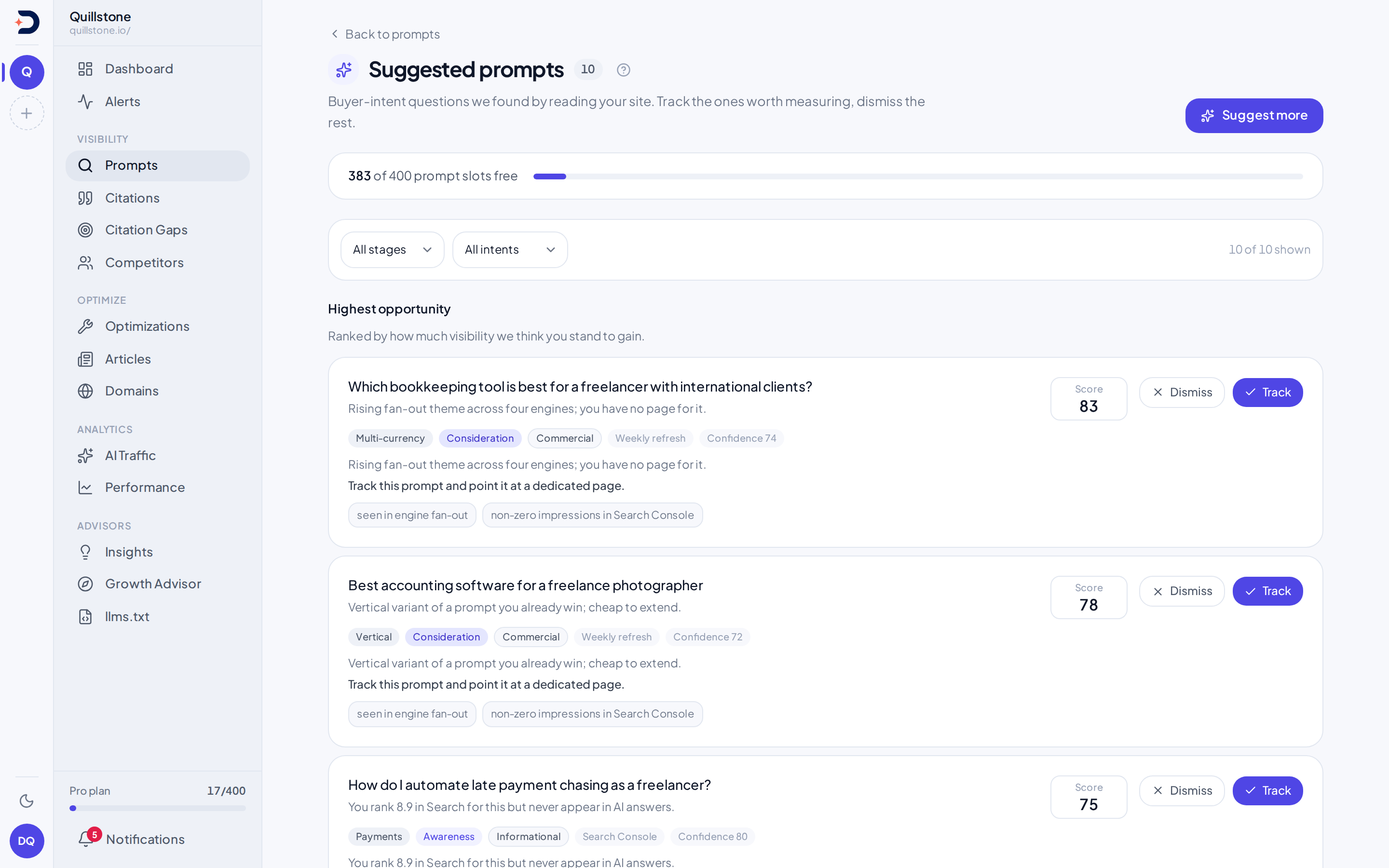
Prompts → Suggestions is a queue of prompts nobody typed in by hand. Every card on it was written by a research run: DiscoveredBy renders your homepage, has a model pick a handful of other pages worth reading, scrapes those, and builds a short profile of the business from what it found. A separate model call then turns that profile into a batch of buyer-intent questions, and that call is also handed your best-performing Search Console queries as extra context. A Google query does not become a suggestion by itself: it only ever reaches this screen folded into the profile a model reasoned over, never lifted onto the queue as-is. (One exception is a query pulled in from an AI engine's own answer, covered on a separate page.)
Each card shows the theme, buyer stage and intent a run assigned it, an opportunity score, and a rationale. A card flagged "similar to a tracked prompt" is close enough to something you already track that tracking it too would likely duplicate a measurement rather than add a new one; see Prompts for what a tracked prompt is.
A card can also carry a persona tag. Those come from a different source: an
active persona's own Suggest prompts
request, not this screen's research run, and tracking one creates that
persona's targets rather than General ones. A persona filter alongside
theme, buyer stage and intent narrows the queue to one persona, General
suggestions only, or everything
(frontend/src/routes/(app)/prompts/suggestions/+page.svelte#personaOptions).
When the queue is empty
The queue only lists suggestions still waiting on a decision, and the Suggestions tab on Prompts shows a count beside its name while any are pending (no count when there are none). If nothing is pending, the reason shown depends on what the most recent research run did: none has run yet for a brand new project, one is reading your site right now, the last one could not reach your site at all, the last one failed outright, or the last one finished without producing anything usable. Only the "could not reach" and "failed" cases offer a retry button; the others just wait for the next run.
Auto refill and its backoff
Beyond your own actions, the pending queue tops itself up on its own once it runs low, without you asking. That top-up is skipped while a research run for the project is already in progress, and after an unproductive run (one that failed, or finished without producing a single new suggestion) it waits before trying again rather than retrying immediately: the wait starts short and roughly doubles after every unproductive run in a row, up to a cap of about a day. After several unproductive runs in a row it stops trying on its own, and only a run you start yourself brings it back, through whichever of Try again or Suggest more the screen currently offers. This automatic top-up is separate from a plan's own on-demand and weekly-refresh entitlements; see Pricing for what your plan includes there.
Tracking or dismissing a suggestion
Tracking a suggestion turns it into a real tracked prompt, in the
suggestion's own country when the project covers it and otherwise in every
country the project covers
(api/services/prompt_discovery.py#_resolve_accept_countries), and
immediately queues a fast first
run outside the daily cycle, the same exception
Prompts describes for
accepting a suggestion. It also counts against your prompt slots the same
way adding one by hand does; see Pricing for what each plan
includes. A card warns you when tracking it would need more room than you
have free, but that warning by itself does not disable the button: click it
anyway and the request still goes to the server, which rejects it with an
error message instead of creating a prompt if there truly is no room. Your
role can disable it, separately: the page passes its own write-access check
down to every card as a prop, and both Track and Dismiss are disabled
outright for a viewer, with a role notice above the queue explaining why
(frontend/src/routes/(app)/prompts/suggestions/+page.svelte#writable).
Dismissing a suggestion sets it aside; it drops off this queue and will not resurface here on its own. Both tracking and dismissing can trigger the auto-refill top-up described above, so acting on a card can quietly bring a fresh one in behind it.
Search Console opportunities
Prompts → Opportunities
is a different screen answering a different question: not "what should I
track," but "where am I already ranking well on Google for something I do
track, while AI engines still ignore me." A job compares your Search
Console history against your tracked prompts and lists the pairs worth
acting on. It runs after each scheduled daily Search Console import and again each
Monday (api/tasks.py#import_gsc_daily_task,
#reconcile_gsc_vs_ai_task); the Opportunities tab on Prompts shows a count beside its name while any
are open (no count when there are none).
A row here is not one row per search query. Each row is a specific (query, page) pairing that met three conditions over a trailing 28-day window: the page's impressions-weighted average Google position for that query was 5 or better, it drew at least 100 impressions, and the query text matched an active tracked prompt closely enough to be treated as the same question. That position band only touches, at its edge, the Quick wins list on Search performance, which instead covers positions 4 to 20 and has no requirement that a query match a tracked prompt or that AI visibility be low: the two lists are built from different populations, not the same funnel under two names. Because a page is part of what defines a row here, the same query ranking well on two different pages of your site can appear on this screen twice. A high-ranking query that does not match any tracked prompt closely enough does not appear here at all; it becomes one of the demand signals fed into the next research run instead (see above), not a reconciliation row.
The AI visibility figure on each row is not a project-wide number: it is how
often engines have cited your own domain as a source when answering the
matched prompt specifically, over the same trailing 28-day window the row
itself was matched in (_RECON_WINDOW_DAYS,
api/services/integrations/google/reconciliation.py), the same underlying
measure as citation rate elsewhere
in the product but scoped to one prompt and one fixed window. A row only exists
here once that prompt has completed runs in the window to measure, and only
when that figure sits below the job's low-visibility threshold; a prompt
with no completed runs yet in the window is left out rather than shown at
zero. Every row here already links to the prompt it matched, since a row
cannot exist without a match; open "See the prompt" to jump straight to it.
Dismissing a row here only removes it from view; a viewer cannot click it at
all, since the button on this screen is disabled the same way the
suggestions queue's are
(frontend/src/routes/(app)/prompts/opportunities/+page.svelte#writable).
It does not change the
underlying Search Console or citation data. A dismissal holds for 28 days,
the same length as the detection window: while it is newer than that, the
job does not open a new row for the same tracked prompt and page, whichever
search query matched them
(api/services/integrations/google/reconciliation.py#DISMISS_HOLD_DAYS,
#_existing_dedupe_keys). Once the dismissal is older than 28 days, a fresh
row for that prompt and page can appear if they still qualify.
Related
- Prompts: what a tracked prompt is, and how a tracked prompt actually gets run
- Metrics defined: every project-wide number's exact formula and denominator
- Troubleshooting: what to check when citations are not showing up
- Pricing: what each plan includes for prompt slots and on-demand suggestion generation
Last verified 2026-09-29