Account
WordPress drafts
Send a finished article into a connected WordPress site as a new draft, never a publish, with duplicate, unknown-outcome and interrupted-send handling.
A new draft, never a publish
WordPress sends one
finished article into a WordPress site as a new draft post. Each accepted
send creates a new draft; nothing is ever updated, and nothing here ever
publishes, edits or deletes a post in WordPress, or touches anything
already there. The only write this feature makes is the single POST that
creates a post with status: 'draft'; no other request DiscoveredBy sends
to WordPress can change anything
(api/services/cms/wordpress.py#draft_payload,
api/services/cms/wordpress_client.py#request).
Only a finished article, one that has reached ready status with a written
draft, can be sent. A page recommendation from
Optimizations is a different kind of record
and stays a Markdown or PDF task packet; it is never sent to WordPress
(api/services/cms/wordpress.py#send_draft).
Connect a WordPress account
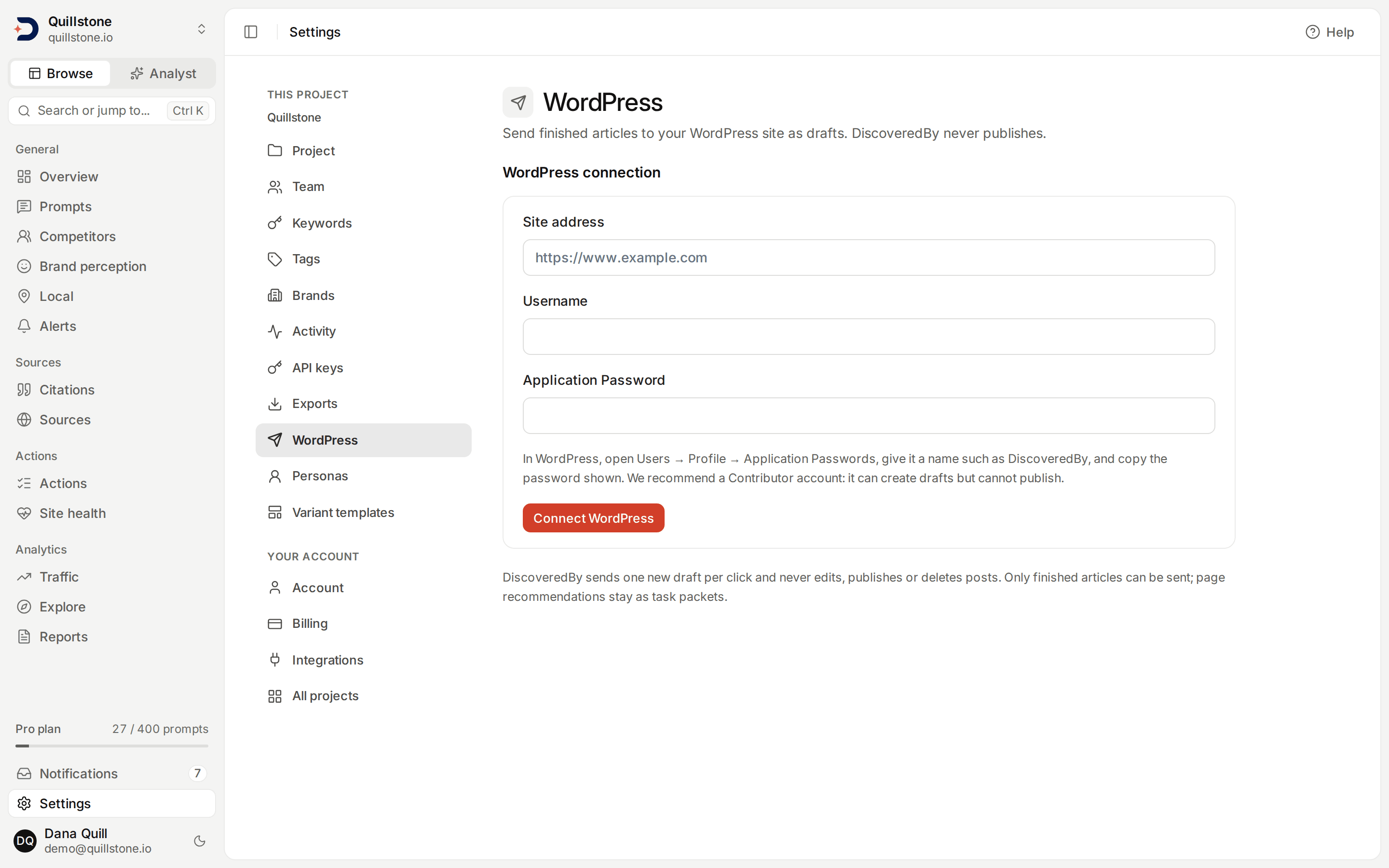
Open WordPress under
project settings. Only the project owner can connect, replace or disconnect
the project's WordPress account; an editor or a viewer sees a message
saying so instead of the form, and nobody outside the project can reach
this screen at all (api/services/cms/wordpress.py#connect, #disconnect,
api/dependencies.py#get_project_for_user).
Connecting takes a site address, a WordPress username, and a WordPress Application Password (a per-app credential WordPress issues from a user's own profile, separate from their login password). The address is checked before anything is sent to WordPress:
- It must be
https://, with no query string, no URL fragment, no embedded username or password, no port other than the default, and no host that is obviously private on its face, such as a literal internal IP address (api/services/cms/wordpress_client.py#validate_site_url). - Its registrable domain must equal the project's own domain. A subdomain
such as
https://blog.example.comis accepted for a project onexample.com, because both reduce to the same registrable domain; a different domain entirely is refused (api/services/urls.py#extract_domain).
DiscoveredBy then signs in as that account and asks WordPress who it is. It
tries the pretty permalink form of the REST API first
(https://your-site/wp-json/wp/v2/...); only when that specific address
answers with a 404 or a response DiscoveredBy cannot parse does it retry
with the ?rest_route= form instead. Any other failure there, including a
wrong username or an application password WordPress refuses, is reported
immediately, with no second attempt
(api/services/cms/wordpress.py#connect,
api/services/cms/wordpress_client.py#api_url). Whichever form answers is
the one every later send from this connection uses.
The account must be able to create posts. WordPress reports this back as a
capability named edit_posts, and a connection attempt is refused with
"This WordPress account cannot create posts" when it is missing
(api/services/cms/wordpress.py#connect). We recommend connecting a
Contributor account rather than an Administrator or Editor one: a
Contributor can create drafts but cannot publish, so WordPress itself
enforces the draft-only rule as a second line of defense. When the account
DiscoveredBy connects can publish, the settings screen says so as
information; it changes nothing about what gets sent
(frontend/src/routes/(app)/settings/wordpress/+page.svelte#connection).
The Application Password itself is stored encrypted. It is never returned
by the API, never logged, and never written into an audit row; reading the
connection back exposes the site address, the WordPress username, the
account's display name, when it was last verified, and whether that
account can publish, but never the password itself
(api/schemas/wordpress.py#WordpressConnectionRead,
api/services/cms/wordpress.py#read).
Every actual request this feature sends, at connect time (the identity
check above) or at send time, re-resolves the site's address live and
refuses to proceed if that address turns out to be private or internal,
even when the address already passed the syntax check above; this defends
against a public hostname that later resolves somewhere internal, and a
refusal here is reported as unreachable
(api/services/cms/wordpress_client.py#request). No such request ever
follows a redirect either: a site that answers with a redirect, the bare
domain bouncing to www for one, fails outright with a message asking for
the address it redirects to; the Application Password is never sent to
whatever address a redirect points at
(api/services/cms/wordpress_client.py#_perform). An http:// address
can never reach this point in the first place: the syntax check above only
accepts https://.
What is sent
Each click sends exactly one WordPress post, built from the finished article:
- Title: the article's title, cut to 500 characters and then sent as
plain text:
<,>and&are sent as HTML entities, so WordPress shows them as those characters instead of reading them as markup (api/services/cms/wordpress.py#draft_payload). - Content: the article's Markdown, rendered to HTML. A leading heading
that just repeats the article's own title is stripped first, since the
title above already carries it
(
api/services/cms/article_html.py#_without_title_heading). The Markdown is model output built from scraped and cited pages, so it is not trusted as markup. Raw HTML written inside it, such as a<script>or an<iframe>tag, is escaped: it reaches WordPress as visible text, not as a tag. A link whose target is nothttp://,https://,mailto:, or a relative link, ajavascript:link among them, is not created at all: the surrounding link markdown fails to parse as a link, and its raw text appears in the article as plain, visible text instead (api/services/cms/article_html.py#render,#_safe_link). A link that is created keeps only its address; a hover title written for it is dropped (api/services/cms/article_html.py#_link_open). - Excerpt: the article's meta description, when it has one, sent as
plain text the same way as the title
(
api/services/cms/wordpress.py#draft_payload). - Slug: the slug suggested on the article's publish checklist, only
when it is present and already matches a check DiscoveredBy applies
before sending, not a WordPress rule: lowercase letters, digits and
hyphens only, at most 80 characters. Otherwise no slug is sent, and
WordPress assigns its own
(
api/services/cms/wordpress.py#draft_payload,#SLUG).
WordPress expands any text in square brackets that names one of its
shortcodes, such as a contact form or an embed. So that no text in the
article can do that, every [ and ] in the rendered content, code
included, is sent as the HTML entity [ or ], which displays as
the same bracket; a bracket inside a link's address is percent-encoded
instead (api/services/cms/article_html.py#_encode_brackets, #_link_open).
Images are not sent. An image in the Markdown becomes its alt text, as
plain text, and the draft contains no <img> tag at all, so nothing loads
from the image's address when the draft is previewed
(api/services/cms/article_html.py#_image_as_alt_text). Nothing is
uploaded to WordPress's media library either; this feature never makes a
media-upload request. Nothing else new reaches WordPress:
no categories, no tags, no JSON-LD, and no scheduling: the post is always
created with status: draft, and nothing sets a publish date
(api/services/cms/wordpress.py#draft_payload).
A very long article, one whose Markdown or rendered HTML passes an internal
size ceiling, is refused outright rather than sent partially
(api/services/cms/wordpress.py#send_draft,
api/services/cms/article_html.py#MAX_MARKDOWN_CHARS, #MAX_HTML_BYTES).
These protections describe the draft as DiscoveredBy creates it. Entities
such as < and [ are stored in the post as sent, but WordPress's
own editor can decode some of them when someone opens the draft there and
saves it again, so read the draft in WordPress before you publish it.
WordPress answers a send with the status it actually gave the new post.
When that is anything other than draft (a plugin on the site can change
it, for example), the send's line under Recent sends says "WordPress
reports this post as" followed by that status. DiscoveredBy records the
status exactly as WordPress reported it and never tries to correct it: it
makes no second request to change the post
(api/services/cms/wordpress.py#send_draft,
frontend/src/routes/(app)/articles/[id]/+page.svelte#wpDrafts).
Duplicates and "Send another copy"
Sending the same finished draft twice does not normally create two WordPress posts. Before sending, DiscoveredBy fingerprints the exact payload above together with the connected site's address, then looks at its most recent earlier send of this article with that same fingerprint and site that either created a draft or ended with an unknown outcome (see Outcome unknown below):
- When it created a draft, the new send is refused with a message naming the earlier post's number.
- When its outcome is unknown, the new send is refused with "An earlier send of this version may already be in WordPress. Check WordPress, then use Send another copy if it is not there."
A send that failed in a way that means nothing was created, a refused
password for example, never blocks a resend. This check never asks
WordPress: it only looks at DiscoveredBy's own record of that earlier send,
so a post that was since trashed or deleted directly in WordPress still
counts, and the refusal happens regardless. Changing the article's content,
its title, its meta description, or its slug changes the fingerprint, so it
is never treated as a duplicate of an older send. When either refusal
appears, the screen offers a second button, Send another copy, which
explicitly asks to create a second draft anyway
(api/services/cms/wordpress.py#send_draft, #UNCERTAIN_KINDS,
frontend/src/routes/(app)/articles/[id]/+page.server.js#sendDraft).
Spacing, and a send stuck in flight
Two sends for the same project must be at least ten seconds apart, whether
or not they are for the same article; a second send inside that window is
refused with a message asking to wait
(api/services/cms/wordpress.py#SEND_INTERVAL).
While a send is waiting on WordPress, its record reads Sending, and a
second send for the same project is refused outright rather than allowed to
race it, so clicking a second time while the first request is still waiting
cannot create a second draft. That guard clears once the first send finishes
one way or the other, or after two minutes, whichever comes first. A record
still reading Sending past that two-minute mark is shown as
Interrupted instead: WordPress may or may not have actually created the
post, and DiscoveredBy has no way to tell which, so it is never edited or
retried automatically
(api/services/cms/wordpress.py#SENDING_TIMEOUT, #_state).
When a send or a connection fails
Once DiscoveredBy has passed its own checks and is actually talking to WordPress, whether that is the identity check at connect time or an actual send, any failure there carries one of eleven kinds, each with its own message:
- auth_refused: WordPress refused this username and Application Password.
- forbidden: WordPress says this account is not allowed to do that.
- not_found: No WordPress REST API answered at this address.
- redirected: WordPress answered with a redirect. Enter the address it redirects to.
- rejected: WordPress rejected the request.
- unreachable: WordPress could not be reached. On a send, this kind only covers failures before anything reached WordPress: the address could not be resolved or connected to, the secure connection or its certificate failed, or the live public-address check described above refused it. At connect time it covers every network failure other than a timeout.
- timeout: WordPress did not answer in time. The draft may or may not have been created; check WordPress before sending again. On a send, any other network failure after the connection was made, such as the answer being cut off, is reported as this kind too, because WordPress may already have received the request.
- server_error: WordPress answered with a server error (an HTTP 5xx status). The draft may or may not have been created; check WordPress before sending again.
- unconfirmed: WordPress accepted the request but its answer could not be read. The draft was probably created; check WordPress before sending again. This kind only happens on a send: at connect time an unreadable answer is bad_response.
- bad_response: WordPress sent a response DiscoveredBy could not read.
- interrupted: shown only on a send stuck past the two-minute mark
above, never on a connection attempt, and never stored as its own status
(
api/models/wordpress.py#ERROR_KINDS,api/services/cms/wordpress_client.py#MESSAGES,api/services/cms/wordpress.py#_state).
A connection check creates nothing, so at connect time timeout and
server_error use plainer messages, "WordPress did not answer in time."
and "WordPress answered with a server error. Try again later."
(api/services/cms/wordpress.py#connect).
None of the earlier local refusals on this page carry one of these eleven kinds: a missing plan, the wrong role, an article too long, sending too soon, an unresolved duplicate, and a site address that fails the syntax check are each their own one-off message, decided before DiscoveredBy ever talks to WordPress.
Outcome unknown
A send that fails as timeout, server_error or unconfirmed may
have created a post in WordPress anyway: each can happen after WordPress
received the request. Its line under Recent sends reads Outcome
unknown with that kind's message, instead of Failed, and it blocks a
plain resend of the same version the way a created draft does (see
Duplicates and "Send another copy"
above). Check WordPress for the post, then use Send another copy only
if it is not there (api/services/cms/wordpress.py#UNCERTAIN_KINDS,
#_state). After any failed send, the page reloads its list, so the new
line appears straight away
(frontend/src/routes/(app)/articles/[id]/+page.svelte#wpDrafts).
Roles and who sees what
Reading the connection's status and reading the send history are open to
any current project member, always: neither check restricts by role beyond
ordinary project membership, and neither one checks the plan
(api/services/cms/wordpress.py#read, #list_drafts). On an article's own
page, Recent sends and any past send already in it stay visible
whether or not the project is on a qualifying plan, whether or not
WordPress is even still connected, and regardless of the article's own
status; only the Send buttons above that list are shown or hidden by
connection, plan, role and article state
(frontend/src/routes/(app)/articles/[id]/+page.svelte#wpDrafts).
Everything that changes state is narrower. Sending a draft is open to
owners and editors; a viewer's attempt is refused the same way any other
viewer write is (api/dependencies.py#require_write_access). Connecting a
new account, replacing one, and disconnecting are all owner-only
(api/services/cms/wordpress.py#connect, #disconnect). On an article's
page, an editor or viewer whose project has no connection, or whose owner's
plan lacks this feature, is told that the project owner manages it,
without a link to a settings screen they cannot use
(frontend/src/routes/(app)/articles/[id]/+page.svelte#wpConnection).
On Settings → WordPress, a downgraded owner is not locked out of an
existing connection: the card showing the connected site, the account and
Disconnect keeps showing as long as a connection exists, because that
part of the screen runs off whether a connection exists, not off the plan.
Only Replace connection, and a fresh connect form when nothing is
connected yet, are hidden once the plan no longer includes this feature
(frontend/src/routes/(app)/settings/wordpress/+page.svelte#connection).
Plan
Connecting a new account, replacing one, and sending a draft each require
the project owner's persisted cms_drafts entitlement. Standard Starter,
Growth and Pro presets enable it; Free and Trial do not
(api/services/cms/wordpress.py#owner_can_use,
api/services/entitlements.py#get_entitlements,
api/services/plan.py#get_user_plan). It is read from the project owner's
plan, not the plan of whichever member is signed in, the same rule every
other owner-plan entitlement in this product follows; see
Plans and limits for the general rule.
Disconnecting is the one write this entitlement never gates: an owner can
disconnect an existing connection on any plan, downgraded or not
(api/services/cms/wordpress.py#disconnect). Reading the connection's
status and its send history never check the entitlement either, on either
screen; see Roles and who sees what above for
exactly what stays visible on a plan without this feature.
Disconnecting
Disconnecting deletes the stored connection outright, unlike a Google
integration on this product, which only marks its connection revoked and
keeps the row. Drafts already sent to WordPress are not affected either
way: nothing about disconnecting reaches into WordPress, and the sent
history on this project's articles stays exactly as it was
(api/services/cms/wordpress.py#disconnect). Reconnecting afterward is a
fresh connection, entered again from scratch; there is no previous
username or address to reuse, because the row that held them is gone.
Disconnecting here only deletes DiscoveredBy's own stored copy of the
Application Password; WordPress does not know a disconnect happened, so
the password itself stays valid there until you revoke it from the
account's own WordPress profile too.
Related
- Articles: how a finished draft gets to "ready" in the first place
- Optimizations: the other kind of recommendation, which stays a task packet and is never sent to WordPress
- Plans and limits: how an owner-plan entitlement like this one is read and enforced
- Team: what owner, editor and viewer mean elsewhere in the product
Last verified 2026-09-27