Advisors
Notifications
Read account notifications and configure project owner alert email cadence, categories and weekly-report delivery.
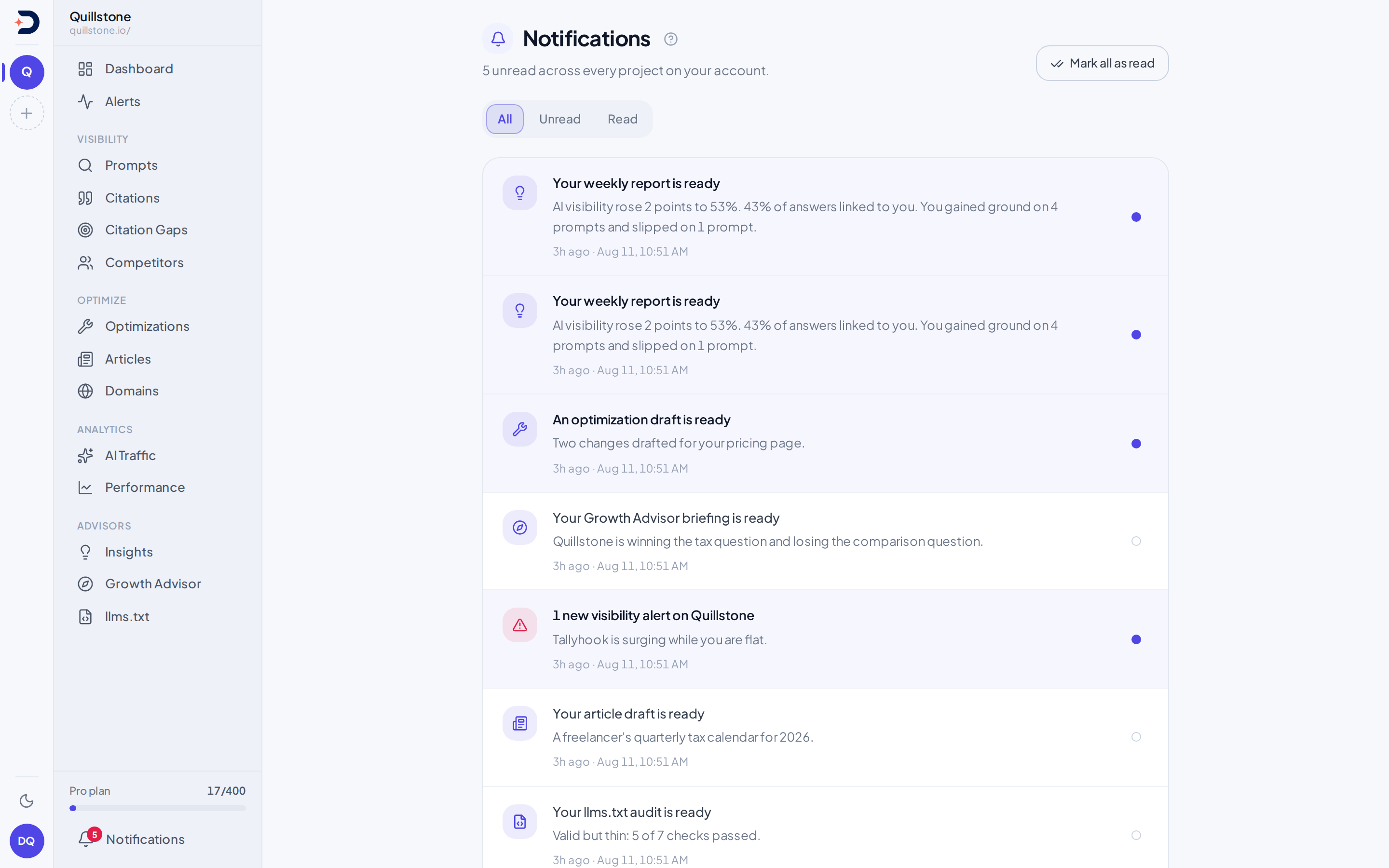
What this is
Notifications is one inbox
for the whole account: every project you belong to writes into the same
list, read against your own user, not against whichever project happens
to be selected right now (api/routers/notifications.py#list_notifications).
A separate endpoint tracks how many are unread, read independently of the
list itself, so the badge in the app chrome never depends on how many
rows the list happens to have loaded (#unread_count).
Eight kinds, and where each comes from
Eight kinds exist today, one write site each, and nothing else in the
product writes to this table: every Notification(...) construction in
the backend was checked, and these eight are all of them.
source_watchlist: subscribed citation gains/losses, one notice per saved alert, with counts and recorded channel in its detail (api/services/source_watchlist_alerts.py#evaluate_subscriptions)visibility_digest: the daily watchdog run described in Alerts (api/services/watchdog.py#run_watchdog_for_project,#VISIBILITY_DIGEST)weekly_report_ready: a week's Weekly report finishing (api/services/weekly_report.py#_notify_report_ready,#WEEKLY_REPORT_READY)growth_briefing_ready: a Growth Advisor briefing finishing (api/services/growth_advisor.py#_notify_briefing_ready,#GROWTH_BRIEFING_READY)llms_txt_audit_ready: an llms.txt Advisor run finishing (api/services/llms_txt/service.py#_notify_audit_ready,#LLMS_TXT_AUDIT_READY)citation_gaps_ready: fresh citation gap opportunities found for a project (api/services/citation_gap.py#notify_citation_gaps_ready,#_NOTIFICATION_KIND)optimization_ready: a new on-page recommendation ready to review (api/services/optimization/service.py#notify_optimization_ready,#OPTIMIZATION_READY_KIND)article_ready: a drafted article finishing (api/services/articles.py#_notify_article_ready,#ARTICLE_NOTIFICATION_READY)
The screen keeps its own copy of this same eight-entry table to decide
each row's icon and where it links
(frontend/src/routes/(app)/notifications/+page.svelte#KINDS).
The boundary with alerts
An alert and a notification are not the same thing, and they are not
even one-to-one. When the watchdog described in
Alerts persists one or more fresh visibility alerts for a
project, it writes exactly one visibility_digest notification per
project member for that run, summarizing every alert together; a day
with three alerts still produces one notification, not three
(api/services/watchdog.py#run_watchdog_for_project). Going the other
way, most notifications are not about an alert at all: six of the eight
kinds above come from a report or a recommendation finishing, with no
visibility_alerts row behind them anywhere.
Read, unread, and marking it so
A row's read state is a plain boolean you set directly, not a toggle the
server flips for you: the caller sends the state it wants stored
(api/routers/notifications.py#update_notification). One action clears
every unread row on the account at once
(#mark_all_read). The list itself returns up to 100 rows, newest first,
optionally filtered to unread only; the screen asks for 50 and says so
once that many come back
(#list_notifications,
frontend/src/routes/(app)/notifications/+page.server.js#ROW_CAP).
Delivery
Five of the eight kinds also send an email to the project owner, on top
of the in-app row: the watchdog's digest, but only when the owner is on a
plan with alert-email access and owner preferences allow it
(api/services/email.py#send_visibility_alert_email); the
weekly report, also entitlement-gated and optionally disabled by the owner
(api/tasks.py#_email_weekly_report); and citation gaps and a finished
article, sent to the owner whenever they have an email on file, with no
plan check of their own
(api/services/email.py#send_citation_gaps_ready_email,
#send_article_ready_email). A growth briefing, an llms.txt audit and an
optimization recommendation stay in-app only: nothing in the product
sends an email for any of those three.
Source watchlist email is separately opted into on each list. It joins the owner's existing alert digest when entitlement and cadence allow it, including when team in-app delivery for that list is off. Editing, unsubscribing or deleting a list cancels its queued email. In-app notices are separate from the visibility digest and link to their own saved source evidence.
Whose project it is about
A notification can be about a project other than the one currently
selected, since the inbox spans every project on the account, not just
the current one. Each row's project name is resolved from your own
project list, and a row whose project has since left that list, access
removed, project deleted, renders with no link forward rather than
sending you to an error
(frontend/src/routes/(app)/notifications/+page.svelte#projectNames).
Related
- Alerts: visibility digests and watchlist notices with saved evidence
- Weekly report: the other periodic email this inbox also carries a row for
- Growth Advisor: one of the three kinds that never leaves the app
Choose owner email preferences
Open Project owner email preferences from Notifications. Only the owner of the selected active project can change these settings. They control emails to that owner; they do not subscribe teammates or change anyone's in-app inbox.
Choose Daily, Weekly, or No alert emails. Select any of the nine
alert categories: the original four (visibility drops, competitor surges,
prompt visibility drops and citation rank slides), four brand-signal
categories (brand share shifts, emerging brands, sentiment shifts and
competitor-only social citations) and fact contradictions
(api/schemas/email_preferences.py#ALL_ALERT_KINDS). Brand share shifts is
one checkbox covering your own share rising or falling and every qualifying
competitor's share rising, all of which run on every plan. Sentiment shifts
is one checkbox covering four checks: your own negative-sentiment share
rising or falling and a competitor's negative-sentiment share moving either
way, which all run on every plan, plus a rising weakness reason for your own
brand or for a named competitor, which only runs for a project whose owner's
plan includes Brand reasons; on a plan
without it, that same checkbox still delivers the other three checks.
Competitor-only social citation can go entirely unused: it only runs for
a project whose owner's plan includes
Social sources, and its checkbox is
harmless on a plan without it because nothing of that kind is ever produced
to send (api/services/brand_signals.py#detect_brand_signals).
Fact contradictions work the same way: they are only detected for a
project whose owner's plan includes Fact check
(api/services/fact_check/alerts.py#detect_fact_contradictions).
An owner whose saved list already had all four original categories selected
was upgraded to all eight the moment this shipped
(alembic/versions/e7c3a9f5b2d8_alert_subject_key.py#UPGRADE_BACKFILL_SQL).
An owner who had narrowed their list to fewer than the original four keeps
exactly what they had, with none of the four new categories added, until
they tick them in manually. Fact contradictions followed the same rule
when Fact check shipped: a saved list with
all eight earlier categories selected gained it, and a narrower list was
left as it was
(alembic/versions/b03c5e8a1f47_fact_checks.py#EMAIL_KINDS_UPGRADE_SQL).
Choose No alert emails to stop alert email entirely; a sending cadence
needs at least one category, so saving Daily or Weekly with none selected is
refused rather than stored as a silent off
(api/schemas/email_preferences.py#kinds_match_cadence).
Daily is the default; all nine categories start selected for an owner with
no saved preferences at all. Source watchlist email selection is managed
separately on each watchlist, using this
same cadence. Separately, toggle Email generated weekly reports, which
defaults on (api/services/email_preferences.py#save).
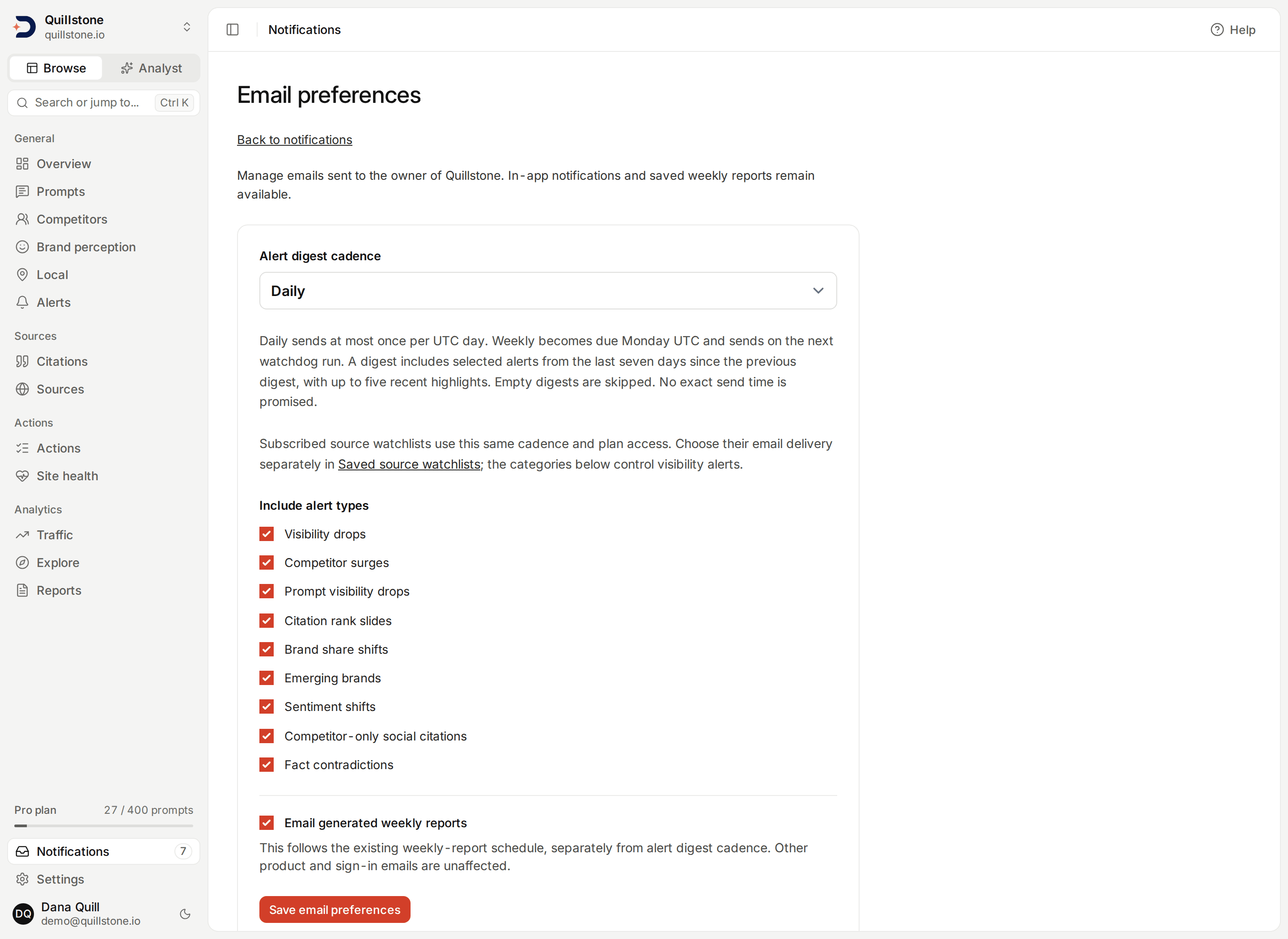
Daily sends at most once per UTC day. Weekly becomes due Monday UTC; delivery
happens on the next watchdog run, including a later day if Monday was missed.
Digests contain selected saved alerts, and any subscribed source watchlist
events, from the preceding seven days since the last successful digest,
excluding anything already dismissed
by send time, with up to five most recent highlights and the total
count. Empty digests are skipped. This is not an exact send-time scheduler.
Older alerts remain in the app; the email window does not backfill an outage
longer than seven days (api/services/email_preferences.py#deliver_digest).
Failed email sends leave the delivery cursor unchanged for the next run. A process failure after the mail provider accepts a digest but before its receipt is saved can repeat that digest. Changing preferences never generates new alerts or suppresses saved reports. Existing owner entitlements still control email eligibility, and the page shows when a plan lacks access. Other product and sign-in emails keep their existing behavior. Slack and webhook delivery are not supported in this workflow.
Last verified 2026-09-27