Visibility
Fact check
Keep a list of approved facts about your brand, then see where AI engines get them wrong: a weekly fact study and the answers to up to ten tracked prompts you choose are checked against them, with each contradiction quoted from the answer, linked to its sources and queued for your team to review.
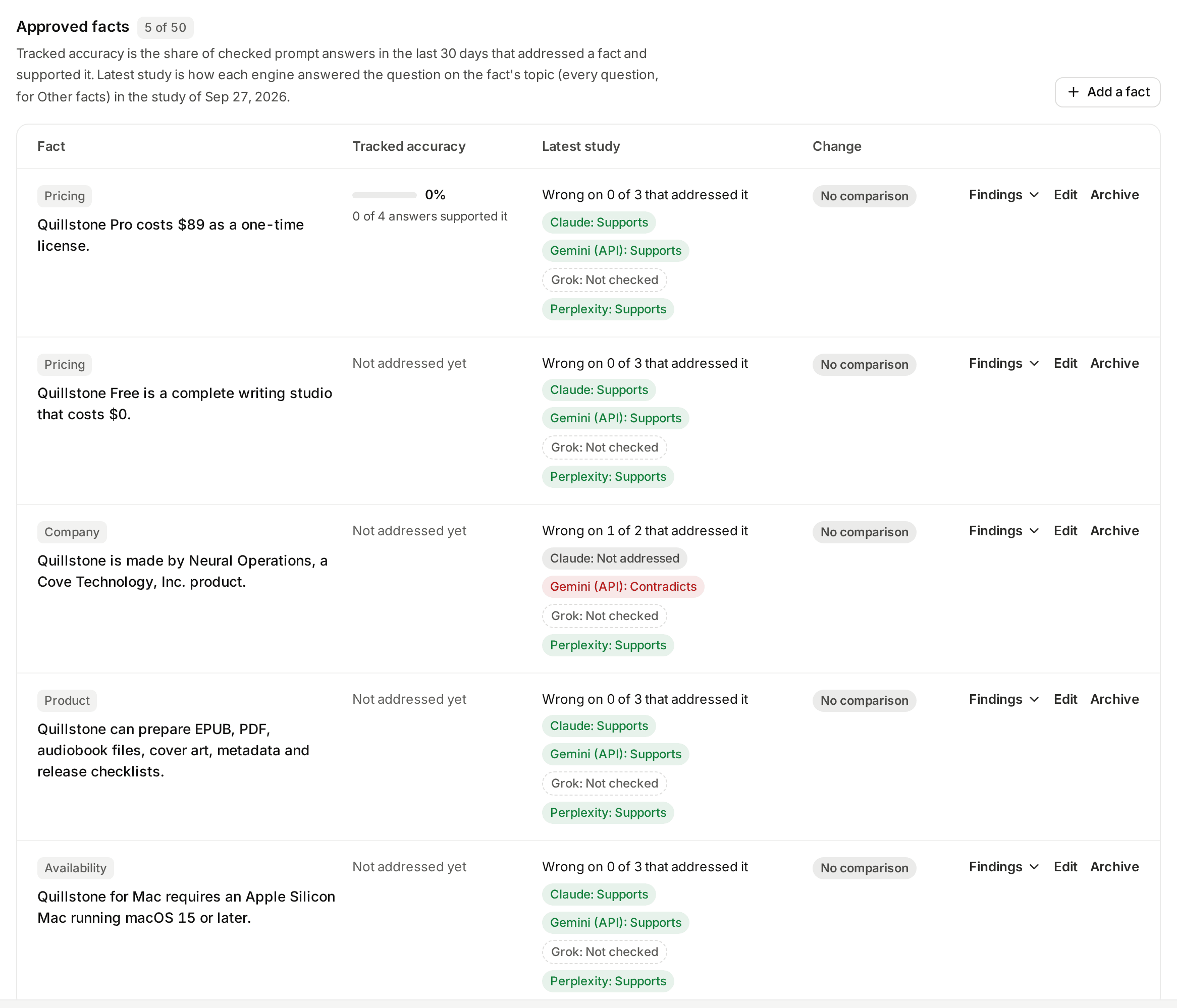
The screenshot shows the approved facts of the Quillstone demo project on development data. The five facts were typed by hand from Quillstone's own site, and every Change reads No comparison because the demo has run only one study so far. The review queue above them is left out of the screenshot, because its quotes and explanations are AI-written text about the demo brand, which we do not publish.
What this screen shows
Open Fact check from the
Fact check tab under Brand perception in the sidebar, after
Attributes (frontend/src/lib/nav.js#HUBS). You keep a list of approved
facts about your own brand, such as what a plan costs, when the company
was founded or which countries it serves, and the screen shows whether
AI engines state those facts correctly.
At the top, four totals: Open contradictions, Prompt answers
checked, Skipped by the daily limit and Checks that failed, the
last three over the window chosen with the 7 days, 30 days and
90 days control beside them (30 by default). That window also sets the tracked accuracy
below. Run now starts a fact study for owners and editors; while a
study runs, a banner says so and the page refreshes itself every few
seconds. Within 24 hours of the last study, owners and editors see "A
study started in the last 24 hours" and when the next run is available. If the
newest study did not finish, a note says why and which study the results
are from (frontend/src/routes/(app)/sentiment/facts/+page.svelte#STUDY_ERROR).
The date range and engine chips of the filter bar at the top of the app
do not apply here: they read "Date range (page filter)" and "Engine (page
filter)", because this screen has its own window control and its own
engine filter on the review queue; the other chips are not available on
this screen (frontend/src/lib/nav.js#HUBS,
frontend/src/lib/filters.js#disabledChipLabel).
Below the totals, four sections:
- Needs review: the review queue, with an Open tab (showing the
open count) and a Reviewed and archived tab, filtered by fact,
engine and Checked in (fact studies or checked prompts). Each
finding shows the fact's category and wording as checked, marked
"Checked against an earlier wording" or "Archived fact" where that
applies; the verdict, and how it counts after a review; the engine,
model and date; the study question, or the checked prompt with a link to
it; the engine's quote; the AI-written explanation; and the sources
the engine cited for that sentence, or "No source was tied to this
sentence." Owners and editors review a finding the model said
contradicts with Confirmed wrong, Answer agrees with the fact,
Our fact is out of date and Not relevant, can Add a note,
and can Reopen a reviewed finding; a supports finding offers no
review choices (
frontend/src/lib/facts.js#REVIEW_CHOICES,#offersReview). A finding marked Our fact is out of date shows Edit fact and Archive fact for its fact until the fact is edited or archived (frontend/src/lib/components/facts/ReviewQueue.svelte#activeFact). The queue shows 25 findings a page, newest first; if a later page empties because its last findings were reviewed, it says "Nothing is left on page N." and offers the way back (frontend/src/lib/components/facts/ReviewQueue.svelte#shown,frontend/src/lib/facts.js#queuePage). - Approved facts: each active fact, with how many of the 50 are in
use, its Tracked accuracy (a bar with the percentage and "N of M
answers supported it", or "Not addressed yet"), its Latest study
result with one chip per engine, and its Change. Findings opens
a fact's tracked accuracy by engine and its recent findings, supports
included. Owners and editors can Add a fact, Edit and
Archive; archived facts sit in a closed Archived facts list with
Restore (
frontend/src/lib/components/facts/FactsTable.svelte#studyText). - Drafts from your site: Suggest from my site, the state of the
last run (how many pages it read and facts it drafted, or why it did not
finish), and each draft with its category, its statement labelled
"AI-drafted from this page", the sentence it came from and a link to
the page. Owners and editors can
Approve it as it is, Edit it and then approve it, or
Dismiss it after confirming
(
frontend/src/lib/components/facts/FactsManager.svelte#SITE_ERROR). - Checked prompts: the selected prompts, how many of the 10 are in
use, each linked to its prompt page and, for owners and editors,
marked when paused.
Choose prompts opens a search over the project's prompts; it offers
active prompts, and a paused prompt only while it is already chosen
(
frontend/src/lib/components/facts/CheckedPrompts.svelte#matches).
Viewers see the same screen without the controls, with a note saying why. On a plan without Fact check the screen shows "Fact check requires Starter or higher." with a link to the plans.
Facts
A fact is one statement about your own brand, in one of six categories:
pricing, company, product, availability, policy or other
(api/models/fact_check.py#FACT_CATEGORIES). For example, "Company:
founded in 2019 in Berlin" or "Availability: the app is available in
English, German and French".
Owners and editors add, edit, archive and restore facts
(api/routers/facts.py#_writable_project). A fact you type needs no
separate approval: it is active at once and is checked from then on
(api/services/fact_check/facts.py#create_fact). The rules:
- A statement is one line of plain text, 5 to 300 characters once spaces
at either end are trimmed. Line breaks and control or invisible
formatting characters are refused
(
api/services/fact_check/facts.py#clean_statement,#STATEMENT_MIN,#STATEMENT_MAX,#REFUSED_CATEGORIES). - A project can have 50 active facts at once. Adding, approving or
restoring a fact beyond that is refused; archive one first
(
api/services/fact_check/facts.py#MAX_ACTIVE_FACTS,#_require_active_room). - A statement that matches an active fact or a draft, ignoring case and
runs of spaces, is refused as a duplicate
(
api/services/fact_check/facts.py#normalize_statement,#existing_statements,#_require_unique). - Editing the wording or the category of an active or archived fact gives
it a new version. If someone else changed the fact after you loaded it,
your edit is refused and you reload. A draft can only be changed by
approving it (
api/services/fact_check/facts.py#update_fact). An archived fact's wording is checked for duplicates when it is restored, not when it is edited (#restore_fact). - Archive stops checking a fact: only active facts are ever sent to a
check (
api/services/fact_check/facts.py#archive_fact,#active_facts). Its findings are kept, and it drops out of the metrics and the Open queue (see Verdicts and review). Restore makes it active again, subject to the cap and the duplicate rule. - Active and archived facts cannot be deleted, so their history stays.
Only a draft can be removed, by dismissing it
(
api/services/fact_check/facts.py#delete_draft).
Each change is recorded in the project's activity log with the fact's id,
the action, its category, status and version, never the statement itself
(api/services/fact_check/facts.py#_audit).
Drafts from your site
Suggest from my site asks an AI model to propose draft facts from your
own website. Owners and editors can run it; it is refused while a run is
in progress and for 24 hours after the latest run that counts was started. A run that
could not be queued, or that was interrupted on our side, does not count
(api/services/fact_check/site.py#start_site_run, #RUN_COOLDOWN,
#UNCOUNTED_ERROR_KINDS, #latest_counted_created_at,
api/routers/facts.py#suggest_from_site).
Which pages are read:
- Your homepage,
https://plus your project's domain. It must end up on your project's own site, meaning the same registrable domain (a site on a shared host such asgithub.iocounts as its own site). If the homepage cannot be read, or redirects to another site, the run fails and no AI call is made (api/services/fact_check/site.py#_read_pages,#_site_of,#run_site_suggestions). - Then up to 7 links found on the homepage, in the order they appear,
that are on the same site and whose path contains one of
pricing,plans,price,about,company,features,product,faq,terms,refund,securityorcontact. The query and fragment are dropped, and the homepage and repeated links are skipped (api/services/fact_check/site.py#pick_pages,#PATH_KEYWORDS,#MAX_PAGES). A link that cannot be read, or that redirects to another site, is skipped (#_read_pages).
Each page is rendered in a browser that can reach only public addresses
(api/services/page_diff.py#fetch_page). The pages are read before the AI
model is called, and only from links on your homepage, so no address the
model writes is ever opened (api/services/fact_check/site.py#run_site_suggestions).
The model receives your project's name, its domain, and each page's
address with the first 6,000 characters of its text, and is told to treat
the page text as data, not instructions
(api/services/fact_check/site.py#build_suggest_prompt, #PAGE_TEXT_LIMIT,
#_sent). For each proposal it returns a category, a statement, which
page it came from and the sentence on that page that states it. Our code
reads at most 20 proposals and keeps one only when
(api/services/fact_check/site.py#validate_suggestions, #MAX_SUGGESTIONS):
- it names one of the pages we sent;
- its sentence is found in that page's text, exactly or ignoring case
(
api/services/brand_mentions.py#_locate), and is at least 12 characters long; the stored sentence is the page's own text, cut to 300 characters (api/services/fact_check/checker.py#MIN_QUOTE_LENGTH,#QUOTE_LIMIT); - its statement follows the same rules as a fact you type; and
- it does not repeat an active fact, a draft or an earlier proposal.
Kept proposals are saved as drafts, each with the address the browser
landed on and the located sentence. A project holds at most 20 drafts;
proposals beyond that are dropped
(api/services/fact_check/site.py#run_site_suggestions,
api/services/fact_check/facts.py#MAX_DRAFTS). The run fails when the AI
call fails, and is marked interrupted if it is still running 30 minutes
after it started (api/services/fact_check/site.py#INTERRUPTED_AFTER,
#expire_interrupted).
A draft's statement is the model's wording. Our code checks that the
sentence shown with it is on your page, not that the statement says the
same thing, so read each one against its sentence before you approve it.
Nothing is checked against a draft. Approve makes it an active fact,
optionally with your own wording and category, under the same cap and
duplicate rule as a typed fact
(api/services/fact_check/facts.py#approve_fact). Dismiss deletes it.
How answers are checked
Answers reach a check in two ways: a weekly fact study, which asks each chat engine, and ChatGPT (app), about your brand directly, and checked prompts, the tracked prompts you choose, whose answers are checked as they arrive. Both use the same check, described under How a finding is made.
The fact study
A study asks each chat engine, and ChatGPT (app), one question for each
category that has at least one active fact. Other has no question and is never asked
(api/services/fact_check/studies.py#study_categories,
api/services/fact_check/question.py#STUDY_CATEGORIES). The questions use
your project's name and domain, and never the text of a fact, which would
lead the engine toward it
(api/services/fact_check/question.py#QUESTIONS, #build_question):
Pricing: How much does {name} ({domain}) cost? Describe its pricing,
plans, any free plan or free trial, and billing options. Cite sources
where you can.

Company: Tell me about the company behind {name} ({domain}): when it was
founded, where it is based, who owns or runs it, and how large it is.
Cite sources where you can.

Product: What are the main products and features of {name} ({domain})?
What does it do, and what does it not do? Cite sources where you can.

Availability: Where and on which platforms is {name} ({domain})
available? Which countries, languages, devices and integrations does it
support? Cite sources where you can.

Policy: What are the policies of {name} ({domain}) on refunds,
cancellation, data privacy, security and customer support? Cite sources
where you can.
The category name before each question is a label on this page, not part
of what is sent. Name and domain are trimmed to 120 and 255 characters
(api/services/fact_check/question.py#NAME_LIMIT, #DOMAIN_LIMIT). Each
question goes to every engine on the project owner's plan that is active
and available, except Google AI Overviews, Google AI Mode and Gemini
(app), three of the four engines collected through DataForSEO; ChatGPT
(app), the fourth, is asked. There is one answer per category and engine,
and the exact question is saved with each answer when the study is created
(api/services/fact_check/studies.py#create_study,
api/services/brand_study/engines.py#study_engines_for_plan,
#STUDY_EXCLUDED_PROVIDERS). The study uses your project's default
language: each engine receives the same instruction to answer in that
language that a tracked prompt in that language receives, and ChatGPT
(app) gets it added after the question, because a language setting alone
does not change the language it answers in (see
What reaches ChatGPT).
No city or persona is sent, and no country except to ChatGPT (app), which
is always asked with the United States as its country
(api/services/brand_study/question.py#question_search_context,
#study_prompt, #STUDY_APP_COUNTRY; see
Languages and templates).
The wording carries a version number, and studies are compared only with
studies that asked the same version in the same language
(api/services/fact_check/question.py#FACT_QUESTION_VERSION).
Each engine's answer is saved, cut to 50,000 characters, with the model
the engine reported and the sources it cited, in the same way as an
objection study
(api/services/fact_check/pipeline.py#run_answer, #RESPONSE_TEXT_LIMIT,
api/services/brand_study/sources.py#capture_sources, #model_of). The answer is
then checked against the active facts of its own category plus every
active Other fact, as they are at the moment it is checked
(api/services/fact_check/pipeline.py#_check). Other facts go with every
category because an answer about any topic can address them.
An engine error, a blank answer, or a failed check affects only that
answer. A blank answer (empty or only spaces) is recorded as a failed
answer and is not checked (api/services/fact_check/pipeline.py#EMPTY_RESPONSE).
The study succeeds when at least one answer was checked, and fails when
none was.
It is marked interrupted when no answer has finished for 90 minutes
(api/services/fact_check/pipeline.py#finalize_if_complete,
api/services/fact_check/studies.py#INTERRUPTED_AFTER,
#expire_interrupted).
The screen shows the latest succeeded study, and notes a newer one that
failed (api/services/fact_check/read.py#facts_view).
Study answers are kept apart from your tracked prompts' answers
(api/models/fact_check.py#FactStudyAnswer). They use no prompt slot and
change no visibility metric or sentiment figure; their findings appear
only on this page, in Fact contradiction alerts, and in the export, API
and MCP.
When studies run
Studies run automatically once a week, with no setting to turn on. A
systemd timer (discoveredby-cli@enqueue-fact-studies.timer) runs every
Friday at 05:00 UTC and starts a study for every active project whose
owner's account is active and whose owner's plan includes Fact check,
unless the project already has a study running or one was created in the
last 6 days. A project with no available engines, or with no active fact
outside Other, is skipped
(api/cli.py#cmd_enqueue_fact_studies,
api/services/fact_check/studies.py#enqueue_scheduled_studies,
#SCHEDULE_INTERVAL).
Owners and editors can also press Run now. It is refused while a
study is running, for 24 hours after the latest study that counts was
created, when the plan has no available engines, and when there is no
active fact outside Other; viewers cannot run a study
(api/services/fact_check/studies.py#start_manual_study, #NO_FACTS,
api/routers/fact_checks.py#start_study). A study that could not be
queued, or that was interrupted, does not count toward the 24 hours or
the 6 days; a study that ran and failed does
(api/services/fact_check/studies.py#_counts_toward_interval).
Checked prompts
Owners and editors choose which tracked prompts are checked. The
selection can hold any prompts of the project, including paused ones,
which produce no new answers while paused; the picker on the screen
offers a paused prompt only if it is already chosen
(frontend/src/lib/components/facts/CheckedPrompts.svelte#matches). A
prompt of another project is refused
(api/services/fact_check/tracked.py#set_checked_prompts,
api/schemas/fact_check.py#CheckedPromptsWrite, #MAX_CHECKED_PROMPTS).
The selection holds up to 10 prompts.
When a tracked answer to a selected prompt completes, whether from the
daily run or a run started on demand, a check is queued for it. That
includes a completed Google AI Overviews, Google AI Mode, ChatGPT (app) or
Gemini (app) answer, which has text like any other; a run where Google showed no AI answer has
nothing to check and is skipped. Looking
the prompt up can never fail the answer itself
(api/tasks.py#_resume_completed_execution, #enqueue_post_answer_work,
#_enqueue_fact_check, #enqueue_fact_checks_if_selected,
api/routers/executions.py#execute_single_query, #execute_batch,
api/services/fact_check/tracked.py#prompt_is_selected). Before checking,
the task makes sure the answer has text, the prompt is still selected,
the owner's plan still includes Fact check, at least one fact is active
(an Other fact is enough), and the answer has not been checked before.
The answer is checked against every active fact of the project
(api/services/fact_check/tracked.py#check_execution,
api/services/fact_check/facts.py#active_facts).
Selecting a prompt also queues its completed answers from the last 7 days
(counted in UTC days, today included) that have not been checked, newest
first, as many as today's limit still allows
(api/services/fact_check/tracked.py#set_checked_prompts,
#BACKFILL_DAYS). Removing a prompt from the selection stops checks of
its new answers; its findings stay.
Each answer is checked at most once. A check that failed, or that was
skipped by the daily limit, is recorded and not tried again, even on a
later day (api/services/fact_check/tracked.py#_already_checked,
#_write). The header counts both in the window, so a failure does not
vanish from the numbers.
The daily limit
A project can make 200 checks of tracked answers per UTC day. Only
checks that completed count; checks that failed and study checks do not,
so an outage of the AI model does not use up the day. An answer that
arrives after the limit is recorded as skipped, and the header shows how
many were skipped in the window, so you can see when not every answer was
checked. The limit is read just before each check
starts, so checks already running at that moment can take a day slightly
past 200 (api/services/fact_check/tracked.py#DAILY_CAP,
#_checks_today).
How a finding is made
An AI model reads the answer and judges it against your facts. It is sent
your brand's names, the facts (each with its id, category and statement)
and the first 16,000 characters of the answer, and is told that all of it
is data, not instructions
(api/services/fact_check/checker.py#build_check_prompt,
#CHECK_TEXT_LIMIT). The names are your brand's name, its aliases and
the names of its active sub-brands, or the project's name when no brand
has been set up (api/services/fact_check/tracked.py#own_brand_names,
api/services/brand_families.py#family_roots). For each fact the answer
addresses, the model says whether the answer supports it or
contradicts it, quotes the sentence that makes the claim and explains
in one sentence. It is told to judge only claims about your brand, to
treat an outdated or partly wrong statement as a contradiction, and to
leave out a fact the answer says nothing about.
Our code then decides what is kept
(api/services/fact_check/checker.py#validate_check):
- At most 50 findings are read from one answer (
#MAX_FINDINGS). - The fact id must be one of the facts sent with this answer; any other id is dropped.
- The quote must be found in the answer, exactly or ignoring case; a
finding whose quote cannot be found is dropped
(
api/services/brand_mentions.py#_locate). The quote stored is the answer's own text at that position, cut to 300 characters, and a quote shorter than 12 characters, not counting spaces at either end, is dropped (api/services/fact_check/checker.py#QUOTE_LIMIT,#MIN_QUOTE_LENGTH). - One answer gives at most one finding per fact: the first one the model listed that passes these checks.
- The explanation is cleaned of control characters and cut to 300
characters (
api/services/fact_check/checker.py#clean_text,#EXPLANATION_LIMIT). It is the model's wording and is shown as such.
Each finding keeps the fact's wording and version as they were sent, so a
later edit does not rewrite what was checked
(api/services/fact_check/tracked.py#check_execution,
api/services/fact_check/pipeline.py#_check). If the AI call fails, a
failed check is recorded with no findings.
The verdict is the model's judgement; what our code guarantees is that the quote is really in the answer and the fact is really one of yours. The review actions below are how your team corrects a wrong verdict.
How sources are linked
Our code, not the AI model, links the engine's sources to a finding, with
the same rule as Objections:
a source is linked when the engine placed one of its citations on the
quote itself or in the run of citation markers directly after it
(api/services/brand_study/sources.py#link_sources). For a tracked
answer, the list of sources is rebuilt from the citation records saved
with the answer, in the same order the check used
(api/services/fact_check/sources.py#execution_sources, #resolve_sources).
This depends on the engine recording where in its answer it cited each
source. Claude records none, so findings from Claude answers show no
sources (api/services/llm.py#run_anthropic). Gemini (API) records
positions in bytes rather than characters, so for text in a non-Latin
script its sources usually land on the wrong sentence or are missing
(api/services/llm.py#run_gemini). Gemini (app) reports the passage each
source supports, and every passage that occurs exactly once in the answer
is recorded for its source, so a quote in any of them links to that
source (api/services/llm.py#_gemini_app_answer). The Objections page explains each
engine in detail. A linked source shows where the engine placed its
citation; it is not a check that the page says what the quote says.
Verdicts and review
Owners and editors review each finding the model said contradicts. A
supports finding, which appears under Reviewed and archived when its
fact is archived, offers no review choices
(frontend/src/lib/facts.js#REVIEW_CHOICES, #offersReview,
api/services/fact_check/review.py#review_finding,
api/routers/fact_checks.py#review_finding):
- Confirmed wrong (confirmed): the answer really is wrong about your fact.
- Answer agrees with the fact (overturned): the model misjudged, and the answer agrees with your fact, so the contradiction counts as a support.
- Our fact is out of date (fact outdated): the answer may be right and your fact wrong. Once it is marked, the finding offers Edit fact and Archive fact, so later answers are checked against the fact as it is now.
- Not relevant (not relevant): set the finding aside.
- Reopen sets a reviewed finding back to open.
The review decides the effective verdict that tracked accuracy, study
results, changes and alerts use
(api/services/fact_check/checker.py#effective_verdict):
- open or confirmed: the model's verdict stands;
- overturned: the verdict flips, contradicts to supports and supports to contradicts;
- not relevant or fact outdated: the finding is left out of accuracy, study results, changes and alerts.
A note is optional, at most 500 characters, and refuses control and
invisible formatting characters other than a line break and the
zero-width joiner used in emoji
(api/schemas/fact_check.py#FindingReview,
api/schemas/visibility_alert.py#check_status_note,
#STATUS_NOTE_MAX_LEN). Status and note are replaced together each time.
If someone else reviewed the finding after you loaded it, your change is
refused and you reload. The reviewer and time are kept, and the activity
log records the change without the note text
(api/services/fact_check/review.py#review_finding).
The Open tab lists findings where the model said contradicts, the
review status is open (never reviewed, or set back to open), and the fact
is active. It includes a finding checked against an earlier wording of
the fact, marked as such. The Reviewed and archived tab lists every
finding a person has reviewed (whatever the outcome, including Our fact
is out of date), and every finding of an archived fact (api/services/fact_check/read.py#_open,
#_reviewed). Both are newest first, 25 to a page, and can be filtered by
fact, engine and origin (study or checked prompt)
(api/services/fact_check/read.py#findings_page, #PAGE_SIZE,
api/routers/fact_checks.py#list_findings). Each finding carries the fact
as it was checked, the quote, the explanation, the linked sources, the
engine and model, and the study question or the prompt the answer came
from (api/schemas/fact_check.py#FindingOut).
What the numbers mean
Tracked accuracy
For each active fact, over the window you choose (7, 30 or 90 days, 30
by default, by when the check ran)
(api/routers/facts.py#read_facts, #WINDOWS):
- Addressed is how many checked answers to your checked prompts addressed the fact, by effective verdict; supported and contradicted split it.
- Accuracy is supported divided by addressed, as a percentage to one
decimal. When no answer addressed the fact there is no accuracy, shown
as "Not addressed yet", never as 0%
(
api/services/fact_check/metrics.py#tracked_accuracy,#accuracy). - The same figures are given per engine.
Only findings checked against the fact's current wording count, so
editing a fact starts its accuracy again. Study findings do not count
here; they have their own column
(api/services/fact_check/read.py#_tracked_rows).
The header's Prompt answers checked, Skipped by the daily limit
and Checks that failed count checks of tracked answers in the window,
including answers that addressed no fact. A failed check is not tried
again. Open contradictions counts the Open tab, from any date and
either origin (api/services/fact_check/read.py#_totals,
api/schemas/fact_check.py#FactsTotals).
The latest study
For each active fact, each engine asked in the latest succeeded study gets
one result (api/services/fact_check/metrics.py#study_view,
api/services/fact_check/read.py#_study_answers, #_study_fact):
- Contradicts or supports, by effective verdict, or not addressed when its answer said nothing about the fact.
- Not checked when its answer, or the check of it, failed; a blank
answer counts as a failed answer. Such an engine is listed but not
counted (
frontend/src/lib/facts.js#engineState). - For an Other fact, the engine's answers to every category are read together: a contradiction in any of them wins, then a support.
Wrong on N of A that addressed it counts the engines that contradict
the fact out of those that supported or contradicted it. When engines
were checked but none supported or contradicted it, the column reads No
engine addressed it (N checked), where N counts the engines checked
(frontend/src/lib/facts.js#studyHeadline). An engine counts only when
its answer was checked against the fact's current wording. When none
was, the column says why instead
(api/schemas/fact_check.py#StudyFactOut,
frontend/src/lib/components/facts/FactsTable.svelte#studyText):
- Engines could not answer in the latest study: the study asked the fact's topic (any topic, for an Other fact), but every engine's answer to it, or the check of that answer, failed.
- Not in the latest study yet: the fact was added or edited after the study, so the study did not check its current wording.
- No study yet: the project has no succeeded study.
The engine chips and the change are shown only when the fact has a result from the study.
What changed since the previous study
The latest study is compared with the most recent earlier succeeded study
that asked the same question version in the same language
(api/services/fact_check/read.py#_previous_study), over the engines with
a result in both. Each fact gets one change
(api/services/fact_check/metrics.py#change_status):
- Newly wrong: at least one engine contradicts it now, none did before.
- Fixed: at least one engine contradicted it before, none does now.
- Still wrong: at least one engine contradicts it in both studies.
- Still right: no engine contradicts it in either, and at least one supports it in both.
- No comparison: anything else, including no earlier comparable
study, no engine with a result in both, a fact edited between the two
studies or not sent in one of them (
#study_view).
Alerts
The daily watchdog run that raises Alerts also
looks for new contradictions when the project owner's plan includes Fact
check (api/services/watchdog.py#_run_visibility_watchdog_for_project,
api/services/fact_check/alerts.py#detect_fact_contradictions). It raises
one Fact contradiction alert for each active fact with at least one
contradiction still open in review, found in checks made in the 26 hours
before the run, from a study or a checked prompt
(api/services/fact_check/alerts.py#ALERT_WINDOW_HOURS). Only
contradictions of the fact's current wording count, so an alert's count
can differ from the Open tab, which also lists contradictions of an
earlier wording. The alert keeps the fact's current wording, how many
answers contradicted it, which engines, and up to five of the findings
(#MAX_FINDING_IDS). The same
fact does not raise a new alert within 7 days, or while its alert is
snoozed (api/services/watchdog.py#_is_duplicate, #DEDUPE_WINDOW_DAYS).
Opening the alert shows the fact, and Review in Fact check opens this
screen with the review queue filtered to that fact
(frontend/src/routes/(app)/alerts/[id]/+page.svelte#factReviewHref,
frontend/src/routes/(app)/sentiment/facts/+page.server.js#readQuery).
Fact contradictions are one of the nine owner email categories, on by
default (api/schemas/email_preferences.py#ALL_ALERT_KINDS,
frontend/src/routes/(app)/notifications/email/+page.svelte#kinds). An
owner whose saved list had all eight earlier categories on has it
switched on from the day this shipped; a narrowed list is left as it was
(alembic/versions/b03c5e8a1f47_fact_checks.py#EMAIL_KINDS_UPGRADE_SQL).
See Notifications.
Access
Any current project member can read this screen, viewers included. It is
available when the project owner's plan includes Fact check: standard
Starter, Growth and Pro presets do, Free and Trial do not
(api/services/entitlements.py#standard_entitlements,
api/services/fact_check/facts.py#require_fact_checks,
api/routers/facts.py#read_facts). Only owners and editors can change
facts, suggest drafts, choose checked prompts, run a study or review a
finding (api/routers/facts.py#_writable_project,
api/routers/fact_checks.py#put_checked_prompts, #start_study,
#review_finding).
Without the entitlement the screen shows an upgrade message, and no
tracked answer is checked, no weekly study runs and no fact alert is
raised (api/services/fact_check/tracked.py#check_execution,
api/services/fact_check/studies.py#enqueue_scheduled_studies,
api/services/fact_check/alerts.py#detect_fact_contradictions). Facts
and findings already stored are kept, and become readable again if the
plan returns.
Export, API and MCP
The findings are available as the fact_checks file export, through the
customer API's GET /fact-checks route with the facts:read permission,
and through the list_fact_checks MCP tool, each also gated by the Fact
check entitlement (api/services/exports/fact_checks.py#statement,
api/routers/exports.py#download_export,
api/services/customer_api.py#fact_checks_page,
api/routers/customer_api.py#list_fact_checks,
api/services/customer_mcp.py#list_fact_checks). They list one row per
finding, from studies and checked prompts, selected by the UTC date of the
check: when it was checked, answered_at (for a tracked answer, its run
time, when the engine answered; for a study answer, when it was stored
after its check, not when the engine answered), the origin, study or prompt,
engine and model, the fact's wording and version as checked
(fact_version), whether the fact has been edited since
(earlier_wording), its status now, the model's verdict and the effective
verdict (empty, or null in JSON, when marked not relevant or fact
outdated), the quote, the explanation, the source URLs, and the review
status and note (api/services/exports/fact_checks.py#COLUMNS,
#earlier_wording,
api/schemas/customer_api.py#FactCheckRow). Only checks that succeeded
have findings, so failed and skipped checks add no rows. See
Exports and activity,
Customer API and keys and
MCP connector.
What this does not include
- Facts about competitors: facts are about your own brand, and the check is told to ignore claims about other brands.
- Claims that match none of your facts. A claim the answer makes about something you have no fact for is not reported.
- Re-checking. Adding or editing a fact does not check answers that were already checked; existing findings keep the wording they were checked against.
- Every tracked answer: only the checked prompts, within the daily limit,
and only the first 16,000 characters of each answer
(
api/services/fact_check/checker.py#check_text). - Sources on Claude answers, which record no citation positions.
- Correcting anything. The product shows the contradiction and the sources the engine cited; it does not contact an engine or change any answer.
Related
- Objections: the weekly study that asks engines why a buyer might not choose your brand
- Brand reasons: reasons for and against each brand in your tracked answers
- Prompts: the tracked prompts you can choose to check
- Languages and templates: the default language a study uses
- Alerts: where a fact contradiction alert appears
- Plans and limits
Last verified 2026-09-29