Visibility
Compare vs. competitor
A controlled comparison against one active competitor over the answers that name both, with coverage, named-first, sentiment and reasons.
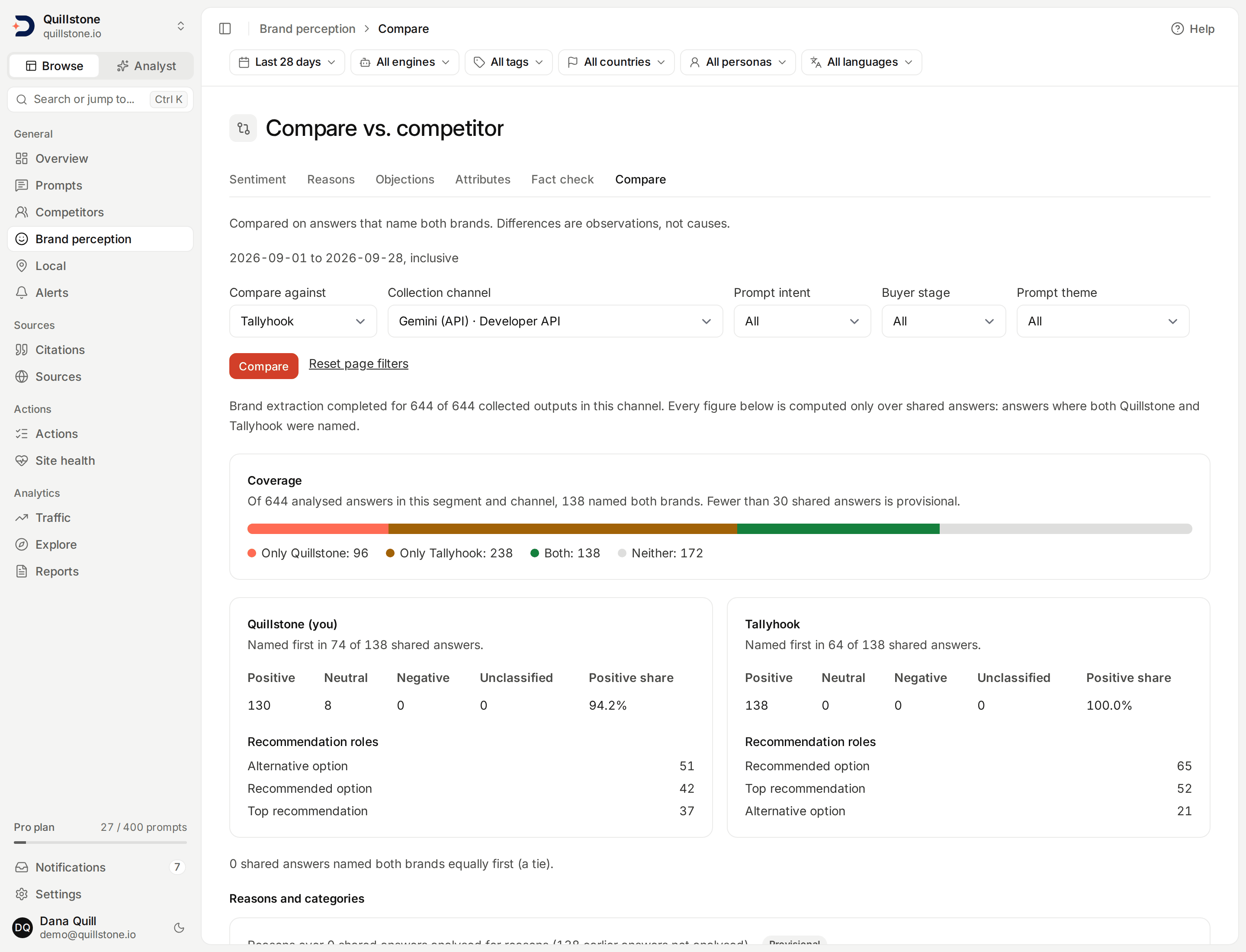
What this compares
Open Compare vs. competitor
from the Compare tab under Brand perception in the sidebar. It compares your
brand against one active tracked competitor you choose, over one collection
channel and window, using only the answers where both were named
(api/services/sentiment_compare.py#sentiment_compare_for_project).
Sentiment trends shows each brand's own
sentiment across every answer that names it; this screen answers a narrower
question, how the two of you look when an answer discusses you side by side.
Everything here is a saved-data comparison within one window, not a before-and-after: it sets your brand's numbers beside a competitor's in the same window, from evidence already saved; it never says why the two differ, and it produces no composite "winner" score.
Choosing the comparison
Pick which active competitor to compare against, one collection channel
and the same prompt intent, buyer stage and theme used on Sentiment trends.
The
filter bar
sets a 7, 28 or 90 day window ending yesterday (28 by default) and can
narrow by engine, tag, country, persona and language; with an engine
chosen, the channel list offers only that engine's channels
(api/routers/sentiment_compare.py#ACCEPTS,
api/services/sentiment_population.py#segment_targets,
api/services/sentiment_compare.py#sentiment_compare_for_project).
Your own brand is always one
side; you cannot compare two competitors against each other. A sub-brand named alongside your own
brand, or alongside the competitor's, counts as its family being named,
exactly like Sentiment trends rolls sub-brands
into their family
(api/services/sentiment_compare.py#_side_case).
Coverage: only you, only them, both, neither
Of every analysed answer in the selected filters, segment, channel and window, the
coverage bar splits them into four groups: only your brand named, only the
competitor named, both named, or neither. Every other figure on this screen
is computed over the both group alone, called shared answers
throughout. Fewer than 30 shared answers is marked provisional, the same
small-sample threshold used across the product
(api/services/brand_metrics.py#MIN_OBSERVATIONS).
Named first, and ties
Within shared answers, "named first" is decided by whichever family's
earliest mention appears first in the answer; equal earliest positions are
a tie, counted on their own rather than credited to either side. A tie is
not a share you can win by controlling the other numbers: it is simply how
often the two of you land in the same spot
(api/services/sentiment_compare.py#sentiment_compare_for_project).
Sentiment, roles and reasons on shared answers
For each side, the screen shows the positive/neutral/negative/unclassified
mix and the recommendation-role mix of that family's own mentions, computed
only within shared answers, not across every answer that names it
(api/services/sentiment_compare.py#_build_side). With the owner's
Brand reasons entitlement, it adds each
side's strength and weakness rate per reason and per category, over the
shared answers that were analysed for reasons; without that entitlement,
this part of the screen shows a locked message instead of zeros
(api/schemas/sentiment_compare.py#reasons_locked). Reason-analysed shared
answers are a subset of shared answers, not a separate population: an
answer collected before reason extraction shipped has no reasons to draw
on, so it counts as not-yet-analysed instead, and the two together, reason
analysed and not-yet-analysed, always add back up to the full
shared-answer count
(api/schemas/sentiment_compare.py#reason_analysed_shared,
#reason_unanalysed_shared). This part of the screen carries its own
provisional flag, fewer than 30 reason-analysed shared answers, separate
from the shared-answers provisional flag above
(api/schemas/sentiment_compare.py#reason_provisional).
Per-prompt table and paired evidence
The table is keyed on prompt target, not prompt: one row per
(prompt, country, audience, language) combination with at least one shared
answer, 25 per page, sorted by the most shared answers first, so a prompt
tracked in several countries, run as several personas, or tracked in more
than one language can appear
more than once, each occurrence with its own shared-answer count, each
side's positive share, and which side was named first more often; the row
itself does not name which language it is
(api/services/sentiment_compare.py#PROMPT_PAGE_SIZE,
api/schemas/sentiment_compare.py#ComparePromptRow). Selecting one row
opens paired evidence for that specific prompt target, up to 25 shared
answers per page, newest first, each showing both sides' saved quote (cut
to 500 characters), sentiment and role from that same answer
(api/services/sentiment_compare.py#EVIDENCE_PAGE_SIZE).
Access
Every current project member can read this screen and its evidence on every plan, the same as Sentiment trends. The reason and category rows need the project owner's Brand reasons entitlement; everything else here does not.
Related
- Sentiment trends: each brand's own sentiment across every answer that names it, not only shared ones
- Brand reasons: the reason categories and per-reason rates this screen locks without that entitlement
- Brands and sub-brands: how a sub-brand's mentions roll up into its family for this comparison
- Personas: the audiences the persona chip filters by, here as on Sentiment trends and Brand reasons
- Competitors: which brands are eligible to compare against
Last verified 2026-09-24