Account
Customer API and keys
Create scoped, expiring read keys for project prompts, collected answers, citations, daily metrics, brand reasons, objections, attributes, fact checks, saved weekly report digests and Explorer queries.
Read one client's data from your own tools
The customer API provides read access to a project's current prompts,
completed collected answers, saved citation records, daily metrics, brand
reasons, objections, attributes, fact checks, weekly report digests and
Explorer queries and saved views. Create credentials in
Settings → API keys.
Owners and editors can manage keys; viewers cannot. Standard Starter,
Growth and Pro plans include access, using the project owner's persisted
API entitlement. Free and Trial do not include it. Custom plans follow their
configured entitlement (api/services/customer_api.py#api_available).
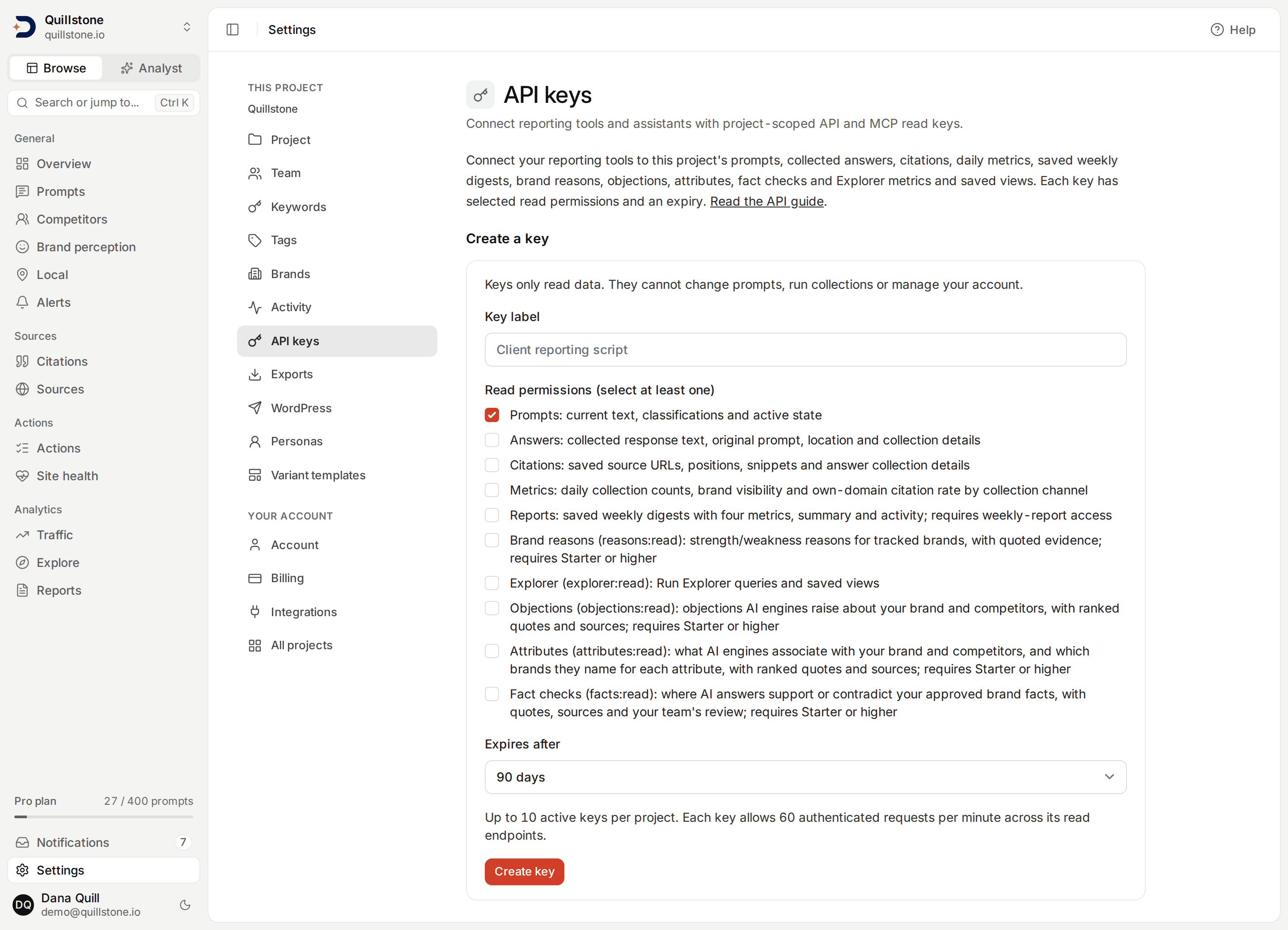
The screenshot shows the create-key form in the local Quillstone demo. No key or secret is visible.
The API provides prompts, answer text, citation records, daily metrics, brand reasons, objections, attributes, fact checks, bounded weekly digests and Explorer results. The read-only MCP connector uses these same keys and permissions with compatible assistants. Refreshable BI connectors and API writes are not included. Exports still provides the thirteen downloadable datasets, and Client reports compares saved weekly reports across accessible projects.
Create and manage a key
Choose the client project, give the key a label, select its permissions and
choose a 30, 90 or 365-day expiry. The default is 90 days. A key can hold up
to ten scopes, one per permission below (api/schemas/customer_api.py#CreateApiKey,
#ReadScope).
Permissions are:
| Scope | Data it permits |
|---|---|
prompts:read |
Current prompt text, IDs, classifications and active state |
answers:read |
Completed collected answers, original prompt text, recorded location, persona and collection provenance; full answer text through the chunk endpoint |
citations:read |
Saved citation URLs, answer and prompt IDs, position, source type, bounded snippet and collection provenance |
metrics:read |
Daily collection and analysis counts, brand visibility and own-domain citation rate by recorded collection provenance |
reasons:read |
Strength and weakness reasons a completed answer gave for a tracked brand, with category, polarity and quoted evidence; also requires the project owner's Brand reasons entitlement |
objections:read |
Objections from succeeded objection studies, with the brand asked about, engine, rank, score, objection group, quote and source URLs; also requires the project owner's Objections entitlement |
attributes:read |
Attributes from succeeded attribute studies, in two measures: what engines associate with each brand, and which brands they name for each asked attribute, with engine, rank, score, attribute, quote and source URLs; also requires the project owner's Attributes entitlement |
facts:read |
Findings of Fact check: where an AI answer supported or contradicted one of your approved facts, with the origin, engine, fact as checked, verdicts, quote, explanation, source URLs and your team's review; also requires the project owner's Fact check entitlement |
reports:read |
Saved weekly digests: four metric readings, summary, activity and recommendation titles; also requires the project owner’s weekly-report entitlement |
explorer:read |
Explorer queries computed on request, and the project's saved Explorer views and their results; see Run Explorer queries |
Existing keys keep their original scopes; explorer:read is never added to
a key automatically. To add metrics, citation, reasons, objections,
attributes, fact check, report or Explorer access, create a new key with the required scopes, update your
integration, then revoke its old key. Each permission authorizes only its own
dataset; citation access does not grant answer text or report reads.
The secret appears once, immediately after creation. Store it in your
server or reporting tool's secret manager, copy it, then dismiss it.
DiscoveredBy stores a hash, so the secret cannot be shown again. If it is
lost, create a replacement and revoke the old key
(api/services/customer_api.py#create_key).
There are at most 10 unexpired, unrevoked keys per project. The list includes
all such keys first, followed by recent history, up to 100 entries. It shows
creation, expiry and last authenticated request times in UTC. An “active”
state means unexpired and unrevoked; it does not prove that the project,
creator or plan is currently eligible (api/services/customer_api.py#list_keys).
Every request checks the key's project and scope, expiry and revocation,
active project and owner, current owner-plan access, and the creator's active
account and editing permission. Removing the creator's membership or
changing them to a viewer stops access. Restoring eligibility can make an
unexpired, unrevoked key work again. Revocation is permanent. Owners and
editors can list and revoke keys after downgrade or archive, even when they
cannot create new ones. An admitted request may finish after revocation;
downloaded copies cannot be recalled
(api/services/customer_api.py#authenticate_key, #revoke_key).
Authentication and base URL
The settings page shows this project's base URL. In production its form is:
https://api.discoveredby.ai/customer-api/v1/projects/PROJECT_ID
Use HTTPS and send the secret in the Authorization header. Keep it out of
URLs, browser applications and shared notebooks. Session cookies and keys
passed as query parameters do not authorize these routes. An API key cannot
sign in to the app or access its internal management endpoints.
curl --fail-with-body \
  -H "Authorization: Bearer $DISCOVEREDBY_API_KEY" \
  'https://api.discoveredby.ai/customer-api/v1/projects/PROJECT_ID/prompts?limit=50'
Set DISCOVEREDBY_API_KEY securely in your execution environment and replace
PROJECT_ID with the number shown in settings. A key only works for its
own project; use a separate key for each client.
Read and paginate prompts
GET /prompts accepts limit (1–100, default 50) and after_id
(default 0). It includes active and paused prompts, using their current
text and classifications. An unclassified value is null.
Each item in data has id, public_id, text, active, intent_class,
buyer_stage and theme. public_id is a UUID string; id is the numeric
prompt ID used by answer records. Rows are ordered by increasing numeric ID.
The response has data and next_after_id. When next_after_id is a number,
pass it as the next request's after_id. When it is null, the current
listing is complete (api/services/customer_api.py#prompts_page).
Read daily metrics
GET /metrics/daily requires metrics:read under the existing API entitlement;
it does not require weekly-report access. Counts use the same definitions as
the daily metrics file export (api/services/exports/daily_metrics.py#rows).
Pass inclusive UTC execution dates as start and end: 28 days ending today
by default, with a maximum window of 366 days. Only end selects the preceding
28 days; only start uses today as the end. days sets the number of calendar
days per page (1–31, default 7). The response contains data, start, end,
page_end and next_start. For the next request pass next_start as start,
keeping the returned end and your days unchanged. Stop only when
next_start is null, even if a page's data is empty. No day's groups are
split or truncated (api/services/customer_api.py#daily_metrics_page).
Each row groups by execution_date, platform, surface, collection_method,
provider and model_used, in that order. Missing recorded provenance stays
an empty string. Countries and prompts are pooled within that group, including
paused prompts and targets with history. Search-result surfaces remain distinct
from generated answers. Do not merge unlike channels into a consumer-wide score.
| Field | Definition |
|---|---|
responses_collected |
Completed executions |
responses_analysed |
Completed executions with finished brand-mention extraction |
responses_naming_brand |
Analysed executions with at least one saved self-brand mention; aliases count once per execution |
responses_citing_own_domain |
Completed executions with at least one saved own-domain citation; repeated URLs count once per execution |
distinct_domains_cited |
Distinct saved cited domains across completed executions in this group; not additive across days or channels |
responses_failed |
Failed executions |
responses_in_flight |
Pending or running executions, excluded from both rate denominators |
responses_no_answer |
Google AI Overviews or Google AI Mode runs where Google showed no AI answer; not answers, so excluded from both rate denominators, and always 0 for the other engines |
brand_visibility_percent |
responses_naming_brand / responses_analysed × 100, rounded to one decimal |
domain_citation_rate_percent |
responses_citing_own_domain / responses_collected × 100, rounded to one decimal |
These definitions and counts come from api/services/exports/daily_metrics.py#rows.
Both rates are null with no denominator. Measured zero is 0.0.
brand_visibility_provisional and domain_citation_rate_provisional are true
when their respective denominators are below 30, including zero
(api/services/customer_api.py#daily_metrics_page).
A citation rate of zero means no saved self citation among collected outputs;
it cannot prove complete provider citation coverage. Brand extraction that has
not finished is excluded from visibility, not treated as a negative mention.
Days with no executions have no rows. To combine compatible groups, sum the
numerators and denominators and divide; do not average their percentages or sum
distinct-domain counts. These are live reads, not saved weekly metrics or an
immutable snapshot. Re-fetch the complete date window and replace rows keyed by
all six grouping fields to pick up late collection, extraction or deletions.
A sequence of pages can change while it is being read. This endpoint provides
no competitor breakdown, retrieval rate, sentiment, country filter or revenue
attribution (api/services/customer_api.py#daily_metrics_page).
curl --fail-with-body \
  -H "Authorization: Bearer $DISCOVEREDBY_API_KEY" \
  'https://api.discoveredby.ai/customer-api/v1/projects/PROJECT_ID/metrics/daily?start=2026-09-01&end=2026-09-19&days=7'
Read and paginate collected answers
GET /answers accepts the following parameters:
| Parameter | Meaning |
|---|---|
start, end |
Inclusive UTC execution dates, YYYY-MM-DD; default is 28 days ending today. Supplying only end uses the 28 days ending on that date; supplying only start uses today as the end. Maximum window: 366 days. |
limit |
1–25 records, default 25 |
after_id |
Last ID from the previous page; default 0 |
The response contains data, next_after_id, and the resolved start and
end. Keep those dates fixed while following next_after_id; rows are
ordered by ID, not by execution date. There is no file-export row cap on
pagination. A date-window limit is not a promise of retained history
(api/services/customer_api.py#answer_window, #answers_page). Only
completed answers are returned: a Google AI Overviews or Google AI Mode run
where Google showed no AI answer has no text and is not an answer; its
count is in daily metrics' responses_no_answer.
Each record contains id, prompt_id, execution_date, executed_at,
platform, surface, collection_method, model_used, country,
persona, language, city, location_delivery, prompt_text_sent,
response_text, response_chars and response_truncated. Dates use ISO
8601; executed_at includes its timezone. city is the target's
city, null for a country-wide target;
persona is null for the
General audience, an {id, name} object otherwise; language is null
for As written, an ISO 639-1
code otherwise
(api/schemas/customer_api.py#CustomerAnswer).
location_delivery says how the target location was sent to the engine for
that answer, as recorded when it ran: an object with country and city,
each one of native (a location field of the engine's API), prompt (the
"Search context" text block), native_and_prompt, query (added to the
search query; no engine is sent a location this way now, and only older
Perplexity answers carry it) or not_sent (the city of a country-wide
target). A ChatGPT (app) answer (provider chatgpt_app) always reads
{"country": "native", "city": "not_sent"}: it is sent the country only,
and a city target does not run on it. A Gemini (app) answer (provider
gemini_app) to a city target reads {"country": "native", "city": "native"}, because the city is sent as its coordinates, or "city": "not_sent" for a city with no coordinates on record. It is
null for an answer collected before this was recorded, never a guess
(api/schemas/customer_api.py#CustomerLocationDelivery,
api/services/collection.py#LOCATION_DELIVERY). What each engine receives
is on
Engines and measurement.
Only completed executions are returned. The prompt is the text sent for
that execution, so editing today's prompt does not relabel an old answer.
Each answer keeps its own recorded collection provenance. Answers from the
engines queried through their APIs are not consumer-app observations;
ChatGPT (app) and Gemini (app) answers (collection method licensed) are
what chatgpt.com and gemini.google.com showed a session that was not
signed in, fetched by a third-party data provider. Location describes the saved target and how it was sent,
not verified consumer session geolocation. Older provenance fields can be
empty.
List responses include up to 8,000 Unicode characters of answer text.
response_chars gives the full character count and response_truncated
states whether more text exists. No provider payloads, upstream error
messages, raw provider objects, account details or credentials are included.
All list endpoints are live reads, not immutable snapshots or change
feeds. Existing rows can be edited, deleted or completed between pages. A
previously pending execution that completes below your last ID will not
appear later in that pagination pass. Re-read the desired date window from
after_id=0 and deduplicate by ID when refreshing a report.
Retrieve complete answer text
GET /answers/ANSWER_ID/text requires answers:read. It accepts offset
(default 0), limit (1–32,000 characters, default 32,000), and version.
It returns id, text, offset, next_offset, total_chars and
text_version (api/services/customer_api.py#answer_text).
Start with offset 0 and no version. Append the returned text to your
result. When next_offset is not null, send that offset and the first
response's text_version as version. Continue until next_offset is
null. Use the returned offsets; JavaScript string length counts UTF-16
units and can disagree with these Unicode character offsets.
The content version prevents combining chunks from different revisions. If the stored answer changes, the API returns 409; discard the accumulated text and restart from offset 0. A subsequent nonzero offset without a version is refused. Empty answers return an empty string and no next offset. This reads the full saved response text, not the upstream provider's raw payload.
Read and paginate citations
GET /citations requires citations:read. It returns one record per saved
citation from a completed execution, including history for paused prompts and
targets. Repeated URLs remain separate citation records. A citation is not a
brand mention or proof that the cited page mentions your brand.
| Parameter | Meaning |
|---|---|
start, end |
Inclusive parent execution dates; same 28-day default, UTC dates and 366-day maximum as /answers |
limit |
1–25 records, default 25 |
after_id |
Last citation ID from the previous page; default 0 |
answer_id |
Optional exact answer ID, still restricted to this project and date window |
The response has data, next_after_id, start and end. Follow
next_after_id until null, keeping the date window and optional answer_id
fixed. Records are ordered by citation ID, not date or position. There is no
file-export row cap. Missing or other-project answers return an empty list,
as does an answer with no saved citations (api/services/customer_api.py#citations_page).
Each record contains:
id,answer_id,prompt_id: citation ID and links to the answer and prompt datasets.execution_date,executed_at,platform,surface,collection_method,model_used,country,city: the parent answer's recorded provenance and target location, with the same limitations as/answers.url,domain: the saved source URL and domain.rank,source_type,is_self: saved citation position, provider source type and collection-time own-domain flag. Position is not a brand ranking;source_typeis not the editorial category from Source types.snippet,snippet_chars,snippet_truncated: at most 2,000 Unicode characters of saved citation snippet, its full length and whether it was cut. An empty snippet means no snippet was saved. There is no full-snippet endpoint.
Citation records can be read before sentiment classification finishes. This endpoint does not include sentiment, framing, scraped page text, editorial category overrides, provider metadata, raw responses or credentials. It does not fetch a page, collect new answers or run a model. Source URLs and snippets are saved provider observations, not verified page contents.
Use answer_id with /answers/ANSWER_ID/text and a key that also has
answers:read when you need the complete saved answer. Except for ChatGPT
(app) and Gemini (app), whose answers are consumer-app observations fetched
by a third-party data provider, these are API observations, not
consumer-app observations. An empty citation result cannot distinguish unsupported or
missing provider evidence from an observed absence of citations, and must not
be used alone as a zero-citation metric.
As with the other lists, citation reads are live. Refresh the date window from
after_id=0 and replace records by citation ID to capture corrections or late
completion. Reconcile removals against a full refresh; this is not a change feed
or an immutable snapshot. No citation retention period is promised.
Read and paginate brand reasons
GET /brand-reasons requires reasons:read and the project owner's current
Brand reasons entitlement in addition
to customer API access. It returns one record per strength or weakness
reason a completed answer gave for a brand resolved to a tracked family;
reasons stored for an untracked mention are never returned
(api/services/customer_api.py#brand_reasons_page).
| Parameter | Meaning |
|---|---|
start, end |
Inclusive UTC answer dates, YYYY-MM-DD; same 28-day default and 366-day maximum as /answers |
limit |
1–25 records, default 25 |
after_id |
Last reason ID from the previous page; default 0 |
The response has data and next_after_id. Follow next_after_id until
null, keeping the date window fixed; records are ordered by reason ID, not
date (api/services/customer_api.py#answer_window, #brand_reasons_page).
Each record contains id, execution_id, date, prompt_id, persona
(null for General), language (null for As written), country_code,
provider, platform, surface, collection_method, model, brand
({id, name, kind}), parent_brand (null for a top-level brand),
reason, category, polarity and evidence
(api/schemas/customer_api.py#CustomerBrandReason). category
is one of six fixed groups over the thirteen reason labels; see
Brand reasons for what
each group contains.
These are live reads over the same underlying data as the brand_reasons
file export and the Brand reasons screen, not a separate computation.
Reasons are not returned for an answer whose brand extraction predates this
feature; there is no field distinguishing "not yet analysed" from "analysed,
no reasons given" in this endpoint, unlike the Brand reasons screen's own
analysed-answer counts.
Read and paginate objections
GET /objections requires objections:read and the project owner's
current Objections entitlement in
addition to customer API access. It returns one record per objection
found in a succeeded objection study created in the date window; only
objections that were grouped are returned, so a failed study contributes
none (api/services/customer_api.py#objections_page).
| Parameter | Meaning |
|---|---|
start, end |
Inclusive UTC dates on which the study was created, YYYY-MM-DD; same 28-day default and 366-day maximum as /answers |
limit |
1–25 records, default 25 |
after_id |
Last objection ID from the previous page; default 0 |
The response has data and next_after_id. Follow next_after_id until
null, keeping the date window fixed; records are ordered by ID, not by
date or brand, unlike the file export, which lists your own brand first
within each study (api/services/customer_api.py#answer_window,
#objections_page).
Each record contains id, study_date, study_id, trigger,
language (null for As written), brand, brand_kind (own or
competitor), provider, platform, surface, model, rank,
score, objection and objection_description (the group's label and
description), claim, quote and sources, a list of source URLs
(api/schemas/customer_api.py#ObjectionApiRow). These are the columns of
the objections file export plus id, with sources as a list rather
than one space-separated string (see Exports).
These are live reads over the same studies as the Objections screen. The
rank, score and group are what that screen explains; the grouping and its
labels are an AI model's wording, and each quote is text located in the
engine's saved answer, returned exactly as it appears there, markdown and
citation markers included; the screen hides those markers. sources holds
the URLs our code linked to the objection from where the engine placed its
citations; it is empty when none is linked, which is always the case for
an engine that records no citation positions;
see how sources are linked.
Read and paginate attributes
GET /attributes requires attributes:read and the project owner's
current Attributes entitlement in
addition to customer API access. It returns rows from succeeded
attribute studies created in the date window, one measure at a time
(api/services/customer_api.py#attributes_page):
| Parameter | Meaning |
|---|---|
measure |
association (the default): one record per attribute an engine gave when asked what a brand is known for, grouped attributes only. market: one record per brand an engine named when asked which brands are known for an asked attribute |
start, end |
Inclusive UTC dates on which the study was created, YYYY-MM-DD; same 28-day default and 366-day maximum as /answers |
limit |
1–25 records, default 25 |
after_id |
Last ID from the previous page; default 0 |
The response has data and next_after_id. Follow next_after_id until
null, keeping measure and the date window fixed; each measure has its
own IDs, and records are ordered by ID
(api/services/customer_api.py#answer_window, #attributes_page).
Each record contains id, study_date, study_id, trigger, language
(null for As written), measure, attribute, attribute_description,
custom_attribute (yes when it is one of your attributes now, otherwise
no), brand, brand_kind (own or competitor, and for market also
untracked), provider, platform, surface, model, rank, score,
phrase, quote and sources, a list of source URLs
(api/schemas/customer_api.py#AttributeApiRow). For association,
brand is the brand asked about and phrase the engine's wording of the
attribute; for market, brand and phrase are the brand's name as
written in the answer, and attribute is the label the study asked. These
are the columns of the attributes file export plus id, with sources
as a list (see Exports).
These are live reads over the same studies as the Attributes screen, not
its computed scores: association and market prominence are averages over
these rows that the screen calculates. The grouping and its labels are an
AI model's wording, each quote is located in the engine's saved answer and
returned exactly as it appears there, and sources is empty when no source
is linked; see
how sources are linked.
Read and paginate fact checks
GET /fact-checks requires facts:read and the project owner's current
Fact check entitlement in addition to
customer API access. It returns one record per finding: one approved
fact that one checked answer supported or contradicted, from a fact study
or from one of your checked prompts, checked on a date in the window. Only
checks that succeeded have findings, so failed checks and answers skipped
by the daily limit contribute none
(api/services/customer_api.py#fact_checks_page).
| Parameter | Meaning |
|---|---|
start, end |
Inclusive UTC dates on which the answer was checked, YYYY-MM-DD; same 28-day default and 366-day maximum as /answers |
limit |
1–25 records, default 25 |
after_id |
Last finding ID from the previous page; default 0 |
The response has data and next_after_id. Follow next_after_id until
null, keeping the date window fixed; records are ordered by ID, while the
file export orders by when the answer was checked
(api/routers/customer_api.py#list_fact_checks,
api/services/customer_api.py#fact_checks_page).
Each record contains id, checked_at, answered_at (for a checked
prompt, its run time, when the engine answered; for a study answer, when
it was stored after its check, not when the engine answered), origin (study or
tracked), study_id (study findings only), prompt_id and prompt
(checked-prompt findings only), provider, platform, surface,
model, fact_id, fact_category, fact_statement and fact_version
(the wording and version the answer was checked against),
earlier_wording (true when the fact has been edited since),
fact_status (the fact's status now), verdict (the model's),
effective_verdict (after your team's review; null when marked not
relevant or the fact out of date), quote, explanation, sources, a list of source URLs, and
review_status and review_note
(api/schemas/customer_api.py#FactCheckRow). These are the columns of the
fact_checks file export plus id, with sources as a list rather than
one space-separated string (see Exports).
The quote is text located in the engine's saved answer, returned exactly
as it appears there; the explanation is an AI model's wording. sources
holds the URLs our code linked to the quote from where the engine placed
its citations, and is empty when none is linked, which is always the case
for Claude; see
how sources are linked.
Read saved weekly report digests
GET /reports requires reports:read and the project owner's current
weekly-report entitlement in addition to customer API access. Standard
Starter, Growth and Pro include both; custom overrides still apply. Reads
never generate a report or run a model. Only saved, generated reports for
completed Monday–Sunday UTC weeks are returned. Skipped, failed, malformed,
current and future weeks are excluded (api/services/customer_api.py#report_scope).
The generator always writes that shape, snapping to the last complete
Monday–Sunday week even when a run is delayed past its Monday
(api/services/weekly_report.py#week_bounds). A small number of older rows
were written by a delayed run before that rule existed and start on another
weekday; those are not returned here. They remain readable on the Weekly
report screen (Reports → Weekly insights) and through report sharing.
| Parameter | Meaning |
|---|---|
start, end |
Inclusive saved week-start dates, not overlapping date ranges. Default: 28 days ending today; maximum: 366 days. Dates follow the same defaulting rules as /answers. |
limit |
1–25 digests, default 25 |
after_id |
Last report ID from the previous page; default 0 |
The response has data, next_after_id and resolved start and end.
Follow next_after_id until null, keeping dates fixed. Ordering is ascending
report ID, which can differ from week order. An empty list means there are
no eligible saved reports in that window; it does not mean zero visibility.
To select one exact week, set both dates to that Monday
(api/services/customer_api.py#reports_page).
curl --fail-with-body \
  -H "Authorization: Bearer $DISCOVEREDBY_API_KEY" \
  'https://api.discoveredby.ai/customer-api/v1/projects/PROJECT_ID/reports?start=2026-09-07&end=2026-09-07'
Each item has id and digest. The digest follows version 1 of the client
sharing format, with these fields:
| Field | Meaning |
|---|---|
version |
Digest format version, currently 1; separate from the internal metrics version |
client_name, accent |
Current project name and validated brand colour |
week_start, week_end |
Saved report dates |
summary |
At most 2,000 characters of the saved narrative |
metrics |
Four {label, value, unit} readings: Brand visibility, Citation rate, Citation share and Average citation position |
recommendations |
At most three saved recommendation titles, each capped at 300 characters |
articles_published, pages_optimized, prompts_added |
Saved nonnegative activity counts, or null if unavailable |
Unavailable metric readings stay null; measured zero stays 0. Legacy
reports retain the conservative unknown-value handling used in the app and
client snapshots. Percent readings use %; average citation position has
an empty unit. These are stored weekly readings, not freshly computed
metrics or averages across clients. Raw metrics JSON, revenue, findings,
engine notes, recommendation details, generation errors, token usage,
account data and sharing secrets are excluded
(api/services/report_shares.py#build_snapshot).
GET /reports/REPORT_ID returns the same {id, digest} for one eligible
report. It returns 404 for missing, other-project or ineligible reports; it
never substitutes another week (api/services/customer_api.py#report_detail).
These are live saved reports, not previously issued link snapshots.
Regeneration and project renaming can change later reads. Refresh from
after_id=0 and replace records by ID to pick up changes to earlier rows.
Use report sharing when you need an issued
snapshot with expiry and revocation. A date-window limit is not a retention
promise. No cross-client aggregation or automatic BI refresh is provided.
Run Explorer queries
Three routes require explorer:read. They use the customer API
entitlement, with no extra plan gate, and compute the same numbers as the
app's Explorer
(api/services/customer_api.py#explorer_query, #explorer_views_page,
#explorer_view_result).
| Route | Returns |
|---|---|
POST /explorer/query |
The result of the Explorer query in the JSON body |
GET /explorer/views |
Every saved view as data: id, name, chart, query, needs_repair, problems, updated_at |
GET /explorer/views/VIEW_ID/result |
view and result: the saved view run now |
The query body is the Explorer's own query object: metrics (1 to 5),
breakdowns (0 to 2), filters (up to 8 of dimension and values),
window ({"days": 7}, 28 or 90, or {"start", "end"}), grain
(none, day or week), compare (none, previous or year) and
smoothing (none or avg7). Unknown fields are refused. Metric and
dimension keys, and every rule a query must follow, are on the
Explorer page (api/schemas/explorer.py#ExplorerQuery).
Every Explorer metric is accepted, including the three that count runs,
answer_shown_rate, organic_first_page_rate and organic_position, and
the seven answer-feature rates, web_search_rate, shopping_rate,
local_businesses_rate, ads_rate, video_rate, images_rate and
tables_rate (api/schemas/explorer.py#MetricKey; see
Answer features).
curl --fail-with-body \
  -H "Authorization: Bearer $DISCOVEREDBY_API_KEY" \
  -H 'Content-Type: application/json' \
  -d '{"metrics": ["brand_visibility"], "breakdowns": ["engine"], "window": {"days": 28}}' \
  'https://api.discoveredby.ai/customer-api/v1/projects/PROJECT_ID/explorer/query'
A result has the normalised query, start and end, compare_start
and compare_end (null without a comparison), rows, truncated and
notes. Each row has keys and labels per breakdown, period (a date
with a grain, otherwise null), partial, and values per metric: value,
observations, unit, provisional, prior_value, prior_observations
and delta (api/schemas/explorer.py#ExplorerResult). Labels are display
text and can change (the Gemini API engine's label changed from "Gemini"
to "Gemini (API)" when Gemini (app) was added); key on keys. A value of null
means no data, never zero. truncated names each breakdown that was cut to
25 values and how many values it had.
The views list is not paginated. A view's query is the stored query
exactly as saved; a view with needs_repair cannot run until it is fixed
in the app, and problems says why. These are live reads: each query and
each view result is computed at the moment of the request, not a stored
snapshot. Nothing here saves views, edits dashboards or creates share links.
Each query and each view result also spends one query from the project's
Explorer budget
of 120 a minute, which the app, dashboards, exports and every key on the
project share. Listing views spends only the key's own request
(api/services/explorer/budget.py#charge_budget).
Limits, errors and audit history
Each key admits 60 authenticated requests in a one-minute window shared
across all its read endpoints and MCP requests, including MCP discovery and
initialization. A new window begins with the next request
after the previous window expires. Valid-key requests that are refused for a
missing scope, fail parameter validation or return a missing answer or report all
consume a request.
On 429, wait at least the Retry-After number of seconds before retrying.
The limit is shared across server processes (api/services/customer_api.py#authenticate_key).
| HTTP status | Action |
|---|---|
| 401 | Check the header, project, key expiry/revocation and current project/creator/plan eligibility. The response deliberately does not reveal which eligibility check failed. |
| 403 | Use a key with the endpoint's required read scope; report reads also require weekly-report access, brand reasons reads also require the Brand reasons entitlement, objections reads also require the Objections entitlement, attributes reads also require the Attributes entitlement, and fact check reads also require the Fact check entitlement. |
| 404 | The answer, completed weekly report or saved Explorer view is unavailable in that project. |
| 409 | Answer text changed during retrieval; restart the text read. |
| 422 | Correct the IDs, date range, page size, offset, version or measure. On Explorer routes, a query outside the query shape gets the usual validation array; one that cannot run for this project lists every reason in detail.problems; one that ran too long says so in detail. |
| 429 | Wait for the Retry-After interval. On Explorer routes this is either the key's own limit or the project's Explorer budget; the detail says which. |
Error responses carry a detail field; validation details may be an array,
and an Explorer query that cannot run carries an object with a problems
list.
API responses and key-management responses use Cache-Control: no-store.
Successful reads record the key ID, dataset and returned row count under the
API reads tab of project activity, which
is kept separate from the changes view so read traffic does not crowd out
human actions. Creation and revocation are audited as changes. Neither the
secret nor the answer contents are written to those receipts
(api/services/customer_api.py#record_read,
api/routers/pages.py#get_activity_page). Last use means an authenticated
request was admitted; it is not a guarantee that data was returned.
Related
- Exports for CSV and JSON files across thirteen datasets.
- Explorer for the metrics, dimensions and rules
behind
explorer:readqueries. - Brand reasons for what a reason, category and polarity mean on the analysis screen this endpoint mirrors.
- Objections for what rank, score,
prominence and an objection group mean on the screen
GET /objectionsreads from. - Attributes for what association, market
prominence and an attribute mean on the screen
GET /attributesreads from. - Fact check for what a finding, a verdict
and the effective verdict mean on the screen
GET /fact-checksreads from. - Personas for what the
personafield on an answer or a brand reason refers to. - Languages and templates for
what the
languagefield on an answer or a brand reason refers to. - Team for project roles.
- Client reports for the same-week agency overview.
- Plans and limits for shared account allowances.
Last verified 2026-09-28