Account
Plans and limits
What is measured against your plan, what is simply on or off, and what happens the moment you cross either line.
Product trial and introductory pricing
Eligible accounts can start a no-card 14-day product trial from Settings →
Billing when the trial is available. It includes one project, 25 prompt
slots across six engines (Gemini (API), Perplexity, Google AI Overviews,
Google AI Mode, ChatGPT (app) and Gemini (app)), three
competitors, two team members,
one article draft for the entire trial, and up to three page recommendations
per weekly run. An account can use the trial once. Previous paid subscribers
are not eligible (api/routers/billing.py#start_product_trial).
The trial ends on Free without a charge unless you choose a paid subscription.
The single article allowance does not reset at the start of a week or when
you delete a project or article. You can retry the same draft
(api/services/limits.py#reserve_trial_article). Saved data remains after
expiry; only the oldest active projects and prompt slots within your current
plan are monitored. Pause those to choose which others run
(api/services/limits.py#monitored_target_ids).
When the Starter introductory offer is displayed, new paid subscribers pay
the introductory rate for their first three paid months, then the standard monthly price shown on Pricing. Trial
days do not count as paid months. Cancelling and resubscribing does not restart
the discount. Moving from introductory Starter to another paid plan starts
normal billing for the new plan at the end of the current paid cycle; checkout
shows the timing. Growth and Pro retain their standard prices.
Offer availability is shared between the pricing website and checkout
(api/routers/billing.py#public_offers, api/services/billing_offers.py#intro_available).
What one plan covers
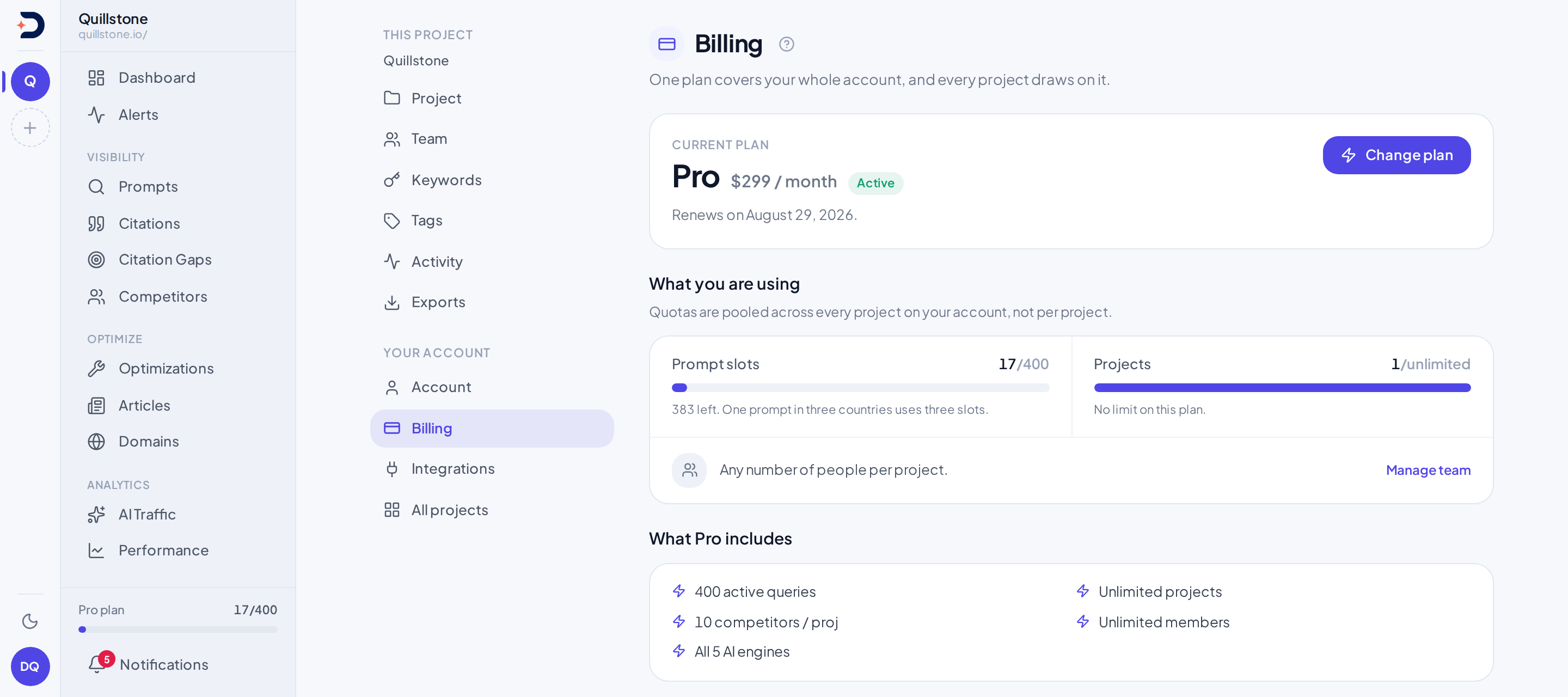
Every project you own draws on the same plan: the one tied to your account,
not to that individual project. That is why the settings navigation puts
Billing in its "Your account" group, alongside Account, Integrations and All
projects, while the "This project" group holds Project, Team, Keywords,
Tags, Activity and Exports: the plan sits above any single project, not
inside one (frontend/src/routes/(app)/settings/+layout.svelte#groups).
Prompt slots follow the same account-wide shape: they pool across every
project you own together, counted once regardless of which of your projects
a given prompt belongs to, not reset per project
(api/services/limits.py#get_active_prompt_slot_count,
#check_query_limit).
The checks below all resolve the plan from the project rather than from
the person: they read Project.user_id for the project the request names
and look the plan up from that, so what governs the work is the project
owner's plan, not the plan of whoever happens to be looking at the screen.
The competitor, team-member and article checks each begin with that lookup
(api/services/limits.py#check_competitor_limit, #check_team_limit,
#check_article_limit), the project-count re-check that runs when a paused
project is resumed is handed the project's own owner id
(api/routers/projects.py#update_project; the same check at creation time
is handed the creator's id, who is that project's owner by definition), and
data exports resolve the plan
the same way (api/routers/exports.py#exports_index, #download_export,
api/services/plan.py#get_user_plan). Exports make the effect concrete:
a download is allowed or refused on the project owner's plan, and nothing in
that check additionally looks at whether the person clicking download has
write access to the project, so at the API level a viewer on someone else's
paid project can download the same exports an editor or the owner could.
The prompt-slot check gets there by a slightly different route: it is told
who the owner is instead of looking the owner up itself. It takes a user id
and counts active prompt targets across the projects that user owns, so it
is only a correct meter when the id handed to it is the project owner's
(api/services/limits.py#check_query_limit,
#get_active_prompt_slot_count). It has four call sites, and that is the
whole set: creating a tracked prompt and editing one both pass the project's
own user_id (api/routers/prompts.py#create_prompt, #update_prompt),
accepting a suggested prompt reads the same field off the project it is
accepting into (api/routers/prompt_candidates.py#accept_candidate), and
creating a project during onboarding passes the caller, who is that
project's owner because the project does not exist until the request
succeeds (api/routers/projects.py#create_onboarding_project). So an editor
adding a prompt to a project someone else owns spends the owner's slots
against the owner's plan, which is the same account the prompt itself lands
on.
So if you are an editor or a viewer on a project someone else owns, every
limit and gate you meet on that project is the owner's, with no exception.
Reaching that project's screens in the app is a separate question, and the
answer is that you can: GET /projects returns the projects you were added
to alongside the ones you created; see Team for what
each role can then do once a screen is open.
What's metered
Five numeric limits live as plain integer columns on the plan itself, not
as logic scattered through the code: active prompt slots, active projects,
active competitors per project, team members, and articles generated per
week. Each plan row, seeded at api/services/seed.py#DEFAULT_PLANS, sets
its own value for each of the five. A column holding negative one turns that particular ceiling off
entirely: the check that reads it returns immediately, so nothing on that
plan is ever compared against it, let alone rejected
(api/services/limits.py#check_project_limit, #check_query_limit,
#check_competitor_total_limit, #check_team_limit,
#check_article_limit). The actual figures for each plan, and which plan
has which, live on Pricing and nowhere else in this section, so
there is exactly one place to keep them current.
What each column governs, and where it is checked:
- Prompt slots: active prompt targets, pooled across every project the
project's owner owns, as described above. Checked before a slot is
added, in every place one can be: creating a project during onboarding,
creating or editing a tracked prompt (including turning a paused one back
on), and accepting a suggested prompt
(
api/services/limits.py#check_query_limit,api/routers/projects.py#create_onboarding_project,api/routers/prompts.py#create_prompt,#update_prompt,api/routers/prompt_candidates.py#accept_candidate). A country, audience and language combination is one slot each, exactly like a country was before languages existed: languages, choosing which engines run a prompt, and saving a combination as a template draw on this same pool, on every plan, with no separate entitlement of their own (api/services/prompt_variants.py#sync_targets). - Projects: active projects you own. Checked before a new one is
created, and checked again whenever a paused project is resumed; see
below (
api/services/limits.py#check_project_limit). - Competitors per project: active competitors tracked on one project.
Checked per project, both when a project is first set up and whenever a
competitor is added afterward
(
api/services/limits.py#check_competitor_limit,#check_competitor_total_limit). - Team members: checked whenever someone is added to a project's team,
and again whenever a paused member's access is switched back on
(
api/routers/team.py#invite_member,#update_member). The check tallies the project's own active membership rows and compares that count against the column, with no extra seat added for the owner: the project's creator already holds one of those rows, written when the project is created (api/services/limits.py#check_team_limit,api/routers/projects.py#create_project). A cap therefore admits that many people in total, the owner among them, and the request is refused only once the seats are genuinely full rather than one short of it. - Paid articles per week, per project: articles started in the current calendar week,
Monday through Sunday, counting every article whose status is not
failed. A failed attempt does not count against the week, so retrying
one is free (
api/services/limits.py#check_article_limit).
What's gated
Separate from the five metered columns, capabilities and agent limits are persisted in each plan's entitlements. Renaming a plan or changing its price does not change those capabilities. Every gate below is one a customer can actually reach from a screen in the app:
- Explicit AI source-mention review uses the project owner's persisted
source_mention_reviewflag. Standard Starter, Growth and Pro enable generation; Free and Trial do not. Saved reads, owner/editor corrections, combined brand filters and explicit snapshots remain available on every plan. No automatic review runs after scraping (api/services/source_mention_review.py#_access). - Reviewable AI prompt classification uses the project owner's persisted
prompt_classificationflag. Standard Starter, Growth and Pro enable it; Free and Trial do not. Manual labels and bulk edits remain available on every plan. Generation is limited to one batch per project per minute; saving an already generated, unexpired review does not make another model call (api/services/prompt_classification.py#require_generation_access). - Weekly automatic prompt-suggestion refresh, the toggle that keeps the
Suggestions queue topped up on its own. Turning it on is rejected unless
your plan's discovery tier allows it; turning it back off is always
allowed (
api/services/prompt_discovery.py#_tier_for_plan,api/routers/projects.py#update_project). - On-demand "Suggest more prompts", read from the same discovery tier
table as the toggle above, but as its own separate flag rather than tied
to whether weekly refresh is on
(
api/routers/prompt_candidates.py#generate_more_candidates). - Weekly citation-gap opportunity generation, which runs as a
background job rather than from a click. The entry plan's cap in this
table is zero, so the weekly job for a project on that plan returns
nothing and logs that it skipped, every week, indefinitely
(
api/services/citation_gap.py#_limit_for_plan,#find_gaps_for_project). - On-demand citation-gap refresh, the button that runs the same
underlying work immediately. This one reads a separate refresh permission
rather than the weekly volume limit, so the button's availability and the weekly job's
output are governed by separate entitlements that describe the
same feature (
api/routers/citation_gaps.py#_require_on_demand,#refresh_project_citation_gaps). - Weekly page-optimization opportunity generation, a background job
shaped like the citation-gap one above it: zero on the entry plan, a
per-week cap on the rest. One difference between the two is worth
knowing if you ever go looking in the logs: the citation-gap run records
a line saying it skipped, while this one returns an empty list and
records nothing at all
(
api/services/optimization/service.py#score_optimization_opportunities_for_project,#score_optimization_opportunities_for_project). - On-demand page-optimization refresh, the Refresh button on the
Optimizations screen, for a whole project or for one prompt. Unlike the
citation-gap button above, neither endpoint behind it reads a plan: both
call the same generator, which returns nothing at all on a cap of zero,
and both then report success with nothing produced. What keeps a person
off that path is the screen, which does not draw the button on the entry
plan (
api/routers/optimizations.py#refresh_project_optimizations,#refresh_prompt_optimizations,api/services/optimization/service.py#run_optimization_for_prompt,frontend/src/routes/(app)/optimizations/+page.svelte#canRefresh). - Article generation, gated by the metered weekly column above, but a
zero on that column is not a silent skip here: starting an article,
whether from a citation-gap topic or one you typed yourself, is a
request a person clicked, so a zero refuses it outright with a message
instead of quietly producing nothing
(
api/services/limits.py#check_article_limit). Which drafting strategy the writer then uses for an article that is allowed to start, a research-grounded pass or a single one-shot draft, also varies by plan; see Articles for what that changes about the result. - Growth Advisor: both the manual "Refresh now" trigger and the weekly
auto-refresh toggle reject the entry plan, by the same rule written out
twice, in two separate checks whose messages differ only in their last
few words (
api/routers/growth_advisor.py#trigger_briefing,api/routers/projects.py#update_project). - llms.txt Advisor: the same shape as Growth Advisor, a manual trigger
and a toggle, both rejecting the entry plan
(
api/routers/llms_txt_advisor.py#trigger_audit,api/routers/projects.py#update_project). - Data exports: the project owner's persisted
csv_exportsentitlement covers both CSV and JSON. Standard Trial, Starter, Growth and Pro presets enable it; price and plan name do not determine access. Any active project member can download, including viewers (api/routers/exports.py#exports_index,#download_export). The same entitlement gates exporting an Explorer result (api/routers/explorer.py#export_explorer). - Customer read API: the project owner's persisted
customer_apientitlement enables key creation and authenticated reads. Standard Starter, Growth and Pro presets enable it; Free and Trial do not. Owners and editors manage project-scoped keys. Existing keys can still be listed and revoked after entitlement loss or project archive. Citation records use the separatecitations:readpermission under the same API entitlement. Daily metrics usemetrics:readand do not need weekly-report access. Explorer queries and saved views use the opt-inexplorer:readpermission under the same API entitlement, with no extra plan flag (api/schemas/customer_api.py#ReadScope). Saved weekly digest reads additionally require the owner's weekly-report entitlement and a key withreports:read; existing keys keep their scopes. The read-only MCP connector uses the same entitlement, scopes and per-key rate budget; it has no separate plan flag. See Customer API and keys (api/services/customer_api.py#api_available). - Explorer share links: the project owner's persisted
weekly_reportsentitlement, the same one that gates client report links. Standard Starter, Growth and Pro presets enable it; Free and Trial do not. It is checked when an owner or editor previews or creates a link and again every time the link is opened, so a link stops opening while the owner's plan lacks it. See Dashboards and sharing (api/services/explorer/shares.py#preview_share,#resolve_share). - Analyst: the project owner's persisted
analystentitlement. Standard Starter, Growth and Pro presets enable it; Free and Trial do not. It is checked when a member asks a question and again when the question starts running. Any project member can ask, viewers included; without it, existing conversations stay readable and new questions are refused. See Analyst (api/services/analyst/conversations.py#analyst_available,api/services/analyst/pipeline.py#_eligible). - Social sources: the project owner's persisted
social_sourcesentitlement. Standard Starter, Growth and Pro presets enable it; Free and Trial do not. Any current project member can read the screen once it is enabled; adding or removing an own social profile stays owner-only and a competitor's stays owner/editor, unrelated to this entitlement. See Social sources (api/services/entitlements.py#standard_entitlements,api/routers/social_sources.py#_project_with_access). - Brand reasons: the project owner's persisted
brand_reasonsentitlement. Standard Starter, Growth and Pro presets enable reading the Brand reasons screen; Free and Trial do not. Reasons are extracted for every plan's answers, so upgrading shows reasons for answers analysed since the feature shipped. See Brand reasons (api/routers/brand_reasons.py#_project_with_access). - Objections: the project owner's persisted
objectionsentitlement. Standard Starter, Growth and Pro presets enable it; Free and Trial do not. It gates reading the Objections screen, the weekly study, Run now, theobjectionsfile export (which also needs the data-export entitlement), the customer API'sGET /objectionsand thelist_objectionsMCP tool (both of which also need customer API access and a key withobjections:read). Any current project member can read the screen once it is enabled. A study runs automatically every Wednesday at 05:00 UTC for each eligible project, with no setting to turn on, and owners and editors can also run one on demand, which is refused within 24 hours of the project's latest study (one that never started or was interrupted does not count). Without the entitlement no new studies run and the screen is locked; studies already stored are kept. See Objections (api/routers/objections.py#read_objections,api/services/objections/studies.py#start_manual_study,#enqueue_scheduled_studies,api/routers/exports.py#download_export,api/services/customer_api.py#objections_page,api/services/customer_mcp.py#list_objections). - Attributes: the project owner's persisted
attributesentitlement. Standard Starter, Growth and Pro presets enable it; Free and Trial do not. It gates reading the Attributes screen, the weekly study, Run now, adding and removing your own attributes, theattributesfile export (which also needs the data-export entitlement), the customer API'sGET /attributesand thelist_attributesMCP tool (both of which also need customer API access and a key withattributes:read). Any current project member can read the screen once it is enabled. A study runs automatically every Thursday at 05:00 UTC for each eligible project, with no setting to turn on, and owners and editors can also run one on demand, which is refused within 24 hours of the project's latest study (one that never started or was interrupted does not count). Without the entitlement no new studies run and the screen is locked; studies already stored are kept. See Attributes (api/routers/attributes.py#read_attributes,#add_custom_attribute,api/services/attributes/studies.py#start_manual_study,#enqueue_scheduled_studies,api/routers/exports.py#download_export,api/services/customer_api.py#attributes_page,api/services/customer_mcp.py#list_attributes). - Fact check: the project owner's persisted
fact_checksentitlement. Standard Starter, Growth and Pro presets enable it; Free and Trial do not (api/services/entitlements.py#standard_entitlements). It gates reading the Fact check screen, the weekly fact study and Run now, the checks of your checked prompts' answers, Suggest from my site, fact contradiction alerts, thefact_checksfile export (which also needs the data-export entitlement), the customer API'sGET /fact-checksand thelist_fact_checksMCP tool (both of which also need customer API access and a key withfacts:read). Any current project member can read the screen once it is enabled; owners and editors make every change. A study runs automatically every Friday at 05:00 UTC for each eligible project, and owners and editors can also run one on demand, which is refused within 24 hours of the project's latest study (one that never started or was interrupted does not count). The feature has its own fixed caps, the same on every plan that includes it: 50 active facts, 20 drafts, a selection of checked prompts, and 200 checks of tracked answers per project per UTC day. Without the entitlement no answer is checked, no study runs, no fact alert is raised and the screen is locked; facts and findings already stored are kept. See Fact check (api/routers/facts.py#read_facts,api/services/fact_check/studies.py#start_manual_study,#enqueue_scheduled_studies,api/services/fact_check/tracked.py#check_execution,#DAILY_CAP,api/services/fact_check/facts.py#MAX_ACTIVE_FACTS,#MAX_DRAFTS,api/schemas/fact_check.py#MAX_CHECKED_PROMPTS,api/services/fact_check/alerts.py#detect_fact_contradictions,api/routers/exports.py#download_export,api/services/customer_api.py#fact_checks_page,api/services/customer_mcp.py#list_fact_checks). - WordPress drafts: the project owner's persisted
cms_draftsentitlement. Standard Starter, Growth and Pro presets enable it; Free and Trial do not. It gates connecting a WordPress account and sending an article as a draft; reading an existing connection and its send history stays open to any current project member regardless. See WordPress drafts (api/services/cms/wordpress.py#owner_can_use). - Personas: the project owner's persisted
max_personasentitlement caps how many active personas a project can hold at once, by plan; see Pricing for each plan's number. Creating or restoring a persona past that cap is refused with a message naming the limit; archiving one you can no longer create or restore remains available regardless, so a downgraded account can still tidy up (api/services/personas.py#persona_limit,api/services/personas.py#_enforce_limit). Existing personas and their run history are unaffected by a plan change on their own. - Alert narration: the project owner's persisted
alert_narrationentitlement. Standard Starter, Growth and Pro presets enable requesting an AI reading of one alert's saved evidence; Free and Trial do not. Every alert is still detected and shown on every plan regardless; the entitlement only gates the request to explain one (api/services/alert_narration.py#_access). See Alerts. - Sub-brands: the project owner's persisted
brand_hierarchyentitlement. Standard Starter, Growth and Pro presets enable creating a sub-brand, restoring an archived one, and adding a name to an active sub-brand; Free and Trial do not. A brand can hold up to 10 active sub-brands, and a project up to 50 active sub-brands in total. Archiving a sub-brand, and removing an alias other than a sub-brand's own name, which can never be removed, stay available on every plan, so a project that has moved off a qualifying plan can still tidy up; an archived sub-brand's own aliases are frozen in the app until it is restored. See Brands and sub-brands (api/services/brand_families.py#hierarchy_available,api/services/brand_families.py#MAX_SUB_BRANDS_PER_BRAND,api/services/brand_families.py#MAX_SUB_BRANDS_PER_PROJECT). - Which AI engines actually run your prompts is plan-dependent too,
through a different mechanism again: each plan is linked in the database
to a set of engines, and only an engine linked to your plan, and still
available at all, is ever queried on your behalf. Nothing here checks a
plan name (
api/services/plan.py#get_user_provider_ids). The standard plans are linked as follows: Free to ChatGPT (app) and Gemini (API); Trial and Starter to Gemini (API), Perplexity, Google AI Overviews, Google AI Mode, ChatGPT (app) and Gemini (app); Growth to those six plus Grok; Pro to all eight, adding Claude (api/services/seed.py#DEFAULT_PLANS). Google AI Overviews, Google AI Mode, ChatGPT (app) and Gemini (app) are collected through a licensed data provider rather than an API (see Engines and measurement, How ChatGPT (app) is collected and How Gemini (app) is collected). A prompt left on "All engines on your plan" runs on all four as soon as your plan includes them. The monthly estimates on Pricing multiply prompt slots by engines by 31 days (Trial 4,650, Starter 9,300, Growth 32,550, Pro 99,200), so they are upper bounds: persona variants, Chinese variants and prompts over 700 characters do not run on the Google engines, persona, city and Chinese variants and prompts over 2,000 characters do not run on ChatGPT (app), persona and Chinese variants and prompts over 2,000 characters do not run on Gemini (app) (city variants do), and a Google run can show no AI answer (api/services/prompt_variants.py#DAYS_PER_MONTH_ESTIMATE).
What happens when you hit one
The five metered columns, and every gate checked from a toggle or from a button whose endpoint reads a plan, share one behavior: the request is refused outright, with a message, before anything happens. Nothing is created, nothing is half-applied.
Two things behave differently, and both can leave a screen empty with
nothing said. The first is the two weekly background jobs. When the owner's
plan resolves to a cap of zero for citation gaps or for page optimizations,
the weekly run for that project returns nothing and moves on; no browser is
waiting on it, so there is no request to fail and no message to show. The
result looks identical to a week where the job ran and genuinely found
nothing worth surfacing: an empty list either way
(api/services/citation_gap.py#find_gaps_for_project,
api/services/optimization/service.py#score_optimization_opportunities_for_project).
The second is the page-optimization Refresh button, which is a click with a
browser waiting on it, and whose two endpoints read no plan at all: on a cap
of zero the same generator returns nothing, and the request reports success
with an empty result instead of a refusal. What keeps a person off that path
is the Optimizations screen, which does not draw the button on the entry
plan, so what you meet there is a missing control rather than a message
(api/routers/optimizations.py#refresh_project_optimizations,
#refresh_prompt_optimizations,
frontend/src/routes/(app)/optimizations/+page.svelte#canRefresh). The
citation-gap button is not shaped this way: it has its own plan check and
answers a click with a refusal
(api/routers/citation_gaps.py#_require_on_demand).
This is the most useful distinction on this page: whether a limit shows up as a message you can act on, or as a queue that quietly never fills.
The billing screen
Billing shows your plan's
name and its monthly price, a status chip ("no card on file" in place of
the raw status when nothing is subscribed), and one of three renewal
states: renewing on a coming date, cancelling on a coming date and
reverting to the entry plan then, or no renewal date at all because
nothing is currently being charged
(api/routers/billing.py#billing_page,
frontend/src/routes/(app)/settings/billing/+page.svelte). When a plan
change is already queued, a banner names the plan you are moving to and when
it starts. If that plan's features have already been switched on ahead of
the billing date, the banner also names which plan is still being billed
until then; if they have not, it says only that billing stays where it is
until that date. Either way it warns that an upgrade can trigger a small,
temporary authentication charge from the payment gateway itself, separate
from the plan's own price (api/routers/billing.py#_subscription_info,
frontend/src/routes/(app)/settings/billing/+page.svelte#sub).
Underneath, prompt slots and projects render as real usage bars, used
against total. When the plan's column carries no ceiling, the total reads as
unlimited, the bar is drawn full rather than as a fraction, and the note
under it says there is no limit on this plan
(frontend/src/routes/(app)/settings/billing/+page.svelte#promptMeter,
#projectMeter). Team members render only as a stated cap, not a bar. The
number the endpoint reports as "used" for that row is a real count now,
rather than one of two fixed values: it is the active membership rows on
whichever project you own has the most of them, counted the same way the
team-member check counts, which makes it the project sitting closest to the
cap (api/routers/billing.py#_largest_team_size, #_subscription_info).
The screen still does not draw it: that row reads as a cap and a link
through to the Team page
(frontend/src/routes/(app)/settings/billing/+page.svelte#sub). Note what
the count is scoped to, if you ever see it through the API: projects you
own, so a project you were only added to contributes nothing to it. Below
that, a
features list keyed to your plan's name, and a payments list capped at a
fixed number of recent rows with a note when it is showing only the newest
slice (api/routers/billing.py#PLAN_FEATURES, #billing_page).
Changing plans defaults in one direction only: moving to a plan that costs
more takes effect immediately, and moving to one that costs less is
scheduled for the end of the period you have already paid for, rather than
applied right away. That is the rule the plan-picker always computes; the
screen exposes no separate control to override it
(api/services/billing.py#default_plan_change_mode). Cancelling follows
the same end-of-period default: the request asks the payment gateway to
cancel at the end of the current cycle first, and only cancels immediately
when the gateway reports there is no cancellable current cycle left to
defer to, or when the gateway no longer recognizes the subscription at
all, in which case it is marked cancelled locally instead
(api/routers/billing.py#cancel_subscription,
#_cancel_gateway_subscription, #_is_no_current_cycle_error,
#_is_gateway_subscription_missing). Cancelling again once a cancellation
is already scheduled is refused rather than accepted a second time, and so
is cancelling when there is no current subscription at all or when its
status is one of the four the endpoint reads as leaving nothing to cancel:
created, expired, completed or cancelled.
One more re-check belongs here even though it happens on a different
screen: resuming a paused project runs through the exact same active-project
check that creating a brand new one does, not a lighter version of it. If
you paused a project specifically to get under your project limit, resuming
it later can be refused the same way starting a new project would be, if
you are still at that limit when you try
(api/routers/projects.py#update_project,
api/services/limits.py#check_project_limit).
Importing prompts, checking robots.txt and site audits
CSV and Excel (.xlsx) prompt imports are available on every plan, subject to the project owner's prompt slots. Excel reads the first worksheet only; see Prompts for file limits and validation.
Robots diagnostics is included on standard Starter,
Growth and Pro plans, but not Free or Trial. Project owners and editors can
run checks; viewers cannot. Custom plans use the saved robots diagnostics
feature setting. This checks declared policy, without measuring bot visits or
actual access. Saved page diagnostics reuses
this feature setting for explicit policy, HTTP and HTML checks with recheck
history. Site audit reuses the same feature
setting to start a crawl of the project's site; cancelling a running audit
only needs owner or editor project access and never checks this feature
setting, so a crawl already in progress can always be stopped
(api/services/site_audit/service.py#_can_start, #_authorize_cancel). A
running audit also re-checks access before every page it inspects: it stops
with a failed status if the requester loses owner or editor project access,
the project owner loses the robots diagnostics feature, or the project's
domain changes while the audit is running
(api/services/site_audit/runner.py#run_step).
Every current project member can read saved results, including after a
downgrade. There is no new plan flag or pricing change.
Languages, engine choice and variant templates
Every plan; each variant uses a prompt slot. Running a prompt in a
language, restricting which
engines it runs on, and saving a country/audience/language/engine
combination as a reusable template are all available on every plan, with
no entitlement of their own: a prompt tops out at 100 active variants
(countries times audiences times languages), enforced on every path that
can add one, creating or editing a prompt, bulk-applying a template,
CSV/Excel import, and accepting a suggested or discovered prompt (saving a
template is capped the same way, so its own grid can never be saved over
100 either). Editing a prompt or bulk-applying a template to one is the
one exception: either can keep a grid already larger than 100 from before
this release, just never grow it further. A project can hold at most 20
saved templates, the same ceilings regardless of plan
(api/services/prompt_variants.py#MAX_VARIANTS_PER_PROMPT,
#variant_cap_error, #_per_prompt_over_cap,
api/services/variant_templates.py#TEMPLATE_LIMIT). Choosing fewer
engines for a prompt never frees or costs a prompt slot; it only changes
how many answers that prompt produces a month.
Explorer, saved views and dashboards
The Explorer, saved views and
dashboards are on every plan,
with no entitlement of their own: they read the answers a project has
already collected and cost nothing extra to run. Their limits are the
same on every plan: a project keeps up to 100 saved views and 20
dashboards of up to 12 views each, and runs up to 120 Explorer queries a
minute, shared by the whole team, its exports, share previews and its API
keys (api/schemas/explorer.py#MAX_VIEWS, #MAX_DASHBOARDS, #MAX_TILES,
api/services/explorer/budget.py#QUERIES_PER_MINUTE). Only exporting a
result, sharing a snapshot by link and reading through the API use a plan
entitlement, each listed above.
Prompt coverage
Prompt coverage, the Coverage tab on
Prompts, is on every plan with no entitlement of its own: it reads the
answers a project has already collected, calls no AI model and stores
nothing of its own. Every project member can read it and preview a
selection; owners and editors can pause from it through the same bulk
pause as the Tracked tab. Pausing frees the paused prompts' slots, and
resuming one later needs free slots, the same as any other resume
(api/routers/prompt_coverage.py#read_coverage, #preview_coverage,
api/services/limits.py#get_active_prompt_slot_count,
#reserve_prompt_slots).
Related
- Create your account: what a project is, how sign-in works, and how team roles are assigned before any of the limits above come into play
- Suggestions and opportunities: the on-demand and weekly-refresh entitlements for prompt discovery, and what counts against a prompt slot
- Citation gaps: the weekly opportunity generation this page describes as a background gate, from the screen where its results actually appear
- Articles: the weekly article quota in practice, and how the drafting strategy itself changes by plan
- Languages and templates: the 100-variant and 20-template ceilings in practice, and the preview that shows the slot cost before you save
- Dashboards and sharing: the saved-view, dashboard and share-link limits in practice
- Objections: when the weekly study runs and how the Run now cooldown counts
- Prompt coverage: which running prompts you could pause to free slots while what they see regularly is still covered
- Fact check: what the fact study and the checks of your checked prompts do, and the daily check limit
Last verified 2026-09-29