Visibility
Sentiment trends
Compare sentiment by prompt segment, collection channel and persona, including sub-brand rows and a by-persona view, review negative or warned-against brand evidence, inspect separate citation framing, and jump to the controlled comparison.
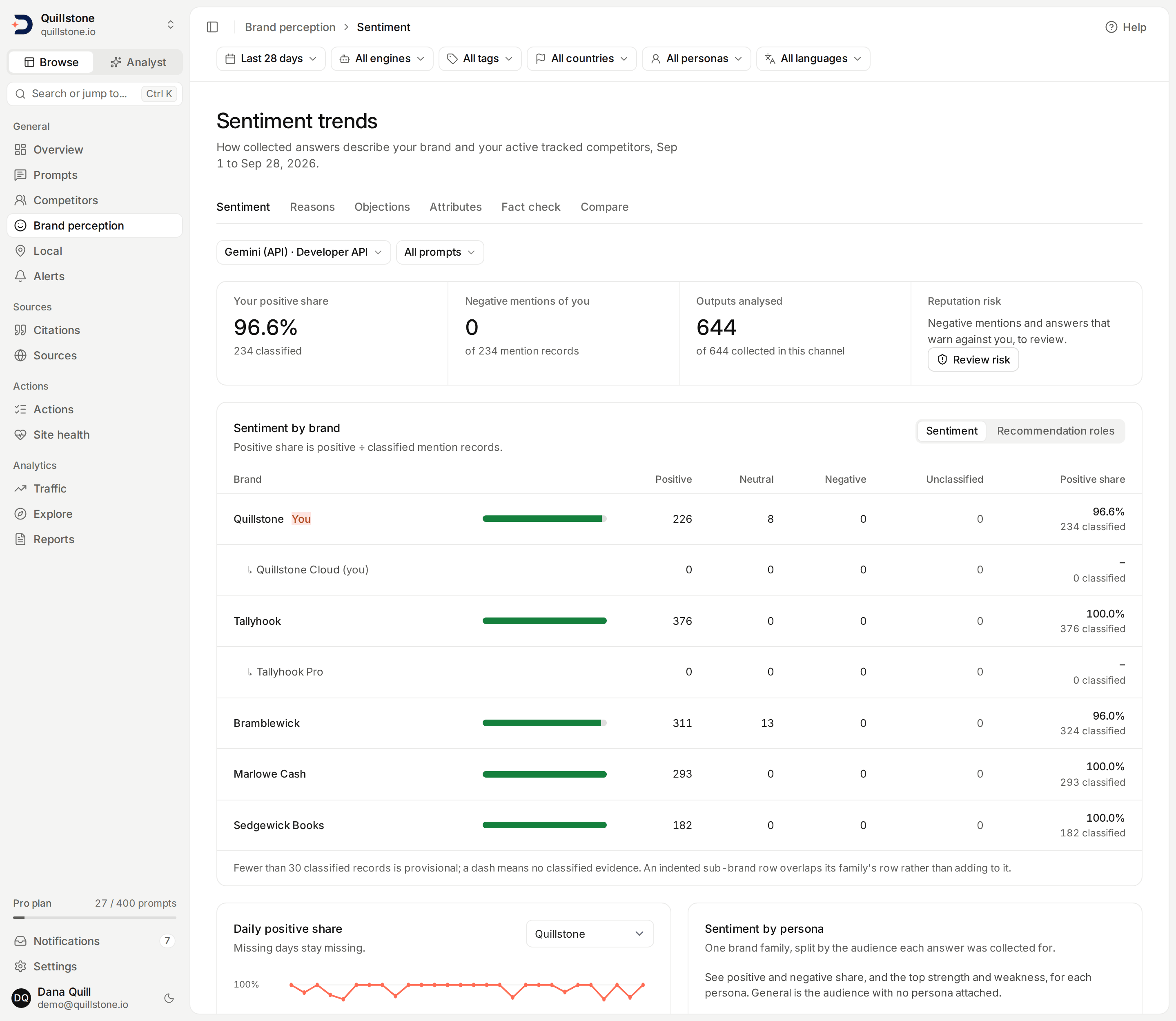
Compare sentiment across tracked brands
Open the Sentiment tab under Brand perception in the sidebar. Choose a 7, 28 or 90
day window with the date range chip in the
filter bar,
then pick a collection channel from the channel chip under the tabs; the
screen updates as soon as you pick one. The window is the days
ending yesterday; the default is 28 days
(api/services/answer_filters.py#resolve_answer_filters). The bar's
engine, tag, country, persona and language chips narrow every section of
this screen, and with an engine chosen the collection channel list offers
only that engine's channels
(api/services/sentiment_trends.py#sentiment_trends_for_project).
The comparison shows your brand and currently active tracked competitors.
Pausing or removing a competitor excludes it immediately, without deleting its
stored mentions. Newly tracked brands may have no evidence yet: tracking does
not retrospectively assign old, unresolved mentions to them
(api/services/sentiment_trends.py#sentiment_trends_for_project).
Each of those brands' active sub-brands is listed too, indented underneath it, and selectable the same way in the trend brand and evidence brand pickers below. Pausing the top-level competitor takes its sub-brands out of the comparison with it; archiving a sub-brand on its own removes only that row, without touching its family's own row.
A headline strip opens the screen: your own brand's positive share with its classified count, its negative mention records out of all its mention records, the outputs analysed in the channel, and a Review risk shortcut. Below it, one card compares every brand, a trend and a by-persona card sit side by side, and one Evidence card holds the mention and citation lists on two tabs. The longer notes on how everything is counted are under How this is measured at the bottom.
Project members, including viewers, can read this screen. It uses existing stored data and does not run prompts, classify new content or fetch websites. Your plan's existing provider and competitor limits still determine what you can collect and track.
Filter by prompt segment
Open the segment chip beside the channel (it reads All prompts until
a segment is set), choose Prompt intent, Buyer stage and Prompt
theme, then select Apply. All selected dimensions must match. All includes
missing classifications; Unclassified selects only prompts with no saved
value. The deliberate Other theme is different from Unclassified
(api/services/sentiment_population.py#segment_targets). Audience and
language are chips in the filter bar rather than fields here: the persona
chip narrows to one persona, archived ones
included, or to General, and the language chip to one
language or As written.
These filters, like the bar's, apply to coverage, brand comparisons, daily counts, roles and citation evidence. The segment uses each prompt's current classifications, even for historical outputs. Changing a classification changes the historical segment; this is not a snapshot of the classification when an answer was collected. Paused prompts and targets remain included when they have saved results. A segment with no completed outputs has an explicit empty state. Changing the segment or the channel clears the evidence lists' sentiment, role, citation reason and citation sentiment filters and returns both lists to their first page; the risk and brand selections stay. Reset page filters, shown once any of this screen's own filters is set, clears the segment, the channel choice and every evidence filter, and keeps the filter bar's selection.
What the counts mean
Positive, neutral and negative are the sentiment labels saved on brand-mention records. Unclassified means the saved record has no sentiment label. It does not mean neutral. A completed output with no brand mention contributes no sentiment record; a failed output or an output whose brand extraction has not completed contributes none either.
Positive share = positive records ÷ classified records × 100. Classified
records include positive, neutral and negative. Unclassified records are shown
separately and excluded from that denominator. For example, one positive, one
neutral, one negative and seven unclassified records produce 33.3% positive
share, based on three classified records
(api/services/sentiment_trends.py#sentiment_counts).
The unit is a stored mention record, not an answer, a citation, a customer or a name occurrence. Repeating a name within a record does not increase its weight. If an output has multiple stored records resolving to the same brand, each record counts; this screen does not merge them. The rate describes sentiment among classified mentions, not the percentage of all outputs recommending you.
A brand family's own row already includes every one of its sub-brands' mention records, alongside its own direct ones. An indented sub-brand row below it is that sub-brand's own count on its own, which overlaps the family row above rather than adding to it: a mention record already counted for the family is counted again on its sub-brand's row, never counted twice toward the family.
A dash means there is no classified evidence. A measured 0% means there are
classified records, but none is positive. Fewer than 30 classified records is
marked provisional, using the same small-sample threshold as the brand
metrics (api/services/brand_metrics.py#MIN_OBSERVATIONS). This is a sample-size
flag, not a statistical confidence interval.
Keep collection channels separate
A channel is one provider, platform, surface and collection method. The last three values come from the execution's saved provenance; editing today's provider settings does not relabel historical outputs. A channel with unknown provenance stays separate. Provider deactivation does not hide historical data.
Perplexity answers are generated answers from its Sonar API, like the
other engines' API answers (api/services/llm.py#run_perplexity). Perplexity
answers collected through its earlier Search API have a different surface,
so they form a channel of their own and are not averaged with Sonar
answers. API outputs can differ from consumer-app responses.
Google AI Overviews and Google AI Mode each form their own channel,
labelled "Google AI Overviews · AI Overview · Licensed data" and "Google AI
Mode · AI Mode · Licensed data", because both are collected through a
licensed data provider rather than an API of Google's
(frontend/src/routes/(app)/sentiment/+page.svelte#channelLabel; see
How the Google engines are collected).
A run where Google showed no AI answer has no text to read, so it adds
nothing to either channel.
ChatGPT is one channel, "ChatGPT (app) · Web app · Licensed data", for
what chatgpt.com shows a person who is not signed in, collected through the
same licensed data provider (see
How ChatGPT (app) is collected).
The two Gemini engines are separate channels: "Gemini (API)
· Developer API" for DiscoveredBy's own call to Google's Gemini Developer
API, and "Gemini (app) · Web app · Licensed data" for what
gemini.google.com shows a person who is not signed in (see
How Gemini (app) is collected).
An engine name that already says how it is collected is not followed by
the method again (frontend/src/lib/provider-meta.js#qualifierSuffix).
Outputs analysed in the headline shows how many completed outputs in the selected channel have finished brand extraction, out of those collected. This is extraction coverage, not the proportion with classified sentiment. Changes in prompts, countries or model versions can change the sentiment mix; the channel does not control those differences.
Daily positive share and evidence
Choose a Trend brand to see that brand's daily positive share. A chart needs at least five days with classified mentions. Missing days break the line instead of appearing at zero. Open Daily counts to inspect every day, including days without evidence. The daily percentage divides by that day's classified records; the whole-window percentage divides by all classified records in the window, so it is not the average of the daily percentages.
The Mentions tab of the Evidence card lists stored excerpts,
sentiment, recommendation role, date and output ID, with a link to the
prompt and its collected outputs. Excerpts are limited to 500 characters.
Its risk, brand, sentiment and recommendation-role chips apply as soon as
you pick a value, and affect this list only, not the comparison or trend. Selecting a top-level brand in the Brand
filter includes its sub-brands' evidence; selecting a sub-brand shows only
its own. The list shows 25 records per page, newest first, with a total and
pagination (api/services/sentiment_trends.py#EVIDENCE_PAGE_SIZE).
An empty evidence filter is not evidence of neutral sentiment. Missing excerpts are labelled as unavailable. A model's classification and a quoted mention are evidence to inspect, not proof that its judgment is correct.
Review reputation-risk evidence
Select Review risk in the headline to jump to the evidence list, whose first tab then reads Reputation risk. The shortcut selects your own brand when it is in the current roster, keeps the filter bar's selection, channel and prompt segment, and resets sentiment, role and evidence-page selections. Without an own-brand entity it shows all tracked brands. Use Brand to include competitors or all brands.
The Reputation risk filter offers:
- Negative or warned against: negative sentiment or a saved Warning or caveat / Not recommended role.
- Negative sentiment: only negative brand-mention records.
- Warned against: either of those two roles, including records with positive, neutral or unclassified sentiment.
- All mention evidence: remove the risk restriction.
A record matching both signals counts once. Competitor preferred alone does not qualify. Brand, sentiment and role filters narrow the risk selection together; for example, choose Warned against and Positive to inspect that combination. Each chip applies as soon as you pick a value. Pagination retains the filters; changing the window, segment or channel retains the risk selection. Reset page filters returns to the full comparison and all mention evidence.
The list counts saved mention records, not unique answers or incidents, and
shows up to 25 records per page with excerpts capped at 500 characters. Count,
page and rows come from one database snapshot. Comparison totals, positive
share, role counts and citation framing are unaffected by the risk filter
(api/services/sentiment_trends.py#sentiment_trends_for_project).
Select View prompt and outputs and use the displayed output ID to inspect the saved answer. Missing excerpts are explicit. These model labels are review signals, not verified harmful claims or fact-check verdicts. Missing labels, incomplete extraction and an empty list do not establish an absence of risk. There is no risk score, case status, assignment or notification created by opening this view. It adds no new collection, analysis or paid entitlement. The existing channel, current-roster and current-segment limitations above continue to apply.
Recommendation roles and citation reasons
Recommendation roles are the brand card's second view: switch it from Sentiment to Recommendation roles. Citation reasons open the evidence card's Citations tab, above the citation list; a link that carries a citation filter or a citation page opens on that tab.
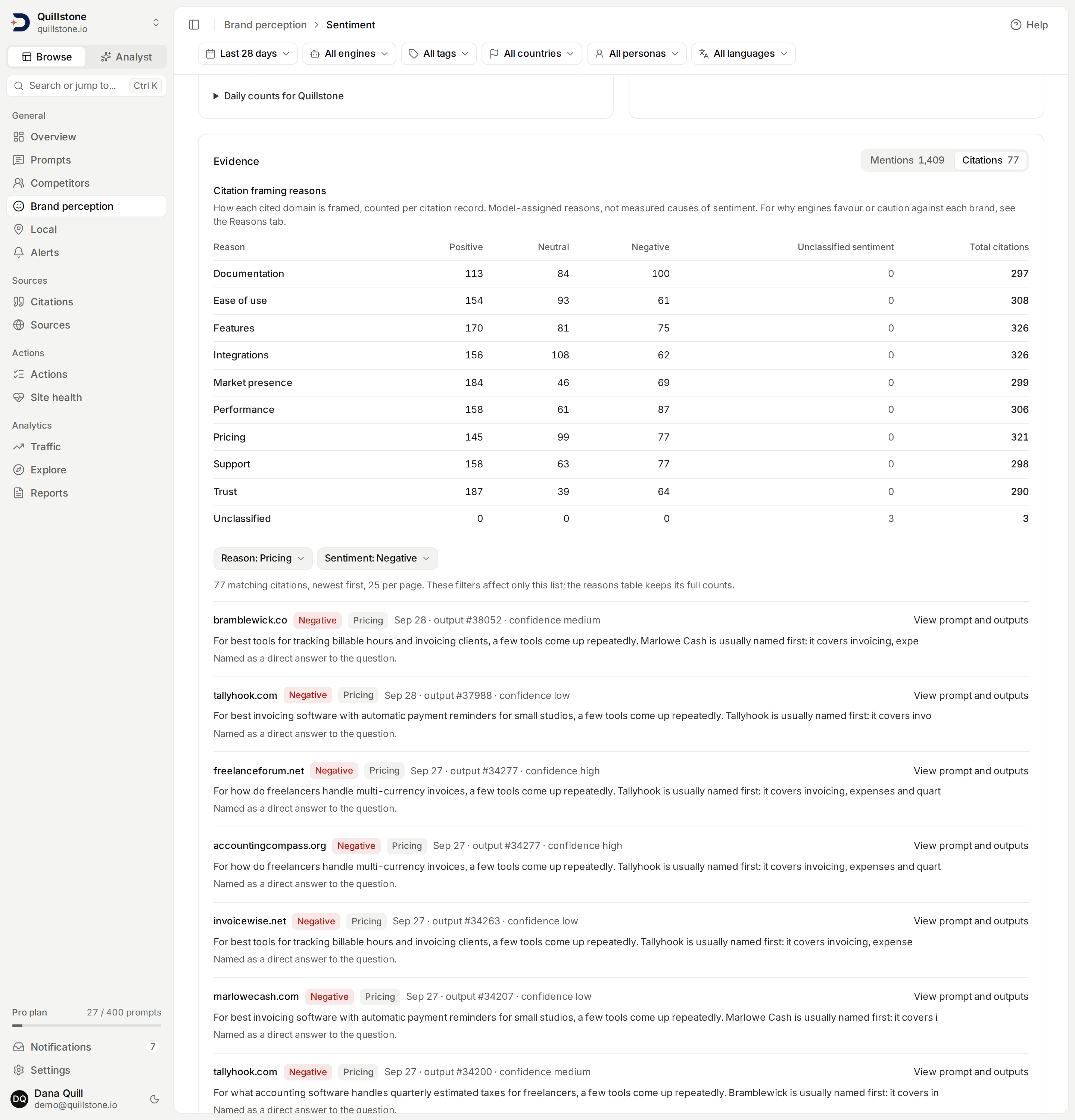
The screenshot shows existing local Quillstone demo data, with Citation evidence filtered to Pricing and Negative; no new collection was run for this example.
Recommendation roles by brand counts saved mention roles such as Top recommendation, Alternative option, Warning or caveat and Not recommended, one row per brand and one column per role; a role no brand received in the segment gets no column. Each mention record contributes once, regardless of repeated name occurrences. Missing roles remain Unclassified. A role is independent of sentiment: use both filters in Mention evidence to inspect, for example, negative mentions with a warning. The comparison counts do not change when evidence is filtered.
Citation framing reasons is a separate population. It groups saved
citation records across all cited domains by model-assigned reasons such
as pricing, features, support or security, with positive, neutral, negative
and unclassified sentiment counts. Repeated citations count separately. It
does not assign those reasons to brand mentions or use them in brand sentiment
rates. For reasons given about each brand itself, see
Brand reasons. A citation can have evidence even when brand extraction is incomplete;
failed outputs are excluded, and so are outputs whose own citation
classification has not finished, because their citations are unread rather
than unlabelled. Unknown is an explicitly saved reason;
Unclassified means no saved reason. The reasons table keeps its full
segment/channel counts when the citation evidence is filtered
(api/services/sentiment_trends.py#citation_framing).
On the Citations tab, filter the citation list by reason and citation sentiment to inspect the cited domain, exact saved excerpt, rationale, confidence, date and output ID. Open the linked prompt to review the collected output. Excerpts are limited to 500 characters and rationales to 1,000. The list shows 25 citation records per page, newest first, with independent pagination. Missing text and missing confidence stay unavailable; no new explanation is generated on this screen.
These are saved model classifications, not verified facts or measured causes of a sentiment change. Prompt segmentation helps compare the evidence you have; it does not control for country, model, collection changes or other confounders. Reasons given about each brand, as strengths and weaknesses with quotes, are on a separate screen, Brand reasons.
By persona, and comparing against one competitor
In the Sentiment by persona card, select Break down (your brand)
by persona to see one brand family with one row per audience, and use
the card's brand picker to switch family or Close persona view to leave
it: General, included only when it has at least one answer naming
the family, plus every persona in the same
position, archived personas included, in the current window, filters,
segment and channel: analysed answers, positive share, negative share, and, with the
owner's Brand reasons entitlement, that
audience's top strength and top weakness reason
(api/services/sentiment_population.py#by_persona_rows). Fewer than 30
analysed answers for an audience marks that row provisional, the same
threshold used everywhere else on this screen.
Compare vs. competitor is a separate, narrower comparison: instead of each brand's sentiment across every answer that names it, it looks only at the answers that name both your brand and one competitor you choose, with coverage, who is named first, and the same reason breakdown restricted to those shared answers.
Related
- Brand reasons: why answers favour or caution against each brand, with quotes
- Compare vs. competitor: the narrower comparison restricted to answers naming both brands
- Personas: the audience the persona chip filters by, and the By persona view on this screen
- Brands and sub-brands: what a sub-brand is and how its records roll up into its family's own row
- Competitors: how tracked brands are selected
- Key terms: mentions versus citations
- Metrics defined: measurement populations and limits
Last verified 2026-09-29