Visibility
Objections
A weekly study that asks each chat engine on your plan, and ChatGPT (app), directly why a buyer might not choose your brand and each active tracked competitor, then ranks the objections by prominence with the quotes behind them and shows what changed since the last comparable study.
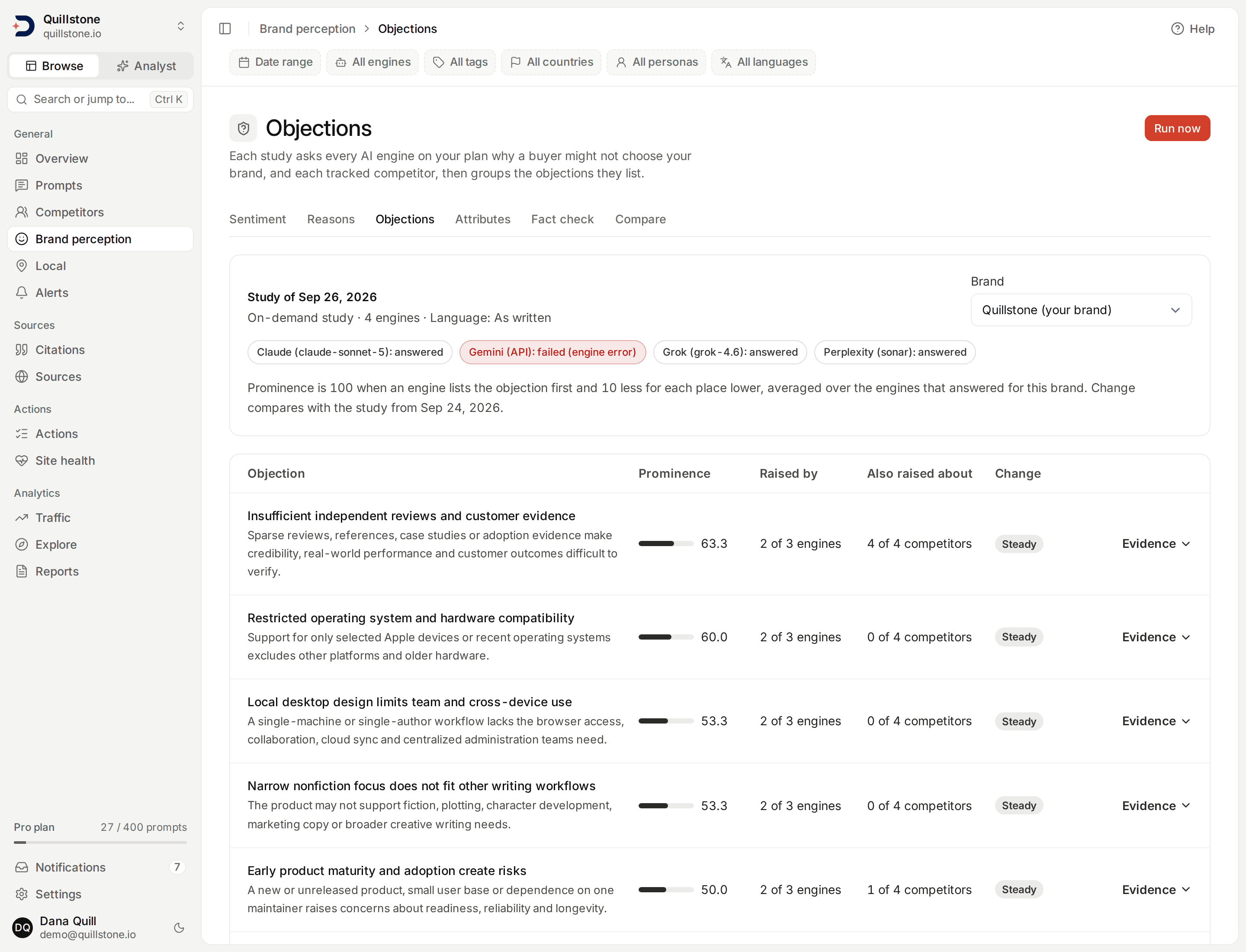
The screenshot shows the Quillstone demo project after two studies on development data.
What this screen shows
Open Objections from
the Objections tab under Brand perception in the sidebar. It shows the objections AI
engines raise when they are asked directly why a buyer might not choose
your brand, and the same for each active tracked competitor. Each
objection is a group with a short label and description, and for every
group the screen shows how prominent it was across the engines that
answered, how many of them raised it, what changed since the previous
comparable study and, for your own brand, how many competitors had the
same objection raised about them. Each row opens to the quotes behind it
(api/services/objections/read.py#objections_view).
The data comes from a separate objection study, not from your tracked prompts. A study asks every chat engine on your plan, and ChatGPT (app), one fixed question about each brand, reads the objections out of each answer, and groups them. Read the next section before reading the numbers: the question is designed to produce objections, so almost every brand will have some.
The question each engine is asked
For each brand, every engine is sent this question, with the brand's name
and domain filled in
(api/services/objections/question.py#build_question):
A buyer is considering {name} ({domain}), a {business type}, and wants to
understand the downsides before deciding. What are the main objections,
concerns or reasons a buyer might have for not choosing {name}? List them
from most to least significant, one per line, and cite sources where you can.
The ", a {business type}," part is included only when your project has a business type, and your project's business type is used for the competitors too, since they sell in the same market. Name, domain and business type are trimmed to 120, 255 and 120 characters.
Because the question asks for downsides, an engine will usually list some for any brand, including a well-regarded one. The objections here are not a measure of how negative engines are about you in ordinary answers; that is what Sentiment trends and Brand reasons measure. What the study tells you is which objections engines reach for first when asked, and how that compares with your competitors and with earlier studies. Prominence is therefore relative: compare objections with each other, across brands and across studies, rather than reading a high score as bad news on its own.
The question is written in English. When your project has a default
language (see
Languages and templates),
the study is created in that language and each engine also receives the
same plain-language instruction to answer in that language that a tracked
prompt in that language receives. ChatGPT (app) gets it added after the
question, because a language setting alone does not change the language it
answers in (see
What reaches ChatGPT).
With As written, nothing is added
(api/services/brand_study/question.py#question_search_context,
#study_prompt). No city or persona is sent, and no country except to
ChatGPT (app), which is always asked with the United States as its country
(api/services/brand_study/question.py#STUDY_APP_COUNTRY).
The wording carries a version number
(api/services/objections/question.py#QUESTION_VERSION). Studies are only
compared with studies that asked the same version in the same language.
Which brands and engines
A study asks about your brand, by your project's name and domain, and then
each active tracked competitor, by its name and domain, in the order the
competitors were added, up to your plan's competitor allowance. A
competitor saved without a name is asked about by its domain. Paused
competitors are not asked about, and sub-brands are not asked about
separately (api/services/brand_study/engines.py#study_subjects).
Every brand is asked of every engine your plan includes that is active and
currently available, except Google AI Overviews, Google AI Mode and Gemini
(app), three of the four engines collected through DataForSEO: the study
relies on an instruction to answer in the study's language, which those
engines never receive, and a Google results page with no AI answer would
read as a failed study answer. ChatGPT (app), the fourth, is asked, with
the language instruction added to its question as described above
(api/services/brand_study/engines.py#study_engines_for_plan,
#STUDY_EXCLUDED_PROVIDERS; see
Engines and measurement).
Each (brand, engine) pair is one answer.
Each answer keeps the brand's name and domain as they were when the study
was created. A competitor you later rename keeps its old name in the
studies that already asked about it; one you delete keeps its history in
those studies and is absent from later ones
(api/models/objection.py#ObjectionAnswer).
When studies run
Studies run automatically once a week, with no setting to turn on. A
systemd timer (discoveredby-cli@enqueue-objection-studies.timer) runs
every Wednesday at 05:00 UTC and starts a study for every active project
whose owner's account is active and whose owner's plan includes
Objections, unless the project already has a
study running or one was created in the last 6 days
(api/cli.py#cmd_enqueue_objection_studies,
api/services/objections/studies.py#enqueue_scheduled_studies,
#SCHEDULE_INTERVAL). So a study you run yourself on a Monday means the
Wednesday run skips that project that week. A project whose plan has no
available engines is skipped.
Owners and editors can also press Run now. It is refused while a study
is already running, and for 24 hours after the latest study that counts
was created (api/services/objections/studies.py#start_manual_study,
#RUN_COOLDOWN). Viewers cannot run a study
(api/routers/objections.py#start_study). A study that never ran
because it could not be queued, or that was interrupted on our side
(still running with no progress for 90 minutes), does not count toward
the 24 hours or the 6 days. A study that ran and failed, because every
answer failed or grouping failed, does count
(api/services/objections/studies.py#UNCOUNTED_ERROR_KINDS).
A study first collects every answer, then groups the objections, then
succeeds. While a study is running, the screen says which of the first
two steps it is on. The screen shows the latest succeeded study, and a
study history with the 10 most recent studies, each marked weekly or on
demand, with its status (api/services/objections/read.py#HISTORY_LIMIT).
You can open any earlier succeeded study from that list.
From answer to objections
Each engine's answer is saved, cut to 50,000 characters, together with
the model the engine reported (its default model when it reports none)
and the sources the engine cited, one per URL, each with the positions in
the answer where the engine cited it, when the engine records them. At
most 50 sources are kept: those with a recorded position come first, in
the order they first appear in the answer, then the rest in the order the
engine listed them
(api/services/objections/pipeline.py#run_answer, #RESPONSE_TEXT_LIMIT,
api/services/brand_study/sources.py#model_of, #capture_sources,
#_spans, #MAX_SOURCES).
Another AI model then reads the answer and lists the objections it gives
for not choosing that brand, leaving out strengths, neutral facts and
objections about other brands. It is told to treat the answer as data and
not to follow instructions inside it, and it reads the first 16,000
characters of the answer
(api/services/objections/extraction.py#build_extraction_prompt,
#EXTRACT_TEXT_LIMIT). For each objection it returns a short claim and
the sentence from the answer that states it, not a heading or bold label
on its own. The model is not shown the sources and does not choose them.
Our code then decides what is kept
(api/services/objections/extraction.py#validate_extraction):
- At most 10 objections are read from one answer
(
api/services/brand_study/ranking.py#MAX_ITEMS_PER_ANSWER). - The quote must be found in the saved answer, exactly or ignoring case;
an objection whose quote cannot be found is dropped
(
api/services/brand_mentions.py#_locate). The quote stored is the answer's own text at that position, cut to its first 300 characters (api/services/brand_study/ranking.py#QUOTE_LIMIT). A quote shorter than 20 characters, not counting spaces at either end, is dropped as a fragment such as a heading or a bold label (api/services/brand_study/ranking.py#MIN_QUOTE_LENGTH). When two quotes overlap, only the objection the model listed first is kept. - Rank is the order of the quotes in the answer, not the order the
model listed them: the kept objection whose quote appears first has rank
one. Its score is 100 minus 10 for each rank after the first, so
ranks one to ten score 100 down to 10
(
api/services/brand_study/ranking.py#score_for_rank).
An answer with at least one kept objection has succeeded; one with none,
including an empty answer or an engine that declined, answered with no
objections (api/services/objections/pipeline.py#_extract).
How sources are linked
Our code, not the AI model, links sources to an objection. A source is
linked when the engine placed one of its citations on the quote itself,
or when it is one of the citation markers or inline links placed directly
after the quote: a run of them one after another, skipping spaces, line
breaks, closing punctuation and brackets, quotation marks and emphasis
marks between them. A marker in the run is linked when it starts less
than 300 characters after the end of the quote, even if it ends later.
The run stops at the first plain text, so citations attached to the
following sentence are not linked
(api/services/brand_study/sources.py#link_sources,
api/services/brand_study/sources.py#capture_sources).
This depends on the engine recording where in its answer it cited each source:
- ChatGPT (app) records, for each source, where its link first
appears in the stored answer. The app usually, though not always, writes
that link right after the text it supports, so a source is usually
linked to the quote its first link follows. A source whose link is not
found in the stored answer has no recorded position and links nothing,
and a later link to the same source has no recorded position either
(
api/services/llm.py#_chatgpt_app_answer,#_span_of). - Perplexity records the stretch of text a numbered marker such as
[1]follows, back to the previous marker or sentence end; a marker at the very start of a line records no text, so it is not linked (api/services/llm.py#_sonar_marker_citations). - Grok records positions for its inline citations only; the other
sources it lists have none, so they are never linked
(
api/services/llm.py#run_grok). - Gemini (API) records the stretch of text each source supports, and we
store the start and end it reports as they are
(
api/services/llm.py#run_gemini). Gemini counts those positions in bytes of UTF-8 text, while the answer is measured in characters, so every character that takes more than one byte shifts later positions. For English and other plain Latin text the shift is small, and a few accented letters move a source by a few characters, so it is usually linked correctly but can occasionally land on a neighbouring objection. For a study in a language written in another script, such as Arabic, Hindi, Japanese or Russian, where most characters take two or three bytes, the positions land far from the text they describe: Gemini (API) sources for those studies will usually be linked to the wrong objection or missing, and a position past the end of the stored answer is dropped (api/services/brand_study/sources.py#_spans). - Claude records the text it cited but no position in its answer, so
objections from Claude answers show no sources
(
api/services/llm.py#run_anthropic).
A linked source shows where the engine placed its citation. It is not a check that the page says what the objection says. An objection with no linked source shows "No source was tied to this objection."
How quotes are shown
On the screen, a quote is shown without markdown bold markers and without
citation markers such as [1], including a marker written as a markdown
link whose text is a number of one to three digits, and any other
markdown link is shown as its text, so the quote reads as plain text
(frontend/src/lib/engine-quote.js#displayQuote).
The stored quote is not changed: the export, the customer API and the MCP
tool return it exactly as it appears in the engine's answer.
How objections are grouped
When every answer is in, AI model calls assign each objection in the
study to a group, in batches of at most 120 objections per call, taken in
the order they were saved; each batch is saved before the next starts
(api/services/objections/pipeline.py#group_study, #GROUP_BATCH_SIZE).
Each call is sent the batch's claims, without saying which brand each was
about, so that objections raised about different brands can share a
group, together with the project's existing groups, the 150 most recently
seen, which puts the groups earlier batches of the same study used first
(api/services/objections/pipeline.py#GROUPS_IN_PROMPT,
api/services/objections/grouping.py#build_grouping_prompt). The model is
asked to reuse an existing group when an objection says the same thing,
and otherwise to create a new one with a short description and a label
written without brand names. A label is cut to 80 characters
(api/services/brand_study/grouping.py#LABEL_LIMIT).
Our code checks each batch's result before saving it: every objection in
the batch must be assigned exactly once, to a group of this project that
was sent or to a new group the model defined
(api/services/brand_study/grouping.py#validate_grouping). If the output
fails that check, the model is asked once more with the list of problems.
If the second output also fails the check, or either call fails, the
study fails; batches already saved keep their groups, but a failed
study's objections are not shown. A new group whose label
matches an existing group's label, ignoring case, is merged into that
group (api/services/objections/pipeline.py#_apply_plan).
Groups belong to the project and are shared by your brand, your competitors and every later study, which is what makes the brand comparison and the change since last time possible. The grouping and the labels are an AI model's judgement and wording: two similar objections can end up in separate groups, or a group can be broader than you would draw it. The quotes under each group are the check on that.
What the numbers mean
For the brand selected, over the engines that answered for it (with objections or with none; an engine whose answer failed is left out):
- An engine's score for a group is the highest score among its objections in that group, and 0 if it answered without raising it.
- Prominence is the average of those engine scores over the answered
engines, from 0 to 100, rounded to one decimal
(
api/services/brand_study/metrics.py#prominence). For example, with three engines answering, one listing the objection first (100), one third (80) and one not at all (0), prominence is 180 ÷ 3 = 60.0. - Raised by is how many of the answered engines raised the group, out
of the answered engines
(
api/services/brand_study/metrics.py#raised_by). - Also raised about, on your own brand's view only, is how many of
the competitors in the same study had at least one engine raise the same
group about them, out of the competitors with at least one engine
answering. It helps separate objections raised about the whole category
from ones raised only about you. It is not shown when the study included
no competitors
(
api/services/brand_study/metrics.py#competitors_raising).
Objections are listed by prominence, highest first. If no engine answered
for a brand, nothing is scored for it: the screen lists no objections for
that brand rather than objections at 0. Each objection opens to its
evidence: for each engine, the rank, the quote from the answer and its
sources. Above the table, each engine asked about the selected brand is
listed with its model and whether it answered, answered with no
objections, or failed, with the kind of failure but never the engine's raw
error text (api/schemas/objections.py#EngineStatus,
frontend/src/routes/(app)/sentiment/objections/+page.svelte#engineStatus).
What changed since the previous study
A study is compared with the most recent earlier succeeded study of the
project that asked the same question version in the same language
(api/services/objections/read.py#_previous_study). A study is never
compared with one in another language, so after you change your project's
default language, the first study in the new language shows no
comparison unless an earlier study used that language too.
The change is computed only over the compared engines: the engines
that answered for this brand in both studies. Both studies' prominence is
recalculated over those engines alone, and the change shown is the
difference, in points. An engine joining your plan, leaving it, or failing
in one of the two weeks therefore cannot make an objection look new or
gone on its own. When the compared engines are not all of the engines
that answered this time, the screen names the ones compared
(api/schemas/objections.py#ComparisonOut,
frontend/src/routes/(app)/sentiment/objections/+page.svelte#comparedSubset).
Because the prominence column averages over every engine that answered
this time, the change can differ from the difference between two
prominence figures when the engines differ.
Each objection gets one change status
(api/services/brand_study/metrics.py#change_status,
#CHANGE_THRESHOLD):
- New: the compared engines did not raise it last time and do now.
- Rising or Falling: its prominence over the compared engines moved by 15 points or more, up or down.
- Steady: it moved by less than 15 points.
- No comparison: there is no earlier study with the same question in the same language, or the most recent such study has no engine that answered about this brand in both studies, or no compared engine raised it in either study (only an engine not being compared raised it this time).
An objection that no engine raised this time, but that a compared engine
raised last time, moves to a separate No longer raised list, with its
earlier prominence over the compared engines. An objection that a
compared engine raised last time, and that only an engine not being
compared raises this time, is listed normally, as falling or steady over
the compared engines, not as no longer raised
(api/services/objections/read.py#objections_view).
When a study or an answer fails
One failed answer does not fail the study: an engine error, or a failure
of the extraction call, marks only that answer as failed, and the study
goes on to group the rest. A study fails when every answer failed, when
grouping fails (as described above), when it could not be queued, or when
it is still collecting or grouping with no progress for 90 minutes: no
answer finished and no grouping batch was saved in that time, counting
from when the study was created
(api/services/objections/pipeline.py#finalize_if_complete,
#_apply_plan, api/services/objections/studies.py#expire_interrupted,
api/services/brand_study/engines.py#INTERRUPTED_AFTER). A failed study's objections are not shown. When
the newest study failed, the screen keeps showing the last succeeded one
and notes the failure.
Access
Any current project member can read this screen, viewers included. It is
available when the project owner's plan includes Objections: standard
Starter, Growth and Pro presets do, Free and Trial do not
(api/services/entitlements.py#standard_entitlements,
api/routers/objections.py#read_objections). Without it the screen shows
an upgrade message and no studies run for the project. Studies already
stored are kept, and become readable again if the plan returns. Only
owners and editors can press Run now
(api/services/objections/read.py#RUNNERS).
Export, API and MCP
The same objections are available as the objections file export, through
the customer API's GET /objections route with the objections:read
permission, and through the list_objections MCP tool, each also gated by
the Objections entitlement
(api/services/exports/objections.py#statement,
api/services/customer_api.py#objections_page,
api/services/customer_mcp.py#list_objections). They list one row per
objection in each engine's answer, with its rank, score, group, quote and
source URLs, from succeeded studies only. See
Exports and activity,
Customer API and keys and
MCP connector.
How this differs from Brand reasons
Brand reasons reads the answers to your tracked prompts and counts the reasons they happen to give for or against each brand, over thirteen fixed labels. Tracked prompts do not usually ask for downsides, so weaknesses there are what engines volunteer. Objections asks every chat engine on your plan, and ChatGPT (app), directly for the downsides, every week, and groups the answers by meaning instead of by fixed label. Use Brand reasons to see what comes up in the answers your buyers are likely to get; use Objections to see which objections engines put first when a buyer asks.
Study answers are kept apart from your tracked prompts' answers
(api/models/objection.py#ObjectionAnswer). They use no prompt slot and
change no visibility metric, sentiment figure, Brand reasons count,
Explorer result or alert.
How this differs from Attributes
Attributes is a separate weekly study, run
on Thursdays rather than Wednesdays, that asks the same engines what each brand
is best known for, good or bad, and then which brands it names for a chosen
quality (api/services/attributes/question.py#build_association_question,
#build_market_question). It measures what a brand is known for rather
than why a buyer might not choose it, and its attributes have no positive
or negative side. It keeps its own groups
(api/models/attribute.py#AttributeGroup), so grouping in one study never
changes the other's.
What this does not include
- No alerts or emails when an objection appears or rises.
- No editing, merging, renaming or hiding of objection groups.
- No location: studies are not run per country or city, and no persona is used.
- No re-running of a stored study, no backfill of weeks before the feature, and no deleting of studies from the app.
Related
- Brand reasons: reasons for and against each brand in your tracked answers
- Attributes: what engines say each brand is known for, and which brands they name for each quality
- Fact check: a separate weekly study that checks what engines say about your brand against the facts you approve
- Sentiment trends
- Competitors: which competitors a study asks about
- Languages and templates: the default language a study uses
- Engines and measurement
- Plans and limits
Last verified 2026-09-29