Optimize
Page issue queue
Prioritize known owned pages using saved gaps, draft status, diagnostic findings, linked evidence and recorded outcomes.
Open Actions → Page issues to bring known owned pages, saved citation gaps and optimization work into one place. Start with a page, review the evidence, then open its existing workflow to decide what to implement.
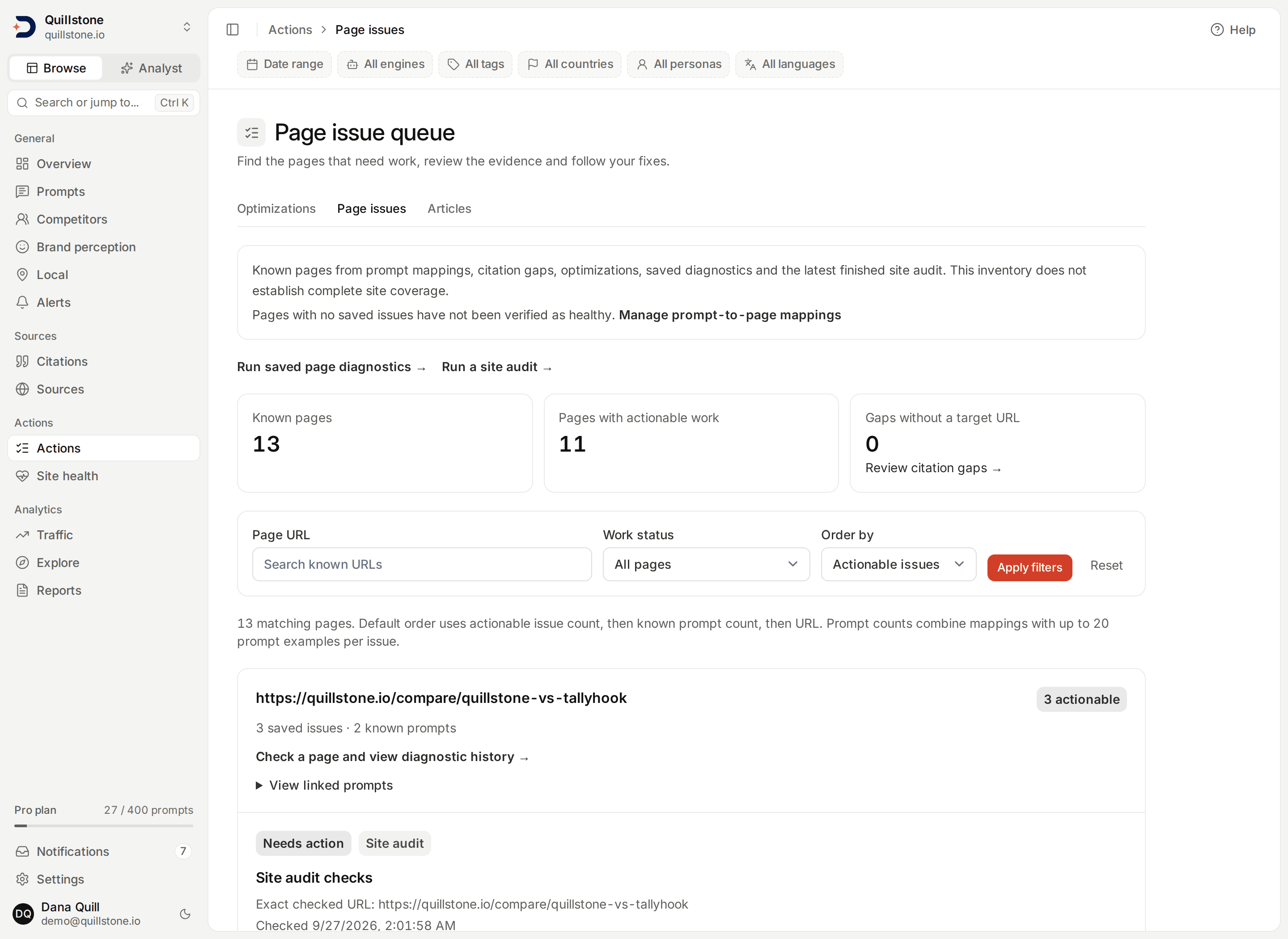
Which pages appear
The queue groups URLs from the current project's prompt-to-page mappings,
citation gaps with target URLs, optimization opportunities, saved diagnostic
URLs and the project's newest finished site audit.
Paused prompts retain their saved mappings. URLs use the same normalization
as the page store: tracking parameters, fragments and trailing slashes are
removed; meaningful query parameters and distinct hosts remain. Pages must
belong to the project's registrable domain. Unsafe links and off-domain
records are excluded and counted
(api/services/page_issues.py#inventory_statement).
This is known inventory, not a complete site crawl. Pages seen only in Google integrations or the global URL store do not enter this first version. “No saved issues” means there is no saved gap or optimization for that page; it is not a health check or a clean audit result. Gaps without a target URL have their own count and link to Citation gaps.
Only the project's newest completed or cancelled site audit feeds the
queue. A running or failed audit is skipped when choosing that audit, so it
never hides the previous finished audit's saved findings while a new audit is
in progress or after one fails
(api/services/page_issues.py#inventory_statement). Each page that audit
inspected, whether it passed, needed review, was skipped or failed to load,
appears as one Site audit checks item, labelled with a "Site audit" badge
and linking to that page's saved audit evidence.
The screen reads up to 2,000 newest records from each of the five sources. If a source exceeds that limit, a warning names it. Counts, filters and ranking describe the inspected records, including when the inventory is limited.
Choose the next page to work on
The default order is actionable issue count, then known prompt count, then URL. An issue is actionable when it needs action or has a draft ready. You can instead sort by known prompts or URL, search URL text, and filter by work status. Results show 25 pages at a time; summary counts describe inventory before your filters.
Known prompt counts combine mappings with up to 20 prompt examples per issue. They are not complete prompt-reach or visibility metrics. Each issue shows its original citation-gap impact or optimization score and available effort label. Those two scores are not combined into a new AEO score or predicted lift.
When a citation gap already has a linked optimization for the same normalized page, it appears once under that optimization. Different target pages remain separate. Expand linked prompts and up to five cited-source examples to inspect the context, then choose Review evidence and next steps to open the exact saved issue, even if it is outside the normal list's first 100 records.
Follow the work
- Needs action: a saved gap or opportunity has no displayed ready/applied draft.
- Draft ready: an open optimization recommendation is available for review.
- Applied: a recommendation was marked applied, or a citation gap is in an implemented, monitoring or recorded-outcome state.
- Stale analysis: the parent analysis, displayed draft or owned-page mapping changed. Review and refresh the existing workflow before using old advice.
- Dismissed: the parent issue was dismissed.
Optimization display follows the existing lifecycle: a non-dismissed applied recommendation still inside its measurement window takes precedence over newer drafts; otherwise the newest non-dismissed recommendation appears. The queue does not list every historical recommendation. Stale or dismissed parent state takes precedence over a ready draft. An applied date and outcome, when present, are saved observations; they do not prove the edit caused a performance change.
Use Optimizations to review drafts, approve handoff, mark changes applied and inspect measurements. Opening the queue only reads saved records. It does not run generation or refresh evidence, and the platform does not modify your website.
Access and limits
Owners, editors and viewers on every plan can read their project's saved queue. Linked generation, review, export and measurement actions keep their existing role and plan requirements. There is no new paid gate, integration or collection job. Saved page diagnostics adds explicit policy, HTTP, HTML, structure, response and browser-render checks, saved evidence and recheck history. Each exact URL's latest completed diagnostic appears as a separately labelled bundle with no impact score. Several exact diagnostic URLs can share one normalized queue page. Running or interrupted rechecks retain the previous completed queue result.
A bundle with review findings is Needs action; otherwise it is Diagnostics unknown if any check is unknown, or Diagnostic checks passed. A first run without completed evidence is unknown. A passed bundle is not a complete page health verdict. Opening the queue only reads; owners/editors with the existing robots diagnostics entitlement can open a page's diagnostic history and start an explicit recheck. Saved diagnostic evidence is readable by every current member. Rendering, readability and response timing are single lab heuristics, not field measurements. Third-party crawler access and field (Core Web Vitals) performance remain outside these checks.
A Site audit checks item reuses the same three labels: Needs action
whenever that page needs review, whether it completed, was skipped or failed
to load; a page the audit skipped because DiscoveredByBot's own policy is
blocked needs action for that reason, since its policy check itself needs
review. Otherwise it is Diagnostics unknown when the site audit could not
read the page (skipped for another reason, or failed) or any check is
unknown, or Diagnostic checks passed
(api/services/page_issues.py#page_issues). The "Site audit" badge is what
tells it apart from a saved page diagnostic bundle. Opening its evidence only
needs the read access every current member already has; starting a new audit
keeps Site audit's own owner/editor and plan
requirements.
Related
- Citation gaps: review the evidence behind a gap.
- Optimizations: review, implement and measure a fix.
- Saved page diagnostics: run checks and compare saved rechecks.
- Site audit: crawl your whole site; its newest finished results feed this queue.
- Robots diagnostics: inspect declared crawler policies.
Last verified 2026-09-23