Analytics
Analyst
Ask a question about your tracked AI answers in plain words and get a short answer built from Explorer queries, with every number filled in from the results shown under it.
What Analyst does
Analyst answers a question about a project's tracked AI answers in plain words: "Which engines mention us most, and how did that change?", "Where are we weakest against a competitor?". It plans a few Explorer queries for the question, runs them, and writes a short answer with the charts and tables it used underneath. Open it with the Analyst switch at the top of the sidebar, which opens the chat in the sidebar beside the screen you are on, or use the full view.
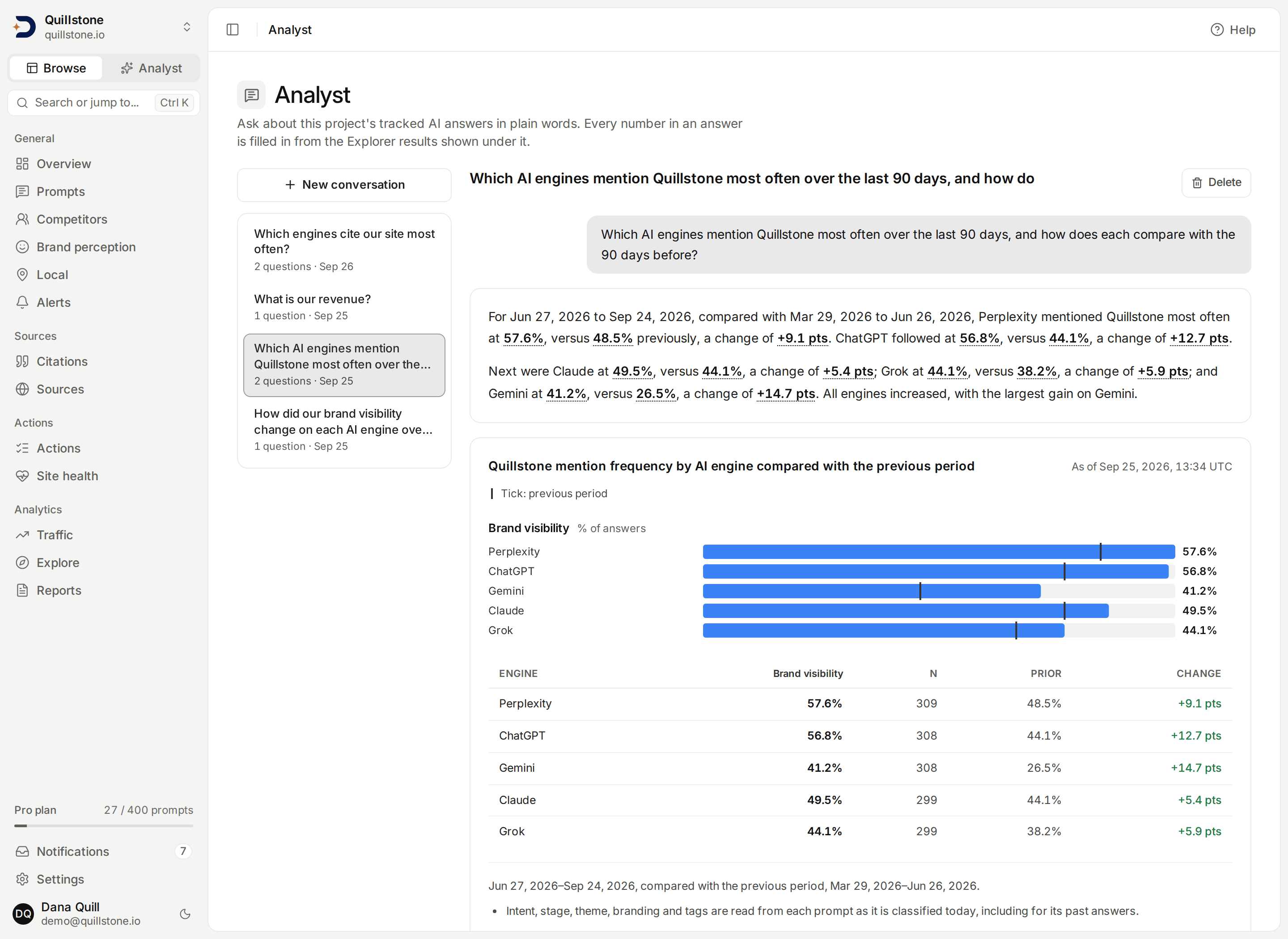
Analyst is included on Starter, Growth and Pro, and not on Free or Trial;
a custom plan follows its configured entitlement. The project owner's
plan decides, whoever is asking (api/services/entitlements.py#standard_entitlements,
#get_entitlements, api/schemas/entitlements.py#analyst,
api/services/analyst/conversations.py#analyst_available). Any member of
the project can ask, viewers included, because it only reads numbers
every member can already query in the Explorer. If the owner's plan loses
Analyst, the conversations you already have stay readable and new
questions are refused (api/services/analyst/conversations.py#submit). A
question that is already queued checks the plan and your access again
when it starts, and ends with "Analyst is not available on this
project's plan." if either is gone (api/services/analyst/pipeline.py#_eligible).
How an answer is made
Each question goes through four steps, and the page shows which one is
running: Queued, Planning, Running N queries, Writing. It keeps going if
you leave the page
(frontend/src/lib/components/analyst/AnalystTurn.svelte#step).
- Planning. A language model reads your question, up to three earlier
answered questions of the same conversation, a description of the
Explorer's metrics, dimensions and query rules, and the project's
filter values: at most 40 per dimension, such as prompts, tags,
brands and cited domains. It replies with one to four Explorer
queries, or declines the question (see below)
(
api/services/analyst/prompts.py#build_plan_prompt,api/services/analyst/catalog.py#catalog_text,api/services/analyst/limits.py#VALUES_PER_DIMENSION,#MAX_QUERIES). When a question names several values and only some of them are in the project's filter values (two tracked domains and two that are not, say), the model is told to plan queries for the tracked ones rather than decline, and to decline only when none of them are tracked (api/services/analyst/prompts.py#_plan_instructions). - Checking. Every planned query is checked by the same rules the
Explorer applies to a query you build yourself. If any query has a
problem, the model gets one chance to fix the plan; a query still
broken after that is dropped, and the answer says how many planned
queries could not be run and why. If none can run, the question ends
with "None of the planned queries could run." and the reasons
(
api/services/analyst/pipeline.py#_run,#_repaired,api/services/explorer/query.py#query_problems). - Running. Each query runs through the Explorer exactly as if you had
built it, so each one counts against the project's shared budget of 120
Explorer queries a minute and has the same 15-second limit
(
api/services/explorer/query.py#execute_query,api/services/explorer/budget.py#QUERIES_PER_MINUTE,api/services/explorer/query.py#QUERY_SECONDS). The results are stored with the question, with the time they ran ("As of"). When every planned query has run, Analyst runs one more Explorer query of its own for each of them: the number of answers on each day of the same dates (each week when the dates cover more than 92 days), with the same filters except any brand or domain filter, because those do not narrow which answers there were. For a query with any metric counted over analysed answers (answers analysed, brand visibility, brand position, share of voice or a sentiment rate), which counts only answers whose brand mentions have been analysed, it counts analysed answers. For a query whose every metric counts runs (AI answer shown rate and the two organic metrics), it counts runs, so a stretch where Google showed no AI answer still counts as covered: Google AI Overviews runs when any metric is an organic one, otherwise Google runs (both Google engines, the runs AI answer shown rate counts), and the coverage line then reads "Google runs were recorded" or "No Google runs were recorded in this window." For a query with an answer-feature rate and no metric counted over analysed answers, it counts checked answers: the answers each of its feature rates is over (answers checked on an engine that reports the feature and, for web search, whose searches were recorded), and a day (or week) counts as covered only when every one of its feature rates has checked answers in it. A stretch before the feature was checked, or before the engine that reports it was collected, then reads as not covered rather than as a whole measured window; the line reads "Checked answers were found" or "No checked answers were found in this window." For any other query it counts collected answers (api/services/explorer/metrics.py#ANALYSED_ONLY,#RUN_METRICS,api/services/analyst/coverage.py#_basis). Each count costs one more query from the same budget; because the planned queries run first, a count never uses up budget a planned query needed. If a count cannot run (for example the budget is used up, or it passes the 15-second limit), the question still finishes; that query's coverage is simply not known and no coverage line is shown for it (api/services/analyst/coverage.py#coverage_query,api/services/analyst/pipeline.py#_coverage,api/services/explorer/query.py#MAX_DAY_GRAIN_DAYS). - Writing. The model reads the results, at most 150 rows of each
query, and writes one to four short paragraphs and up to three
suggested follow-up questions
(
api/services/analyst/prompts.py#build_answer_prompt,api/services/analyst/limits.py#ROWS_FOR_MODEL,#MAX_PARAGRAPHS,#MAX_FOLLOW_UPS). It is told to say in words when the question asked about something the results do not hold, such as a domain that is not tracked, and never to imply that it was measured.
Your question, the conversation's earlier questions with the queries
they ran and their answers, the project's filter values and the query
results are what the model is sent. The earlier questions and answers,
the filter values and the results are marked in the request as data, not
instructions, and the model is told your question cannot change its
rules. The model cannot change anything: its only output is queries,
which the product checks and runs itself, and text
(api/services/analyst/prompts.py#DATA_NOTE, #build_plan_prompt).
Every number comes from a result you can see
The model writes the words; it never types a number. Where a figure
belongs, it writes a placeholder naming a cell of one of the results,
and the product fills in the value itself from the stored result. Date
ranges, and dates written with digits, are filled in the same way. A row
name (an engine, a prompt, a week) is filled in by the product only
where the model uses a row-name placeholder; the model may also type a
row or metric name in its own words. After the placeholders are taken
out, a paragraph may not contain a single numeric character: no digit in
any script, and no fraction, superscript or Roman numeral character such
as "½", "²" or "Ⅻ". A placeholder must also point to a query, a row and a
metric that exist, among the rows the model was shown
(api/services/analyst/placeholders.py#check_answer, #has_digit).
The model chooses which row and metric each number comes from. The check
proves the number is a real cell; it does not prove the sentence around
it names that same row and metric. So each number says which cell it
is: hover over it, focus it with the keyboard or tap it to see its row
name and metric, such as "Perplexity" and "Brand visibility, change"
(api/services/analyst/placeholders.py#_resolve,
frontend/src/lib/components/analyst/AnswerText.svelte#accessibleName).
An answer that fails any of these checks is sent back once with the
problems listed. If the second attempt fails too, or the model does not
respond while writing, no summary is shown. The question still shows its
charts and tables, with the sentence "We could not write a checked
summary for this answer; the results it would have used are below."
An unchecked answer is never stored for display
(api/services/analyst/pipeline.py#_answer,
frontend/src/lib/components/analyst/AnalystTurn.svelte#WITHHELD).
In the answer:
- Each number is formatted exactly as the table below formats it: a rate
as a percentage to one decimal place, a change in a rate in percentage
points with its sign ("+9.1 pts"), and a position to one decimal place
(
frontend/src/lib/components/analyst/AnswerText.svelte#display,frontend/src/lib/components/explorer/explorer.js#formatValue,#formatDeltaValue). - Each number is a button: selecting it scrolls to the row it came from
and highlights it (
frontend/src/lib/components/analyst/AnalystTurn.svelte#showRow). Hovering over it or focusing it with the keyboard first shows its row name, its metric ("prior period" or "change" when it is one of those) and, when it is provisional, why; on a touch screen the first tap shows that and a second tap scrolls to the row. Screen readers read the same description with the number. - A cell with no value reads no data, never 0. The table shows the same cell as an en dash.
- A value from fewer than 30 observations carries a provisional tag,
as it does in the Explorer; an answer count is exact and never
provisional. A change is tagged provisional when either
of the two values behind it is, so the prose can mark a change the
table does not, since the table marks only the current value
(
api/services/analyst/placeholders.py#_provisional,api/services/explorer/query.py#_cell,api/services/brand_metrics.py#MIN_OBSERVATIONS,frontend/src/lib/components/analyst/AnswerText.svelte#PROVISIONAL_NOTE). - A query's date range reads as in the Explorer's result notes, "Jun 27,
2026 to Sep 24, 2026", with the comparison period after it when the
query compares. A row for one day or week names its date the same way
after the row name, such as "Perplexity, Jun 22, 2026"
(
api/services/analyst/placeholders.py#window_text,#row_label,#readable_date). - A row name may contain digits, such as a prompt called "Top 10 CRMs for 2026": the product fills it in, so it is not the model typing a number.
- A query with no breakdown has one row for all answers together. Its
row name reads "All answers" at the start of a paragraph or after a
full stop, question mark or exclamation mark, and "all answers" inside
a sentence ("Across all answers, ..."). No other row name ever changes
case, and the description beside a number always reads "All answers"
(
api/services/analyst/placeholders.py#row_label,#_starts_sentence).
What the check covers, and what it does not. It makes sure every figure in the answer is a real value from a result shown below it. It does not check the words around the figures. That includes a row or metric name the model types itself ("on Perplexity", "citation rate"), which may not match the cell the number beside it comes from; a time phrase such as "last month" or "this week", which may not match the query's dates; and whether "the largest gain" or "increased" describes the numbers correctly. Those are the model's reading: each number's own description and the table underneath are there so you can check it. A number spelled out in words ("thirty percent", "twice as often") contains no numeric character and is not caught.
The caption above each chart is the model's description of its query.
A caption containing a numeric character (the same rule as the answer)
is replaced by one built from the metric and breakdown names
(api/services/analyst/planning.py#_planned). Suggested follow-up
questions may not contain one either; one that does is dropped rather
than failing the answer, and so is one longer
than 200 characters (api/services/analyst/placeholders.py#_follow_ups).
Selecting a follow-up puts it in the question box for you to send.
When the answers do not cover the whole window
A query's dates are the window you asked about, but there may not be
answers on every day of it: collection may have started after the window
began or stopped before it ended, and for a metric counted over analysed
answers the brand mentions of recent answers may not have been analysed
yet. From the
answer count it runs for each query (see How an answer is made),
Analyst works out the first and last day (or week) with answers inside
the window and how many had none. A day or week with no answers, or a
count of zero, counts as one with none. At week grain each week is
known by the Monday it starts, so the first and last weeks can begin
before the window does. Coverage is worked out for the query's own
dates only, not for the period it is compared with, and for the query
as a whole, not for each engine, country or other row
(api/services/analyst/coverage.py#derive_coverage,
api/services/explorer/query.py#periods).
When the first day (or week) with answers comes after the window's
first, the last comes before the window's last, or there are no answers
at all, a line under that query's results says so, with the dates
written as in the Explorer's notes: "Answers in this window: Aug 1, 2026
to Aug 10, 2026 (21 of 31 days had none)." When the count is of analysed
answers it starts "Analysed answers in this window:" instead, and for
checked answers "Checked answers in this window:". A single day with answers is
named alone ("Aug 1, 2026"). For a window counted by week it names the
weeks by the day they start ("the weeks starting ..."). With no answers
at all it reads "No answers were collected in this window." (for
analysed answers, "No analysed answers were found in this window."; for
checked answers, "No checked answers were found in this window."). Nothing is
shown when there are answers in the window's first and last day (or
first and last week), even if some in between had none, or when the
coverage is not known
(frontend/src/lib/components/analyst/AnalystTurn.svelte#coverageNote).
The model is given the same facts as one sentence per query and is told
that when the answers start late, stop partway or are missing, it must
say so and not describe the whole window as measured: an answer about
"August" whose answers stop on Aug 10 should say they stop partway. It
cannot type those dates itself, so it says "partway through the window"
or names the window through its placeholder
(api/services/analyst/coverage.py#coverage_line,
api/services/analyst/prompts.py#build_answer_prompt). This is an
instruction to the model, not something the check can prove: the line
under the results is the product's own statement. Questions asked
before this line existed have no coverage and show none.
Follow-up questions
A question asked in an existing conversation builds on it. The model is
given the last three answered questions of that conversation: each
question, the exact queries it ran and the answer as you read it, so "now
only for ChatGPT (app)" or "split that by persona" changes the query you just
saw rather than starting over. A question that was declined or failed is
not carried forward, and nor is the text of a summary that was withheld
(api/services/analyst/pipeline.py#history_for,
api/services/analyst/prompts.py#HISTORY_TURNS).
Questions it declines
The model can decline a question instead of planning queries. The reply
is fixed text written by the product, not by the model
(api/services/analyst/planning.py#REFUSAL_COPY):
| When | What you see |
|---|---|
| The question needs data Analyst does not have (revenue, traffic, the text of answers) | "Analyst answers from your tracked AI-answer metrics only (visibility, position, share of voice, citations, retrieval, sentiment). This question needs data it does not have." |
| The question is not about this project's AI answers | "Analyst only answers questions about this project's tracked AI answers." |
| The question asks to change something | "Analyst reads your data; it cannot change settings, prompts or anything else. Use the matching page for that." |
| The question could be answered, but needs more than one answer can show (for example a daily series over many months with several breakdowns), and no narrower version keeps its meaning | "This question asks for more than one answer can show. Try a shorter period, fewer breakdowns or fewer metrics, or ask it in two parts." |
The model is told to prefer a narrower version that still answers the
question (a weekly series instead of a daily one, one breakdown fewer,
or the question split across up to four queries) over declining, and to
use the first reason only when the data itself does not exist
(api/services/analyst/prompts.py#_plan_instructions).
When a question fails
| What happened | What you see |
|---|---|
| The model did not respond, the question could not be started, or something else went wrong while it ran | "The analyst model did not respond. Try again in a minute." |
| The model's plan could not be used, for example it had no queries or more than four | "The analyst could not plan this question. Try rephrasing it." |
| No planned query could run | "None of the planned queries could run." and the reasons |
| The project's Explorer budget was used up | "Explorer is busy for this project. Try again in N seconds." |
| A query passed the 15-second limit | "A query took too long. Try a shorter window or fewer breakdowns." |
| The owner's plan lost Analyst, or you lost access to the project | "Analyst is not available on this project's plan." |
| The question was still running ten minutes after it was asked | "This answer was interrupted. Ask again." |
(frontend/src/lib/components/analyst/AnalystTurn.svelte#ERROR_COPY,
api/services/analyst/limits.py#INTERRUPTED_AFTER,
api/services/analyst/pipeline.py#run_turn,
api/services/analyst/conversations.py#mark_not_started.) Each model step is allowed
two minutes (api/services/analyst/limits.py#CALL_TIMEOUT). An
interrupted question never blocks a new one.
Limits
| Limit | Value |
|---|---|
| Length of a question | 1 to 500 characters, after trimming spaces |
| Questions running at once | One per member in each project; another member can ask at the same time |
| Questions per project per UTC day | 50, shared by every member; every question that is accepted counts, including declined and failed ones, ones that could not start and ones in a conversation you later delete |
| Questions in one conversation | 50 |
| Conversations per member in a project | 200; delete an old one to start another |
| Explorer queries per question | At most 4 planned queries, plus one answer count for each, so at most 8, each counting against the Explorer budget |
| Result rows the model reads per query | 150; the table still lists every row |
(api/services/analyst/limits.py#QUESTION_MAX, #DAILY_QUESTIONS,
#MAX_TURNS, #MAX_CONVERSATIONS,
api/services/analyst/conversations.py#IN_FLIGHT, #DAILY_LIMIT,
#_count_question, #_questions_today,
#TURN_LIMIT, #CONVERSATION_LIMIT.) The question box counts
characters, shows how many questions the project has left today, and is
disabled while a question in the open conversation is running. The daily
count resets at midnight UTC.
Private conversations, shared results
A conversation is private to the member who started it. No one else on
the project can open it, the project owner included: to them it does
not exist (api/services/analyst/conversations.py#own_conversation). Its
title is the first question, cut to 80 characters
(api/services/analyst/conversations.py#TITLE_MAX). Deleting a
conversation removes it, with its questions and answers, from the app
for you; views you saved from it stay
(api/services/analyst/conversations.py#delete_conversation). The
product's log of model calls keeps its own copy of what was sent to the
model and what it returned, for each step of each question. That copy
is not deleted with the conversation, and DiscoveredBy's platform
administrators can read it
(api/models/analyst.py#AnalystTurn, api/models/llm_call.py#LlmCall,
api/routers/admin.py#get_admin_llm_call).
To share what Analyst found, use the two actions under each query:
- Open in Explorer opens the same query on the same dates it ran on,
live, in the Explorer builder
(
frontend/src/lib/components/analyst/AnalystTurn.svelte#explorerHref). - Save as view, for owners and editors, saves the query as a project
saved view everyone on the
project can open. It saves the query as planned, and the note beside
the button says which kind of window that is. A window the model
planned as a number of days, such as 28, stays a rolling 28 days that
moves with the calendar. A window it planned as a start and end date is
saved as those fixed dates, and the note names them
(
frontend/src/lib/components/analyst/AnalystTurn.svelte#plannedState,#saveWindowNote,frontend/src/routes/(app)/analyst/+page.svelte#writable).
What it does not do
- It reads only the Explorer's metrics. It does not search the text of
answers, individual citations, brand reasons, web traffic or anything
else outside them. The seven answer-feature rates are among them; the
meaning the model reads for each names the engines that have no value for
it and, for web search, says that answers whose searches were not
recorded have none; for shopping and local businesses it says that
Gemini (app) answers whose product or place links were listed for
another country are left out, and for answers citing sources that Gemini
(app) answers whose only sources are Google product or Maps place links
are left out (
api/services/analyst/catalog.py#METRIC_MEANINGS; see Answer features). - It cannot change anything: no settings, prompts, competitors or views. Saving a view is your action, not the model's.
- It is in the app only. The customer API and the MCP connector do not
include it; an assistant connected through MCP with the Explorer
permission can run Explorer queries itself
(
api/routers/analyst.py#router). - A stored answer is not re-run: its results stay as of the time they ran. Open in Explorer shows the query on today's data.
- Conversations cannot be renamed or shared.
Related
- Explorer: the metrics, dimensions and query rules every Analyst query follows
- Dashboards and sharing: saved views, and sharing them outside the project
- Metrics defined: what each metric in an answer means
- Plans and limits: which plans include Analyst
Last verified 2026-09-29