Analytics
AI crawlers
Which AI crawlers request your pages, whether each request came from its operator, what your site served it, and which fetched pages AI answers cite, read from logs you send.
What the AI crawlers page shows
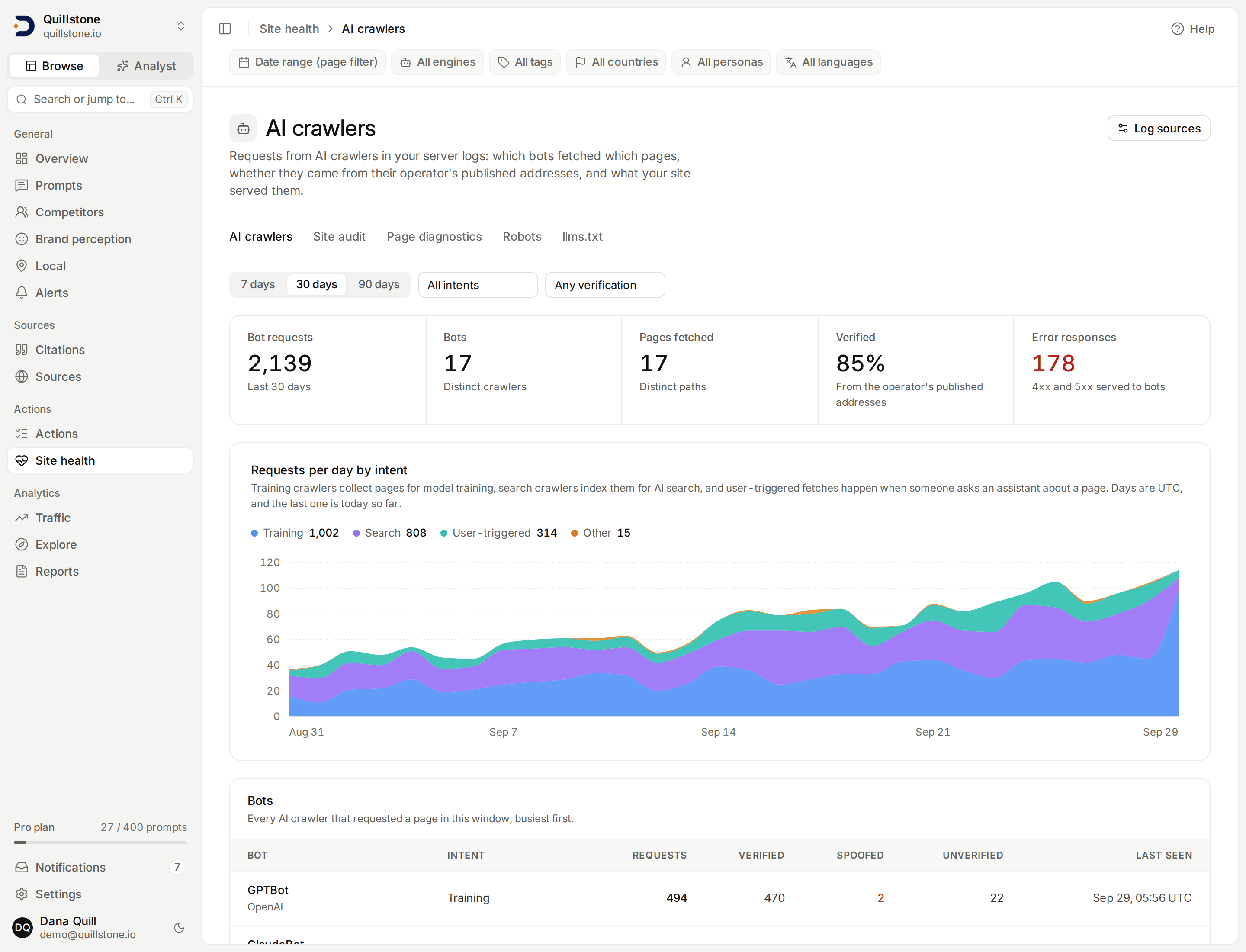
Robots diagnostics tells you what your robots.txt allows. AI crawlers shows what actually happened: which AI and search bots requested your pages, whether each request really came from the bot's operator, what your site served it, and which of the fetched pages AI answers cite. It reads your own server or CDN logs, which you send through a log source. Open it from the AI crawlers tab under Site health in the sidebar, or at app.discoveredby.ai/crawlers.
AI crawler analytics follows the project owner's plan; see
Pricing for which plans include it and how many bot requests
each stores a month. Every member of a project, viewers included, can read
the page. Owners and editors add, revoke and upload to log sources
(api/routers/crawler.py#_readable,
api/services/crawler/sources.py#require_crawler_analytics).
Nothing is collected until you connect a log source. With no source and no requests, the page says so and links to Crawler logs in Settings, where sources live.
Connect a log source
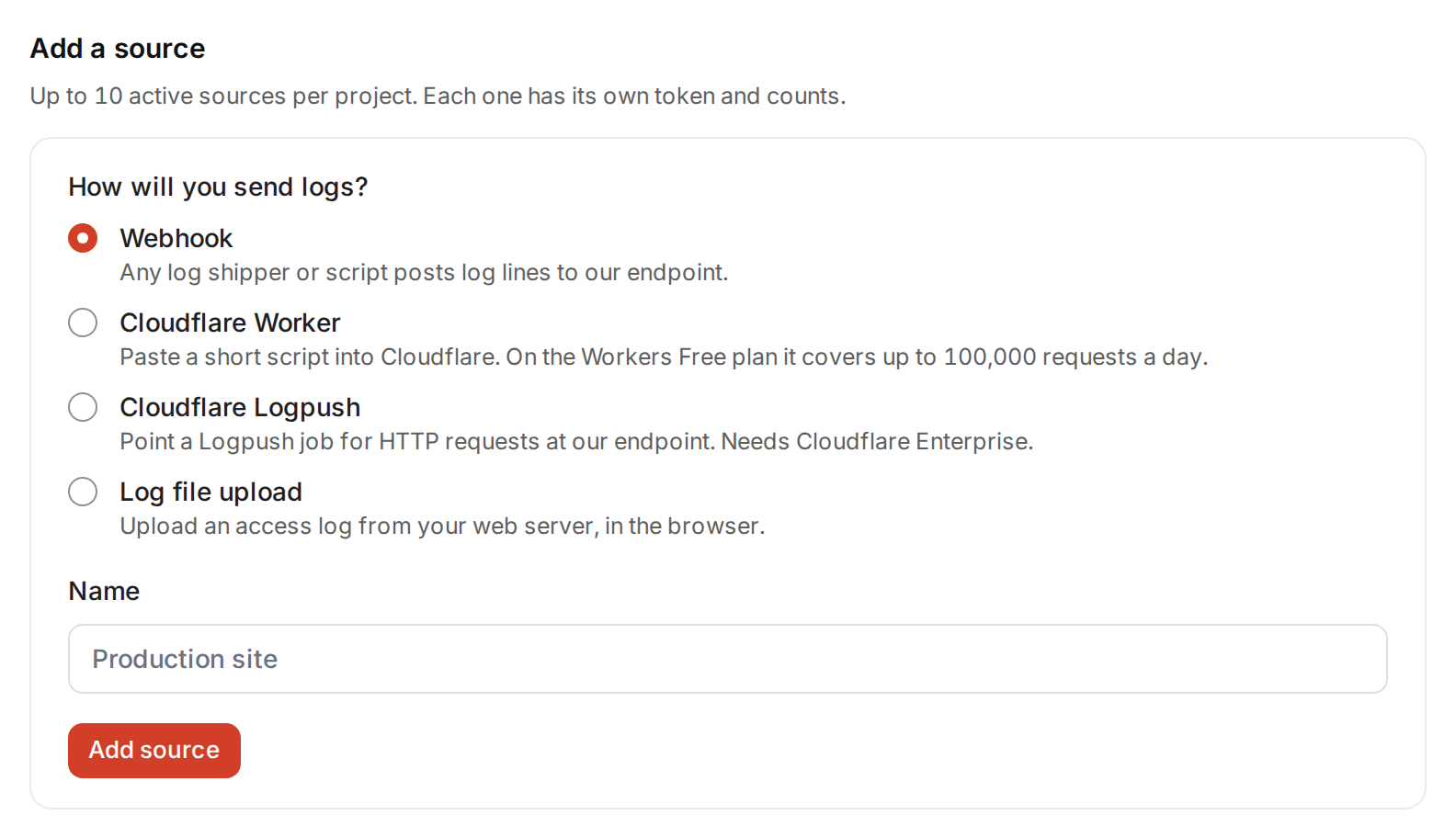
Open Settings, then Crawler logs, and choose how you will send
logs. A project can have 10 active sources at once; revoke one to add
another (api/services/crawler/sources.py#MAX_ACTIVE_SOURCES). Each
source has its own name and its own counts, so you can tell a CDN feed
from an uploaded file.
A webhook, Cloudflare Worker or Cloudflare Logpush source gets a token
that starts dbc_. It is shown once, when you add the source; only a
hash of it is stored, so it cannot be shown again. If you lose it, revoke
the source and add a new one (api/services/crawler/sources.py#create_source,
#token_hash, #TOKEN_PREFIX). Revoking stops the token at once; hits
it already delivered stay (api/services/crawler/sources.py#revoke_source).
Webhook
For any log shipper or script. POST your log lines to the endpoint the
panel shows (/crawler-ingest/v1 on the DiscoveredBy API) with the header
Authorization: Bearer followed by the token. The body is NDJSON: one JSON
object per line, plain or gzip-compressed. The panel gives an example line
and a ready curl command. The line format lists the
fields.
Cloudflare Worker
For a site behind Cloudflare, on any Cloudflare plan. The panel builds a
Worker script with your token and endpoint filled in, and three steps:
create a Worker and paste the script, add a route for your site (for
example yoursite.com/*) with its request limit failure mode set to
Fail open (proceed), then load your site once to check it still works.
The script fetches your page first and returns it to the visitor
unchanged. Only when the user agent names a bot on its list does it send
one line to DiscoveredBy, in the background; if that send fails, it is
dropped and the page is unaffected. Lines from people are never sent
(frontend/src/lib/crawler-worker.js#workerScript). The bot list is written
into the script when you add the source, so a bot added to the catalogue
later is only forwarded by a script from a newer source.
The Worker runs on every request to its route. On Cloudflare's Workers Free plan that is capped at 100,000 requests a day: past the cap, a route set to fail open serves your site without the Worker, so visitors are unaffected but those requests are not logged, while a route set to fail closed shows visitors a Cloudflare error. That is why the panel asks for Fail open.
Cloudflare Logpush
For Cloudflare customers whose plan includes Logpush for HTTP requests
(Cloudflare Enterprise). The panel shows a destination_conf value for an
HTTP destination, with the token carried as the Authorization header, and
the fields to include: EdgeStartTimestamp, ClientRequestUserAgent,
ClientIP, ClientRequestHost, ClientRequestPath, EdgeResponseStatus,
ClientRequestMethod and EdgeResponseBytes
(frontend/src/lib/crawler-worker.js#logpushDestination, #LOGPUSH_FIELDS).
Set the job's max_upload_records to 50,000 or fewer and
max_upload_bytes to 10,000,000 or fewer, so each batch stays inside
the endpoint's request limits. Logpush sends every request, not only bots; the lines from people
are counted as ignored and discarded (see Privacy). The
validation request Cloudflare sends when you create the job is accepted
and stores nothing (api/services/crawler/ingest.py#_is_validation_line).
Log file upload
For a web server access log you already have. An upload source has no
token: owners and editors upload in the browser, under Upload a log
file, choosing the source and the format: Combined Log Format or
NDJSON. Combined is nginx's default access log format. Apache's stock
configuration logs in Common Log Format instead, so point its CustomLog
at the predefined combined nickname before collecting the log you
upload. The browser sends the file in parts
of at most 4,000,000 bytes and shows progress and the running counts
(frontend/src/lib/crawler-upload.js#UPLOAD_PART_BYTES,
api/routers/crawler.py#upload_crawler_log). A part is refused only when a
single line in it is too long to fit; the page says how many parts were
refused and carries on with the rest. Anything else, such as a dropped
connection or a plan that lapsed mid-upload, stops the upload, and the
counts cover only the parts accepted before it stopped. While the page can
still upload to that source, it offers to resume from the part that
stopped it, with the same file, source and format chosen: that sends the
stopped part and the ones after it, not the parts already stored
(frontend/src/lib/crawler-upload.js#sendParts, #resumeUpload). If the
connection failed before any answer came back, the stopped part may have
been stored already, and the page says so.
Nothing removes duplicates: uploading a file again stores its lines again, so every request in it is counted twice, including against the monthly allowance. Resume a stopped upload rather than uploading the file again.
The format menu offers Combined Log Format, not Common Log Format: a
Common Log Format line has no user agent field, so no bot can be
recognised in it and every such line is counted as rejected. Use Combined
format, or NDJSON with a user_agent field
(api/services/crawler/parse.py#read_combined). A Combined line carries
no host, so the host check below does not apply to it
(api/services/crawler/parse.py#build_combined_hit).
The line format
Every connector except a Combined-format upload sends these fields as
NDJSON lines, and every line then goes through the same checks
(api/services/crawler/ingest.py#ingest_lines,
api/services/crawler/parse.py#_ALIASES). Cloudflare Logpush field names
are accepted wherever ours are.
| Field | Required | Cloudflare name | What it takes |
|---|---|---|---|
timestamp |
Yes | EdgeStartTimestamp |
ISO 8601 (UTC when it has no zone) or a Unix epoch in seconds, milliseconds, microseconds or nanoseconds |
user_agent |
Yes | ClientRequestUserAgent |
The request's user agent |
path |
Yes | ClientRequestPath or ClientRequestURI |
The path, or a full URL; the query and fragment are dropped and the result is cut at 2,048 characters |
status |
Yes | EdgeResponseStatus |
The HTTP status your site served, 100 to 599 |
host |
No | ClientRequestHost |
The host requested; checked against your project's domain |
ip |
No | ClientIP |
The client address, used only to verify the bot and never stored |
method |
No | ClientRequestMethod |
GET when absent |
bytes |
No | EdgeResponseBytes |
Response size |
(api/services/crawler/parse.py#build_ndjson_hit, #clean_path,
#_from_epoch, #MAX_PATH_LENGTH.)
A few more rules decide whether a line is kept:
- Time window. A request is accepted from midnight UTC 29 days before
today up to one hour after now. That lower bound is the oldest day whose
individual requests are all still kept, so a late line never lands on a
day whose individual requests are already being deleted
(
api/services/crawler/rollup.py#ingest_cutoff,api/services/crawler/ingest.py#MAX_FUTURE). - Host. When a line has a host, it must be your project's domain or a
subdomain of it; a port is ignored. This stops one site's logs being
counted for another project
(
api/services/crawler/ingest.py#_host_in_domain). - Line length. A line longer than 16,384 characters is rejected
(
api/services/crawler/parse.py#MAX_LINE_LENGTH).
Request limits
These apply to the webhook, Worker and Logpush endpoint
(api/routers/crawler_ingest.py#ingest,
api/services/crawler/sources.py#authenticate_ingest):
| Limit | Value | When it is exceeded |
|---|---|---|
| Body size on the wire | 10 MB | Refused with HTTP 413 |
| Body size after gzip is expanded | 50 MB | Refused with HTTP 413 |
| Lines in one request | 50,000 | Refused with HTTP 413 |
| Requests per source | 600 a minute | HTTP 429 with a Retry-After header |
| Content-Encoding | gzip or none | HTTP 415; a body that claims gzip but is not gzip gets HTTP 400 |
(api/routers/crawler_ingest.py#MAX_BODY_BYTES, #MAX_DECOMPRESSED_BYTES,
#MAX_LINES, #_gunzip,
api/services/crawler/sources.py#REQUESTS_PER_MINUTE.) An unknown or
revoked token gets HTTP 401, and a project whose owner's plan does not
include AI crawler analytics gets HTTP 403. A request with a valid token
counts against the per-minute budget even when it is then refused for its
encoding, its gzip or its line count. The Worker
sends one request per bot visit, so above about 10 bot requests a second
on one source some are dropped; a second source for another route
spreads the load.
A successful request answers with five counts, which also add up on the source's row in Settings:
- Received: every line, except blank lines and Cloudflare's validation line.
- Stored: requests from a catalogued bot that passed every check.
- Ignored: lines whose user agent names no catalogued bot.
- Rejected: lines that could not be read, lacked a required field, or failed the time window, host or length rule.
- Over limit: bot requests past the project's monthly allowance (see Monthly allowance).
Which bots are recognised
A line is matched to a bot when its user agent contains the bot's name,
ignoring case; the longest name is tried first, so OAI-SearchBot is not
mistaken for a shorter name it contains (api/services/crawler/catalogue.py#Catalogue,
alembic/versions/e01c9a7b3d52_crawler_analytics.py#BOTS). Each bot has an
intent: Training crawlers collect pages for model training, Search
crawlers index them for AI search, User-triggered fetches happen when
someone asks an assistant about a page, and Other covers the rest.
| Operator | Bots | Published ranges held |
|---|---|---|
| OpenAI | GPTBot (training), OAI-SearchBot (search), ChatGPT-User (user-triggered), OAI-AdsBot (other) | Yes |
| Anthropic | ClaudeBot (training), Claude-SearchBot (search), Claude-User (user-triggered) | Yes |
| Perplexity | PerplexityBot (search), Perplexity-User (user-triggered) | Yes |
| Googlebot (search), Google-Agent (user-triggered), Google-CloudVertexBot (other) | Yes | |
| Microsoft | Bingbot (search) | Yes |
| Apple | Applebot (search) | Yes |
| Common Crawl | CCBot (training) | Yes |
| DuckDuckGo | DuckAssistBot (search) | Yes |
| Mistral | MistralAI-User (user-triggered), MistralAI-Index (search) | Yes |
| Mistral | MistralAI-Training (training) | No |
| Meta | meta-externalagent (training), meta-externalfetcher (user-triggered), meta-webindexer (search) | No |
| ByteDance | Bytespider (training) | No |
| Amazon | Amazonbot (training), Amzn-SearchBot (search), Amzn-User (user-triggered) | No |
Verified, spoofed and unverified
A user agent is only a claim: anyone can send a request that says
"GPTBot". Each stored request is checked against the address ranges the
bot's operator publishes, then the address is dropped
(api/services/crawler/catalogue.py#_verdict):
- Verified: the request came from an address inside the operator's published ranges.
- Spoofed: we hold the operator's published ranges for the bot and the address is outside them. The request claims the bot but did not come from its operator.
- Unverified: the address could not be checked, for one of four reasons: the line carried no client address, the address was not a valid IP, we hold no published ranges for the bot, or the operator's ranges had not been loaded yet when the line arrived. The bots marked No above are the third case: Meta and ByteDance publish no address list for them, Mistral publishes none for MistralAI-Training, and Amazon publishes its crawler addresses as web pages rather than a machine-readable list, which is not read today. A request claiming to be one of these bots can never be shown as spoofed.
The published ranges are fetched again once a day. A failed or empty fetch
keeps the ranges from the last good fetch rather than emptying the list
(api/services/crawler/catalogue.py#refresh_ip_ranges). An IPv4 address
written in IPv6 form is checked as the IPv4 address.
Privacy
- Client IP addresses are never stored. An address is used only for
the verification check above, then dropped; no table holds one
(
api/models/crawler.py#CrawlerHit). - Visitors who are not bots are discarded. Only the user agent of each
line is read first. A line whose user agent names no catalogued bot is
counted as ignored, and nothing else about it is checked or kept
(
api/services/crawler/parse.py#read_ndjson). - What is kept for a bot request: which catalogued bot it was (not the full user agent string), the time, the path without its query, the status, the method, the size when sent, the verification result and the source it came through.
Retention
Individual requests are kept for 30 days. Daily totals per bot,
verification result, path and status are kept for 400 days
(api/services/crawler/rollup.py#RAW_RETENTION, #ROLLUP_RETENTION,
#prune). The daily totals are rebuilt every hour from the individual
requests (api/services/crawler/rollup.py#rollup_recent).
Monthly allowance
Each project can store a set number of bot requests per calendar month
(UTC); the number comes from the project owner's plan and is listed on
Pricing. A request counts toward the month in which we store
it, not the month in which it happened: a line dated in the previous
month that arrives after the month has turned counts toward the new
month. Once a project reaches its number, further bot requests that month
are counted as Over limit and not stored. Ignored and rejected lines
never count toward it. Requests arriving at the same moment take turns on
the month's count, so together they cannot go over it
(api/services/crawler/ingest.py#ingest_lines, #_reserve, #_month_start,
api/models/crawler.py#CrawlerMonthlyUsage,
api/services/entitlements.py#standard_entitlements,
api/schemas/entitlements.py#crawler_hits_monthly).
If the owner's plan stops including AI crawler analytics, the AI crawlers
page shows an upgrade message, the endpoint refuses new lines, and new
sources and uploads are refused. The list of sources stays visible, and
owners and editors can still revoke them, so a token can always be shut
off (api/routers/crawler.py#list_crawler_sources,
#revoke_crawler_source). Requests already stored are not deleted; they
age out on the retention schedule above.
Reading the page
Window and filters. Choose the last 7, 30 or 90 days (30 is the
default); each window ends with today so far, in UTC. Narrow it by intent
and by verification result. These are the page's own controls: the filter
bar's engine, tag, country, persona and language chips describe AI answers,
not server logs, and do not apply here
(api/routers/crawler.py#WINDOWS,
frontend/src/lib/crawlers.js#readCrawlerQuery).
Headline numbers (api/services/crawler/read.py#summary):
- Bot requests: stored requests in the window.
- Bots: how many different catalogued bots made them.
- Pages fetched: how many different paths they requested.
- Verified: the share of requests that were verified. With no requests
there is nothing to divide, so it reads "No data", never 0%
(
frontend/src/lib/crawlers.js#formatShare). - Error responses: requests your site answered with a 4xx or 5xx status.
Requests per day by intent stacks each UTC day's requests by the bot's
intent; the last day is today so far
(api/services/crawler/read.py#series).
Bots lists every bot with a request in the window, busiest first:
intent, requests, the verified, spoofed and unverified split, and when it
was last seen (api/services/crawler/read.py#bots).
Top pages lists the 100 paths bots requested most, with how many
different bots requested each, the status of the latest response and when
it was last fetched (api/services/crawler/read.py#TOP_PATHS).
Pages failing for bots lists paths whose latest response to a bot was
a 4xx or 5xx, most requested first, up to 100. It is not the same count as
Error responses above: a path that failed once and has since succeeded
adds to Error responses but is not listed here
(api/services/crawler/read.py#_path_rows).
Recent requests shows the 100 newest individual requests in the window:
time, bot, path, status and verification result
(api/services/crawler/read.py#recent, #RECENT_LIMIT).
Today and yesterday are read from the individual requests, so they are
current. Every earlier day is read from the daily totals, which the hourly
rebuild keeps up to date: a late request for an earlier day, such as one
in an uploaded log, shows in the headline numbers, the chart and the
tables after the next hourly rebuild. Recent requests lists the 100 newest
requests by the time they happened, so a late request appears there only
if it is among those 100. Each rebuild picks up every request stored since
the last rebuild that finished, so if rebuilds stop for a while, the next
one catches up on everything stored in the meantime. The one exception is
a request for the oldest day still accepted that arrives after that day's
last hourly rebuild (23:10 UTC): it waits for the daily clean-up at 04:10
UTC (api/services/crawler/read.py#_rows,
api/services/crawler/rollup.py#first_unrolled_day, #discovery_since,
#discovery_query, #rollup_recent, #prune).
In the 90-day window, the days older than the 30 days individual requests
are kept show no times, so a bot or path last seen then shows only the
date, a path's latest status on such a day is the highest status served
that day, and Recent requests shows few or none from them, because their
individual requests are being deleted (api/services/crawler/read.py#window,
frontend/src/lib/crawlers.js#lastSeenText).
What "Cited" means
A Cited mark on a Top pages row means that page was cited in this
project's AI answers in the same window: an answer collected on one of the
window's days cited a URL on your project's domain (any subdomain counts)
whose path matches this one. Paths are compared after the same clean-up
used everywhere else: no query string, no fragment, no trailing slash
(api/services/crawler/read.py#_cited_paths).
The citations are the ones the Citations page counts, which is every source recorded for an answer. For Claude, every search result it returned is recorded as a citation, so a Claude result its answer did not credit can still mark a page as Cited; see Retrieved vs cited. A crawler fetch next to a citation shows the two happened in the same window. It does not show that the fetch caused the citation.
Related
- Robots diagnostics: what your robots.txt declares for AI crawlers, beside what they actually requested here
- Site audit: what a crawler that runs no JavaScript sees on your pages
- Citations: the citations behind the Cited mark
- AI traffic: visits from people who arrived from an AI engine, from Google Analytics 4
- Plans and limits: how plan limits work
Last verified 2026-09-29