Optimize
To do
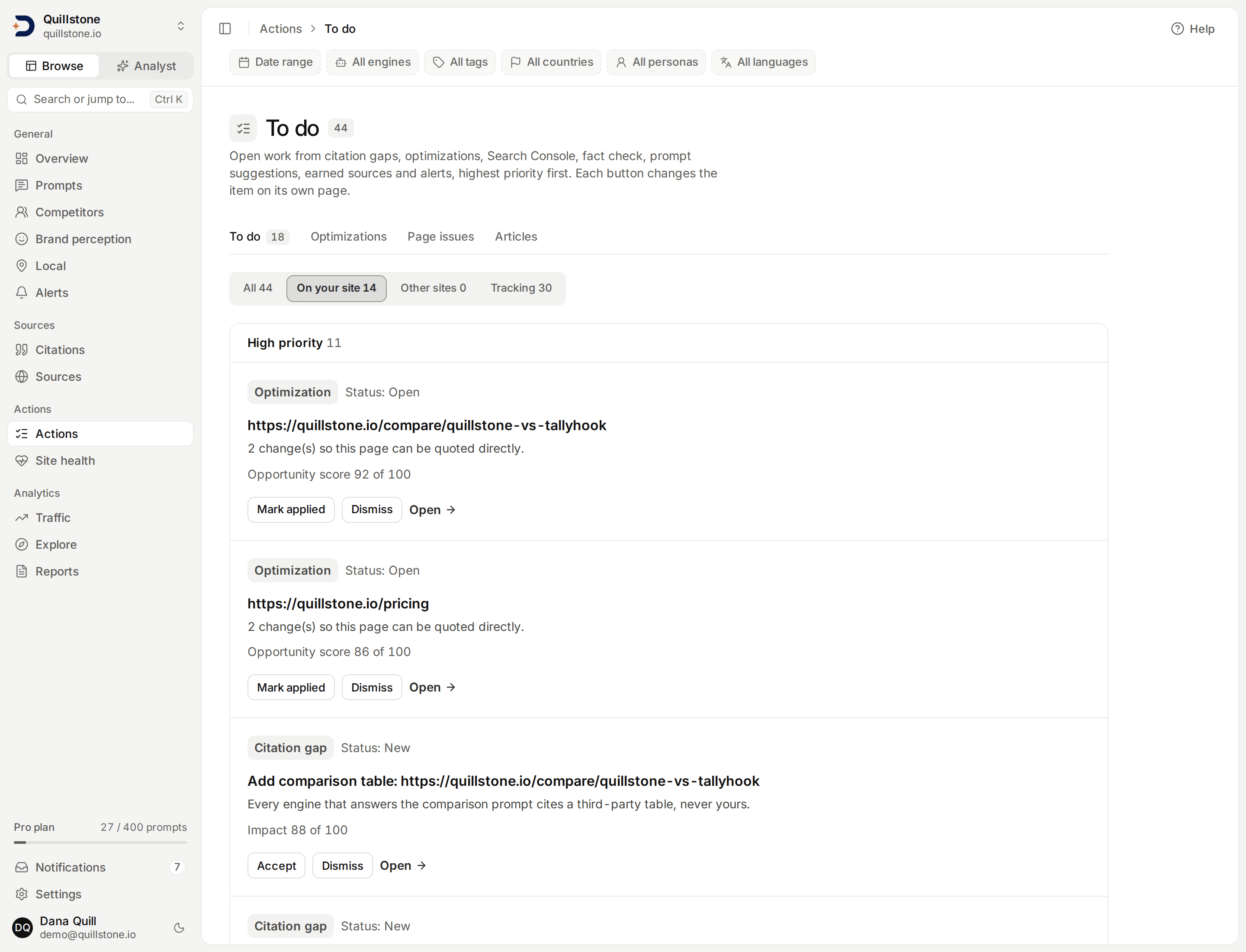
One list of open work from seven sources, banded by priority, where each button changes the record on its own page.
Open Actions → To do to see the open work from seven parts of the product
in one list, highest priority first. The list has no status of its own. Every
item is a record that already lives on its own page (a citation gap, an
optimization draft, an alert), and every button calls that page's existing
action, so acting here changes the same record you would change there
(api/services/actions.py#list_actions).
What appears
One item per open record, from these seven sources
(api/services/actions.py#_fact_contradictions, #_alerts,
#_optimizations, #_citation_gaps, #_search_console, #_earned_sources,
#_prompt_suggestions):
| Label | Listed while | Tab | Open goes to |
|---|---|---|---|
| Fact check | an engine's answer contradicts an active approved fact and nobody has reviewed the finding yet (api/services/fact_check/read.py#_open) |
Tracking | Fact check |
| Alert | the alert is open and not currently snoozed | Tracking | the alert's page |
| Optimization | its draft is open and its optimization is still open or recommended | On your site | Optimizations |
| Citation gap | the gap is new, accepted or in progress (#GAP_OPEN_STATUSES), unless an optimization stands in for it (below) |
On your site | the gap's page |
| Search Console | the Search Console opportunity is open | On your site | Prompts → Opportunities |
| Earned source | the prospect is new, accepted or in progress (#EARNED_OPEN_STATUSES) |
Other sites | the prospect's page |
| Prompt suggestion | the suggestion is pending | Tracking | Prompt suggestions |
Each item shows its label, a New chip when it qualifies, the source's own
status, a title, a detail line when the source has one, the reason for its
priority, and a result line
when the source recorded one. The result line is a citation gap's latest
outcome check, as a change in AI visibility in points since the change
(api/services/actions.py#_gap_result); an alert's change figure, formatted as
the Alerts page formats it (#alert_result); or the date an earned source was
reported placed. A result is a saved observation, not evidence that the change
caused it.
Two kinds of open record are left out on purpose. An alert of the fact contradiction kind is not listed, because the open fact check finding it announces is listed instead. An open alert that is currently snoozed (its snooze date is today or later) is left out too. Snoozing an alert on its own page also acknowledges it, and an acknowledged alert is no longer open, so it leaves the list either way.
The date, engine, tag, country, persona and language filters at the top of the panel do not change this list.
When a citation gap and an optimization overlap
An optimization is often built from a citation gap, and listing both would count the same work twice. A gap is hidden only when either:
- an optimization item for that gap is on the list, or
- the newest draft of one of that gap's optimizations was marked applied or dismissed, so you already acted on that fix.
In every other case the gap stays listed: for example when its optimization has no draft yet, or went stale while its newest draft was still open. This is narrower than Page issues, which shows every optimization, drafted or not, and so can group a gap under any optimization that was not dismissed.
Priority
Scores from different sources measure different things, so the list does not
add them up or compare them. Each item gets a band (High, Medium or Low) from
one rule per kind (api/services/actions.py#priority_for,
#band_for_score):
| Kind | High | Medium | Low |
|---|---|---|---|
| Fact check | always | ||
| Alert | a visibility drop or a competitor surge (#HIGH_ALERT_KINDS) |
every other alert kind | |
| Optimization | opportunity score of at least 70 | at least 40 | below 40, or no score yet |
| Citation gap | impact score of at least 70 | at least 40 | below 40, or no score yet |
| Search Console | at least 1,000 Google impressions in 28 days | at least 300 | fewer than 300, or none recorded |
| Earned source | accepted or in progress | new | |
| Prompt suggestion | opportunity score of at least 70 | below 70, or not scored |
The reason line under each item states the input. With illustrative figures, it reads like "Opportunity score 92 of 100" (an optimization), "Impact 88 of 100" (a citation gap), "1,240 Google impressions in 28 days, position 3.4, AI visibility 12%", "Status: new" or "Not scored".
Items are grouped by band, High first. Inside a band they are ordered by kind
(#KIND_ORDER): fact check, alerts, optimizations, citation gaps, Search
Console, earned sources, prompt suggestions. Inside a kind, by score from high
to low: opportunity score for optimizations (the score Optimizations shows
out of 100, not its high, medium or low impact label), impact score for
gaps, impressions for Search
Console, opportunity score for prompt suggestions. An item with no score sorts
as zero. Ties go to the newest item first (api/services/actions.py#_sort_key).
Tabs, counts and the 200-item cap
The tabs split the list by where the work happens
(frontend/src/lib/actions.js#SIDE_TABS, #filterBySide):
- On your site: optimizations, citation gaps and Search Console items.
- Other sites: earned sources.
- Tracking: prompt suggestions, plus fact check findings and alerts.
- All: everything.
The page loads the list once and switches tabs in your browser. The server
sends at most the first 200 items in the order above
(api/services/actions.py#DEFAULT_LIMIT). The count beside the title and the
count on every tab are taken over every open item, before that cap
(api/schemas/actions.py#ActionCounts, frontend/src/lib/actions.js#sideCount).
When items were cut off, the page says how many of the total it shows, and
that a tab can list fewer rows than its count
(frontend/src/routes/(app)/actions/+page.svelte#capped). Work through the
top of the list, or open a source page for the rest.
In the row of Actions tabs (To do, Optimizations, Page issues and Articles),
the To do tab shows the number of open High-priority items, counted over
every open item before the cap, and shows no number when there are none or
the list could not be loaded
(frontend/src/lib/server/actions-badge.js#loadActionsBadge,
frontend/src/lib/actions.js#highCount).
What the buttons do
Every button calls the same endpoint the source page uses for that action.
When you click one, the app first loads your list again and only sends the
request if that exact button is still listed; if the item changed
or closed in the meantime, you get a message asking you to reload
(frontend/src/lib/actions.js#findAction). After a successful click the list
reloads and a closed item drops off.
- Optimization: Mark applied and Dismiss do what they do on
Optimizations
(
api/routers/optimizations.py#apply_optimization_recommendation,#dismiss_optimization_recommendation). - Citation gap: a new gap offers Accept and Dismiss; an accepted or
in-progress gap offers Mark implemented. Accepting keeps the gap on the
list, now with Mark implemented, and does everything Accept does on
Citation gaps, including the candidate
article brief (
api/routers/citation_gaps.py#accept_citation_gap). Dismiss exists only for a new gap. When the page a gap was matched to has changed since its analysis, Accept and Mark implemented are not offered, because the gap's own page refuses them until the analysis is refreshed. - Search Console: Dismiss only. A dismissal holds for 28 days
(
api/services/integrations/google/reconciliation.py#DISMISS_HOLD_DAYS): while it is newer than that, the Search Console check does not open a new item for the same tracked prompt and page (#_existing_dedupe_keys). After 28 days it can come back if the pair still qualifies. - Prompt suggestion: Accept sends the same request as Track on
Prompt suggestions, and
Dismiss the same as its Dismiss. Neither page asks for countries: the
prompt is tracked in the suggestion's own country when the project covers
it, and otherwise in every country the project covers
(
api/services/prompt_discovery.py#_resolve_accept_countries). It uses prompt slots the same way on both pages. - Alert: Acknowledge and Dismiss set the alert's status and keep its note and its snooze as they are. To snooze or write a note, open the alert (React to an alert).
- Fact check and Earned source: no buttons, only Open. A fact check review has several outcomes that the Fact check page explains, and an earned source is updated through the full form on its own page (Earned sources).
Who can act
Every member of the project can open To do and read the whole list
(api/routers/actions.py#read_actions). Only owners and editors see the
buttons; a viewer sees the same items with Open links and a notice
explaining why the buttons are missing
(frontend/src/lib/permissions.js#canWrite,
frontend/src/routes/(app)/actions/+page.svelte#writable). Each source's own
action checks the role again, so a viewer cannot act by other means. The page
has no plan gate of its own: it lists the open records the project's sources
already hold. See Team for the roles.
What "New" means
The New chip marks an item created in the last 7 days
(api/services/actions.py#NEW_WINDOW). For an optimization that is when its
draft was created, not when the optimization was first found.
What is not on this list
These are not on To do; they have their own pages:
- Page issues: the same gaps and optimizations grouped by page, plus saved page diagnostics and the newest site audit's findings, none of which appear on To do.
- Site health: Site audit, Page diagnostics, Robots and the llms.txt Advisor.
- Growth Advisor: a written briefing, not a list of items.
- Articles and Prompt coverage keep their own queues.
Related
- Citation gaps: the evidence behind a gap.
- Optimizations: review, hand off and measure a fix.
- Page issues: the same work, grouped by page.
- Alerts: what each alert kind means.
- Fact check: how a contradiction is found and reviewed.
Last verified 2026-09-29