Optimize
Optimizations
Page fixes with saved source evidence, bulk handoff review, Markdown/PDF task packets and observations after implementation.
To prioritize work across known owned pages, start with the Page issue queue. It links each page to its saved evidence and existing action workflow.
What this is for
Citation gaps tells you which pages are losing a prompt to a competitor and why. Optimizations picks up from there: for a gap with a page of yours behind it, it reads the pages AI engines are actually citing instead of yours, works out the specific thing they have that yours does not, and writes a draft for that one page, grounded in at least one real quote taken from the page it is based on, not an invented one. Ask an engine "what's the best invoice software for a small agency?" and it answers from a handful of pages it trusts; a generic on-page checklist (title tags, word count, keyword density) has nothing to say about why one of those pages got picked and yours did not. Optimizations names the specific fix that page cluster is actually rewarding.
What an optimization is
An optimization is a diagnosis, not an edit. DiscoveredBy reads your page
and its cited competitors and decides what your page is missing: an FAQ
block, a comparison table, a statistic, structured data, a fresher date, a
clearer heading. What actually gets checked is narrower than the resulting
draft. A proposed change survives only if at least one of its cited
evidence quotes is a real phrase, at least sixteen characters, that
appears in the scraped text of the source page it claims to come from once
case and extra whitespace are ignored; a change with no such quote is
dropped before you ever see it
(api/services/optimization/service.py#_verified_quotes,
_verified_changes). That check covers the evidence, not the draft body:
the Markdown, HTML, or JSON-LD text you would actually paste in is never
itself compared against a source, so read a draft as a starting point to
check, not as text already verified word for word. The quote behind a
change is included in its downloadable task packet; the inline draft shows
the change itself. A
regulated topic (medical, legal, financial, security) gets a review flag;
the flag does not change the wording of the draft. You read the draft,
decide whether to use it, and paste it into your own page yourself, on
your own schedule; nothing here reaches your site without you putting it
there.
What you see
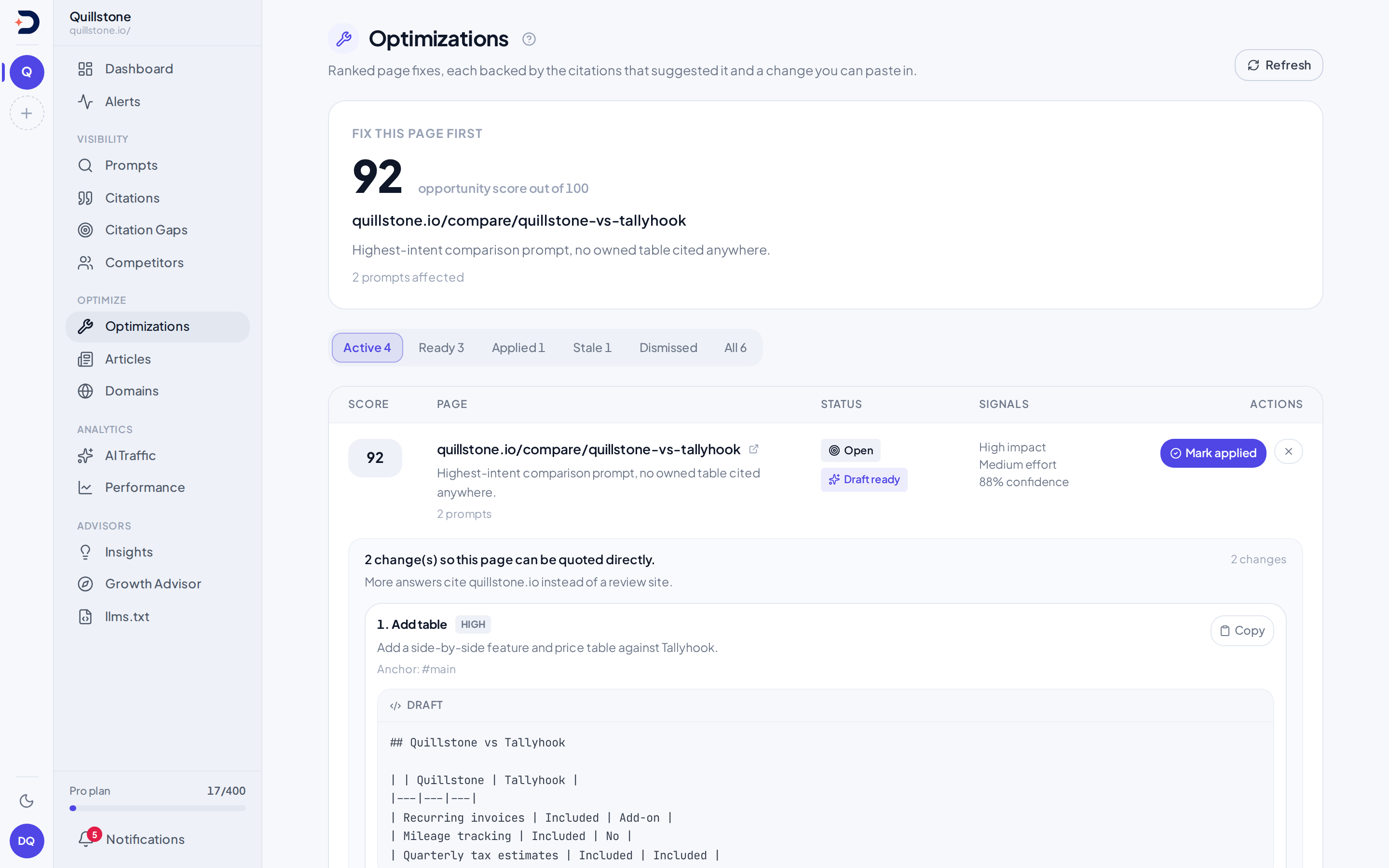
Optimizations opens on the single highest-scoring page still waiting on a fix, its opportunity score, and a "Write the fix" button if nothing has been drafted for it yet. When a target or a required source page has not been scraped yet, a banner says so instead of showing a draft. Filter tabs split the rest into active, ready (a draft exists and nothing has happened to it yet), applied, stale, dismissed, and all. Each row shows the opportunity score, the page, its status, three signals (expected impact, implementation effort, confidence), and whichever of Generate, Mark applied, Measure, or Dismiss applies to it. A drafted recommendation renders inline under its row: each proposed change shows its kind, priority, a review flag on anything regulated, the rationale, the anchor it targets on your page, and a copy button over the draft text. Only one draft format ever shows per change: Markdown first if the writer produced it, then plain replacement text, then HTML, then a stringified JSON-LD block, in that order, even when more than one exists underneath.
Hand off a fix
Choose Export task packet beside a recommendation to download one Markdown file for your implementer, or choose Download PDF task packet for a paginated PDF. It includes the target page, recorded recommendation status and update time, target-page content hash when saved, summary, a review checklist, and each change in priority order. All saved draft formats are included: replacement text, Markdown, HTML and JSON-LD. Each change also carries its anchor, rationale, estimated effort, risk and additional human-review flag, plus the saved source URL and quote when available. Text is fenced so that a draft's HTML or Markdown is shown as content to review.
Owners, editors and viewers can download when the project owner's data-export
entitlement is enabled, normally on Starter and above. The request checks
access again and writes an export receipt to Activity, without copying drafts
or quotes into that receipt. Each source packet covers at most 100 changes and 1 MiB; PDF output is additionally limited to 250 pages and 8 MiB. Unsupported PDF font characters appear as explicit [U+XXXX] codepoints; use Markdown for the original Unicode text.
An oversized packet is refused instead of silently cutting off implementation
details (api/routers/optimizations.py#download_task_packet,
api/services/optimization/handoff.py#task_packet).
Download, review, and attach or paste the packet into your own task tool. The download does not approve a draft, change its status, mark it applied, publish to a CMS, or send it to Linear or another service. Stale or dismissed records are reference material only. A packet is a copy at download time and does not refresh as the recommendation changes. Check the current recommendation and page before implementation; saved quotes are not a fresh check of the sources. The checklist starts unchecked even for an applied recommendation, so it is not a record of previously completed work. After implementing and verifying the edit yourself, return here to mark the recommendation applied.
Approve drafts for handoff
Owners and editors can select up to 25 open drafts on the Optimizations screen, review their content and flags, check the confirmation, and choose Approve selected for handoff. Approval records a separate review; it does not mark edits applied, publish anything or start outcome measurement. Use Clear selected approvals to withdraw the review.
The batch succeeds together or changes nothing. Removed access, a draft that
changed since the page loaded, an ineligible project, or a stale/dismissed
parent prevents approval. Approval is bound to the saved draft content; edited
content no longer carries a current approval. Both downloaded formats disclose
the recorded review state. After implementing and checking the published page,
use the existing Mark applied action
(api/services/optimization/review.py#review, #fingerprint).
How it works
Every optimization starts as a citation gap opportunity
(Citation gaps) with a page of yours
identified as the one that should be winning the prompt. A gap with no page
of yours behind it never becomes an optimization at all
(api/services/optimization/service.py#_upsert_opportunity_from_gap). The
fix for that gap is a page that does not exist yet, which is what
Articles is for. Scoring it here
weighs the gap's own impact score most heavily, adds a bonus for the extra
prompts the same fix would help, capped at five extra prompts (the "N
prompts affected" line), adds for how far under your visibility is, how
commercial the prompt looks, how consistent the evidence pattern is, and
the opportunity's own confidence value (see "What the numbers mean" below
for what feeds it), then subtracts a penalty for a harder fix
(api/services/optimization/service.py#_opportunity_score). This feature
is not on every plan, and how many opportunities a run works through is
bounded by your plan too; see Pricing for what each plan
includes (score_optimization_opportunities_for_project). On a plan that includes it, the weekly
on-page optimization run scores your project's opportunities and then
drafts only for the ones with no live recommendation already behind them,
without you pressing anything
(api/tasks.py#_run_optimization_batch_for_project,
api/services/optimization/service.py#opportunity_ids_needing_recommendation).
A recommendation counts as live, and holds the run off that opportunity, in exactly two cases:
- It is open: a draft you have neither applied nor dismissed.
Generating would reuse that same row in place, replacing its changes
and resetting its status and outcome
(
api/services/optimization/service.py#_open_recommendation_for_opportunity), so a draft you had read and were about to paste in would be gone with no notice. - It is applied and still inside its measurement window, which runs
for the same 30 days a firm verdict waits for
(
api/services/optimization/service.py#MEASUREMENT_WINDOW_DAYS,#still_measuring_clause). Generating does not reuse an applied row, it inserts a second one, so the applied record, its outcome and its Measure button would drop out of view before the verdict they exist for could be read.
The other two statuses a recommendation can hold never block a run. Stale exists precisely so a draft written against a page that has since changed gets rebuilt, and dismissed means you asked for something else, not for the opportunity to go quiet. An applied recommendation whose 30 days have elapsed does not block one either. Nothing here is silenced for good: an opportunity the run skipped comes back the moment you decide on its draft or the measurement window closes.
The screen orders the same way. Where an opportunity has more than one
recommendation, the row shows an applied one still inside its measurement
window if there is one, and otherwise the most recent recommendation that
has not been dismissed
(api/routers/optimizations.py#_latest_recommendation). Once the window
closes the newest row wins again, so a long-settled applied record does
not sit on top of current work. Dismissing a draft with the X on its row
still marks only that one draft dismissed
(api/services/optimization/service.py#mark_recommendation_dismissed).
The "Refresh" button on the screen re-scores on demand, under the same
plan bound, but leaves drafting to you, one "Write the fix" click at a
time (api/routers/optimizations.py#refresh_project_optimizations).
A draft cannot be written until DiscoveredBy has actually read the pages
involved. Your own target page has to be scraped first, and so do at least
the top few cited source pages behind the opportunity: two of them by
default, or all of them if fewer than two exist
(api/services/optimization/service.py#_REQUIRED_SOURCE_PAGES, drawn from
up to five cited URLs kept per opportunity,
api/services/optimization/service.py#_SOURCE_URL_LIMIT). When a required
page has not been fetched yet, nothing gets written this run: the missing
pages are queued for the scraper instead, and the next run, weekly or your
next manual "Write the fix", tries again once they are in.
The writer's own output can also fail outright, or produce nothing that
verifies. Either way, a fallback writes one change instead: it takes a
real sentence, verbatim, from the top source page and puts it in that
change's evidence, but the drafted text itself is a fixed template naming
the source and telling you what to cover, not page content you can paste
as written
(api/services/optimization/service.py#_fallback_recommendation_payload,
_fallback_markdown). If nothing can be grounded even that way, the run
produces no recommendation at all rather than an unverified one.
You mark a fix applied yourself; doing so records the trailing month of
visibility for its prompts, and immediately shows the outcome as "pending
more data"
(api/services/optimization/service.py#mark_recommendation_applied). If
those prompts have no completed answers in that month, the figure recorded
when the recommendation was generated is kept instead of a zero.
"Measure" later compares your current visibility for those same prompts
against a baseline it measures again at every check, from those prompts'
answers in the 30 days before the day you marked it applied, never from a
stored figure, and writes one of four labels
(measure_optimization_outcome, _classify_outcome,
api/services/outcome_engines.py#measure_outcome). With no answers in
those 30 days there is no baseline, and the outcome stays "pending more
data". Your click is no
longer the only thing that can run that comparison. A fan-out job selects
every applied recommendation whose first checkpoint is now reachable and
whose verdict is still unsettled, meaning its outcome is either empty or
reads "pending more data", and queues the same measurement for each one
(api/services/optimization/service.py#recommendation_ids_due_for_measurement,
api/tasks.py#_enqueue_optimization_outcomes,
api/cli.py#cmd_enqueue_optimization_outcomes). A row whose prompts have
answers drops out of that selection by itself, because from the month mark
the verdict is always firm. A row whose prompts have no answers since it
was applied (for example because they were paused) stays "pending more
data" and is checked again every day until answers arrive. That job and the daily schedule written for it,
discoveredby-cli@enqueue-optimization-outcomes.timer, were added to the
codebase in the same change; a schedule only starts firing once a
deployment installs it, so pressing Measure yourself is still the step
that always works.
One more transition here happens without you: if your target page's
content changes after a draft was written, the next day's stale check catches it
and flips the recommendation to stale
(api/services/optimization/service.py#mark_stale_optimizations), on a
real daily timer (discoveredby-cli@mark-stale-optimizations.timer).
A stale draft is one written against a page that has since moved on; the
next weekly run reopens it with a fresh draft.
What the numbers mean
Opportunity score, out of 100, ranks pages against each other for this
project; read it as a relative order, not a percentage of anything.
"Opportunity score" also names a different figure on
Articles, which orders topics rather than pages
(api/routers/articles.py#list_article_topics): the two are separate
numbers that happen to share a name, so a figure here does not translate
into one there. The
confidence shown on a row belongs to the opportunity, not to any one
proposed change: it blends the citation gap's own confidence label, how
much evidence and how many source pages back the pattern, and the gap's
impact score
(api/services/optimization/service.py#_upsert_opportunity_from_gap).
Effort (low, medium, high) is a fixed estimate per fix type, not a
measurement of your specific page.
Outcome starts as "pending more data" the moment you mark a fix applied,
and stays there until you check it. Under a week since applying, checking
it always reads "pending more data" again: too little has run since to say
anything. From a week to a month, it stays "pending" unless your
visibility has already jumped by ten points or more, in which case it
reads "positive" early. At the month mark, "positive" needs five points or
more, "negative" needs five points or more the other way, and anything
smaller than that either way reads "neutral", meaning nothing definitive
happened yet, not necessarily that the fix failed. All of this needs
answers: with no completed answers for the fix's prompts in the period
measured, the check records no score and the outcome stays "pending more
data" at any age, rather than reading as a drop. Both sides are measured
over the engines that ran on the fix's prompts (an answer, or a Google run
that showed no AI answer) on at least 80% of the days those prompts have
any answer, in both the month before the day you marked it applied and the
period measured (api/services/collection_health.py#WINDOW_PRESENCE_MIN_PERCENT), so prompts created a few days before
applying still compare: when some engine that answered was not measured in
both (one started or stopped answering, as an app engine such as ChatGPT
(app) or Gemini (app) does in the window it is added), only the engines measured in both count; with no
engine measured in both, the check has no data
(api/services/outcome_engines.py#shared_outcome_engines,
api/services/optimization/service.py#measure_optimization_outcome,
#_OUTCOME_MIN_DAYS,
_OUTCOME_FIRM_DAYS, _OUTCOME_POSITIVE_DELTA, _OUTCOME_NEGATIVE_DELTA,
_OUTCOME_STRONG_DELTA). For how to read a change against a baseline in
general, see
How to read any number here.
If a page you expected to see cited still is not, start with
Troubleshooting: No citations yet.
Related
- Citation gaps: where an optimization opportunity comes from, and how it is scored before this page ever sees it
- Articles: the other route from a citation gap, for when the page that should win the prompt does not exist yet
- Domains: what an owned page is, including the prompt mapping the page an optimization targets can come from
- Metrics defined: the citation concept behind the visibility numbers compared here
- Troubleshooting: No citations yet: what to check before expecting a fix to change anything
- Pricing: which plans include on-page optimization
Last verified 2026-09-28