Visibility
Prompt coverage
Which running prompts you could pause while everything they see regularly, the sources their answers cite and the brands they name, is still seen by a prompt you keep: the last 28 days of answers, protections for prompts other work depends on, a preview of any selection, and pausing it from the same screen.
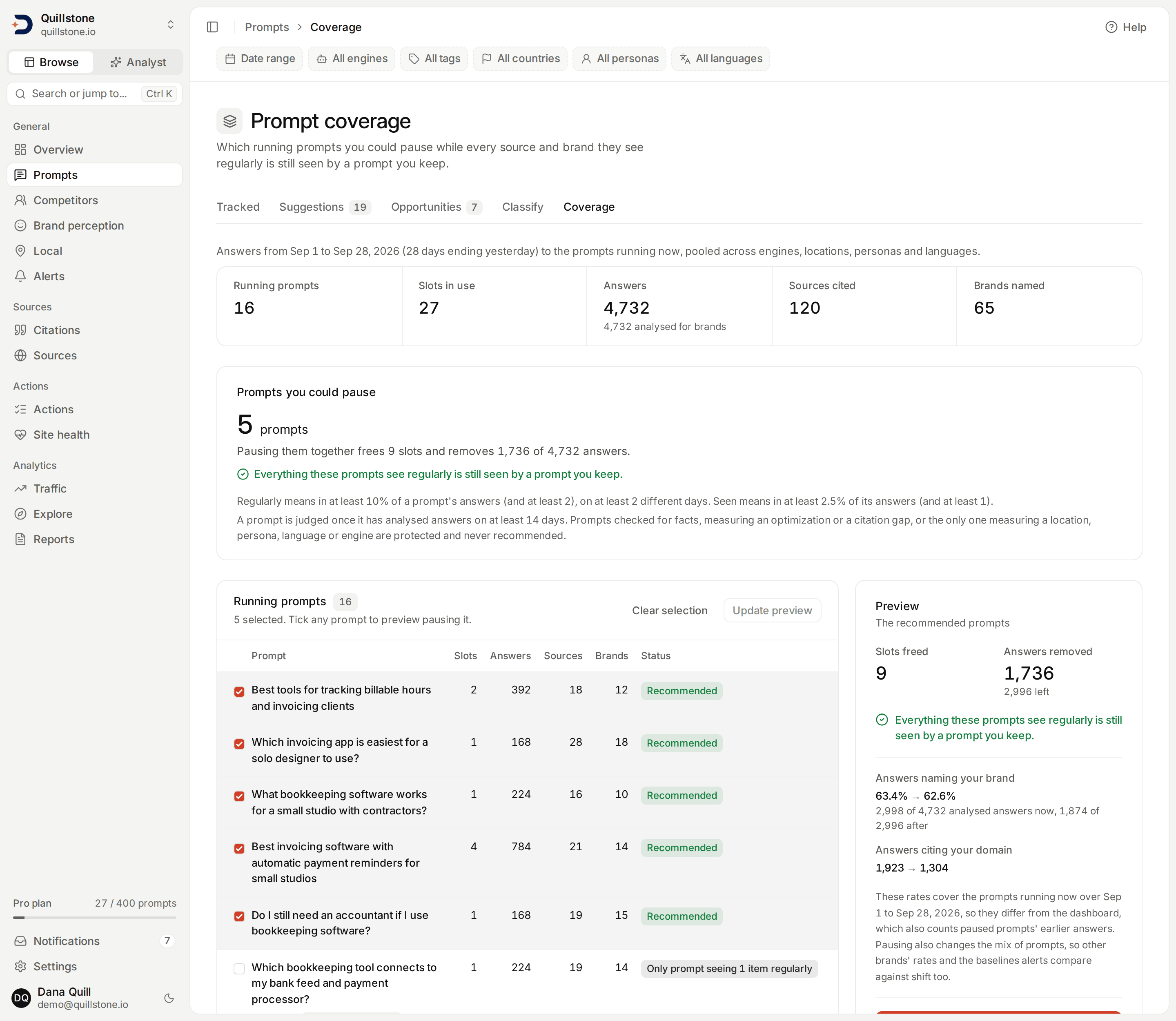
The screenshot shows the Prompt coverage screen for the Quillstone demo project on development data, with nothing paused. The recommended prompts are ticked, as they are when the page opens, and the preview beside them describes that set; the protected prompts sit further down the table, below the part shown. The demo's answer history is generated, so its counts and statuses illustrate the layout rather than what a real project will show.
What this screen shows
Open Prompt coverage from
the Coverage tab under Prompts in the sidebar, after Classify
(frontend/src/lib/nav.js#HUBS). It answers one question: which of the
prompts you run now could you pause while everything they see regularly
is still seen by a prompt you keep? Every number on it is computed when
you open the page, from answers already stored. Computing it calls no AI
model and stores nothing; only a pause you confirm changes anything
(api/routers/prompt_coverage.py#read_coverage,
api/services/prompt_coverage.py#load_coverage, #coverage_view).
At the top, one line names the window, and totals follow: running prompts, slots in use, answers (with how many are analysed for brands), sources cited and brands named. Below them, Prompts you could pause gives the recommended set, if there is one: how many prompts, the slots pausing them together frees, and the answers it removes. Then comes a table of every running prompt with its status, and a Preview of what pausing the selected prompts would change.
The filter bar's chips do not apply here: the window is fixed, and every
engine, location, persona and language is pooled
(frontend/src/lib/nav.js#HUBS).
Which answers count
A prompt is running when it is active and has at least one active
variant (a country or city, audience and language combination). Only
running prompts appear; a paused prompt uses no slots, so there is nothing
to decide about it here (api/services/prompt_coverage.py#load_coverage).
The answers are the completed answers from the 28 days ending yesterday,
both ends included, whose prompt and variant are both active now
(api/services/prompt_coverage.py#WINDOW_DAYS, #population_query,
api/services/explorer/query.py#resolve_window,
api/services/execution_reads.py#completed_execution_scope). Failed runs
do not count, and neither do the earlier answers of a prompt or a variant
you have paused, because coverage is about what keeps running.
Slots in use counts the active variants of this project's running
prompts. The plan limit counts the active variants of every active project
the project's owner owns, so the billing figure can be higher
(api/services/limits.py#get_active_prompt_slot_count).
What counts as coverage
Coverage is made of two kinds of item: the sources a prompt's answers cite and the brands they name.
- Sources: every domain cited in a counted answer, taken from the raw
citation rows, the same rows the Sources screens count. Each is marked
as your domain, a competitor's (an active tracked competitor's domain)
or other (
api/services/prompt_coverage.py#_load_sources,api/services/execution_reads.py#project_citations). - Brands: read only from analysed answers, the ones whose brand
mentions have been extracted. Your own brand is one item. A tracked
competitor is one item for its whole family, so a sub-brand counts as
its top-level brand, and only while that brand is an active tracked
competitor: a mention recorded against a paused or removed competitor
is not an item. Answers collected after a competitor is removed name it
as an untracked brand, so a removed competitor can come back as an
untracked item. An untracked brand is one item per name, ignoring
capitalisation, and only for names that pass the same exclusions as the
list of untracked brands on Competitors
(
api/services/prompt_coverage.py#brand_counts_query,#_load_brands,api/services/untracked_brands.py#untracked_conditions,api/services/brand_mentions.py#sync_brand_entities_for_project).
An untracked brand is labelled with the spelling found in the most
analysed answers in the window; on a tie, the spelling that sorts first by
character code wins, so a capitalised spelling comes before a lower-case
one (api/services/prompt_coverage.py#_load_brands). The Competitors
screen picks the spelling it shows by its own rule, so the two screens can
show the same brand with different capitalisation
(api/routers/untracked_brands.py#_query_untracked).
A prompt's Sources and Brands columns, and the totals, count every distinct item its answers named at least once.
Regular and seen
Real answers carry a long tail of domains and brands that turn up once or
twice and never again. If a single mention counted, almost every prompt
would be the only one seeing something, and nothing could ever be
recommended. So the page judges items against two bars, measured per
prompt over the window
(api/services/prompt_coverage.py#regular_bar, #seen_bar,
#regular_items, #seen_items):
- An item is regular for a prompt when it appears in at least 10% of that prompt's answers (and in at least 2 of them), on at least 2 different days.
- An item is seen by a prompt when it appears in at least 2.5% of that prompt's answers (and in at least 1).
For a source, the percentage is of the prompt's answers; for a brand, of
its analysed answers (api/services/prompt_coverage.py#_base). With 140
answers, for example, regular means at least 14 of them and seen means at
least 4. The two bars are deliberately far apart, so two prompts that draw
on the same sources and brands cover each other even though each sample
differs from day to day (api/services/prompt_coverage.py#REGULAR_SHARE,
#REGULAR_MIN_ANSWERS, #REGULAR_MIN_DAYS, #SEEN_SHARE,
#SEEN_MIN_ANSWERS).
The Prompts you could pause card states both bars, taken from the
same constants (frontend/src/lib/prompt-coverage.js#thresholdsText).
An item is only here for a prompt when it is regular for that prompt
and no other running prompt has seen it, whether or not that other prompt
is judged or protected. The row lists up to five of them, most observed
first, then "+N" for the rest (api/services/prompt_coverage.py#recommend,
#coverage_view, #UNIQUE_SHOWN).
When a prompt is judged
A prompt is judged only when it has analysed answers on at least 14
different days in the window, half of it. Until then its status reads
not enough answers yet, and it is never recommended. This also keeps a
prompt you have just added from being the first one offered for pausing.
An unjudged prompt keeps running, so what it sees still counts when the
page decides which other prompts could be paused
(api/services/prompt_coverage.py#MIN_DAYS, #recommend).
Protected prompts
Some prompts are never recommended, whatever they see, because something
else depends on their answers. Each reads Protected, with the reason
underneath (api/services/prompt_coverage.py#load_protected,
#last_dimension_protections, #all_protections,
frontend/src/lib/prompt-coverage.js#reasonText):
- Checked for facts: a prompt chosen on Fact check for checking its answers.
- Measuring an optimization: a prompt named by an optimization that is still open, or that you marked applied and whose outcome is not settled yet (none yet, or pending more data).
- Citation gap in progress: a prompt linked to a
citation gap opportunity that is
accepted, in progress, implemented or monitoring
(
api/services/prompt_coverage.py#GAP_MEASURED_STATUSES). - The last prompt measuring something: the only running prompt for a
country tracked country-wide, a city, a persona (General counts as
one), a language (As written counts as one), or an engine it runs (a
prompt with no engine choice runs every engine on the plan). A prompt
runs Google AI Overviews, Google AI Mode, ChatGPT (app) or Gemini (app)
only through the variants that run there, so a prompt whose variants are all persona
audiences, for example, does not count as running any of them, and one
tracked only in cities does not count as running ChatGPT (app)
(
api/services/collection.py#target_runs_on). Pausing it would stop measuring that value at all, so the reason names the value, for example "Only prompt measuring London, GB", "Only prompt running Grok" or "Only prompt in French" (api/services/prompt_coverage.py#_load_dimensions).
A protected prompt that is not judged yet reads Protected.
How the recommendation is chosen
The candidates are the running prompts that are judged, not protected and have nothing only they see. They are taken in a fixed order: the prompt with the fewest regular items first, then the one with the most slots, then the lowest id. A candidate is recommended when:
- every item regular for it is still seen by another prompt that has not already been recommended;
- every item regular for an already recommended prompt that this candidate sees is still seen by another such prompt; and
- every country, city, persona, language and engine it measures is still measured by another such prompt.
Recommending it takes it out of those counts for the next candidate
(api/services/prompt_coverage.py#recommend).
The result is a set you can pause together: everything these prompts see regularly is still seen by a prompt you keep, and no country, city, persona, language or engine loses its last running prompt. The card states the first half in those words, and when the recommended set also sees sources or brands only occasionally that no prompt left running sees, it says how many would no longer be seen. That is why two prompts that only see what each other sees are never both recommended.
Every row gets one status:
- Recommended: in the set above.
- Only prompt seeing N items regularly: it has items only it sees.
- Overlaps a recommended prompt: a candidate left out because a recommended prompt was the other one seeing one of its items, or the other one measuring one of its values. It links to the first such prompt in the order above.
- Protected and not enough answers yet, as described earlier.
The table lists the recommended prompts first, in that order, then the
others by status, then by answers
(frontend/src/lib/prompt-coverage.js#sortRows). When nothing is
recommended, the card says so, and the Status column shows why for each
prompt.
Previewing a selection
The preview starts with the recommended set selected. Tick or untick any
running prompt to preview that selection instead. A preview takes 1 to
500 prompt ids, and every one must be a running prompt of this project;
an id that is not is refused with "Only running prompts of this project
can be previewed", followed by the ids that are not (a selection of more
than 500 is refused before it is sent)
(api/routers/prompt_coverage.py#preview_coverage, #not_running_message,
api/schemas/prompt_coverage.py#CoveragePreviewRequest,
#MAX_PREVIEW_PROMPTS, frontend/src/lib/prompt-coverage.js#parsePromptIds).
Previewing is a read: it changes nothing.
For the selection it shows
(api/services/prompt_coverage.py#preview):
- Slots freed: the active variants of the selected prompts.
- Answers removed, and how many are left.
- Lost items: every source or brand that is regular for a selected
prompt and that no prompt left running sees, with the number of answers
in the window that named it. The list is complete, own brand and own
domain first (
api/services/prompt_coverage.py#_LOSS_RANK). When nothing is lost, the preview says so. - Also seen only here, occasionally, listed separately: sources and
brands the selected prompts see only now and then (seen, but regular for
none of them) and no prompt left running sees. The preview gives their count
and the ten most frequent (
api/services/prompt_coverage.py#OCCASIONAL_SHOWN). Pausing loses them, and the guarantee above does not cover them. - No prompt you keep would still measure: every country, city, persona, language or engine the selection would stop measuring.
- Answers naming your brand: the share of analysed answers naming your brand, now
and after the pause, with both counts. It uses the same formula as
brand visibility, rounded to
one decimal, and reads "–" when there is no analysed answer to divide
by (
api/services/prompt_coverage.py#_rate,frontend/src/lib/prompt-coverage.js#rateText). - Answers citing your domain, now and after the pause.
- Warnings for each selected prompt that is protected, not judged
yet ("Not enough answers yet"), has owned pages linked to it, or is the
source of an article topic you selected, so pausing it is a deliberate
choice (
api/services/prompt_coverage.py#load_notes).
These rates cover the prompts running now over this window, so they
differ from brand visibility on Overview and in Explorer, which count
every completed answer in their window, including earlier answers of
prompts you have since paused
(api/services/explorer/metrics.py#compute_raw,
api/services/brand_metrics.py#brand_visibility).
Pausing and resuming
Owners and editors can pause the previewed selection from this screen. It
asks once inline before anything happens. Confirming computes the preview
again for the same prompts and pauses them only if it still frees the
same slots and has the same lost items, warnings and ended values as the
preview you confirmed. If a daily run or someone else's change has moved
any of those since, nothing is paused: the fresh preview is shown with
"Coverage changed since your preview. Check it and confirm again." If a selected prompt is no longer running, nothing is paused
either, and the page reloads so you can check the selection. Otherwise
the prompts are paused through the same bulk change as Pause selected
on the Tracked tab
(frontend/src/routes/(app)/prompts/coverage/+page.server.js#actions,
frontend/src/lib/prompt-coverage.js#previewMatches, #previewFingerprint,
api/routers/prompts.py#bulk_update_prompts,
api/services/prompt_bulk.py#organize_prompts). Pausing from this screen
needs JavaScript in your browser; without it, pause the prompts on the
Tracked tab. Nothing is paused automatically: this screen pauses only
what a person confirms.
A paused prompt stops running and keeps its history and its variants. Its
variants stop counting against your slots, so the slots are free for
other prompts (api/services/limits.py#get_active_prompt_slot_count).
Resume it on the Tracked tab, from its status or with Activate
selected. Resuming needs free slots for its active variants, and is
refused when the plan has too few left, as it always has
(api/routers/prompts.py#update_prompt,
api/services/prompt_bulk.py#organize_prompts,
api/services/limits.py#reserve_prompt_slots); see
Prompts.
Pausing a prompt never settles a measurement on its absence. When the
prompts behind a citation gap opportunity or an applied optimization have
no answers in the period being measured, whether you paused them here or
on the Tracked tab, the check is recorded as no data: the opportunity
stays monitoring and the optimization stays pending more data, and both
are checked again later
(api/services/citation_gap.py#refresh_outcomes_for_project,
api/services/optimization/service.py#measure_optimization_outcome,
#recommendation_ids_due_for_measurement).
Answers from on-demand runs
An answer from a run started on demand gets the same analysis after it
arrives as one from the daily run: brand mentions and sentiment are
extracted, its searches are queued for fan-out classification, and it is
fact checked when its prompt is chosen for that
(api/tasks.py#enqueue_post_answer_work, #_resume_completed_execution,
#enqueue_fact_checks_if_selected,
api/routers/executions.py#execute_single_query, #execute_batch).
Sentiment extraction is skipped when it has already run or the answer is
empty (api/tasks.py#_needs_sentiment). Each queued task re-checks its
own conditions when it runs, so fan-out classification and fact checks
still need a plan that includes them
(api/services/fan_out_classifier.py#classify_execution,
api/services/fact_check/tracked.py#check_execution). An on-demand run
only uses engines on the project owner's plan, and one batch takes at
most 50 prompts
(api/services/execution.py#execute_query,
api/schemas/execution.py#MAX_BATCH_PROMPTS). All of this matters here
because brands come only from analysed answers, and a prompt is judged
on the days it has them.
Before this change, answers from on-demand runs were not queued for
brand, sentiment or fan-out analysis. This release includes a one-off
command that queues the missing work for completed answers of active
projects, prompts and variants, by default from the last 30 days and up
to 500 answers per run, with a dry run that only reports the counts
(api/cli.py#cmd_backfill_post_answer,
api/tasks.py#backfill_post_answer_work). An answer that has not been
analysed yet counts as collected but not analysed; see
Metrics defined.
Access and plans
Prompt coverage is on every plan, Free included, with no entitlement of
its own. Every project member can read it and preview any selection,
viewers included; only owners and editors can pause, and the bulk pause
refuses anyone else (api/routers/prompt_coverage.py#read_coverage,
#preview_coverage, api/routers/prompts.py#bulk_update_prompts).
What this does not tell you
- Fixed thresholds. The 10%, 2.5% and 14-day bars are the same for every project and prompt; you cannot change them.
- Occasional items are not guaranteed. An item in fewer than 10% of a paused prompt's answers can be lost; the preview lists those it can see as occasional. An item a selected prompt named less often than the 2.5% bar is not listed at all.
- How often, only whether. An item counts as still covered when a kept prompt sees it at the 2.5% bar, however many of its answers a pause removes.
- Per engine, location, persona or language. Items are pooled. A prompt that is the only one seeing a source on one engine, or in one country, can be recommended when another prompt sees that source anywhere. What is protected is the last prompt measuring each value, not each item within it.
- The attributed subset of sources. Every citation counts, as on the
Sources screens, not only the stricter attributed citations that
Retrieved vs cited uses
(
api/services/source_retrieval.py#attributed_citation). - Brands in answers not analysed yet. Those answers add sources but no brands.
- Other brands' numbers. The preview shows your own brand's rate
only. Competitors' visibility and share of voice also shift when the
mix of prompts changes, and alerts that compare a window before a pause
with one after it can react to that change of mix, not to anything the
engines did (
api/services/explorer/metrics.py#compute_raw). The preview's note says so; see Alerts. - The future. The evidence is the last 28 days of answers. An answer a paused prompt would have given later could have named something new.
- Paused prompts. A prompt already paused is not evaluated, and its earlier answers are not counted as coverage.
- Wording. Prompts are compared by what their answers see, not by how similar their text is.
- Single variants. Recommendations are for whole prompts; the page does not suggest dropping one country, audience or language from a prompt.
- Exports, the customer API or MCP. Coverage is only on this screen.
Related
- Prompts: pausing and resuming prompts, and how variants use prompt slots
- Fact check: choosing the prompts whose answers are checked, which this screen protects
- Citation gaps and Optimizations: work whose measurement this screen protects
- Citations: the raw citations counted as sources here
- Competitors: tracked and untracked brands
- Metrics defined: brand visibility, and collected versus analysed answers
- Plans and limits: prompt slots and what each plan includes
Last verified 2026-09-28