Analytics
Local
Compare the answers for prompts tracked in a city with the same country country-wide: brand visibility, citation rate, share of voice and position, the gap for each city, and the prompts where a city differs most.
What the Local page shows
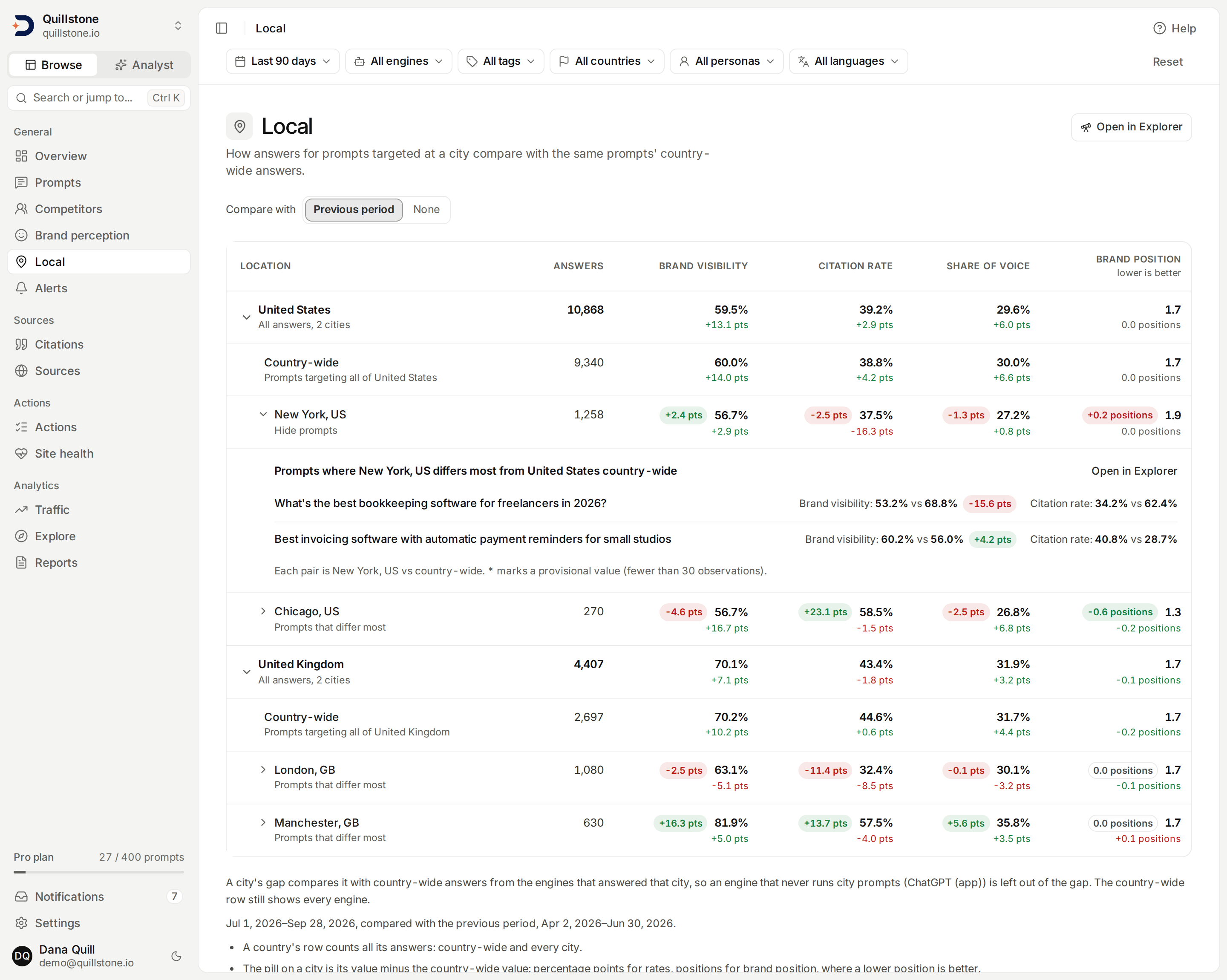
The Local page compares the answers for prompts you track in a city with the same country's country-wide answers: does Perplexity name your brand as often when a question is asked from London as when it is asked of the whole United Kingdom? It is Local in the sidebar.
Local is on every plan, with no entitlement of its own, and every member
of a project can read it, viewers included
(api/routers/local.py#read_local_view). It has no numbers of its own:
the whole page is Explorer queries, so every
value, provisional flag and change is exactly what the Explorer shows for
the same query, and the definitions on
Metrics defined apply unchanged
(api/services/local_view.py#local_view).
A city target passes that city to the engine as the location, in whichever
way the engine supports; it is not a person in that city using a consumer
app. Google AI Overviews, Google AI Mode and Gemini (app) receive a city as
its latitude and longitude, which every seeded city has; a city with no
coordinates on record runs at country level on those three engines, so its
city row holds country-level answers from them, and prompt detail says so
on each such run (api/services/llm.py#dataforseo_location,
api/services/collection.py#COORDINATE_SURFACES). Gemini (app) answers a
city target at the city's coordinates, so its answers appear in city rows
and it enters a city's gap like any engine that answered the city. A local
question tracked for a whole country is answered on ChatGPT (app) and
Gemini (app) for wherever the data provider's connection is, not for a
place DiscoveredBy chooses (see
How Gemini (app) is collected),
so track such prompts as city targets. ChatGPT (app) takes no
city at all, so a city target does not run on it: its answers appear in
country-wide rows only, never in a city row
(api/services/collection.py#target_runs_on). A city's gap is therefore
measured against country-wide answers from the engines that answered that
city, so ChatGPT (app) never enters a gap (see Reading the table below).
See
A target location is not a customer's location.
Controls
- Window: the last 7, 28 or 90 days, ending yesterday, set with the date range chip in the filter bar. 28 is the default.
- Engine, tag, country, persona and language: the filter bar's other
five chips all apply here. An engine covers every channel it answered
through, and a country narrows the table to that country's rows
(
api/routers/local.py#ACCEPTS,api/services/local_view.py#local_view). - Compare with: the previous period (the default) or none. With the previous period on, each value shows its change underneath. The change compares whichever engines answered in each period, so when an engine started answering during the window (ChatGPT (app) or Gemini (app) when it was added, for example), it counts on one side only; choose one engine to compare like for like.
Each control is a parameter in the page's address, so a view can be
shared with anyone on the project as a link
(frontend/src/routes/(app)/local/local.js#localParams).
Open in Explorer opens the same query in the Explorer, broken down by
country and city, with the filter bar's selection as Explorer filters
(frontend/src/routes/(app)/local/local.js#viewExplorerHref).
Reading the table
Each country is one row, then, underneath it, a Country-wide row and one row per city. A country with city rows opens by default; any country can be opened or closed.
- The country row counts all of that country's answers: country-wide and every city together.
- The Country-wide row counts only answers to prompt targets for the whole country, with no city.
- A city row counts only answers to targets in that city.
Every row has five columns: answers collected,
brand visibility,
citation rate, share of voice and
brand position (lower is better)
(api/services/local_view.py#LOCAL_METRICS). Countries are sorted by
answers, and so are the cities inside each one.
On a city row, a pill before each value is the gap: the city's value
minus the same country's country-wide value, in percentage points for a
rate and in positions for brand position. For brand position a negative
gap is the better one, and the pill is coloured that way. The gap compares
like with like: its country-wide side counts only the engines with
answers for that city in the window. When the Country-wide row shown also
pools an engine with no answers for the city (ChatGPT (app), which never
runs city targets, or an engine the city's prompts do not run on), the gap
is read from that country's country-wide answers on the city's engines
alone, so it can differ from the difference between the two rows on
screen, and a note under the table says so
(api/services/local_view.py#_engines_answering, #_country_wide_over).
The gap is empty (an en dash) when either side has no value, and when the
country has no country-wide answers on those engines in the window to
compare with (api/services/local_view.py#_gap).
A value from fewer than 30 observations is marked provisional, the
same threshold the Explorer uses; an answer count is never provisional. A
value with nothing to measure, such as brand visibility with no analysed
answer, is an en dash, never 0
(api/services/brand_metrics.py#MIN_OBSERVATIONS,
api/services/local_view.py#_metric).
Prompts where a city differs most
Open a city to list up to 10 prompts where it differs most from the
country-wide answers: for each prompt, brand visibility and citation rate
in the city next to the same prompt country-wide, both counted over the
engines with answers for that city in the window, ordered by the size of
the brand visibility difference, largest first. A prompt appears only when
it has a brand visibility value on both sides in the window
(api/services/local_view.py#city_prompts, #DRILL_LIMIT).
Only prompts with an active target in that city are compared, up to 25 of them. When more than 25 prompts have an active target in the city, the 25 oldest of them (lowest prompt id) are compared and the list says how many more were not. The list's own Open in Explorer link filters the Explorer to the prompts it shows.
What is not shown
The table keeps 25 places across all countries together, the ones with the
most answers. Country-wide is one of those places: every country's
country-wide answers together take a single place, not one per country.
When a project has more, the page says how many cities are not shown and
links to the Explorer, where a country or city filter shows the rest. A
country's own row still counts every answer, including those of the
cities not shown
(api/services/local_view.py#_cities_not_shown,
api/services/explorer/query.py#AXIS_CAP).
When no prompt has an active city target and the view has no city rows, the page says so above the table; each country's row is still there and opens to its country-wide row. A city whose targets are all paused keeps its rows for the answers it collected in the window, so that view shows the city rows and not the note. With no answers in the window the page offers the most likely way to find some: clearing the filter bar's engine, tag, country, persona and language, then the 90-day window, then the prompts themselves.
Answers from paused prompts and targets still count for the window they were collected in, as they do in the Explorer. The city prompt list is the exception: it compares only prompts that still have an active target in that city.
The query budget
Opening the page, or changing a control, runs two Explorer queries, and
opening a city runs one more (none when no prompt still has an active
target there). Changing any filter bar chip runs the two queries
again and reloads every city whose prompt list is open on screen, one
more query each: with three cities open, that is up to five queries.
Changing Compare with reloads no city. A city's list is kept once it
has loaded, so closing and reopening it, or going back to a selection
it already loaded for, does not load it again. Each query counts
against the project's shared budget of 120 Explorer queries a minute and
the 15-second limit on one query; see
The query budget and time limit
(api/services/explorer/query.py#execute_query,
api/services/explorer/budget.py#QUERIES_PER_MINUTE).
Related
- Prompts: adding a city to a prompt, and the cities you can choose from
- Engines and measurement: how each engine receives a country and a city
- Explorer: the City dimension, and every rule behind the numbers here
- Metrics defined: the formulas for each column
Last verified 2026-09-29