Optimize
Social sources
See which social, community, video, publishing, developer and review accounts AI engines cite, labelled as yours, a tracked competitor's or unlabelled from the cited URL alone, with reach, consistency, influence and period-over-period change per account.
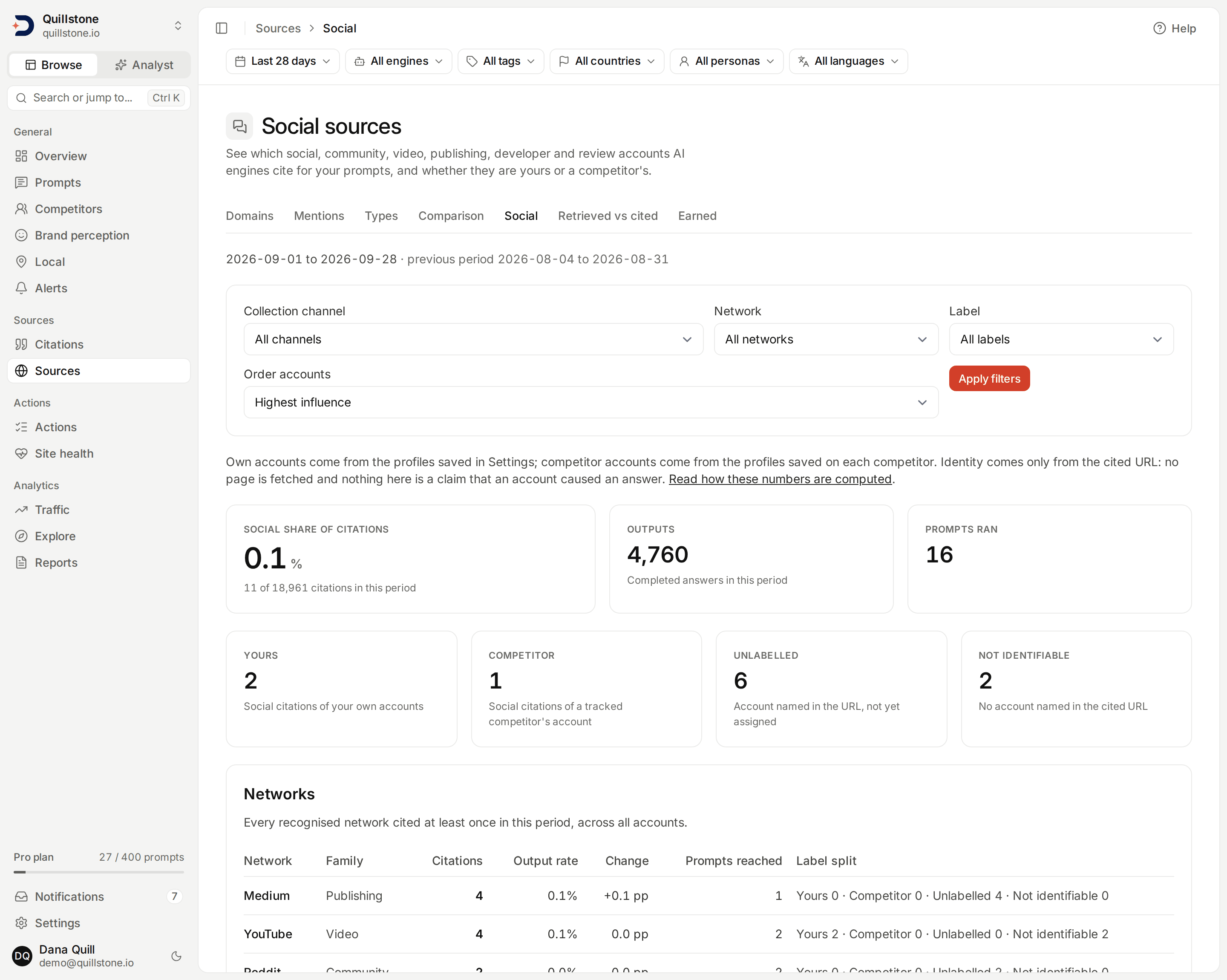
Illustrative development data is shown in this screenshot.
What this screen shows
Open Social sources from
the Social tab under Sources in the sidebar. It lists which social, community,
video, publishing, developer, review and podcast accounts your AI engines
cite for your prompts, in a period you choose, and marks each account as
yours, a tracked competitor's, or unlabelled. Nothing here is stored: every
figure is computed fresh from your citations when the page loads
(api/services/social_sources/service.py#social_sources_for_project). Any
current project member can read it; a project owner on Starter, Growth or
Pro is what makes it available at all, described under Access below.
How networks and accounts are recognised
Identity comes only from the cited URL itself. No social page is fetched, no model reads it, and nothing here looks for your brand name inside a social page's text; that is a different feature, covered by Source mentions.
A recognised network's host is matched first, then its path is checked
against that network's own rules for naming an account
(api/services/social_sources/parser.py#parse_social_url). The families
are community (Reddit, Quora, Hacker News, Stack Exchange, Discord),
video (YouTube, TikTok, Vimeo, Twitch), social (LinkedIn, X,
Facebook, Instagram, Threads, Bluesky, Pinterest, Tumblr, Telegram),
publishing (Medium, Substack, DEV, Hashnode), developer (GitHub),
reviews (Trustpilot, G2, Capterra, Product Hunt) and podcasts
(Spotify, Apple Podcasts).
A URL on one of these hosts still counts for its network even when its path
names no account: a YouTube watch page, a LinkedIn Pulse article, a Quora
question page, and a Reddit link shortened through redd.it with no /r/
or /u/ segment all count toward their network with no account attached.
Those citations show up in the network row and in the Not identifiable
tile, never in the accounts table. A lookalike host, such as a domain that
merely contains the word "reddit", is not matched at all: matching is
against the real network hosts, never a substring of the host name.
Yours, a competitor's, or unlabelled
An account is labelled by comparing its network and its parsed account key against two lists, never against the platform value recorded on a saved profile:
- Yours: the project's own social profiles, added from
Settings. Only the project
owner can add or remove one, up to ten per project
(
api/routers/growth_advisor.py#MAX_SOCIAL_PROFILES). The Growth Advisor reads the same list; adding one here now also labels its citations on this screen. - A tracked competitor's: profiles added from that competitor's own
page, under its Social accounts card. Owners and editors can add or
remove one, up to ten per competitor
(
api/services/social_sources/profiles.py#add_profile,api/schemas/social_sources.py#MAX_COMPETITOR_SOCIAL_PROFILES). Only an active competitor's profiles label anything; pausing a competitor stops its accounts from being labelled here, the same way pausing one drops it from the share-of-voice chart on Competitors. A submitted URL that does not parse to a recognised account is refused (api/services/social_sources/profiles.py#NOT_SOCIAL_DETAIL), and adding one that would duplicate another competitor's account or one of the project's own is refused too. - Unlabelled: the URL names a real account on a recognised network, but it matches neither list.
When an account matches both an own profile and a competitor's, it is shown
as yours. Own and competitor profiles are matched on network and account key
alone, so a profile saved under the wrong platform (for example a LinkedIn
URL saved as "other") still labels correctly, because the label always comes
from parsing the stored URL, never from the platform field
(api/services/social_sources/profiles.py#own_account_keys,
#competitor_account_keys).
An unlabelled row on this screen offers Assign: "Ours", for the project
owner, posts to the same Settings social-profiles endpoint described above;
a competitor select, for an owner or editor, posts to the competitor's
profile endpoint. Both write the exact canonical URL the parser derived from
the citation itself, for example https://www.reddit.com/r/example, never
anything typed into the row.
The window, the engines, and the citation summary
Choose 7, 28 or 90 days with the date range chip in the
filter bar,
defaulting to 28. The current window ends yesterday;
today is still in progress and is excluded. The previous period compared
against is the equal-length window immediately before the current one, with
no gap between them (api/services/social_sources/service.py#_periods).
The bar's engine, tag, country, persona and language narrow both periods
(api/routers/social_sources.py#ACCEPTS). Collection channel pools
every channel the bar leaves by default, all of one engine's channels when
an engine is chosen; choosing one recorded provider,
platform, surface, collection method and model narrows every figure on the
page to that channel alone, the same channel concept
Source comparison uses
(api/services/social_sources/service.py#_channels_for_project).
The top tiles read, for the current period: outputs (completed executions in scope), prompts ran (the distinct prompts among them), and social share of citations, the share of all recorded citations that parsed as social, shown with both counts. When the current period has zero social citations, this section is replaced by an empty state saying so, rather than by a dash on the tile: the summary tiles, the Networks and Accounts tables, and the competitor-only prompts list are all hidden together. That empty state also hides a real loss: an account cited only in the previous period, which would otherwise still surface with zero current figures under the Largest changes and Largest losses sort orders described below, does not appear until the current period has at least one social citation again. Every social citation counted (in a period that does have some) falls into exactly one of Yours, Competitor, Unlabelled or Not identifiable (an account-less URL, as described above).
Networks and accounts
The Networks table lists every network cited at least once in the current period: its citations, its cited outputs (distinct completed executions that cited any URL on that network), an output rate (cited outputs divided by outputs), the change against the previous period in percentage points, how many distinct prompts it reached, and its own label split.
The Accounts table breaks that down by individual account, using the same reach-and-consistency shape Domains uses for a cited domain: for each prompt that ran in the window, take the share of its completed runs that cited this exact account.
- Reach is how many prompts that share is above zero for, shown against how many prompts ran, as "3 of 14".
- Consistency is the mean of that share across exactly the prompts the account reaches.
- Influence is reach multiplied by consistency
(
api/services/social_sources/service.py#_account_entries).
Change is again the current output rate minus the previous one, in
percentage points, and is a dash when either period's output count is zero.
With every channel pooled, when some engine that answered in either period
was not measured in both, meaning it ran (an answer, or a Google run that
showed no AI answer) on fewer than 80% of the days either period has any
answer in scope (one started or stopped answering, as an app engine such
as ChatGPT (app) or Gemini (app) does in the window it is added) (api/services/collection_health.py#WINDOW_PRESENCE_MIN_PERCENT), every change on the page is
withheld and the page says
"Engines changed between the periods: choose an engine to compare."; a
chosen engine or channel keeps its changes
(api/services/social_sources/service.py#social_sources_for_project).
An account cited only in the previous period still appears, with zero
current figures, under the Largest changes, gains and losses
sort orders, because a real loss deserves to be visible; it drops out of
the Highest influence and Most citations sorts, which have nothing
to rank it by
(api/services/social_sources/service.py#_sort_accounts). Filter by
network or by label, and page through 25 accounts at a time
(api/services/social_sources/service.py#PAGE_SIZE). An account with fewer
than 30 observed runs is marked provisional, the same threshold used
across the product
(api/services/brand_metrics.py#MIN_OBSERVATIONS).
Select Details on any account to open its cited URLs for the current
period alone: each URL's citations, cited outputs, last cited date, the
engines that cited it, and up to three example prompts, 25 URLs per page
(api/services/social_sources/service.py#social_account_detail).
Prompts where only a competitor showed up
This section lists prompts run in the current period where at least one
competitor-labelled social citation occurred and none of your own accounts
were cited on that same prompt. Each row names the prompt and up to five of
the competitor accounts involved, sorted by competitor citations, and is
capped at 50 rows with the true total shown separately when there are more
(api/services/social_sources/service.py#_competitor_only_entries,
#COMPETITOR_ONLY_CAP).
Bounds and truncation
At most 5,000 distinct social cited URLs are parsed per request, most-cited
first (api/services/social_sources/service.py#MAX_SOCIAL_URLS). Past that
bound the page states that counts are lower bounds, and that rates and
changes are not reliable while truncated; a shorter window brings a large
project's social citations back inside the bound.
What this does not claim
This screen never fetches a social page and never calls a model: every account identity comes from parsing the cited URL, and every figure is computed from citations already recorded. It does not look for your brand name inside a social page's own text. A high influence figure describes what was cited, not that the account caused an answer, and a label is only as accurate as the profile a team member entered; nothing here verifies that a saved profile actually belongs to the account it names.
Access
Any current project member can read this screen. What makes it available at
all is the project owner's plan: standard Starter, Growth and Pro presets
enable it, Free and Trial do not
(api/services/entitlements.py#get_entitlements,
#standard_entitlements). Reading is checked against the project owner's
plan even for a member who is not the owner
(api/routers/social_sources.py#_project_with_access,
api/services/plan.py#get_user_plan). Without it the screen shows an
upgrade message linking to billing instead of the tables above.
Related
- Domains: the same reach, consistency and expected formula, applied to a whole cited domain instead of one social account.
- Source comparison: the equal-period, percentage-point comparison this screen borrows for networks and accounts.
- Competitors: tracking, pausing and removing a competitor, which decides whose accounts can be labelled here.
- Plans and limits: feature access follows the project owner's plan.
Last verified 2026-09-28