Advisors
Alerts
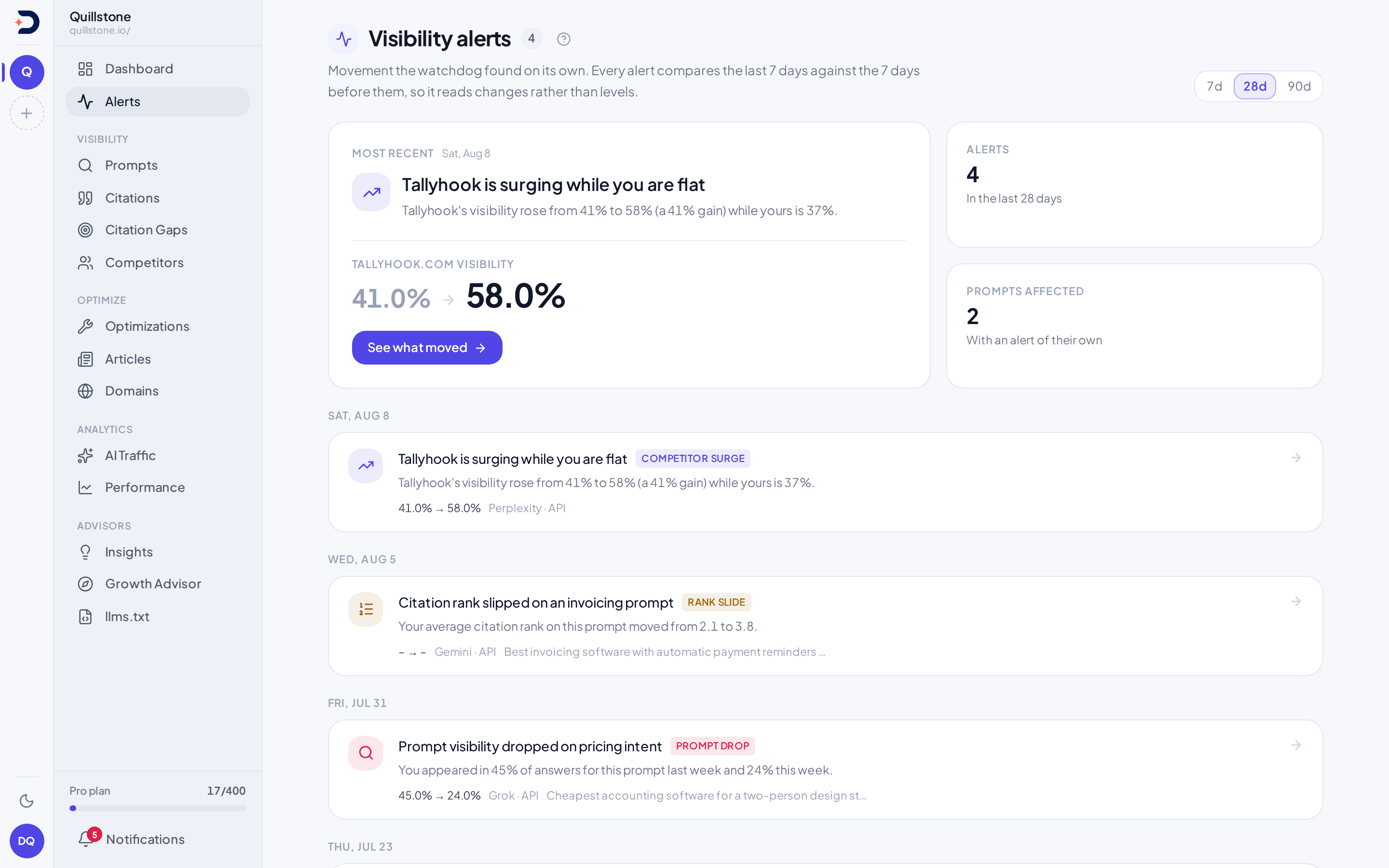
A daily watch on your visibility that raises an alert when something moves enough to be worth reading, shows why it fired, and lets the team acknowledge, dismiss, snooze or ask for an AI reading of the saved evidence.
What this is
Alerts is a daily comparison the
watchdog runs for every active project, no model involved: adjacent
seven-day windows, with a row written when one of four visibility
changes crosses its threshold, one of four brand-signal changes does, or
an opted-in source watchlist records a citation gain or loss
(api/services/watchdog.py#detect_alerts_for_project,
api/services/brand_signals.py#detect_brand_signals). The same run also
raises a fact contradiction alert when an AI answer contradicts one of
your approved facts in Fact check; that
alert reads findings an AI model has already made (see Fact contradiction
alerts below). Every kind runs in-app on every plan, except two
brand-signal checks and fact contradictions, which need a specific plan
feature (see Plan gates for brand-signal alerts and Fact contradiction
alerts below);
email delivery of any kind follows its own separate plan gate (see
Delivery below). Owners and editors can acknowledge, dismiss or snooze
any alert with a shared team note (see React to an alert below), and on
Starter and above can ask for an AI reading of one alert's saved evidence
(see Explain this alert below).
Visibility changes and thresholds
Four visibility kinds, each with its own floor and threshold
(api/services/watchdog.py#build_aggregate_alerts,
#build_prompt_alerts):
- Visibility drop: your own visibility across the whole project fell
at least 20% relative to the week before, counted only when that prior
week's own visibility was itself at least 10%
(
#OWN_DROP_THRESHOLD,#OWN_DROP_BASELINE_MIN). - Competitor surge: evaluated only while your own visibility is
under 20%. A tracked competitor whose own visibility reached at least
10% rose at least 30% relative to its own prior week
(
#OWN_VIS_WEAK_CEILING,#COMPETITOR_MIN_VISIBILITY,#COMPETITOR_SURGE_THRESHOLD). The comparison pools only the engines measured in both weeks (see below), so an engine added or dropped between them cannot cause a surge, and the 20-answer floor below applies to that pooled set in each week. A competitor at exactly 0% the week before on those engines has no relative change to measure, so instead of a percentage it raises a surge marked newly cited, under the same conditions otherwise: you under 20%, the competitor at 10% or more now, the same floors. "Cited" because a competitor's visibility here counts answers citing its domain, not answers naming it. Its change reads "Newly cited (0% the week before)" on the alert, never a percentage, and neither the email digest nor an AI explanation is given one (#NEWLY_NAMED). The engine a relative surge names as driving it is never one where the competitor was at 0% the week before. A newly cited surge, where every engine it compares was at 0%, names the engine citing the competitor most now instead. In the per-engine breakdown, an engine the competitor rose on from 0% reads "Newly cited" rather than a percentage (#build_aggregate_alerts,#_provider_breakdown_context,#_newly_named_driver). The alert's message gives the competitor's figures on the engines that ran in both weeks and your own visibility across all engines, and says so. - Prompt drop: one prompt's own visibility fell at least 25% relative
to its prior week, counted only when that prompt's prior-week
visibility was itself at least 15%
(
#PROMPT_DROP_THRESHOLD,#PROMPT_DROP_BASELINE_MIN). - Rank slide: a prompt still cites you about as often as before (it
did not also cross the drop threshold above), but your average
citation rank on it was in the top 5 the week before and slid by at
least 2 full positions
(
#RANK_SLIDE_TOP_N,#RANK_SLIDE_MIN_POSITIONS).
All four visibility kinds compare only the engines measured in both
weeks, minus any engine in outage (see below). An engine counts as
measured in a week only when it ran (an answer, or a Google run that showed
no AI answer) on at least 80% of the week's answered days, the days on
which any engine has an answer (6 of 7 when every day was answered)
(api/services/collection_health.py#WINDOW_PRESENCE_MIN_PERCENT): an engine that ran in one week only, such as a Google
engine in its first week, or on a few days of one, such as ChatGPT (app)
in the week after it was added (one launch day in the week before) or the
week it was switched off, sits on neither side of any comparison, and a
newly added engine such as Gemini (app) sits out the same way until it has
run on enough days of both weeks, so
adding or removing an engine cannot by itself raise or hide an alert. Every
figure in the alert message comes from those engines
(api/services/collection_health.py#engine_windows,
api/services/watchdog.py#detect_alerts_for_project).
Volume floors for visibility alerts
Before the thresholds above are evaluated at all, the project needs at
least 5 days of measured history in the prior week, and at least 20
completed answers, project-wide, in both the prior week and the current
one; short of either floor the whole project is skipped for that day,
whatever the raw percentages would say
(#BASELINE_MIN_DAYS, #MIN_WINDOW_EXECUTIONS,
#detect_alerts_for_project). A prompt-level check adds a second, its
own: that one prompt itself needs at least 20 answers in both windows,
not just the project as a whole (#_has_window_volume,
#build_prompt_alerts).
Adding a persona audience or a new country to a tracked prompt changes the
populations these checks read, not just what the prompt covers going
forward: once its new (country, audience) target starts running, its
answers fold into the same project-wide and per-prompt counts visibility
drop and prompt drop compare window over window, and into the same family
counts brand share shift reads. An alert (or the lack of one) shortly after
such a change can reflect the wider mix of what is now being measured
rather than a genuine swing in how you are doing
(api/services/watchdog.py#_load_domain_metrics,
api/services/watchdog.py#_load_prompt_metrics,
api/services/brand_signals.py#build_population).
Brand-signal changes and thresholds
Four more kinds compare the same shape of adjacent seven-day windows as
above, but ending one day earlier (yesterday, not today), and read
brand-mention, sentiment and social-citation data instead of citation and
rank data (api/services/brand_signals.py#build_population). Like
competitor surge, prompt drop and rank slide above, each of these four
kinds can raise more than one alert in a single run, one per subject that
crosses its own line: brand share shift raises at most one for your own
family rising, one for your own family falling, plus one per qualifying
competitor rising; emerging brand raises one per qualifying untracked name;
sentiment shift raises at most one for your own negative share rising, one
for it falling, one per qualifying reason of yours, and up to three more
shared between a qualifying competitor's negative share moving and a
qualifying competitor's weakness reason rising; and competitor-only social
citation raises one per qualifying competitor. Subject keys never collide
across directions, so a snoozed drop for your brand can never suppress a
later rise for the same brand, and vice versa. Each kind's own cap on how
many alerts fire per run is described below.
- Brand share shift covers three different measures, not one shared
pool. Your own share is the fraction of all analysed answers that name
your brand; it can fire as a drop, falling at least 20% relative to its
baseline week, counted only when that baseline share was itself at least
10% (
#OWN_DROP_BASELINE_MIN,#OWN_DROP_RELATIVE_THRESHOLD,#_detect_own_drop), or as the mirror-image rise, your own share reaching at least 10% in the current week and rising at least 20% relative to a nonzero baseline (a baseline of exactly zero answers is skipped, since a relative change against no baseline at all would be a fabricated figure) (#OWN_RISE_CURRENT_MIN,#OWN_RISE_RELATIVE_THRESHOLD,#_own_rise_alert); the two use different subject keys, so a snoozed drop cannot suppress a later rise. A competitor's share is its fraction of every (answer, family) pair among your tracked, active brand families, yours and every competitor's counted together; it reached at least 10% in the current week and rose at least 30% relative to its own baseline, one alert per qualifying competitor, uncapped (#COMPETITOR_RISE_CURRENT_MIN,#COMPETITOR_RISE_RELATIVE_THRESHOLD,#_detect_competitor_rises,#detect_brand_share_shift). A competitor with zero tracked pairs at all in its baseline week, or whose root brand entity was created on or after that baseline week began, is skipped rather than compared against a fabricated near-zero baseline; a genuinely new competitor like that is what emerging brand below covers instead (#_detect_competitor_rises). Pausing a competitor during the baseline week does not trigger that skip: a brand entity's creation date never moves when it is paused or resumed, so a competitor created well before the baseline week is still compared even if it was paused for part of it. What a pause does change is which of its mentions can be tracked at all: the roster the model matches brand names against excludes a paused competitor entirely (api/services/brand_mentions.py#build_entity_roster,api/services/brand_families.py#active_entity_condition), so mentions recorded while it was paused keep no entity match and count as untracked evidence, permanently, not corrected once it is resumed. A rise measured across a pause can therefore partly reflect the pause ending rather than a real change in how often the brand is named. Adding an alias for that exact name, or creating it as a sub-brand, reattributes its past untracked mentions to the entity from then on (api/services/brand_families.py#reattribute_untracked). - Emerging brand: a name nobody tracks, whose most frequently recorded
kind is company, was named in at least 3 answers across at least 2
distinct prompts in the current window, with none at all in the
baseline window (
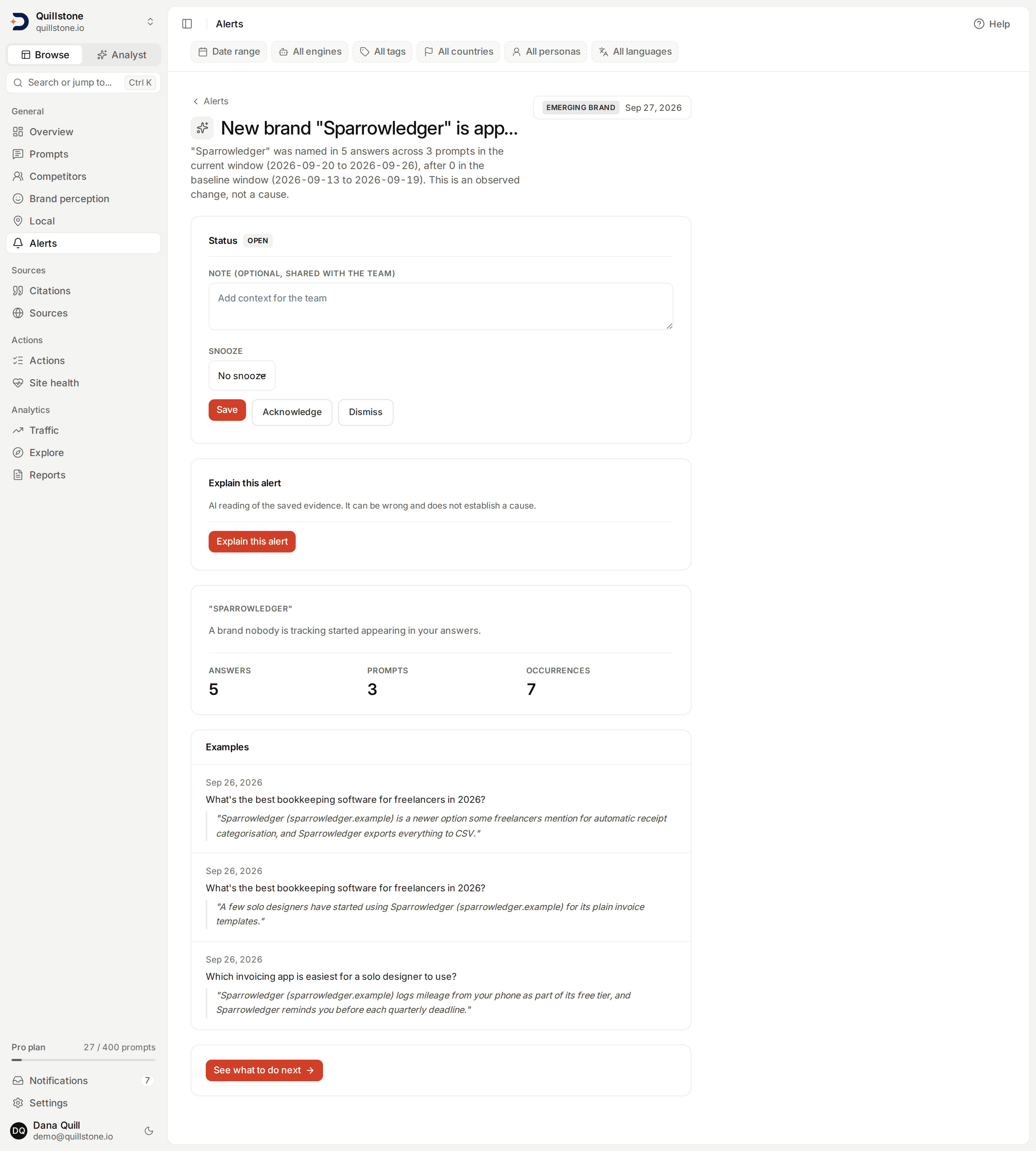
#EMERGING_MIN_CURRENT_ANSWERS,#EMERGING_MIN_CURRENT_PROMPTS,#EMERGING_MAX_BASELINE_ANSWERS,#detect_emerging_brands). At most 5 alerts fire per run even when more names qualify: the ones named in the most current-window answers take the slots, each with up to 3 example quotes (#EMERGING_MAX_ALERTS,#EMERGING_MAX_EXAMPLES). - Sentiment shift covers five checks in total, three about your own
brand and two more about a competitor's, all reading classified or
reason-analysed mentions the same way. The share of your classified brand
mentions carrying negative sentiment can fire as a rise, at least 10
percentage points above the baseline week (
#NEGATIVE_SHARE_RISE_MIN_POINTS,#_detect_negative_share), or as the mirror-image fall, at least 10 points below it (#NEGATIVE_SHARE_FALL_MIN_POINTS,#_detect_negative_share_fall); each window still needs at least 30 classified mentions of your brand to count at all, and the two directions use different subject keys, so a snoozed rise cannot suppress a later fall. Your third own-brand check is a weakness reason: one of the Brand reasons labels cited as a weakness for your brand more often, in at least 5 current-window answers, at a rate at least 10 percentage points above its baseline rate, up to 3 reasons per run, the ones with the largest rise (#WEAKNESS_MIN_CURRENT_COUNT,#WEAKNESS_RISE_MIN_POINTS,#WEAKNESS_MAX_ALERTS,#_detect_weakness_reasons). The remaining two checks run the same two measures against every active competitor instead of your own brand: a competitor's classified-negative-mention share moving at least 10 percentage points in either direction (#COMPETITOR_NEGATIVE_MOVE_MIN_POINTS,#_detect_competitor_negative_moves), or one of its own weakness rates rising the same way your own does, at least 5 current-window answers, a 10-point rise, and at least 30 reason-analysed answers for that competitor in both windows, the same floor your own weakness check needs (#COMPETITOR_WEAKNESS_RISE_MIN_POINTS,#_detect_competitor_weakness_rises). Those last two share one combined cap of 3 alerts per run across every competitor and every reason together, the largest moves first, not 3 each (#COMPETITOR_SENTIMENT_MAX_ALERTS). The competitor weakness-rate check needs the same Brand reasons entitlement as your own; the competitor negative-share move runs on every plan, like your own negative-share rise and fall. - Competitor-only social citation: a competitor-labelled social
account with zero citations at all in the baseline window was cited in
at least 2 current-window answers, on prompts where none of your own
accounts were cited, using the same account identity
Social sources shows
(
#SOCIAL_MIN_CURRENT_ANSWERS,#detect_social_competitor_only). At most five alerts fire per run even when more competitors qualify, each listing its own qualifying accounts, five at most, the ones cited in the most answers; the message always states the true number of accounts that qualified, even when the list itself is shorter (#SOCIAL_MAX_ALERTS,#SOCIAL_MAX_ACCOUNTS_PER_ALERT).
Every one of these checks is the same kind of comparison as the four above: crossing a threshold means the numbers moved between two seven-day windows, not why. An emerging brand's name is whatever the model itself extracted, not a name checked against any registry, so a new spelling or short form of a brand you already track can appear as new until you add it as an alias or a competitor. A weakness-reason alert only ever counts answers analysed for reasons since Brand reasons shipped; older analysed answers are excluded from its count, not treated as reason-free.
Provider set and floor for brand-signal alerts
All four kinds share one provider set and one pair of windows, worked
out once per project per run before any of the checks above
(#build_population). The current window is the 7 days ending
yesterday and the baseline window is the 7 days immediately before it,
one day earlier throughout than the domain-visibility windows above,
which run through today.
The provider set is every engine measured in both windows by the same rule
(it ran on at least 80% of each window's answered days, 6 of 7 when every
day was answered)
(api/services/collection_health.py#WINDOW_PRESENCE_MIN_PERCENT), minus
any engine whose failure rate over the current window alone exceeds 50%
(api/services/collection_health.py#providers_in_outage,
api/services/watchdog.py#OUTAGE_FAILURE_RATIO). An engine that started or
stopped answering within the baseline or current window, as an app engine
such as ChatGPT (app) or Gemini (app) does when it is added, is therefore left out until it has run on most days
of both, so a brand only that engine names cannot read as emerging in the
week after its launch. The failure rate is
failed runs out of completed runs, runs where Google showed no AI answer
and failed runs: a run with no AI answer is a request that succeeded, so a
Google engine that mostly shows no AI answer is not taken for one in
outage (api/services/collection_health.py#engine_execution_counts). The
visibility checks above leave out an engine in outage by the same rule
(api/services/watchdog.py#_excluded_provider_ids). Runs with no AI
answer never enter any count or share here, which read completed answers
only. Every count and share
above is restricted to that set. Within it, each window separately needs
at least 30 analysed answers, mention extraction finished, and at least
5 distinct execution dates; short of either, on either window, none of
the four checks run for that project that day
(api/services/brand_metrics.py#MIN_OBSERVATIONS,
api/services/brand_signals.py#MIN_EXECUTION_DATES). Your own share's
denominator is exactly this same analysed-answer count, so it is already
covered by that floor; a competitor's rise, the negative-sentiment share
and a weakness reason's rate each use a denominator of their own,
tracked-brand mentions, classified mentions, and reason-analysed answers
respectively, and recheck the same 30-observation floor against it
(#_detect_competitor_rises, #_detect_negative_share,
#_detect_weakness_reasons).
Competitor-only social citation is skipped entirely for a run with more
distinct social URLs in range than it can count reliably, rather than
risk an undercount
(api/services/social_sources/service.py#_social_url_pool).
Scheduled watchdog runs
The configured systemd timer schedules 04:00 UTC runs of api.cli run-watchdog, which
enqueues one watchdog job for every project that is active and whose
owner is active, with no opt-in setting and no plan check at this step
(discoveredby-cli@run-watchdog.timer, api/cli.py#cmd_run_watchdog,
api/tasks.py#_enqueue_watchdog_for_all_projects). Each job runs as its
own background task and calls the same detection and persistence logic
described above and below (#run_visibility_watchdog_task,
api/services/watchdog.py#run_watchdog_for_project). The only other path
that reaches it is an admin running it manually for one project or every
project from the internal admin panel, not something a regular user can
do (api/routers/admin.py#admin_trigger_watchdog,
#admin_trigger_watchdog_all).
Visibility repeats are suppressed
A change that would fire the same kind again for the same project, the
same prompt (or none) and the same competitor (or none) within the last 7
days is dropped before it is ever written, so a drop that stays down does
not post a fresh alert every single day
(api/services/watchdog.py#_is_duplicate, #DEDUPE_WINDOW_DAYS). A row
the team has snoozed counts as a match for as long as
the snooze lasts, however old it is by then, so a nuisance repeat snoozed
for 30 days does not reappear on day 8 just because the plain 7-day window
lapsed; once the snooze ends, the 7-day window is what is left.
Brand-signal repeats are suppressed
The same suppression above also covers these four kinds, keyed on subject
instead of prompt and competitor domain: the same kind, for the same
project and the same subject, a brand family rising or falling, an
untracked name, negative sentiment rising or falling, a reason label for
your brand or for a named competitor, or a competitor's social citations,
is dropped if it already fired within the last 7 days, or is still
snoozed (api/services/watchdog.py#_is_duplicate, #DEDUPE_WINDOW_DAYS).
Two different competitors surging, or two different reasons rising, in the
same run do not suppress each other, and a rise never suppresses a fall
for the same brand, since the two directions carry different subject keys.
The four kinds above this section never set a subject and keep deduping
exactly as they did before this shipped.
Plan gates for brand-signal alerts
Brand share shift (both your own directions and every competitor rise),
emerging brand, and the negative-sentiment checks of sentiment shift, your
own rise and fall and a competitor's move, run for every project on every
plan, in-app, the same as the four visibility kinds above. Two checks stay
behind Brand reasons: the weakness-reason
half of sentiment shift for your own brand, and the matching check for a
competitor's weakness rate. Competitor-only social citation stays behind
Social sources. All three are standard on
Starter, Growth and Pro, and off on Free and Trial; on a plan without one,
that check is simply skipped for the project rather than shown with
nothing found (api/services/brand_signals.py#detect_brand_signals,
api/services/entitlements.py#get_entitlements). Explaining an alert (see
Explain this alert below) is gated the same way, on Starter and above, but
that gate belongs to the request, not to detection: every alert is still
detected and shown regardless of whether its owner can generate a reading
of it. This is separate from the email-copy gate under Delivery below,
which applies the same way across all nine alert categories.
Why it fired is stored, not recomputed
Everything behind "why it fired", the exact before and after figures, the
engine-by-engine breakdown, whether competitors moved too, is built once,
at the moment the alert is detected, and saved on the row itself
(#run_watchdog_for_project). The detail page you open later reads that
saved record; it does not re-run the comparison against today's data
(api/routers/alerts.py#get_alert, #_to_read).
React to an alert
Owners and editors can set an alert's status to open, acknowledged or
dismissed, and attach a short team note; viewers cannot
(api/routers/alerts.py#update_alert_status). This is one shared reaction
per alert, visible to the whole project team, not a personal overlay.
Status and note are replaced every call, so a request that wants to keep
the current note has to resend it, which is what the alert page's own
Save button does: it resubmits the note and snooze fields without
changing status, alongside separate Acknowledge, Dismiss and
Reopen buttons that do change it
(api/schemas/visibility_alert.py#AlertStatusUpdate). A note is at most
500 characters and refuses control and invisible formatting characters;
newline and the zero-width joiner used inside composite emoji are the two
exceptions, which is why a handful of flag emoji built from invisible tag
characters, such as England, Scotland or Wales, are refused while an
ordinary two-letter country flag is not
(api/schemas/visibility_alert.py#STATUS_NOTE_MAX_LEN).
The snooze is handled separately from status and note: omit it and the
alert's current snooze is left exactly as it is, send an explicit Clear
snooze and it is removed, or choose 7, 14 or 30 days and it is set that
many days from today, replacing whatever was there before. The page's
snooze choice defaults to Keep current snooze (until the stored date)
when one is active, or No snooze when none is, precisely so that saving
a note does not have to also decide the snooze
(api/schemas/visibility_alert.py#AlertStatusUpdate). Setting status to
open while a snooze is still active is stored as acknowledged instead,
since an alert cannot stay unactioned while also being silenced; dismissing
is unaffected by an active snooze. Every status change is recorded in the
project's activity log without the note text itself. The list defaults to
showing active alerts, open plus acknowledged; dismissed alerts and the
full history are each available through the same status filter
(api/routers/alerts.py#list_project_alerts).
Explain this alert
On Starter and above, owners and editors can open an alert and choose to
generate a plain-language reading of its own saved evidence: the same
title, message, delta, windows, provider breakdown and quotes already on
the page, sent to a model with instructions to describe what changed and
never to guess why (api/services/alert_narration.py#explain_alert,
api/services/alert_narration.py#build_evidence). Viewers cannot request
one, but can read an existing narration on an alert like any other project
member. The result is cached per alert: once one narration completes,
reopening the same alert shows it again for every project member without a
new model call, for as long as that narration stays among the project's
newest 500 (across every alert in the project, not just this one); once
older requests push it past that count it is pruned, and reopening the
alert then generates a fresh one
(api/services/alert_narration.py#explain_alert,
api/services/alert_narration.py#latest_narration,
api/services/alert_narration.py#MAX_ATTEMPTS). A request is limited
to one per project per minute, and a lease keeps a second request from
starting while one is still running
(api/services/alert_narration.py#RATE_LIMIT_SECONDS, #LEASE_MINUTES).
The saved reading is a summary of at most 600 characters, with up to 3
observations of up to 300 characters each; the model may only refer to a quote already on
the alert by its id, never by copying its text, and any id it invents is
dropped before the response is saved, so the quote text you see always
comes from the alert's own saved record, never from the model
(api/schemas/alert_narration.py#NarrationOutput,
api/schemas/alert_narration.py#NarrationObservation). Treat the result the
same way: it is an AI reading of the evidence already saved on the alert,
not a verified fact, and it never establishes what caused a change, only
what the saved numbers show. A legacy alert with no saved quotes, such as a
plain visibility drop, still gets a narration; it simply has nothing to
cite.
The boundary with notifications
Notifications is the account's inbox, and
visibility digests and source watchlist notices are two of the eight kinds
that can land in it, not the only ones.
When the watchdog persists one or more fresh visibility alerts for a project, it
writes exactly one notification per project member, summarizing every
alert from that run together, and links each of those alert rows back to
the notification created for the project's owner
(api/services/watchdog.py#run_watchdog_for_project). A day with three
alerts still produces one notification, not three. The reverse does not
hold at all: most
notifications are not about an alert; see
Notifications for the other six.
Delivery
Every fresh alert appears on this screen. Visibility alerts contribute to their in-app digest; source watchlist notices follow the list’s subscription settings.
Owner email delivery follows the project's email preferences
and current alert-email entitlement. Daily or weekly digests contain selected
saved visibility alert types and subscribed source-watchlist events from the last seven days since the previous successful digest,
excluding anything already dismissed by then,
with up to five most recent highlights and a total count. Delivery occurs on
watchdog runs; no new alert is required to deliver a pending digest. Turning
email off leaves alert detection and in-app notifications unchanged
(api/services/email_preferences.py#deliver_digest). An email names each
engine as the app does, as in "By engine: ChatGPT (app) +12%" or a prompt
"driven by Gemini (API)", never by its internal slug
(api/services/email_preferences.py#digest_entry). Competitor-only
social citation is also gated at detection itself, in-app included, not
only at email time, so its category can go entirely unused on a plan
without Social sources. The reason part of Sentiment shifts carries the
same detection-time gate, on Brand reasons, but that same checkbox's
negative-sentiment half still delivers on every plan; see Plan gates for
brand-signal alerts above. Fact contradiction is gated at detection too,
on Fact check (see Fact contradiction alerts below).
What's on the screen
The list comes back ordered by the day each alert was detected, so it opens
on the most recent alert rather than the biggest
(api/routers/alerts.py#list_project_alerts,
frontend/src/routes/(app)/alerts/+page.svelte#latest). Visibility alerts carry an impact_score, and those four kinds build it the same way: the size
of the move, times the visibility it moved from, times the log of how many
answers ran in the current week, plus a small constant on the two kinds
that are not about a single prompt
(api/services/watchdog.py#_impact_score, #build_prompt_alerts). What
supplies the size differs, positions for a rank slide and a relative
visibility change for the other three, so the score ranks a day's findings during detection.
A newly cited competitor surge has no relative change, so it is scored on
its current visibility in place of the size of the move times its
baseline. For a rise from a baseline of at least 1%, that product is
exactly the gain in visibility; below 1% the move is measured against a
1% floor, so the product is smaller than the gain. From 0%, the gain is
the current visibility itself (#build_aggregate_alerts,
#_relative_delta). Email highlights use recency;
the score is not a number to read on its own.
The four brand-signal kinds also carry an impact_score, built from the
same delta-times-visibility-times-log shape as above, but not all with the
same visibility figure. Your own drop uses the baseline ratio, exactly
like the four kinds above. A competitor's rise, the negative-sentiment
share and a weakness reason's rate instead use whichever of baseline or
current is larger, so a rise from a near-zero baseline is not scored as
if nothing moved. Emerging brand and competitor-only social citation,
having no baseline to move from at all, score simply on how many
current-window answers qualified instead
(api/services/brand_signals.py#_detect_own_drop,
#_detect_competitor_rises, #_detect_negative_share,
#_detect_weakness_reasons, #detect_emerging_brands,
#detect_social_competitor_only).
Left alone, the list opens on the last 28 days. The date range filter at
the top of the page switches it to 7, 28 or 90 days, carried in the URL as
?days=; any other value in the URL reads as 28
(frontend/src/lib/filters.js#readDays). The
API returns up to 200 alerts for the window, and the screen says so once a
list comes back full (frontend/src/routes/(app)/alerts/+page.server.js#ROW_CAP,
api/routers/alerts.py#list_project_alerts). Below the hero, alerts
group by the day they were detected. Opening one of the four visibility
kinds shows the before and after pair, the two date ranges being
compared, which engine moved most, and, for a rank slide, the rank
movement itself; a visibility drop or a prompt drop additionally shows
whether competitors moved too or the shift looks specific to you
(frontend/src/routes/(app)/alerts/[id]/+page.svelte#movement,
#category). The four brand-signal kinds open on their own layout
instead; see Brand-signal alert detail below.
Brand-signal alert detail
Each of the four brand-signal kinds opens on its own hero instead of the
shared before/after card. Brand share shift and sentiment shift both
show a ratio or rate moving from one bold number to another, with the
exact count behind each one
(frontend/src/routes/(app)/alerts/[id]/+page.svelte#pctWithCount);
sentiment shift adds up to 3 quoted excerpts backing the number
(api/services/brand_signals.py#SENTIMENT_MAX_QUOTES). Emerging brand
shows the current-window answer, prompt and occurrence counts, plus up
to 3 example quotes (#EMERGING_MAX_EXAMPLES). Competitor-only social
citation shows a table of that competitor's own qualifying social
accounts, with the answers and prompts behind each one. Brand share
shift is the only one of the four with a by-engine table; the other
three do not break down by provider
(frontend/src/routes/(app)/alerts/[id]/+page.svelte#providerRows).
Every one of the four also carries a See what to do next link to the
screen its evidence came from, Competitors, Sentiment, Sentiment reasons
or Social sources (#nextStepLink).
Source watchlist alerts
Source watchlists
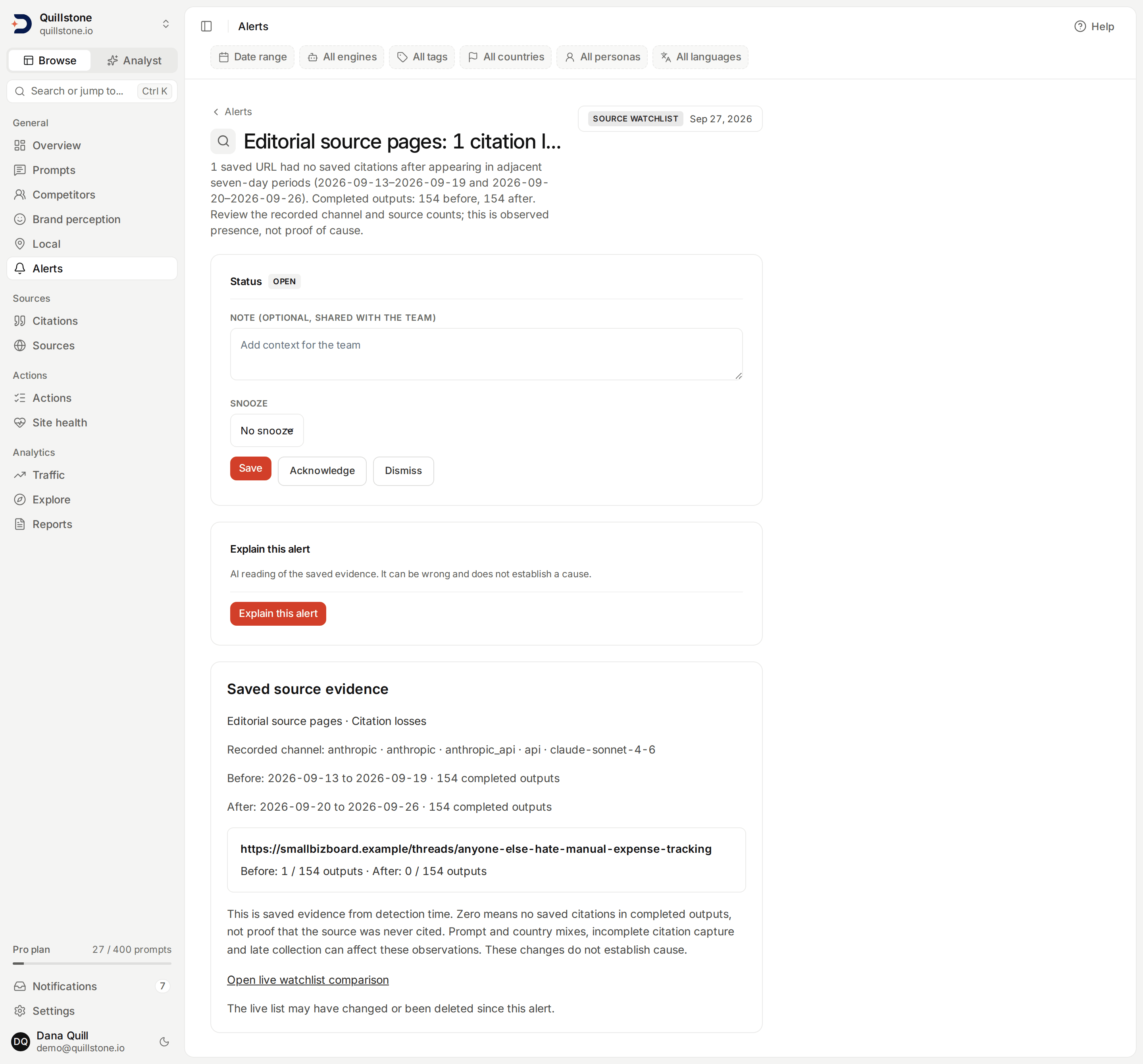
can separately subscribe to gains/losses for exact domains or URLs. These compare
adjacent seven-day periods ending yesterday within each recorded channel, with
at least 30 completed outputs and five observed dates per period. A gain means
zero previous appearances followed by one or more; a loss is the reverse.
Missing or thin data is skipped. Repeated source/direction events within a
list/channel are suppressed for seven days
(api/services/source_watchlist_alerts.py#evaluate_subscriptions).
The saved detail shows each affected source, before/after counts, full-channel denominators, dates and recorded model/surface. These are observed citations, not proof of cause or complete capture. Each gain/loss alert gets its own team notification when that list enables in-app delivery. Email-only subscriptions still create a saved alert. Deleting the list stops future evaluation and email, while saved evidence stays available to current project members.
Fact contradiction alerts
When the project owner's plan includes
Fact check, each watchdog run also raises
one Fact contradiction alert for each active fact with at least one
contradiction of its current wording still open in review, found in
checks made in the 26 hours before the run, from a fact study or a
checked prompt; on a plan without it,
nothing is detected
(api/services/fact_check/alerts.py#detect_fact_contradictions,
#ALERT_WINDOW_HOURS). This is not a comparison of two windows and has
no volume floor: one contradiction is enough. The contradiction itself is
an AI model's judgement of an engine's answer, with the quote located in
the answer by our code; see
How a finding is made.
The same fact does not raise another alert within 7 days, or while its
alert is snoozed (api/services/watchdog.py#_is_duplicate,
#DEDUPE_WINDOW_DAYS).
The alert shows the fact's current wording, how many answers contradicted
it and from which engines (a count that can differ from the Open tab in
Fact check, which also lists contradictions of an earlier wording), and a Review in Fact check
link that opens Fact check with its review queue filtered to that fact
(frontend/src/routes/(app)/alerts/[id]/+page.svelte#factReviewHref,
frontend/src/routes/(app)/sentiment/facts/+page.server.js#readQuery).
Reviewing the findings in Fact check does not change the alert; react to
the alert here as with any other.
Related
- Notifications: the account-wide inbox an alert lands in, and the six report and recommendation kinds that land there too
- Competitors: the comparison a competitor surge alert, and a brand share shift or emerging brand alert, draws on
- Prompts: where a prompt drop or rank slide links back to
- Brand reasons: the weakness labels a sentiment shift's reason half draws on
- Social sources: the account identity a competitor-only social citation alert draws on
- Fact check: the findings a fact contradiction alert draws on
Last verified 2026-09-29