Optimize
Source-mention history
Save literal and reviewed source-mention evidence, inspect frozen aliases and compare compatible gains or losses with combined brand filters.
Open Sources → Mentions and choose Save and compare mention history to retain the brand evidence you see today and compare it with a later observation.
Save evidence
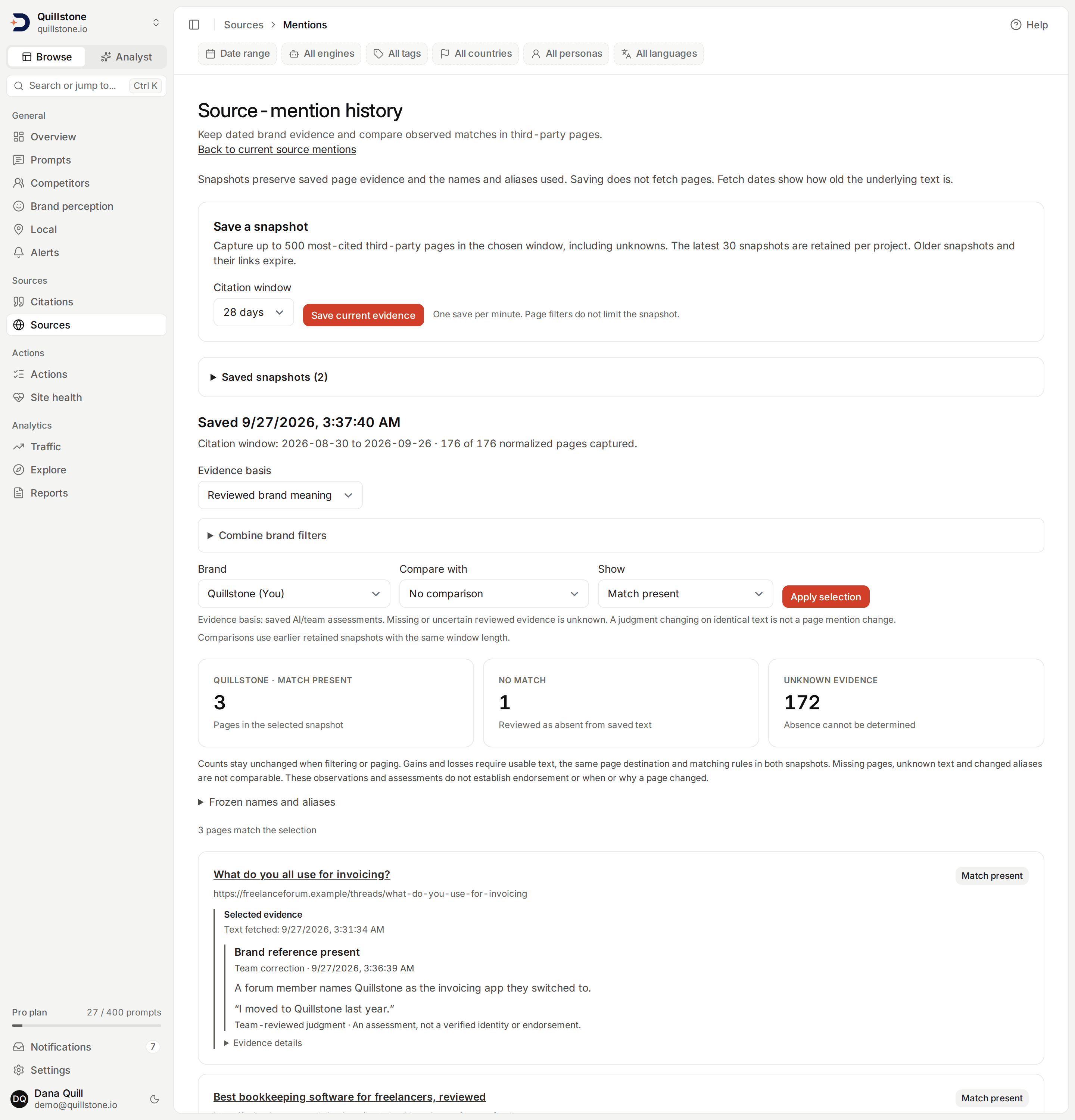
Owners and editors of active projects can choose a 7, 28 or 90 day citation window, ending yesterday, and select Save current evidence. Every plan includes this workflow; all current project members, including viewers, can read retained snapshots.
Saving captures up to 500 most-cited normalized third-party pages in the window,
including pages with unknown text. Your own domain is excluded; competitor sites
are included. The snapshot always captures the full bounded population,
regardless of the current screen's filter or page and of the filter bar's
engine, tag, country, persona and language; while any of those is set,
Mentions disables the way here and says why
(api/services/source_mention_history.py#save_snapshot). It records the window and
coverage counts, brand names, aliases and domains, literal snippets, saved AI/team
assessments with quotes, content fingerprints,
page destinations and fetch/attempt dates. It does not fetch pages or run a model.
Only citations belonging to completed runs in this project enter the population. The window follows the parent run's recorded date. Paused prompts can still contribute completed history. The page cap and unknowns remain explicit.
Compare snapshots
- Open a saved snapshot from Saved snapshots.
- Choose a brand from its frozen roster.
- Choose an earlier retained snapshot with the same citation-window length.
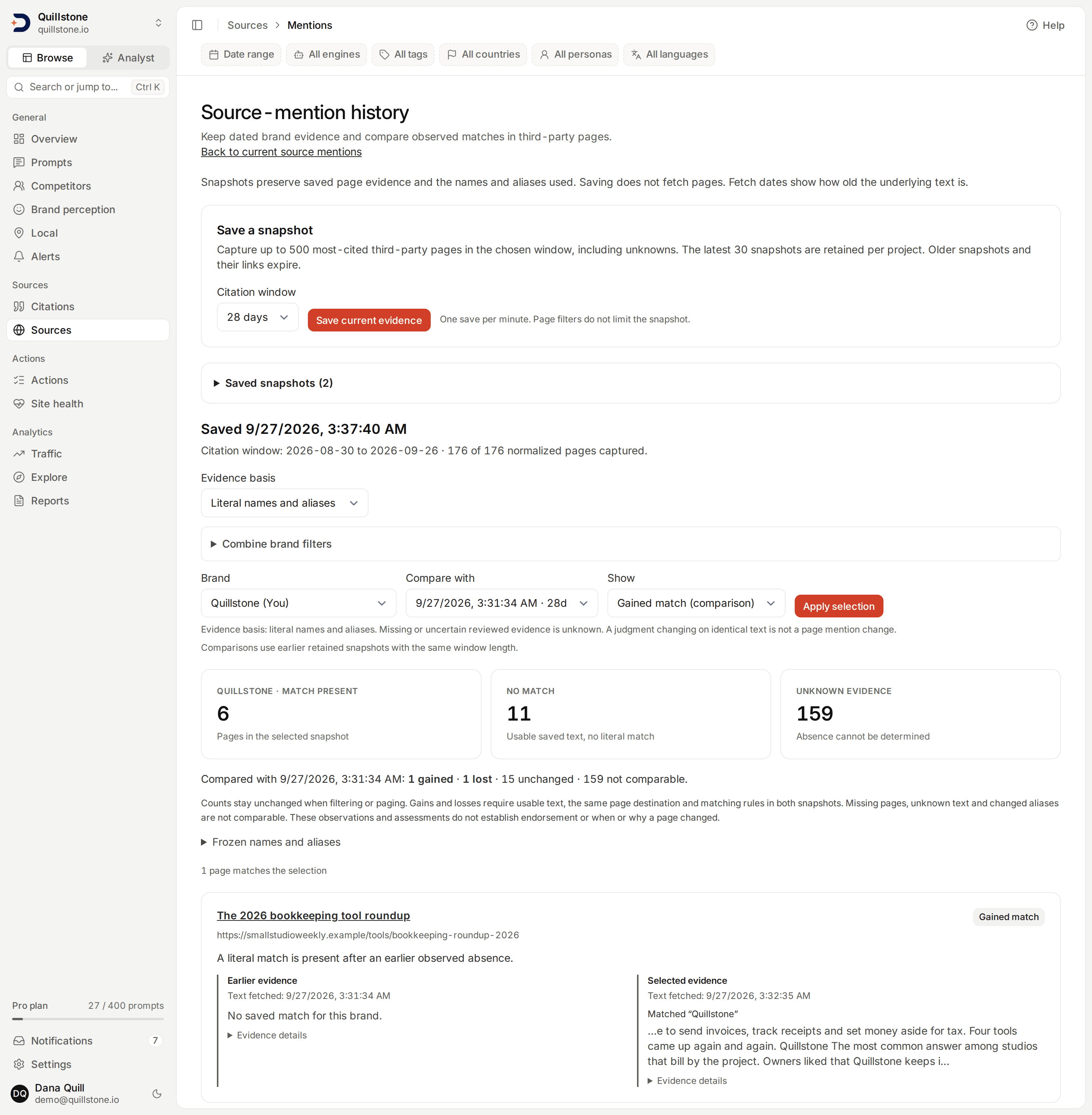
- Choose Literal names and aliases or Reviewed brand meaning as the evidence basis, then select Apply selection and inspect both observations.
| Result | Meaning |
|---|---|
| Gained match | Comparable evidence was absent earlier and present in the selected snapshot, for the chosen evidence basis. |
| Lost match | Comparable evidence was present earlier and absent in the selected snapshot, for the chosen evidence basis. |
| Unchanged | The observed match state is the same; other page text may have changed. |
| Not comparable | A page or brand is missing from one captured population, matching rules/aliases changed, text is unknown, or the saved page destination changed or is unknown. |
Gains and losses require the same normalized source URL in both populations, usable text, the same normalized destination, the same matcher version and the selected brand's unchanged matching names/aliases and own/competitor role. A page falling out of the citation window or scan cap is not a lost mention. Adding an alias does not retroactively change an earlier snapshot.
Reviewed comparisons also require a conclusive, non-stale assessment in both snapshots, unchanged brand domain, and the same assessment method, recorded model and review-rule version. An unspecified/default model identity is not comparable. Switching from AI to a team correction is not comparable. A changed judgment on identical saved text is not a gained/lost page reference. Old snapshots without reviews show unknown reviewed evidence; they are never filled in retroactively.
Combine brand filters applies include-all, include-any and exclude groups together to the selected snapshot, using its frozen roster and chosen basis. Each group accepts up to 20 brands. Exclusion requires observed absence; unknown evidence never passes it. Clear selections to return to every page.
Counters for Match present, No match and Unknown evidence describe the selected snapshot and brand. Comparison counts describe the union of both page populations. These counts stay fixed when filters or pagination show fewer rows. Filter to gained/lost matches for review, or to not-comparable results to see why an observation cannot support a comparison. Without an earlier snapshot, use the present/absent/unknown filters.
Expand Frozen names and aliases to inspect both rosters. Evidence details include the destination, content fingerprint and citation count. Fetch dates are separate from snapshot dates: saving the same old text again does not make it a new fetch. These comparisons do not establish when a page changed, an endorsement or a causal effect on AI visibility. Reviewed identity is an assessment to inspect, not verified truth.
Retention and limits
The latest 30 snapshots per project are retained, with one save per minute. Saving another removes the oldest beyond that limit, including its old links. Snapshots cannot be edited. History begins when evidence is saved; current text is never used to invent a historical baseline.
Matching examines saved extracted text of at most 100,000 characters per page. Larger pages, failed/blocked/missing scrapes and empty text are unknown and cannot establish absence. The saved evidence payload is limited to 8 MiB; an oversized save is refused without replacing retained history. Raw HTML and full source text are not included in snapshots. A short or common alias may match unrelated text in literal mode. Use explicit AI source review before saving a snapshot if you want to preserve a semantic assessment.
No schedule, refresh, notification or outreach is started by this workflow. Historical evidence remains readable when a competitor is paused or removed, because the saved roster is retained. Removed project members lose access.
Related
- Domains and current source mentions
- Source comparison: compare citation rates and watchlist evidence.
- Earned sources: organize follow-up work on cited pages.
Last verified 2026-09-22