Visibility
Search plan
Topics your business should be found for, built from your own searches and prompts, with Google and AI numbers side by side, a state, and, where there is one, the next step.
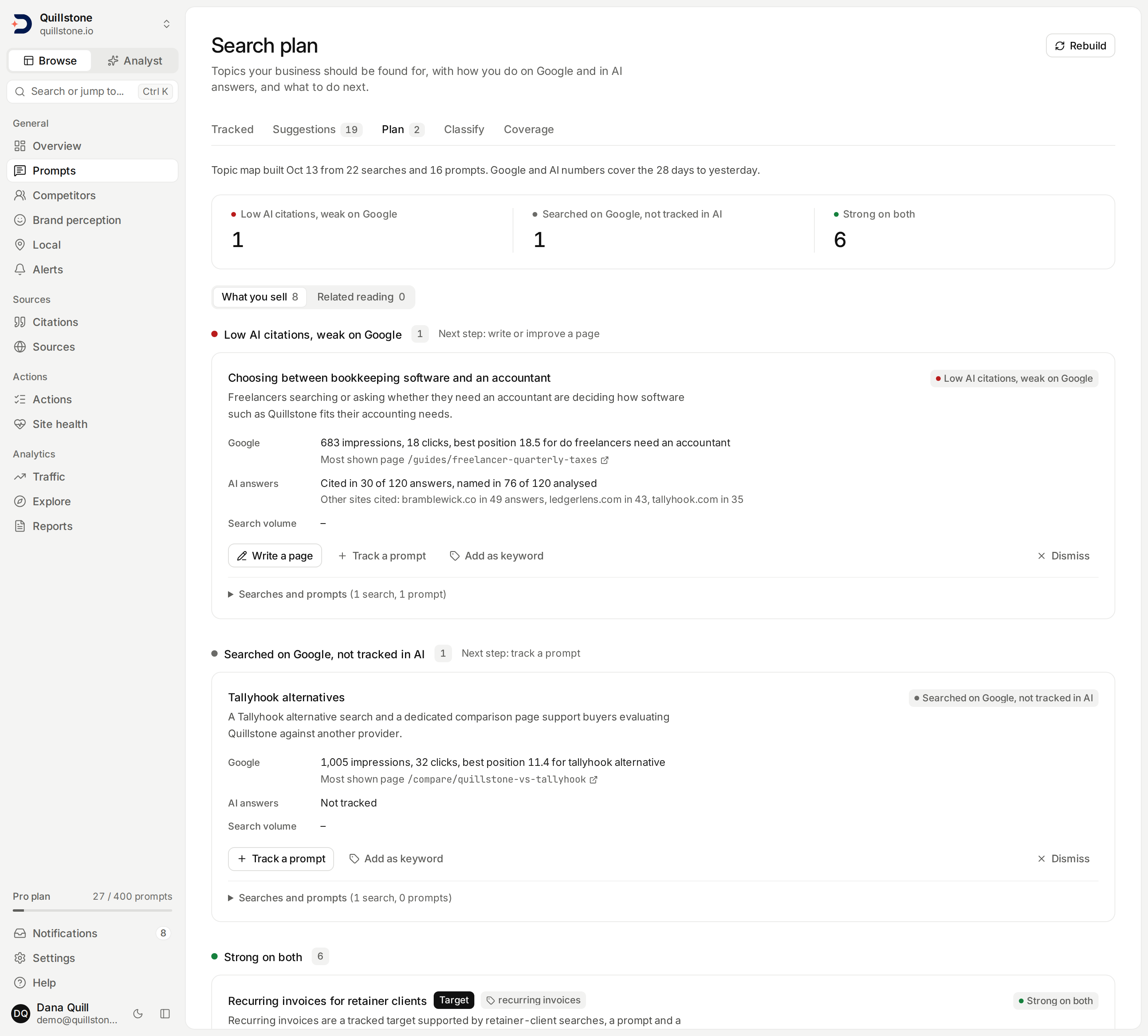
The screenshot shows the Search plan for the Quillstone demo project on development data. Its topic map was built by a real build from the demo's own searches and prompts, but the demo's Search Console rows and answers are generated, so its numbers illustrate the layout rather than what a real project will show.
What this screen shows
Open Search plan from the
Plan tab under Prompts in the sidebar
(frontend/src/lib/nav.js#HUBS). It answers two questions per subject
your business cares about: how do you do on Google, and how do you do in
AI answers? It groups the Google searches that found your site and the
prompts you track into topics, shows Google and AI numbers for each topic
side by side, and names the next step where there is one. The old
Opportunities tab is gone: a link to /prompts/opportunities now lands
here.
Every member of the project can read the plan, on every plan
(api/routers/search_topics.py#list_topics). Owners and editors also see
Rebuild and the buttons on each topic; a viewer sees the same topics
with a notice explaining why the buttons are missing.
What a topic is
A topic is a subject a buyer searches for or a reader learns about, such as "Recurring invoices for retainer clients", not a kind of question such as "pricing". Each topic has a name, a relevance, a one-sentence reason it matters to your business, a short search term (its head term), and sometimes one of your pages that should own it. Each of your searches and each of your prompts belongs to at most one topic.
A model names the topics, judges their relevance, writes the reasons and
decides which searches and prompts go where. It produces no number: every
Google and AI number on a topic is computed from your own Search Console
rows and stored answers each time the page opens
(api/services/search_topics/plan.py#read_plan). Search volume comes from
the DataForSEO figures stored for your project (see below), and the counts
in the line saying when the map was built were recorded by that build.
Each topic has one of three relevances, judged by who is searching:
- What you sell (core): something the business sells, or a decision a buyer of it makes, such as choosing, comparing or hiring a provider.
- Related reading (supporting): a subject inside your field that brings readers rather than buyers, such as a tutorial on a tool your customers use.
- Not about your business (unrelated): a subject outside your field that your site happens to rank for. These topics get no state and no card on the plan; they are listed last on the Search page's Topics tab.
A topic is a Target when it matches one of your
keywords or a search term your newest
research profile suggested. The model lists which keywords and which
research terms a topic matches, and the plan sets Target only when at
least one of those checks out against the keywords and terms it was sent;
a yes or no from the model is never used, and a keyword deleted while the
build runs no longer counts
(api/services/search_topics/build.py#is_target, #persist_map). The
model is told to give every target a topic, even one with no search or
prompt behind it yet. The Target chip's tooltip reads "Matches a keyword
you track or a search suggested by research".
How the map is built
A build reads only your project's own data and sends it to the model as
one bounded payload; it does not search the web
(api/services/search_topics/inputs.py#collect_inputs):
- the business: name, domain, description, business type, market, goal, and the newest research profile's summary;
- targets: your keywords (at most 50) and the newest research profile's suggested search terms (at most 30);
- the topics of the current map (at most 40), so names stay stable;
- your searches: at most 400, those with the most impressions from 28 days
ago through today (
#WINDOW_DAYS,#MAX_QUERIES), leaving out searches for your own brand names, searches with an operator such assite:, and URLs typed into the search box; - your pages: at most 150 pages on your own domain, starting with the pages
your prompts list as their own, then your home page, then the page Google
showed most for each search (
#MAX_PAGES); - your active prompts (at most 300,
#MAX_PROMPTS).
The model makes up to 25 topics (api/services/search_topics/build.py#MAX_TOPICS).
Its answer is checked before anything is stored
(#validate_output): an id or a search it was not sent is dropped, a
search or prompt claimed by two topics stays with the first, a topic's
page is taken from the list of your pages, never from the model's text,
links are removed from names and reasons, and a reason is cut to 300
characters. A head term keeps the letters, marks and digits of any script
and a few punctuation marks, at most 10 words and 80 characters; when
nothing is left, the topic's name is used instead. A build with no valid
topic fails.
Then the long tail: the next searches by impressions, up to 1,600 more
(api/services/search_topics/inputs.py#MAX_ASSIGN_QUERIES), are sent in
batches of 400 (#ASSIGN_BATCH) with the finished topic list, and the
model may only place each one in a listed topic or leave it out. It is
told to keep a search from someone learning (a how-to, a tutorial, a
definition) out of "What you sell" topics. A search already placed is
never moved. A batch that fails, or that the build has no time left to
send, is skipped and never fails the build.
When a build succeeds, the new map replaces the old one in one step
(api/services/search_topics/build.py#run_map, #persist_map). A topic
keeps its identity across rebuilds when the new map returns the same name
(ignoring case and spacing), or else names the old topic: its dismissal
and its keyword link stay with it. A topic the new map does not return is
retired, not deleted, and a later build that returns the same name brings
the same topic back, dismissal included. A failed build leaves the previous
map exactly as it was.
The header
The line under the title says when the shown map was built, from how many
searches and prompts, and which days the numbers cover, for example "Topic
map built Oct 13 from 22 searches and 16 prompts. Google and AI numbers
cover the 28 days to yesterday." The searches are those of the first step
(at most 400) plus every search in each long-tail batch that placed at
least one; the prompts are the active prompts the build was sent. When
Search Console has data for fewer of those days than it should, the line
adds the Search page's own note, such as "Search Console has data for 5 of
the last 28 days (Oct 6 to Oct 10). Totals cover only those days." A day
counts when any row was imported for it, in any country
(api/services/search_topics/plan.py#search_console_coverage,
frontend/src/lib/search-performance.js#coverageNote).
Searches that no topic holds are counted in a line beside the views ("12
searches with 140 impressions are not in a topic yet"), with a link to the
Search page, where they appear as Not in a topic yet. Searches for your
brand, searches with an operator such as site: and URLs typed into the
box are not counted there.
When Search Console is not connected, not mapped to the project, or has no recent days imported, a notice above the topics says which, with the link that fixes it. When the window holds no imported day and the page cannot tell why, the notice reads "No Search Console data in the last 28 days, so topics are judged on AI answers only." Before the first map, the page offers Build the topic map, and tells a viewer that an editor can build it.
When it is rebuilt
Weekly. Every Monday at 10:00 UTC (the timer
platform/backend/deploy/systemd/discoveredby-cli@enqueue-search-topic-maps.timer),
a build starts for every active project with an active owner that has
Search Console rows from the last 28 days or at least one active prompt,
unless a build of any outcome was started for it in the last 6 days. It is
not limited by plan
(api/tasks.py#_enqueue_search_topic_maps_for_eligible_projects,
#SEARCH_TOPIC_MAP_INTERVAL).
On demand. Rebuild (or Build the topic map before the first
map) starts a build for owners and editors
(api/routers/search_topics.py#trigger_run). It is refused while a build
is running, and for 6 hours after the start of the newest build that
succeeded; the refusal names the time to try again, in UTC
(api/services/search_topics/runs.py#trigger_block_reason,
#REBUILD_COOLDOWN). A failed build never blocks a retry.
A build takes a few minutes, and the page does not update by itself: while
one runs, the button reads Building... and the page asks you to
refresh. A build still marked running an hour after it started is treated
as lost: the page shows it as timed out, so Rebuild is available
again, and the next request for a build marks it failed before deciding
(api/services/search_topics/plan.py#_run_read,
api/services/search_topics/runs.py#is_stuck, #reap_stuck_runs,
#STUCK_AFTER). If the newest build failed, the page says "The last
rebuild failed. Try again later." or, for one that ran out of time, "The
last rebuild timed out. Try again.", and keeps showing the map built
before it. The technical reason stays in our logs; it is never shown
(#customer_error, frontend/src/lib/search-plan.js#buildStatusLine).
The numbers on a topic
Both halves cover the same days: the 28 days ending yesterday
(api/services/search_topics/plan.py#google_window).
Google. Impressions and clicks are summed over the topic's searches.
The best position is the lowest impressions-weighted average position,
rounded to one decimal, among the topic's searches with at least 10
impressions (api/services/search_topics/plan.py#MIN_RANKED_IMPRESSIONS); a topic whose searches all have
fewer has impressions but no position. The most shown page is the page
with the most impressions across those searches. A topic none of whose
searches had an impression has no Google numbers, which is different from
zero. When the project has no Search Console data for any of those days,
in any country, Google is unknown rather than zero: every card says "No
Search Console data", and no state judges Google.
AI answers. Only the topic's tracked prompts count: active prompts with
at least one active target. A prompt that is paused, or whose every target
is paused, leaves the topic's prompt list, its numbers and its state
together (api/services/search_topics/plan.py#_prompts_by_topic). Answers use the same definitions as the
Explorer (api/services/explorer/metrics.py#compute_raw),
and the card's line reads like "Cited in 12 of 40 answers, named in 18 of
30 analysed". The first part is the topic's
citation rate: collected answers
that cite your site, out of collected answers. The second is
brand visibility, over analysed
answers only, and is left out when no answer was analysed. Counts are added
across the topic's prompts before dividing, never averaged. Other sites
cited lists the three other domains cited by the most of those answers,
leaving out your own domains. A topic whose prompts have no answers yet has
no rates, never 0%.
States
Each topic that is not unrelated gets one state, from these definitions
(api/services/search_topics/plan.py#topic_state):
- Low AI citations: the topic's prompts have answers, and under 30% of
them cite your site. Often cited by AI is 30% or more, the same
threshold citation gaps use for your
own citation rate (
api/services/citation_gap.py#OWN_VISIBILITY_THRESHOLD). - On Google page one: the best position is 10.0 or better
(
api/services/search_topics/plan.py#PAGE_ONE), which needs a search with at least 10 impressions. Weak on Google: Search Console has data but no search of the topic with 10 or more impressions is on page one, including a topic with no impressions at all.
The rules are checked in this order, and the first that fits gives the state:
| State | Rule | Next step |
|---|---|---|
| Not tracked in AI | no tracked prompt, no Search Console data | track a prompt |
| No Google impressions, not tracked in AI | no tracked prompt; Search Console has data, the topic's searches had no impressions | track a prompt, write a page |
| Searched on Google, not tracked in AI | no tracked prompt; the topic's searches had impressions | track a prompt |
| Waiting for AI answers | tracked prompts, no answers in the window | none yet |
| Low AI citations | no Search Console data; low AI citations | write or improve a page |
| Often cited by AI | no Search Console data; often cited | none |
| Low AI citations, weak on Google | low AI citations, weak on Google | write or improve a page |
| On Google page one, low AI citations | on page one, low AI citations | improve the ranking page for AI |
| Often cited by AI, weak on Google | often cited, weak on Google | improve the page for Google |
| Strong on both | on page one and often cited | none |
Each state chip has a tooltip that states its thresholds, such as "Cited
in under 30% of the answers to this topic's prompts, and weak on Google: no
search with 10+ impressions on page one."
(frontend/src/lib/search-plan.js#STATE_META).
Views, order and the summary
Two views split the topics (frontend/src/lib/search-plan.js#groupTopics):
What you sell (the default) holds the "What you sell" topics and the
targets, and Related reading holds the "Related reading" topics that
are not targets. Unrelated topics, targets or not, are in neither. Each
view's name carries its count of topics not dismissed.
Inside a view, topics are grouped by state, most actionable first: Low AI
citations, weak on Google; On Google page one, low AI citations; Low AI
citations; Searched on Google, not tracked in AI; No Google impressions,
not tracked in AI; Not tracked in AI; Waiting for AI answers; Often cited
by AI, weak on Google; Often cited by AI; then Strong on both
(api/services/search_topics/plan.py#STATE_ORDER). Each group's heading
names its next step, if it has one. Within a state, targets come first,
then monthly searches, then Google impressions (both highest first,
unknown last), then name. A strip at the top counts the topics not
dismissed in each state that has any, and each count jumps to its group.
Each card shows the topic's name, its Target chip and the keyword it is linked to, if any, the model's reason (shown as plain text), the Google line, the most shown page, the AI answers line, the other sites cited, the search volume, and Page for this topic when the page the model chose differs from the one Google shows most. Searches and prompts opens the topic's top 10 searches by impressions, with their positions, and its prompts, each linking to the prompt.
What you can do with a topic
Owners and editors get these on each card:
- Track a prompt opens Prompts' add dialog
with the topic's head term in the prompt box. Nothing is saved until you
add the prompt there, and it counts against your prompt slots like any
prompt you add. Once it is added, it is placed in this topic at once, so
the card counts it without waiting for a rebuild
(
frontend/src/lib/search-performance.js#trackHref,api/routers/search_topics.py#attach_topic_prompt). If that last step fails, the prompt is still added and the page says so; the next build can place it. At your prompt limit the dialog does not open, and the Prompts screen says why. - Write a page, on topics in the states Low AI citations, weak on
Google; Low AI citations; and No Google impressions, not tracked in AI,
opens Articles with the "Write your own
topic" form filled in: the head term as the title and the reason as the
angle. Nothing is generated until you press that form's button
(
frontend/src/lib/search-plan.js#writePageHref). The form stays linked to the topic (Unlink drops the link), so the writer starts from the topic's best-cited tracked prompt, the pages cited for it and the topic's own page, where the topic has them (api/services/articles.py#submit_custom_topic). - Add as keyword adds the head term to your keywords, or links the
keyword with exactly that text if you already have it, and shows it on
the card (
api/routers/search_topics.py#add_topic_keyword). A build links a keyword only to a topic that has none, so it never replaces yours. - Dismiss hides the topic from the plan and from To do; the Search
page's Topics tab still lists it, marked Dismissed. A rebuild keeps the
dismissal for as long as the topic keeps its identity (see above).
Show dismissed brings dismissed topics back into view, each with
Restore (
#dismiss_topic,#restore_topic).
Search volume
After every successful build, the plan looks up how often each topic's
head term is searched on Google, from DataForSEO's keyword data (Google
Ads data), and stores it for your project alone
(api/tasks.py#build_search_topic_map_task,
api/services/search_topics/volumes.py#refresh_keyword_volumes).
Unrelated topics are not looked up. It asks for at most three of the
countries your project covers that DataForSEO also covers, the United
States first and the rest by country code (#volume_locations,
#MAX_LOCATIONS), in the project's default language or English. A term
is looked up again only when its stored figure for that country is
missing or over 30 days old (#TTL).
A card reads like "1,300 searches a month (US, GB) · difficulty 34 of 100
in US": the monthly average summed over the countries that returned a
figure, with the keyword difficulty of the first of them, which the line
names (api/services/search_topics/volumes.py#volumes_for_terms,
frontend/src/lib/search-plan.js#formatVolume). A topic shows "–" when a
lookup returned no figure for any country, and no volume line at all
before its first lookup. Without DataForSEO access, or when a lookup
fails, the stored figures stay as they were; the map itself never depends
on them. The Search page's Topics tab shows the same total as Monthly
searches, or one country's own figure when its country chip is set.
In To do
The plan feeds To do as Search plan items:
topics that are not dismissed, are "What you sell" or a target, and are in
one of the first six states of the order above: Low AI citations, weak on
Google; On Google page one, low AI citations; Low AI citations; Searched
on Google, not tracked in AI; No Google impressions, not tracked in AI;
and Not tracked in AI
(api/services/search_topics/plan.py#actionable_topics, #ACTIONABLE_STATES).
The Plan tab shows a count of the same items, with no count when there
are none.
What the plan does not do
- It does not search the web, and it reads no other project's data.
- It does not create prompts or articles by itself: Track a prompt and Write a page only open a form that you submit yourself.
- It does not follow the filter bar: its numbers always cover the 28 days to yesterday, in every country and on every engine. The Search page's Topics tab does follow its window and country chip.
- It does not keep up between builds, except for a prompt added with Track a prompt: a new search, any other new prompt or a change of page joins a topic only at the next build, and each build places every prompt afresh, the attached ones included.
- It covers at most 2,000 of your searches per build, the most shown
first, with brand searches, URLs and
site:checks left out. - It makes one map per project, not one per country.
Related
- Search performance: the Search Console screen, whose Topics tab lists the same topics
- Google rankings versus AI citations: why a page can rank on Google and still go uncited
- Prompts: what a tracked prompt is
- Prompt suggestions: prompts research suggests, including from your Search Console searches
- To do: where the plan's open topics appear
- Metrics defined: citation rate and brand visibility
Last verified 2026-10-16