Account
Exports and activity
Every downloadable dataset, what one row means in each, how CSV and JSON differ, the per-dataset row cap that refuses rather than truncates, and what the project activity log can actually show.
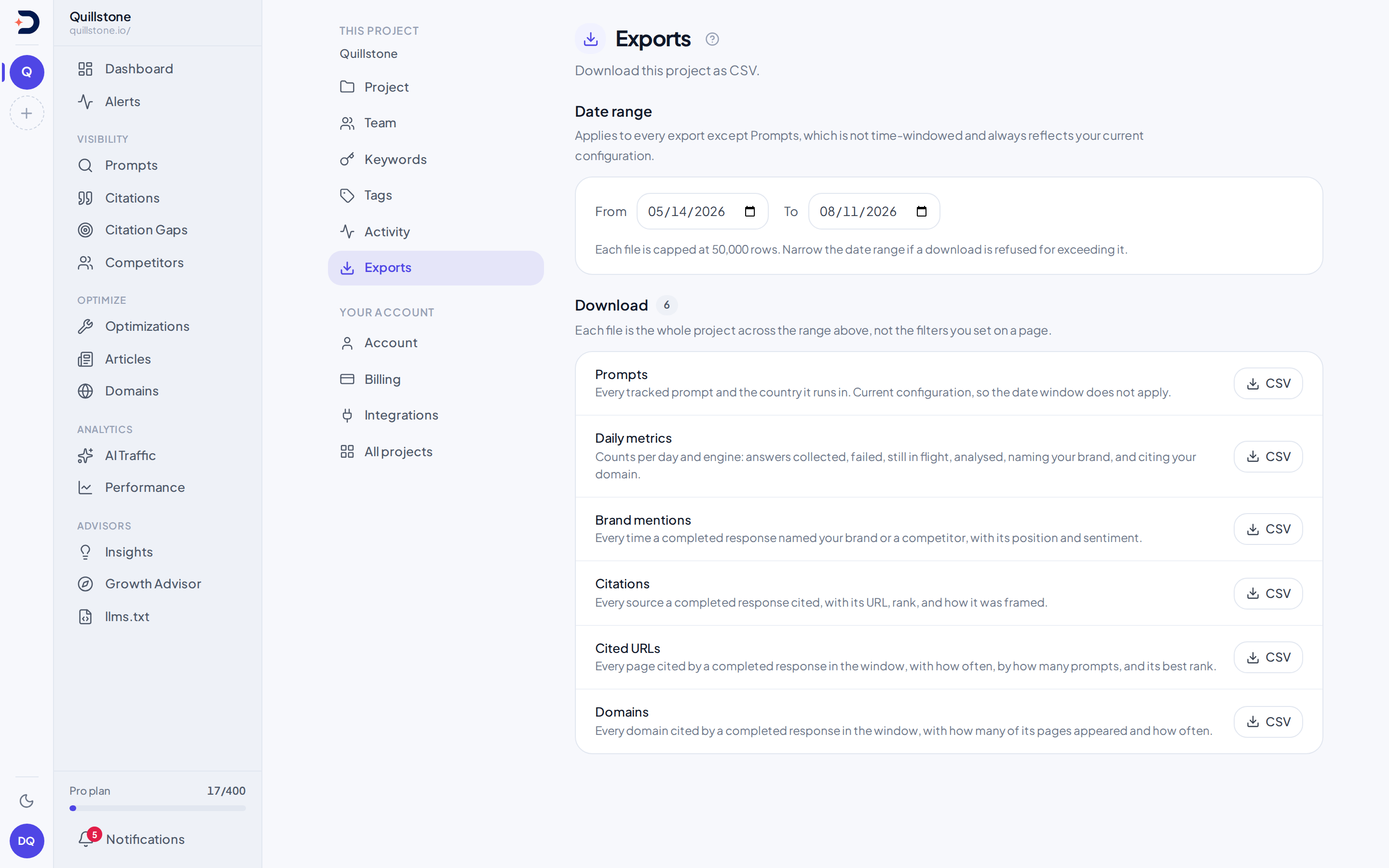
The thirteen datasets
Every export on this screen comes from one registry, an insertion-ordered
dict that is also what the page lists them in
(api/services/exports/__init__.py#REGISTRY). It holds exactly thirteen
datasets, no more and no fewer:
- Prompts: one row per tracked prompt, for each country it runs in (and
each city, when a prompt targets one), including its
intent_class,buyer_stage,themeandbranding, which are empty for a prompt nobody has classified. Not windowed: this is the project's current configuration, not a time series, so a date range does nothing to it (api/services/exports/prompts.py). See Prompts for what the four classifications mean. - Daily metrics: one row per combination of six things, all of them
emitted as columns: the day, the platform, the surface, the collection
method, the provider and the model used. Expect more than one row for a
given day, provider and surface whenever any of the other three changes
inside the window, which a model identifier does on every model upgrade.
Each row counts the selected daily result for each target and engine:
the latest successful outcome, including a valid no AI answer outcome,
or the latest attempt when none succeeded. Failed or running retries do
not displace a successful result. This is the one dataset built from
tracked answers that is not restricted to completed ones. The last column,
responses_no_answer, counts the runs where Google showed no AI answer, and was added at the end so no earlier column moved. Brand mentions, Brand reasons, Citations, Cited URLs, Domains and Answers count completed answers only (api/services/exports/daily_metrics.py#rows,#COLUMNS). - Brand mentions: one row per time a completed answer named your brand,
a tracked competitor, or either one's sub-brand, with its position and
sentiment. This is a plain record of what was seen, not filtered by
whether the brand is still tracked today: a paused competitor's mentions
and an archived sub-brand's mentions both keep appearing here for as long
as they sit inside the window, the same as an active brand's. A
sub-brand's row carries a
parent_brandcolumn holding its parent's display name; the column is empty for a top-level brand's own row and for an untracked name. Apersonacolumn names the persona the answer ran as: empty, never null, for the General audience. Alanguagecolumn names the language variant the same way: empty, never null, for As written (api/services/exports/entity_mentions.py#COLUMNS). - Brand reasons: one row per strength or weakness reason a completed
answer gave for a tracked brand, on plans with
Brand reasons: date, prompt, persona,
language, country, provider and collection provenance, the brand and its
parent brand (empty for a top-level brand), the reason, its category, its
polarity, and the quoted evidence behind it
(
api/services/exports/brand_reasons.py#COLUMNS). Only a mention resolved to a tracked brand carries a row here, the same restriction the Brand reasons screen applies. - Objections: one row per objection found in a succeeded
objection study, on plans with
Objections: the study's date, id, trigger and language (empty for As
written), the brand asked about and whether it is your brand or a
competitor, the provider, platform and surface, the model, the
objection's rank and score, the objection group's label and
description, the claim, the quote from the answer, and the URLs of the
sources linked to it from where the engine placed its citations,
separated by spaces (empty when none is linked, which is always the
case for an engine that records no citation positions; see
how sources are linked)
(
api/services/exports/objections.py#COLUMNS). The window selects studies by the UTC date they were created. Only objections that were grouped carry a row, so a study that failed contributes none (api/services/exports/objections.py#statement). Rows are ordered by study, with your own brand first within each study, then competitors, engine and rank (api/services/exports/objections.py#rows). Each quote is exactly as it appears in the engine's answer, markdown and citation markers included. - Attributes: one row per attribute or brand found in a succeeded
attribute study, on plans with
Attributes. A
measurecolumn says which: anassociationrow is one attribute an engine gave when asked what a brand is known for, withbrandthe brand asked about andphrasethe engine's own wording; amarketrow is one brand an engine named when asked which brands are known for an attribute, withbrandandphrasethe name as written in the answer. Both carry the study's date, id, trigger and language (empty for As written), the attribute's label and description, whether it is one of your attributes at the time you export,brand_kind(ownorcompetitor, and for a market row alsountracked), the provider, platform, surface and model, the rank and score, the quote from the answer and the URLs of the sources linked to it, separated by spaces (api/services/exports/attributes.py#COLUMNS). A market row's attribute is the label the study asked, even if the group was renamed since (api/services/exports/attributes.py#market_statement). The window selects studies by the UTC date they were created, and only phrases that were grouped carry an association row (api/services/exports/attributes.py#association_statement). Rows are ordered by study, association rows first, with your own brand first, then competitors, engine and rank; then market rows by attribute, engine and rank (api/services/exports/attributes.py#rows). - Fact checks: one row per finding of a
fact check, on plans with Fact check:
when the answer was checked,
answered_at(for a checked prompt, its run time, when the engine answered; for a study answer, when it was stored after its check, not when the engine answered), whether it came from a fact study or a checked prompt, the study id or the prompt id and text, the provider, platform, surface and model, the fact's id and category, the fact's wording and version as it was checked (fact_version), whether the fact has been edited since (earlier_wording), its status now, the model's verdict and the effective verdict after your team's review (empty when marked not relevant or the fact out of date), the quote from the answer, the model's explanation, the URLs of the sources linked to the quote, separated by spaces, and the review status and note (api/services/exports/fact_checks.py#COLUMNS). The window selects findings by the UTC date the answer was checked. Only checks that succeeded have findings, so a failed check, or an answer skipped by the daily limit, contributes no row (api/services/exports/fact_checks.py#statement). Rows are ordered by when the answer was checked (api/services/exports/fact_checks.py#rows). Each quote is exactly as it appears in the engine's answer. - Citations: one row per source a completed answer cited, with its URL,
rank, and how it was framed (
api/services/exports/citations.py). - Cited URLs: one row per page cited by a completed answer in the
window, aggregated across every prompt and provider that cited it
(
api/services/exports/cited_urls.py). - Domains: one row per domain cited by a completed answer in the
window, aggregated the same way as Cited URLs
(
api/services/exports/domains.py). - Organic results: one row per organic result stored for a Google AI
Overviews run in the window, the first page of organic results of each
run:
execution_date,prompt(the text as sent),country,city,provider,status(completed, orno_answerwhen no Overview was shown),position(its place among the organic results on that first page),rank_absolute(the place on the whole results page),url,domain,is_own_domain,competitor(the tracked competitor active on that domain now, if any) anddomain_cited_in_overview, which is empty for a run with no Overview, because there was no answer to cite (api/services/exports/organic_results.py#COLUMNS,#rows). Failed runs are not included. See Google results. - Answer features: one row per completed answer, oldest first, with
answer_id(the same id as an answer in the customer API),prompt_id(which joins the Prompts export), the date, the prompt as sent, the engine, its surface, the country, city, persona and language, thedetector_versionthat checked it, thenweb_search(true or false) and a count for each ofshopping,local_businesses,ads,video,imagesandtables(api/services/exports/response_features.py#COLUMNS). A feature cell is empty where the engine does not report that feature, where the answer has not been checked (itsdetector_versionis empty too), forweb_search, where the engine's searches were not recorded, and, on Gemini (app), forshoppingorlocal_businesses, where the answer's product or place links were listed for another country; a 0 is a checked answer without the feature. See Answer features. - Answers: one row per completed answer, carrying the response text
itself alongside the prompt as it was sent, the
persona it ran as (empty for General), the
language variant it ran as
(empty for As written), its country and
city (empty for a country-wide
target), and how the answer was collected
(
api/services/exports/answers.py#COLUMNS). Two columns aftercity,country_deliveryandcity_delivery, say how the location was sent to the engine when the answer ran:native,prompt,native_and_prompt,query, ornot_sentfor the city of a country-wide target. A ChatGPT (app) answer (providerchatgpt_app) always readsnativeandnot_sent: it is sent the country only, and a city target does not run on it. A Gemini (app) answer (providergemini_app) to a city target readsnativeandnative, ornativeandnot_sentfor a city with no coordinates on record. Both are empty for an answer collected before that was recorded, never guessed (api/services/collection.py#LOCATION_DELIVERY; see How location reaches each engine). Two of its columns exist because a long answer is cut to fit:response_charsis the answer's true length andresponse_truncatedsays whether what you are reading is the whole thing. Two more carry what we found in it:citation_count, andbrand_mentioned, which is empty rather than false when brand extraction has not run on that answer, because "we did not look" is not "your brand was absent". See the row cap below for why this dataset is bounded more tightly than the rest.
Datasets 2 through 13 are windowed: the date range you pick shapes what they contain. Dataset 1, Prompts, is the only one that is not.
A dataset's column order is not permanently fixed. When language variants
shipped, the new language column was inserted into the middle of the row,
right after persona, in Answers, Brand mentions and Brand reasons, not
appended at the end; when city targets shipped, Answers gained
country_delivery and city_delivery mid-row in the same way, right after
city
(api/services/exports/answers.py#COLUMNS,
api/services/exports/entity_mentions.py#COLUMNS,
api/services/exports/brand_reasons.py#COLUMNS). A CSV consumer reading by
column position rather than by header name would have had every column
after persona shift over by one the day that change shipped. Read a CSV
export by its header row, not by fixed position, so a future column
addition, mid-row or not, cannot silently misalign a script that already
works today. A JSON download is unaffected either way: its columns array
and each row's keys name every field explicitly.
The two formats
Each dataset downloads as either CSV or JSON, and the page offers both on
every row. The list of formats is not hardcoded in the page: it comes from
the same endpoint that lists the datasets, so a format the download route
does not serve cannot appear as a button
(api/routers/exports.py#FORMATS, api/routers/exports.py#exports_index).
Both formats come from one route, one registry and one set of rows, so they
carry the same rows in the same order for the same request. Only the
authorization check, the paid-plan gate, the date window and the row cap
decide what you get; the format decides only how it is written down
(api/routers/exports.py#download_export).
What differs is the writing down, and it matters if you are parsing the file:
- Numbers, booleans and empty values. CSV is text throughout: an empty
cell is how it writes a value that is absent, which is indistinguishable
from an empty string once a parser has been over it. JSON writes numbers
as numbers,
true/falseas booleans, and an absent value asnull(api/services/exports/base.py#json_cell). - The formula guard. A CSV cell beginning with
=,+,-,@, a tab or a carriage return is prefixed with an apostrophe, because Excel and Google Sheets execute those. JSON gets no such prefix, since nothing executes a JSON file and the prefix would alter the value (api/services/exports/base.py#sanitise_cell,api/services/exports/base.py#json_cell). - The byte order mark. The CSV starts with a UTF-8 BOM, which is what
Excel needs to read non-ASCII text correctly. The JSON does not, because
a BOM breaks strict JSON parsers
(
api/services/exports/base.py#render_csv,api/services/exports/base.py#render_json). - One number is written to a different precision.
match_confidencein Brand mentions is stored asNumeric(4, 3), so the CSV prints the stored scale,0.930, and the JSON prints0.93. The value is the same; JSON has no way to carry a trailing zero on a number (api/models/brand_mention.py#BrandMention,api/services/exports/base.py#json_cell).
A JSON download is an object, not a bare list of rows. Alongside rows it
carries the dataset slug and label, a generated_at timestamp, the
columns in order, a row_count, and the window the rows were selected
over. window is null for Prompts, the one dataset that ignores the
dates it is handed, so an empty file cannot be misread as a quiet date
range (api/services/exports/base.py#render_json).
Asking for a format the route does not serve is refused with a 422 naming
the two that exist, and it is refused only after the project has been
authorized, so the list of formats is not readable from a project you
cannot reach (api/routers/exports.py#download_export).
The row cap
Each dataset declares its own ceiling, and the screen prints it against
every download rather than stating one number for all of them. Twelve of
the thirteen take the package default of fifty thousand rows
(api/services/exports/base.py#MAX_EXPORT_ROWS,
api/services/exports/brand_reasons.py#MAX_ROWS,
api/services/exports/objections.py#MAX_ROWS,
api/services/exports/attributes.py#MAX_ROWS,
api/services/exports/fact_checks.py#MAX_ROWS,
api/services/exports/response_features.py#MAX_ROWS). Answers takes five
thousand, because a row there holds an entire response where a row of Daily
metrics holds a handful of counts, so the same row count would mean a file
of a completely different size (api/services/exports/answers.py#MAX_ROWS).
Hitting a ceiling does not truncate the file: the download route asks for
one row past whichever ceiling applies, and if that many come back, it
refuses the whole request outright, before any file is produced, with a
message naming the dataset and its limit, as in "The Daily metrics export
has more than 50,000 rows. Narrow the date range and try again." Prompts,
which a date range does not change, gets the first sentence only
(api/routers/exports.py#download_export). Narrowing the date window is
what gets you under it; nothing here silently drops rows to fit. A window
longer than 366 days is refused the same way
(api/routers/exports.py#MAX_WINDOW_DAYS).
The Exports page fetches each file itself, one at a time, so a refused download (the row cap, a window that is too long, a plan that leaves the dataset out) shows the API's own message under that dataset's row instead of ending as a failed browser download with the reason lost. The button reads "Preparing" while the file is built. Answer features has one row per answer, so a project with many prompts and engines can pass the cap on the default 90-day window; pick a shorter window and download it in parts.
One thing inside a row is cut rather than refused, and only in Answers. A
response longer than eight thousand characters is shortened to that length
(api/services/exports/answers.py#RESPONSE_TEXT_LIMIT), which is why that
dataset carries response_chars and response_truncated: the row states
the original length and whether it was cut, so a shortened answer cannot be
mistaken for a complete one. If you need every answer in full rather than a
bounded sample of them, a file download is the wrong shape for the job.
Reruns and history
Daily metrics and the aggregated Cited URLs and Domains exports use the latest valid outcome for each target, engine and day. The Answers, Citations, Brand mentions, Brand reasons, Answer features and Organic results exports retain individual runs, including same-day reruns. Their totals can therefore exceed the daily metrics without any data being missing. See prompt history for how the daily result is selected.
The filename
Every download's filename follows one pattern:
discoveredby-{project}-{dataset}.{csv|json} for Prompts, or
discoveredby-{project}-{dataset}-{start}-{end}.{csv|json}, with both dates
in ISO form, for the twelve windowed datasets (every dataset except Prompts). The extension is whichever
format you asked for (api/routers/exports.py#_filename). The project segment is your project's
name, lowercased, stripped to letters, digits and hyphens, and cut to forty
characters, specifically so a project name cannot inject anything into the
response header that names the file (api/routers/exports.py#_project_slug).
Explorer results
An Explorer result downloads as CSV or JSON
from the Explorer page itself, not from this screen: it is the result of
one query, computed when you export, rather than one of the thirteen datasets
above (api/routers/explorer.py#export_explorer). It uses the same data-export
entitlement and the same rendering as the datasets here: the byte order
mark and formula guard in CSV, and in JSON the same envelope with dataset
set to explorer and the query's window. Its lines are one per result row
and metric; there is no fifty-thousand-row refusal, because the Explorer's
own limits bound the result instead
(api/services/explorer/export.py#explorer_rows). The file says when a
breakdown was cut to its 25 busiest values and which dates a comparison
used, and the JSON file carries the result's notes; see
Export a result.
Who can download
Downloading a project's exports needs only the same membership check every
project-scoped screen starts with: the caller must be the project's owner
or an active team member of any role. Neither endpoint behind this screen
adds the write-access check that gates most other changes in the product,
so at the API level a viewer can download every export a project has,
exactly like an owner or an editor can
(api/routers/exports.py#exports_index,
api/routers/exports.py#download_export). See Team
for where that write-access check does apply. Active members can select
shared projects in the app and download the exports their project permits.
Whether exports are available at all is a separate question, and it is
answered by the project owner's plan, never by the plan of whoever is
looking at the screen. A viewer or an editor on a project someone else owns
is served by the owner's plan, again at the API level, even if their own
plan, on projects they own themselves, would not allow an export
(api/routers/exports.py#exports_index, api/routers/exports.py#download_export).
See Plans and limits for what governs a
project's plan generally, and for the mechanism this specific check uses.
Brand reasons, Objections, Attributes and Fact checks each need a second
entitlement on top of that: the owner's plan must also include
Brand reasons for the Brand reasons
dataset, Objections for the Objections
dataset, Attributes for the Attributes
dataset, or Fact check for the Fact checks
dataset, or the download is refused even when the general export
entitlement is present (api/routers/exports.py#download_export). No other
dataset here has a second gate like this.
Activity
/settings/activity reads from the same audit table every write in the
backend can log to, filtered to the rows carrying one project's id
(api/routers/pages.py#get_activity_page). Seeing it needs only the same
membership check as downloading an export: owner, editor and viewer all see
the same rows. The network address a row was recorded from is the exception:
only the project's owners see it, and the endpoint leaves it out for editors
and viewers, so the screen cannot show it to them.
Each row reads as a sentence naming the person and what they did, such as
"Priya applied prompt variants". The detail beside it is built on the server
and is at most 200 characters: the row's own summary sentence when it has
one, otherwise a short line of "Label: value" pairs that leaves out ids,
nested values and any field named for a credential, session, email or
network address (api/routers/pages.py#activity_details). Read-only support sessions show
their actor as "DiscoveredBy support" rather than a staff member's address
(api/routers/pages.py#SUPPORT_ACTOR).
The query behind this screen has a hard ceiling of two hundred rows and no other way to move through the log: no query parameter of any kind, and so no page two. If a project's log ever holds more than two hundred rows, the oldest of them are simply not reachable from this screen.
The screen's three filter menus are built from the rows it just loaded, not
from a fixed list of what an audit row could say: the action menu is the
distinct actions present in those rows, sorted, and the person and
resource-type menus are assembled the same way by the endpoint that fetched
them (frontend/src/routes/(app)/settings/activity/+page.svelte#actionOptions,
api/routers/pages.py#get_activity_page). The menu choices depend on the
activity present in the loaded rows.
Successful exports record who downloaded which dataset and format
(api/routers/exports.py#_summary); an Explorer export is recorded the same
way, as the Explorer dataset with its row count and window. Saving, editing
and deleting Explorer views and dashboards, and creating and revoking
Explorer share links, also write
project receipts: a sentence naming the view, dashboard or link (such as
"Created saved view “Weekly answers”"), plus ids, but never query text or
a link's token (api/services/explorer/views.py#audit). Client report link creation and revocation
also write project receipts (api/services/report_shares.py#create_share,
#revoke_share). Customer API key creation,
revocation and successful reads record the key ID and relevant metadata;
read receipts include the dataset and returned row count, without the
secret or answer contents (api/services/customer_api.py#create_key,
#revoke_key, #record_read). Because one key may read 60 times a minute,
those reads have their own view rather than sharing this one: the screen
opens on changes, and an API reads tab shows the read receipts, each with
its own 200-row history (api/routers/pages.py#get_activity_page). This is
an activity view, not a complete audit archive or a log of every user
interaction.
For automated prompt and answer reads, use the Customer API. File downloads retain their existing limits and entitlement; API keys use separate scoped access.
Related
- Brand reasons: what the fourth dataset's reason, category and polarity columns mean
- Objections: what the fifth dataset's rank, score and objection group mean
- Attributes: what the sixth dataset's two measures, rank, score and attribute mean
- Fact check: what the seventh dataset's verdicts, effective verdict and review status mean
- Personas: what the
personacolumn on Brand mentions and Answers refers to - Languages and templates: what
the
languagecolumn on Answers, Brand mentions and Brand reasons refers to - Brands and sub-brands: what
parent_brandrefers to on a sub-brand's row in Brand mentions - Plans and limits: the mechanism behind the paid-plan gate this page's exports use, and why a project's plan is always its owner's
- Team: the write-access check that every other project screen enforces and this one's two endpoints do not
- Projects: how a project's own identity, and the keywords, tags and activity that belong to it, fit together as one scope
Last verified 2026-10-14