Visibility
Prompts
What a prompt is, how it differs from a keyword, how the ones you track get run, countries, cities and buyer-persona audiences, the Google results card (shown rate and organic rank next to Overview citations), bulk organization, reviewable AI classification and prompt branding, and the Google demand behind it.
What a prompt is
A prompt is a full question, stored as its own row, that DiscoveredBy actually runs against the AI engines you track, not a fragment of one. A keyword is a different thing: a plain text label belonging to the project, which you can attach to a prompt to file it, with no country, no schedule, and nothing that runs it. See Key terms for how a prompt fits the rest of the product's vocabulary.
One target per location, audience and language
Every prompt tracks at least one location: a whole country, or a city (see Cities below). Each location you add creates its own row underneath the prompt, called a prompt target, and that row, not the prompt itself, is what actually gets run: a prompt tracked in three countries produces three prompt targets, each checked independently against every engine on your plan, or a chosen subset, except that a persona variant, a Chinese variant and a prompt over 700 characters never run on the two Google engines (see Google results), and a persona variant, a city variant, a Chinese variant and a prompt over 2,000 characters never run on ChatGPT (app) (see ChatGPT (app) runs), and a persona variant, a Chinese variant and a prompt over 2,000 characters never run on Gemini (app) (see Gemini (app) runs). Adding a country or a city to a prompt, or reactivating one you had paused, uses one of your plan's prompt slots; see Pricing for what each plan includes.
A prompt also tracks at least one audience: the plain, unbranded "General"
audience every prompt starts selected with, plus any
personas you add to it. General can be
deselected as long as at least one persona is selected in its place; at
least one audience always has to remain. A prompt can also track more than
one language, "As written" (no translation, just today's behaviour) plus
any of 48 supported languages; a target is now the combination of one
location, one audience and one language, and each combination is its own
slot, so a prompt tracked in 3 countries as General plus 2 personas, all As
written, produces 3 x 3 x 1 = 9 targets, not 3
(api/schemas/prompt.py#PromptCreate, api/routers/prompts.py#create_prompt,
api/services/prompt_variants.py#sync_targets). See
Personas for what a persona changes about how
the prompt is actually run, and
Languages and templates for the
language dimension, choosing which engines run a prompt, and saving a
combination as a reusable template.
Cities
A prompt can also be tracked from a city: London rather than the whole of
the United Kingdom, say. On the Add and Edit prompt forms, a Cities
picker sits under the countries. It lists the cities of the countries
enabled on your project, grouped by country and searchable by city, region
or country (api/routers/projects.py#list_project_cities,
frontend/src/lib/components/CityPicker.svelte#visibleGroups). A city is a
location of its own: choosing Lyon does not need France selected, and does
not add a France-wide target. It is crossed with audiences and languages
exactly like a country, so each city uses one prompt slot for each audience
and language it runs as, and the preview counts it the same way, as in "2
locations (1 country, 1 city)"
(api/services/prompt_variants.py#resolve_spec, #diff_targets,
frontend/src/lib/api/prompt-form.js#locationCountText). A prompt can hold
at most 100 active targets, and city targets count toward that limit
(api/services/prompt_variants.py#MAX_VARIANTS_PER_PROMPT). Cities are on
every plan, with no entitlement of their own: the prompt slots they use are
the cost.
The list is fixed by us, not typed by you. DiscoveredBy seeds 344 major
cities across the 18 countries a project can target, between 15 and 25 for
each country except Singapore, which is a single city. Each one carries
its region and its time zone, which some engines receive with the city
(api/services/cities.py#DEFAULT_CITIES,
How location reaches each engine).
A city you need that is not listed can be added by our team: contact
support with the city and country. Nobody on a project can type a city
name, so no free text you enter ever reaches an engine's location field.
A city must be in a country enabled on the project, or the save is refused
with the city named (api/services/prompt_variants.py#_validate_city_ids).
If you later turn that country off in project settings, the prompt's city
targets keep running, exactly as its country-wide targets there do; the
Edit form shows the city as belonging to a country no longer enabled and
lets you remove it, but not add it again. A city a target still uses is
never deleted from the list.
Cities are set from the Add and Edit prompt forms and from
variant templates,
including bulk-applying a template, which applies the template's saved
cities. CSV and Excel import, accepting a suggestion and accepting a
discovered prompt all add country-wide targets only, and never change a
prompt's existing city targets
(api/services/prompt_import.py#apply_plan,
api/services/prompt_discovery.py#accept_candidate).
A city target's answers are compared with the same country's country-wide answers on the Local page, and City is an Explorer dimension. What a city target means, and does not mean, about where an answer "comes from" is on Engines and measurement.
How prompts get run
Running a prompt is not something you trigger yourself, with one exception:
accepting a prompt from Suggestions immediately queues a fast first run
outside the daily cycle (see
Your first scan for
what that exception does and does not change). Otherwise, a single scheduled
job, once a day, enqueues one run per active prompt target, on every engine
currently available on your plan that the target runs on
(api/services/collection.py#target_runs_on). It requires the project, the prompt and
the target all to be active before it will enqueue anything, so pausing a
prompt, or removing one of its countries or cities, removes it from that
job's next run. See Your first scan for how
long the first run takes and what appears once it finishes.
The prompt list
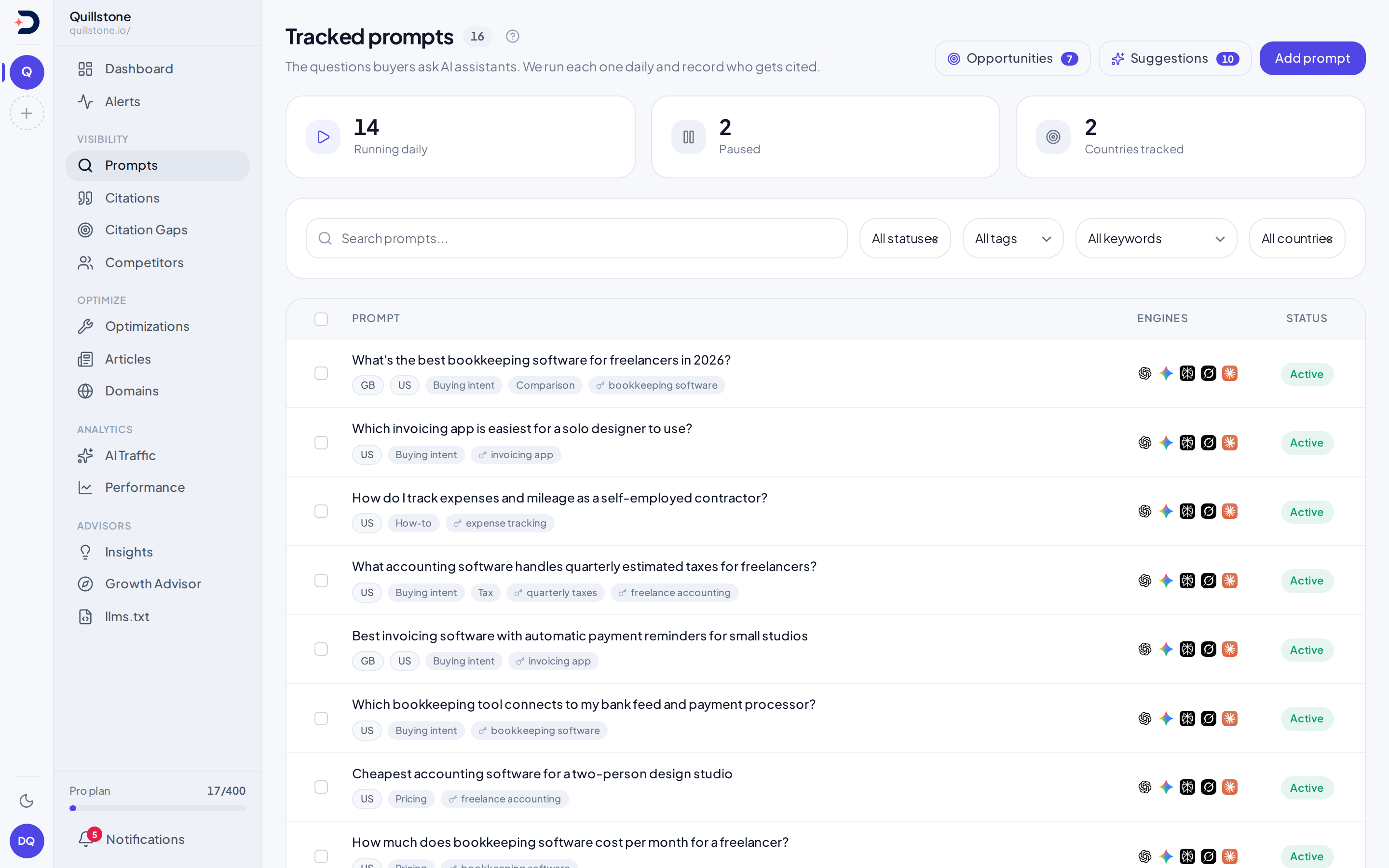
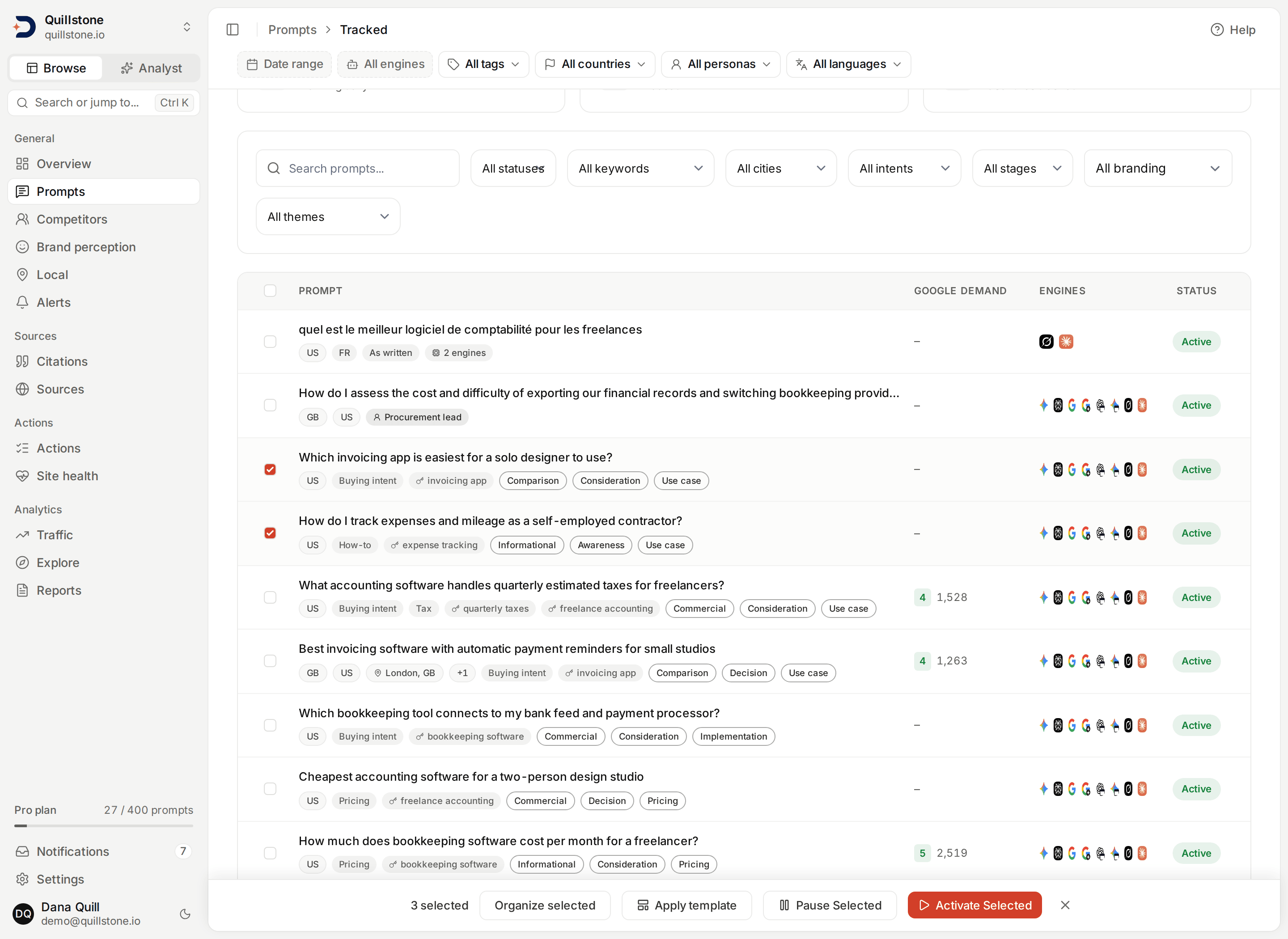
Prompts lists everything you are
tracking. Each row carries the prompt's text, the locations it runs in (a
country code for each country-wide location, then a "City, CC" chip with a
pin for each city; past the first three locations, a "+N" chip lists the
rest when you hover it), its tags and keywords and classifications as chips, an
icon per engine it is checked against, and a running or paused pill. With
Search Console connected there is also a Google demand column, described
below. Three counts sit above the table: how many prompts are running daily,
how many are paused, and how many countries the project tracks between
them, a city's country included
(frontend/src/routes/(app)/prompts/+page.svelte#trackedCountryCodes).
The list deliberately shows no visibility score, trend or citation rate per
row. Those
are computed by the detail endpoint's per-execution aggregation, which is
too expensive to run once for every row of a list, so rather than show a
number that is not the real one, the list shows none and the per-prompt
figures live on the prompt's own page
(api/routers/pages.py#prompt_detail_page).
The filter bar's
tag, country, persona and language chips choose which prompts are listed:
a prompt is listed when it carries the tag and has an active target in the
chosen country, for the chosen persona and in the chosen language, each
checked on its own. A city target counts for its country, so choosing the
United Kingdom finds a prompt tracked only in London
(api/routers/prompts.py#list_prompts,
api/services/answer_filters.py#prompt_conditions). The date range and
engine chips stay disabled here, because a list of prompts is not a set of
answers. When the chips leave no prompt, the page says "No prompts match
these filters" and offers to show every prompt.
Six dropdowns sit above the table on every project: status, keyword, and
the four classification dimensions described below. Each one narrows what
is left rather than widening it, so a prompt has to satisfy every filter
you have set at once, the filter bar's included
(frontend/src/routes/(app)/prompts/+page.svelte#keywordFilter). A City
dropdown appears once some prompt on the list has a city target; with a
country chosen in the filter bar, it lists only that country's cities
(frontend/src/routes/(app)/prompts/+page.svelte#cityFilter,
#citiesShown). The
keyword dropdown and the chips on each row both exist because the list
endpoint returns a prompt's keywords alongside its tags
(api/routers/prompts.py#list_prompts, api/schemas/prompt.py#keywords).
Each row carries a chip for every active audience currently tracking
that prompt, a chip for every real language it runs in (an As-written-only
prompt gets no language chip at all), and a chip naming its chosen engines
when it runs on a subset rather than every engine on your plan
(api/routers/prompts.py#list_prompts,
frontend/src/lib/languages.js#languageChips). See
Languages and templates for
what those language and engine values mean and how to bulk-apply a saved
combination.
Intent, buyer stage, theme and branding
Every prompt can carry four optional classifications, and each one is a
closed list rather than free text
(api/services/prompt_dimensions.py#VOCABULARIES):
- Intent, one of informational, navigational, commercial, comparison or troubleshooting: what the person asking is trying to do.
- Buyer stage, one of awareness, consideration or decision: how close they are to choosing.
- Theme, one of competitor alternative, pricing, use case, implementation, troubleshooting, regional opportunity, comparison or other: what the question is about.
- Branding, branded or unbranded: whether it explicitly names a tracked own or competitor brand, product or alias.
The API and database enforce the allowed classifications. The research agent
assigns the intent, buyer stage and theme vocabulary
(api/services/prompt_dimensions.py#check_constraint_sql). Branding is reviewed
separately through manual controls or the on-demand AI workflow below.
A prompt with no classification is normal, and it is not the same as a
prompt classified as "other". The fields are empty until something fills
them in. A prompt you accept from
Suggestions arrives
already classified, because the research that proposed it assigned all
three, and accepting it now carries them onto the tracked prompt
(api/services/prompt_discovery.py#accept_candidate). A prompt you type in
yourself can be classified in the add dialog. Imported prompts start unclassified;
use manual editing or request AI suggestions after import.
You can set the four yourself or review AI suggestions. The "Not classified" option in each dropdown puts one back to empty. That option is also a filter value, so you can list exactly the prompts nobody has labelled yet.
On the list, a classification is drawn as an outlined chip while a tag or a keyword is drawn as a filled one, because they are different kinds of thing: you choose a tag's name, whereas these four come from the fixed lists above. Hover a chip to see which dimension it belongs to, which matters because "comparison" and "troubleshooting" each appear in more than one of the four lists.
Not every prompt on the list has to start with you typing one in. Prompts → Suggestions is a queue of proposed prompts you track or dismiss, badge-counted on this same screen; that page covers where they come from.
Google demand
If Search Console is connected, each
prompt also carries a Google demand figure: the total impressions Google
recorded in the last 28 days for the search queries that prompt covers
(api/services/prompt_demand.py#demand_for_project).
Read that sentence literally, because the number is easy to over-read. It counts what people typed into Google, not what anyone asked an AI assistant. Nothing in the product measures how often a question is put to ChatGPT or Gemini, and this figure is not a stand-in for it. What it is good for is ranking your own prompts against each other: a question people already search for on Google is usually worth tracking before one nobody searches for anywhere.
A query counts toward a prompt when every meaningful word of the query
appears in the prompt. "bookkeeping software for freelancers" counts toward
"How much does bookkeeping software cost per month for a freelancer?",
because every word of the query is in there, with singular and plural treated
as the same word. It does not count toward "Which invoicing app is easiest
for a solo designer to use?", which shares none of it. The match runs in one
direction only, query into prompt, and a query has to contribute at least two
meaningful words, so a bare head term like "crm" never attaches itself to
every prompt you track (api/services/prompt_demand.py#query_matches_prompt).
Two prompts can cover the same query, and both then count its impressions. That is correct per prompt and wrong in aggregate: the column answers "how much Google demand does this prompt cover", so adding it down the list would count a shared query twice. There is no project total for exactly that reason.
The 1 to 5 score beside the impressions is relative to your own project,
not to any market. The prompt with the most impressions is a 5 and everything
else is placed against it on a logarithmic scale, so one very high-volume
prompt does not flatten the rest to 1
(api/services/prompt_demand.py#bucket_for). A 5 on a small project and a 5
on a large one are not comparable figures. Until at least three of your
prompts match a query there is no spread to rank against, so the impressions
appear without a score rather than with an invented one.
A prompt showing a dash matched no Google query. That is not the same as no demand: Google reports impressions for queries it saw, so no match means we found no query covering this prompt, which may simply mean your site does not rank for it yet. It is never rendered as a zero; see How to read any number here.
The figure appears in three places: as a sortable column on the prompt list, as a section on the prompt's own page listing the matched queries and their individual impressions so the total can be checked, and on each row of Suggestions, where it sits beside the research score. Those two numbers answer different questions: the research score rates how much visibility we think tracking the suggestion would win you, while Google demand counts impressions. A suggestion can score well on one and show a dash on the other.
With no Search Console connection the column, the section and the tile are absent rather than empty, and the figure is not part of the Prompts export, which carries stored fields only.
Importing a list from CSV or Excel
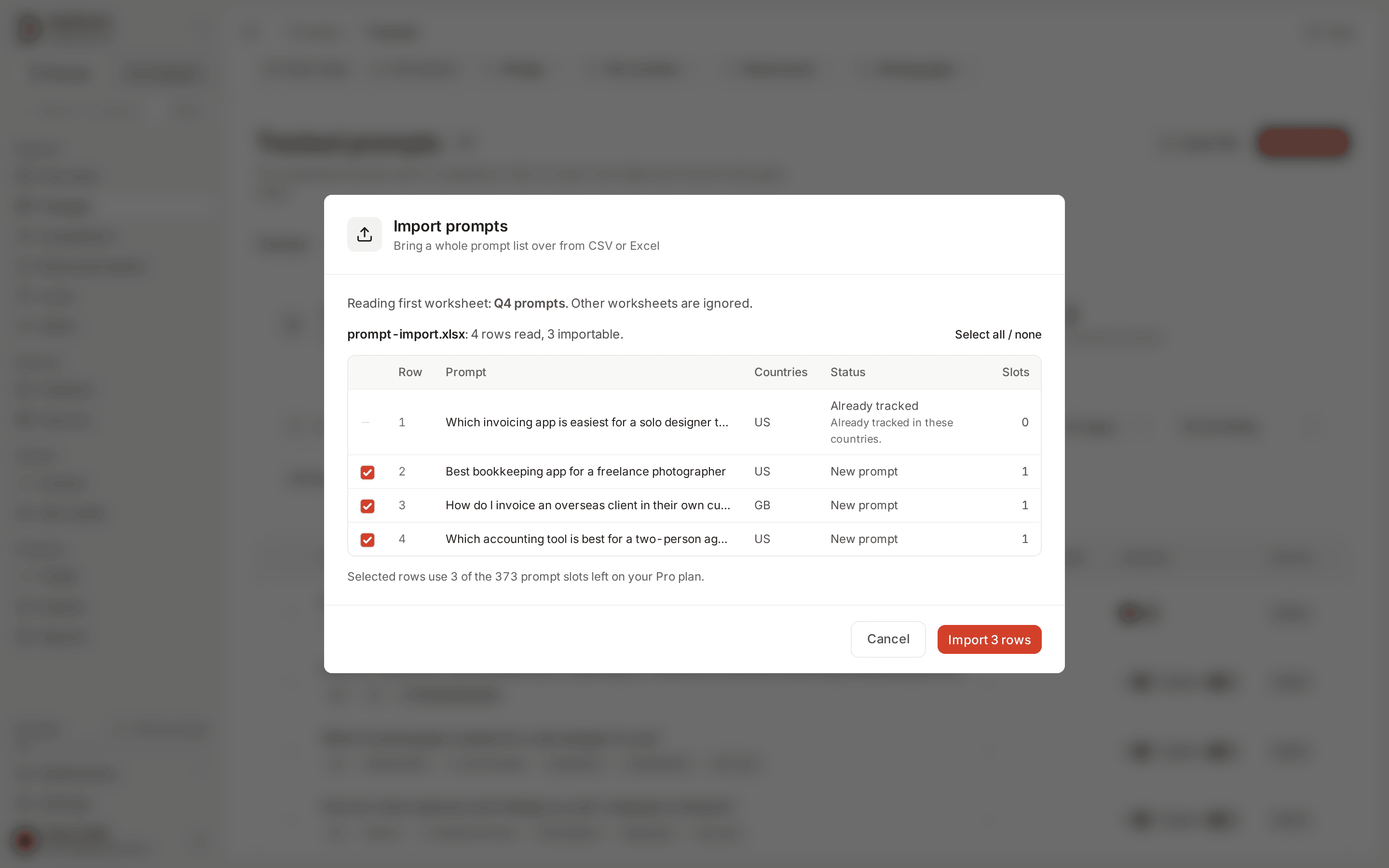
Import file, beside Add prompt, takes a whole portfolio in one pass instead of
one prompt at a time. The file needs a column of prompt text; country and
tags columns are optional. Headers are matched by name, so prompt,
query or question are all recognised for the text column, and a file
whose headings we cannot place asks you to point at the right columns rather
than refusing it (api/services/prompt_import.py#detect_columns). Comma and
semicolon delimiters both work, which covers the CSVs Excel writes in
different locales. A file can carry up to 2,000 data rows and 4 MB.
Excel .xlsx files read only the first worksheet, even when it is hidden;
other worksheets are ignored. The preview names the worksheet being read.
The first row supplies the headers, with at most 100 columns and 2,000 rows
after the header. Formula cells and Excel error cells are rejected: replace
formulas with values before uploading. Password-protected workbooks, macros
and older .xls files are not supported. Workbooks that expand beyond 32 MB
are rejected. Excel then uses the same column mapping, validation, duplicate
handling, row selection and slot budget as CSV
(api/services/workbook_import.py#parse_xlsx).
A country cell takes ISO-2 codes or full country names, comma-separated, and each one has to be enabled for the project already: a country the project does not track is a row error naming it, not a silent skip. Tag names that do not exist yet are created during the import, matching existing tags without regard to case, which is what typing a new tag into the add-prompt form already does.
Choosing a file previews it and writes nothing
(api/routers/prompts.py#preview_prompt_import). The preview is a row-by-row
verdict: what each row would create, which countries are new, how many prompt
slots it would consume, and for anything unusable, the specific reason. Rows
that are fine remain importable while broken ones sit beside them with their
error, so a single bad country code does not send you back to fix the file
before importing any of it. Several rows naming the identical prompt are
merged into one prompt covering every country between them, which is why the
preview lists row numbers rather than one line per file row.
A row whose prompt text already exists in the project adds its new countries to that prompt. It does not touch that prompt's tags, which stay as you curated them in the app, and a row that asks for nothing the prompt is not already tracking reports "already tracked" and is skipped. Because a paused prompt is outside both the quota and the daily run, a country added under one stays paused and costs no slot until you resume it; the preview says so on that row.
Every new country costs one prompt slot, the same as adding one by hand, and the preview states how many of your plan's slots are left before you commit. The slot budget is reserved for the duration of the import, so two people importing at once cannot both spend the same last slot. An import that does not fit is refused whole rather than part-written.
Importing the same file twice is safe. A prompt is identified by the exact
text you imported and a country by the prompt it belongs to, both enforced in
the database, so the second run reports everything as already tracked and
creates nothing (api/routers/prompts.py#import_prompts). That also makes a
retry after a failed import the right move rather than a risk.
Inside one prompt
Opening one prompt leads with its citation rate: how many of that prompt's
completed runs in the window produced an answer citing your domain, out of
how many completed in that same window. The window is the
filter bar's
7, 28 or 90 days ending yesterday, and its engine, country, persona and
language chips narrow the runs; the tag chip is disabled, because one
prompt either carries a tag or does not
(api/routers/pages.py#prompt_detail_page, #PROMPT_DETAIL_ACCEPTS). That is
citation rate exactly as defined
elsewhere in the product, scoped down to one prompt instead of the whole
project, and the screen now names it that. The same figure used to appear
here as a "visibility" score out of 100, from a second field carrying this
rate multiplied by 100 under a name that belongs to a different metric; that
field was removed rather than renamed, so one number is left under one name
(api/schemas/prompt_detail.py#citation_rate). With no completed run inside
that window, or none matching the filters, there is nothing to show, not a
zero; see
How to read any number here.
Two engine callouts sit beside it, the strongest and the weakest engine for this prompt specifically. Both cards always show; with fewer than two engines to compare, the weakest one has nothing to report and says so instead of showing a second score.
Below that: which pages on your own site you have mapped to this prompt, an
engine-by-engine breakdown of the same score, a tally of every brand an
engine has cited when answering this question (yours included), and the
individual citations behind that tally, grouped by engine. How an answer
expanded into an engine's own sub-queries, where the engine reports it, gets
its own panel here too; see Fan-out for what
that panel shows, including how a captured query gets classified and when
one does not, and Engines and measurement
for what the expansion itself means. That panel shows each engine's newest
completed run inside the same window and filters, so with an engine chosen
only that engine appears, and with no matching run it says so instead of
showing an older one (api/routers/pages.py#prompt_fan_outs). A run history table closes out the
page: the runs in the same window and filters, failed ones and runs where
Google showed no AI answer included,
capped at the 50 most recent with a note when there are more, because the
underlying record itself carries no such limit. "Last run" in the page header
is the prompt's newest run of any kind, whatever the window and filters.
Each run names
its location ("GB · London" for a city target) and, under it, how that
location reached the engine, such as "Country sent natively and in the
prompt; city sent natively and in the prompt", or "Location delivery not
recorded" for a run from before
that was stored (frontend/src/lib/location-delivery.js#deliveryText). See
How location reaches each engine.
Google results
Google AI Overviews and Google AI Mode add a Google results card to a prompt's page, below the engine-by-engine breakdown, when either has runs in the window and filters. How both engines are collected, and why a run can show no AI answer, is on Engines and measurement.
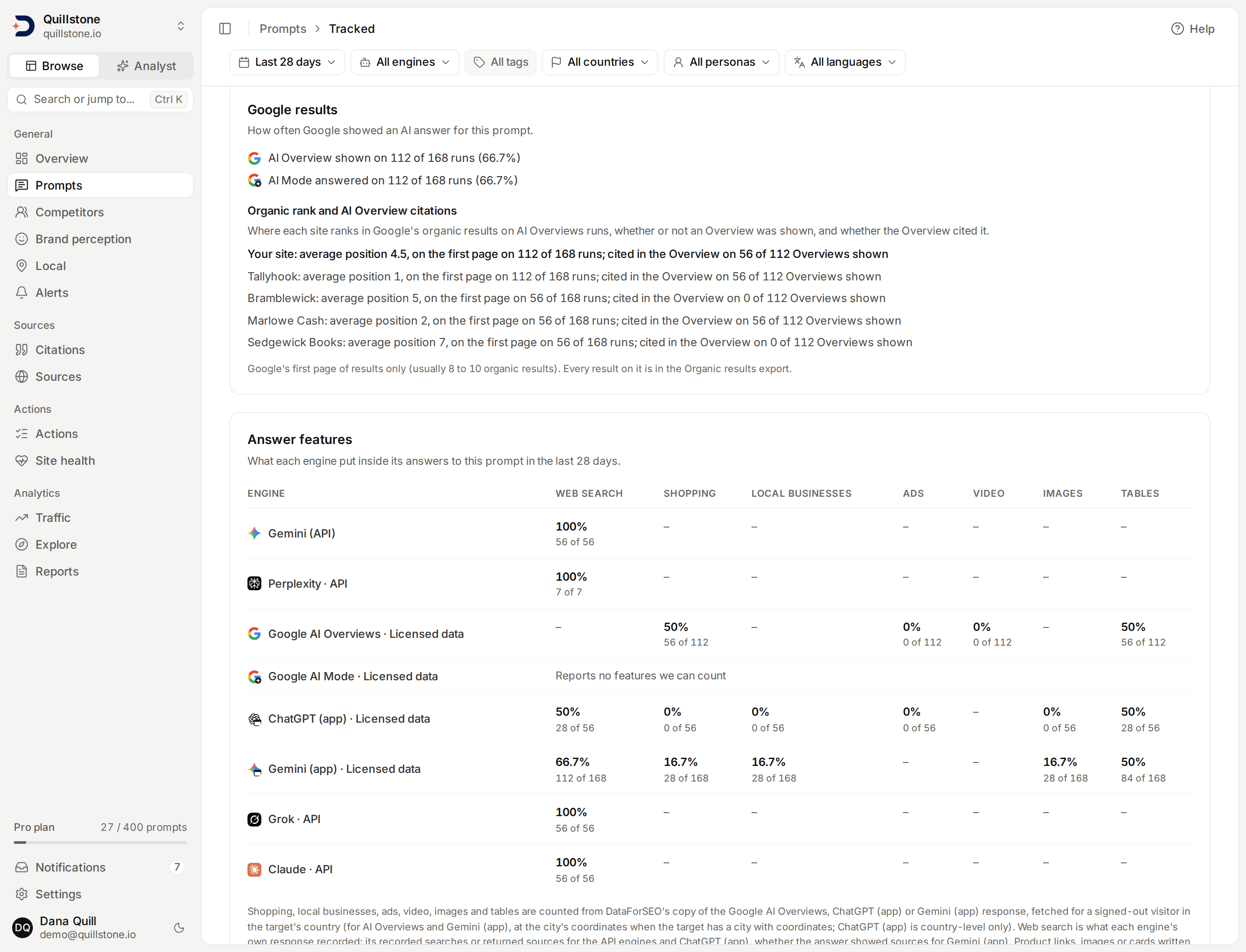
The numbers in this screenshot are demo data: fixed fictional responses run through the product's own collection and detection code.
- Shown rate, per Google engine: "AI Overview shown on 12 of 20 runs
(60%)" or "AI Mode answered on 12 of 20 runs (60%)". A run counts when
it completed or when Google showed no AI answer; a failed run does not
(
api/services/google_serp_reads.py#answer_shown_by_engine). - Organic rank and AI Overview citations, for your site and then each
tracked competitor that is active: its average organic position over the
Google AI Overviews runs where it appears on the first page of Google's
results, on how many runs it appears there, and on how many of the
Overviews shown it was cited, as in "Your site: average position 4.5, on
the first page on 12 of 20 runs; cited in the Overview on 6 of 12
Overviews shown". Every AI Overviews run counts,
whether or not an Overview was shown, because the organic results are kept
either way. Your site is matched the way a citation is; a competitor is
matched by its domain against the competitors active now, so a competitor
added later is counted on older runs too
(
api/services/google_serp_reads.py#organic_panel). Only Google's first page of results is kept, usually 8 to 10 organic results; every result on it is in the Organic results export (see Exports). Google AI Mode has no organic results.
In the run history, a run where Google showed no AI answer reads No AI
Overview shown or No AI Mode answer, with no citation count. Each
Google AI Overviews run lists your site's organic position and each
competitor that ranked or was cited, and whether the Overview cited it, or
that no Overview was shown, as in "Your site #3 · cited" or "Your site not
on the first page · not cited".
Each Google run also says which language was sent: "Language sent to
Google: English" (api/services/google_serp_reads.py#serp_language_label).
A city target whose city has no coordinates on record reads "city
targeted, but sent to Google at country level (no coordinates for this
city)" under its location.
When every Google run in the window showed no AI answer, the page says
"Google showed no AI answer on any Google run in the last 28 days" rather
than that there are no completed runs.
A variant that never runs on a Google engine is listed under the run
history's heading, once per engine, with the reason: "Not run on Google AI
Mode: United States · Procurement lead · As written (personas are not sent
to Google)". The other reasons read "language not supported by AI Mode"
(or AI Overviews) and "prompt over 700 characters once encoded for Google"
(api/services/google_serp_reads.py#not_run_for_prompt,
api/services/collection.py#target_runs_on). The Add and Edit prompt
forms say the same in their preview, as in "Google AI Mode: 3 persona
variants not run", and the monthly estimate there leaves persona
and unsupported-language variants out (see
Languages and templates).
Answer features
An Answer features card follows the Google results card: one row per
engine with a completed answer in the window and filters, one column per
feature (web search, shopping, local businesses, ads, video, images and
tables). Each cell is the share of that engine's checked answers where the
feature was present, with the count beneath, as in "40%" over "2 of 5"
(api/services/response_feature_reads.py#answer_features_by_engine).
A cell reads a dash when the engine does not report that feature, Not
recorded when the engine's searches were not recorded for those answers
or, on Gemini (app), when every answer was left out of shopping or local
businesses because its product or place links were listed for another
country, and Not checked when its answers have not been checked yet. A cell's
title also names any of the engine's answers from before it reported the
feature, such as Perplexity answers collected before Sonar; an engine
that reports nothing we can count, such as Google AI Mode, has one line
reading "Reports no features we can count"
(frontend/src/lib/answer-features.js#featureCell). Hover a column
heading to see which engines report it.
The run history gains an In the answer column: a chip for each feature
present in that answer, in the same order, with a count for shopping, local
businesses, ads, images and tables ("Shopping 4", "Local businesses 16",
"Tables 2")
(frontend/src/lib/answer-features.js#featureChips). A completed answer
not checked yet reads "Not checked"; any other run, and a checked answer
with nothing present, reads a dash. How each feature is detected, and which
engine reports which, is on
Answer features.
ChatGPT (app) runs
ChatGPT (app) is collected through DataForSEO like the Google engines, so
some variants do not run on it either (see
What reaches ChatGPT). They
are listed under the run history's heading the same way, as in "Not run on
ChatGPT (app): London, GB · General · As written (cities are not sent to
ChatGPT's app)". Each of the four reasons has its own wording
(frontend/src/lib/google-serp.js#skipReasonText):
- a persona variant: "personas are not sent to ChatGPT's app"
- a city variant: "cities are not sent to ChatGPT's app"
- a Chinese variant: "language not supported by ChatGPT (app)"
- a prompt too long for it: "prompt over 2,000 characters once encoded for ChatGPT's app"
The list comes from the same rule the daily run uses
(api/services/google_serp_reads.py#not_run_for_prompt,
api/services/collection.py#target_runs_on), and the Add and Edit prompt
previews count the same skips, as in "ChatGPT (app): 2 city variants not
run". Each ChatGPT (app) run in the history says which language was sent:
"Language sent to ChatGPT (app): English"
(api/services/google_serp_reads.py#serp_language_label). ChatGPT (app)
always answers when a run succeeds, so it has no shown rate and is not part
of the Google results card.
Gemini (app) runs
Gemini (app) is collected through DataForSEO too, so some variants do not
run on it (see
What reaches Gemini (app)).
They are listed under the run history's heading the same way, as in "Not
run on Gemini (app): United States · Procurement lead · As written
(personas are not sent to Gemini's app)". Each of the three reasons has its
own wording (frontend/src/lib/google-serp.js#skipReasonText):
- a persona variant: "personas are not sent to Gemini's app"
- a Chinese variant: "language not supported by Gemini (app)"
- a prompt too long for it: "prompt over 2,000 characters once encoded for Gemini's app"
City variants run on Gemini (app): the city's coordinates are sent, and
the location line reads "Country sent natively; city sent natively". A
city with no coordinates on record runs at country level, and its location
line reads "city targeted, but sent to Gemini's app at country level (no
coordinates for this city)"
(frontend/src/lib/location-delivery.js#deliveryText). A local question
tracked for a whole country is answered for wherever DataForSEO's
connection is, so track local prompts on Gemini (app) as city targets.
The Add and Edit prompt previews count the same skips, as in "Gemini
(app): 3 persona variants not run". Each Gemini (app) run in the history
says which language was sent, as in "Language sent to Gemini (app):
Portuguese (Brazil)"
(api/services/google_serp_reads.py#serp_language_label). Gemini (app)
has no shown rate and is not part of the Google results card.
Organize a selection
Use the row checkboxes to select prompts, or the header checkbox to select all prompts matching the current filters. Organize selected lets you set or clear intent, buyer stage, theme and branding together. Each field starts at Leave unchanged. Tags can be added, removed, or replaced; replacing with no tags selected clears the selection's tags.
Selection survives filter changes. The toolbar names how many selected prompts are outside the current filters, and changes apply to the entire selection. Clear the selection before choosing a different group.
Pause selected stops future scheduled runs while preserving history and
country targets. Activate selected resumes those targets and checks the
project owner's available prompt slots for the whole selection. Bulk changes
are atomic: an invalid prompt, foreign tag, or insufficient quota rejects the
whole change. Owners and editors can make these changes; viewers cannot
(api/routers/prompts.py#bulk_update_prompts,
api/services/prompt_bulk.py#organize_prompts).
Prompt coverage
Before pausing prompts to free slots, open the Coverage tab on Prompts. It compares the last 28 days of answers to the prompts running now and recommends a set you could pause together while every source and brand those prompts see regularly is still seen by a prompt you keep. It never recommends a prompt other work depends on, or the last prompt measuring a country, city, persona, language or engine. You can preview any selection first, and owners and editors can pause it from there through the same bulk change as Pause selected; resuming works as described above. It is on every plan. See Prompt coverage.
Review AI classifications
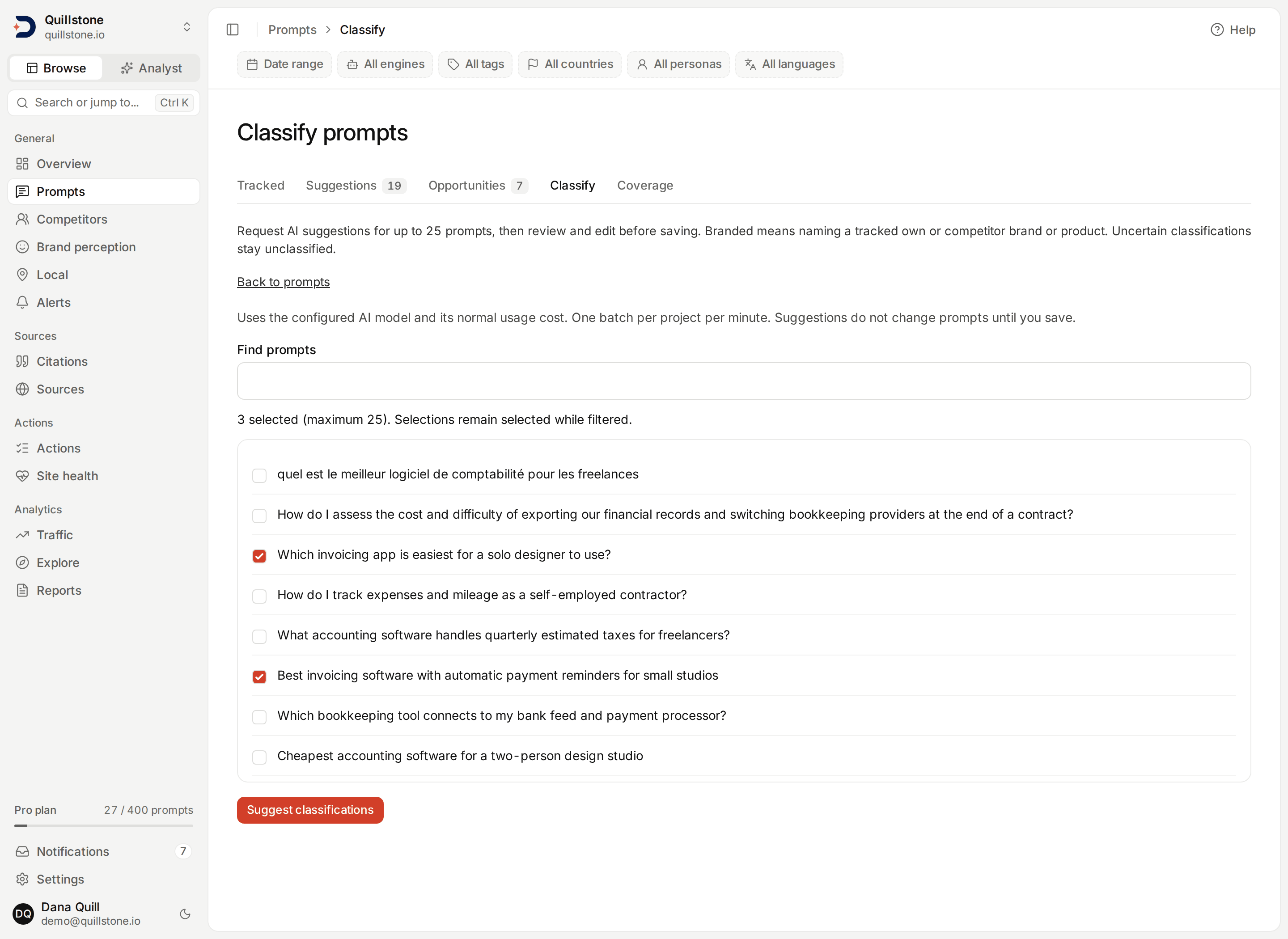
Open the Classify tab on Prompts. Owners and editors of projects with the prompt-classification entitlement (standard Starter, Growth and Pro plans) can select
up to 25 existing prompts per batch, including manually written or imported prompts, and choose Suggest classifications. The configured model suggests intent, buyer stage, theme and branding. This is on demand and uses normal model usage; saving or importing a prompt does not trigger a call.
Branded means explicitly naming a tracked own or competitor brand, product or alias. Unbranded means it does not; uncertain values remain unclassified. Manual labels and bulk editing remain available on every plan. Branding can also be edited manually, changed in bulk, filtered on the prompt list and downloaded in prompt exports. It does not classify historical answer content or add a sentiment filter.
Review the suggested values beside their current values, edit any field and
uncheck prompts you want to leave unchanged. Save reviewed classifications
updates all four fields for the checked prompts together. An unchecked prompt
is unchanged. The preview expires after 24 hours, can be applied once, and
rejects changed prompts or tracked-brand context. Request fresh suggestions if
it becomes stale (api/services/prompt_classification.py#apply_review).
Requests are limited to one batch per project per minute and 40,000 total prompt characters. Model errors change no prompts. Suggestions are advisory; review ambiguous brand names and do not treat the rationale as verified fact.
Related
- Personas: buyer audiences you can run a prompt as, how they use prompt slots, and what changes when they run
- Suggestions and opportunities: where suggested prompts come from, and what a Search Console opportunity is
- Prompt coverage: which running prompts you could pause while what they see regularly is still covered
- Fan-out: what each engine actually searched for behind this prompt, and the eight categories those searches fall into
- Answer features: the shopping, local businesses, ads, video, images, tables and web search each engine's answers held
- Key terms: what counts as a prompt, a mention, and a citation
- Your first scan: the daily run in full, and how long the first one takes
- Engines and measurement: which engines run, and what fan-out means
- Metrics defined: every project-wide number's exact formula and denominator
Last verified 2026-09-28