Visibility
Brand insights
One brand at a time, yours or a competitor, under every filter: its figures beside yours, its trend, a breakdown by engine, tag, country, persona or theme, and where it beats you.
What this page shows
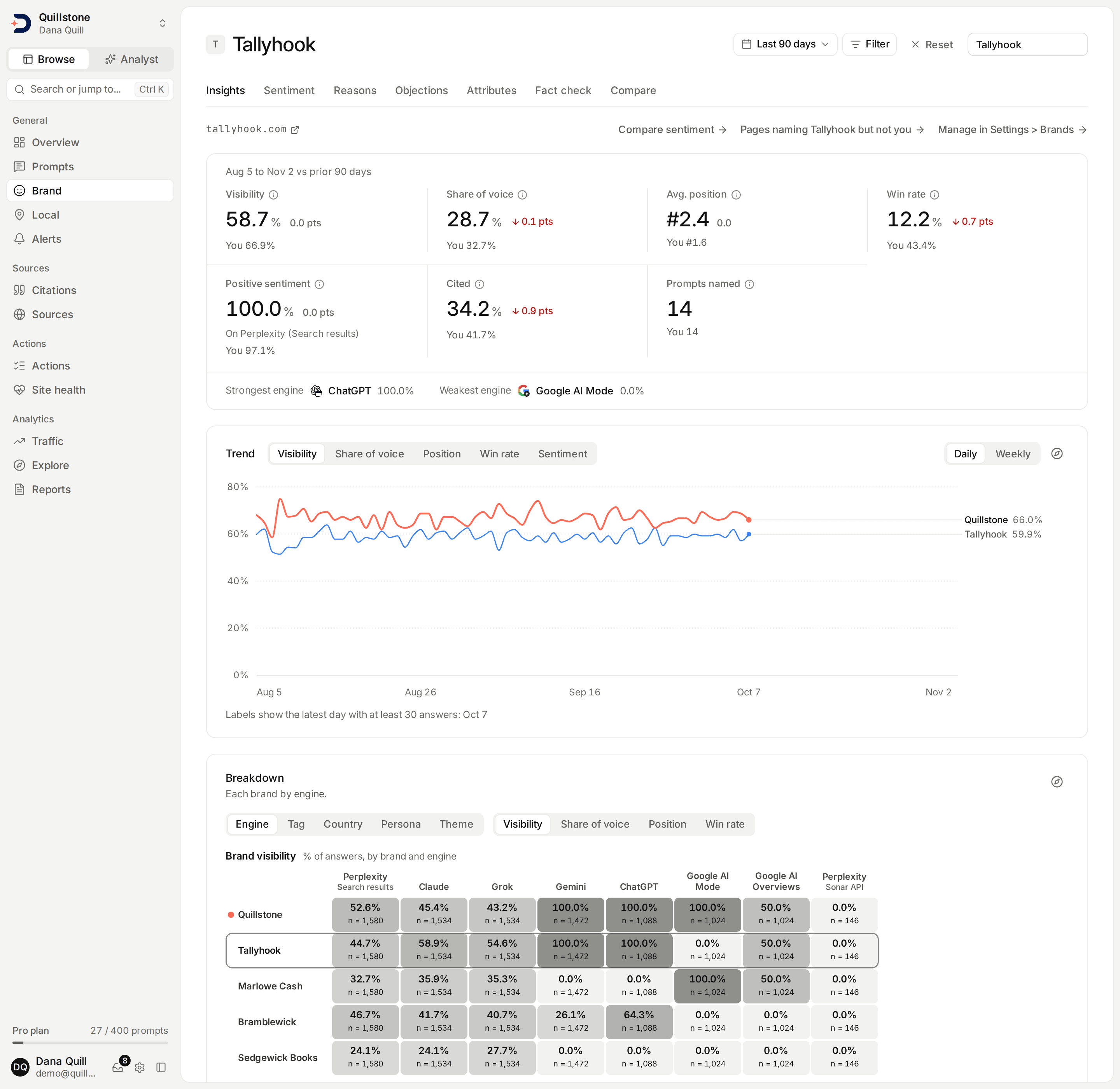
Brand insights shows one brand at a time, your own or a tracked
competitor's, under the filter bar's whole selection. Open Brand in the
sidebar: Insights is its first tab, before Sentiment, Reasons,
Objections, Attributes, Fact check and Compare
(frontend/src/lib/nav.js#HUBS). The page opens on your own brand. The
picker at the top right lists your brand first, marked "(you)", then every
active tracked competitor in the order Overview's Brand ranking puts them;
choosing one keeps the filters you have set
(api/services/brand_page.py#_picker,
frontend/src/lib/brand-insights.js#brandHref).
Each brand's page has its own address, so it can be bookmarked or shared with a teammate. You also reach a brand's page from:
- a row of Overview's Brand ranking, yours included
(
frontend/src/lib/components/overview/BrandRanking.svelte#insightsHref); - See insights on a competitor's card in
Settings → Brands
(
frontend/src/lib/components/brands/CompetitorControls.svelte#insightsHref); - See what to do next on a share of voice rise alert, which opens the
insights of the competitor that rose
(
api/services/brand_signals.py#_detect_competitor_rises); - an old link to a competitor's own page, which now opens that competitor's
insights with its filters, or Settings → Brands when the competitor has no
brand family yet or is not one of this project's
(
frontend/src/lib/competitors.js#competitorDetailRedirect).
Every number on the page honours all six filters, the date range, engine,
tag, country, persona and language, the two citation lists included
(api/routers/pages.py#BRAND_ACCEPTS). Under the brand's name are its
domain, a Your brand badge on your own page, and on a competitor's page
Manage in Settings > Brands, where you rename or pause it and keep its
social accounts. An active competitor also gets Compare sentiment, which
opens Compare vs. competitor on that
competitor with the same filters
(frontend/src/routes/(app)/brand/+page.svelte#compareHref), and
Pages naming {name} but not you, as in "Pages naming Tallyhook but not
you", which opens Earned sources' Discover list narrowed to the third-party
pages AI cites whose saved text names that competitor and does not name
you, with the same filters (see
Pages naming a competitor but not you;
frontend/src/routes/(app)/brand/+page.svelte#sourceGapsHref). Your own
page has neither link.
The headline figures
The strip's header gives the window's dates and the earlier period each
change is measured against, as in "Aug 4 to Nov 1 vs prior 90 days". Each
figure has an info icon carrying its formula
(frontend/src/lib/components/brand/BrandFigures.svelte#cells).
| Figure | What it measures |
|---|---|
| Visibility | Share of analysed answers that name the brand family (brand visibility) |
| Share of voice | The brand's mentions over the mentions of every tracked brand (share of voice) |
| Avg. position | The brand's average rank in the answers that name it; lower is better (brand position) |
| Win rate | Share of analysed answers that name the brand before any other brand (win rate) |
| Positive sentiment | Share of the brand's classified mentions that are positive, on one engine channel, named under the number |
| Cited | Yours: share of collected answers where one of your pages is a source (citation rate). A competitor's: share of collected answers citing its domain |
| Prompts named | Active prompts with an analysed answer that names the brand |
Visibility, Share of voice, Avg. position and Win rate count a brand and
its sub-brands once per answer, as everywhere else. Visibility divides by
analysed answers and Cited by collected answers, so the two rest on
different counts (see
Collected versus analysed answers).
Win rate divides by the same analysed answers as Visibility, so it is never
above it; an answer led by a brand you do not track is a win for nobody
(api/services/brand_page.py#_figures).
Positive sentiment is read on the same one engine channel as Overview's:
the channel with the most analysed answers in the window
(api/services/overview.py#_sentiment_channel).
A competitor's Cited needs no brand family, only its domain. When this
project's answers have never cited that domain, Cited is a measured 0.0% of
the collected answers rather than an en dash; it shows an en dash only when
no answer was collected at all
(api/services/brand_page.py#_uncited_domain_cell). Prompts named counts
every active prompt, read in one pass rather than through the Explorer's
25-value breakdown, and shows an en dash when the brand has no analysed
answer in the window (api/services/brand_page.py#_named,
#_visibility_by_prompt).
On a competitor's page each figure also shows yours beneath it, as in "You 66.8%", so the two can be read side by side.
Each figure but Prompts named shows its change against the earlier period
by the same rules as
Overview's headline numbers:
in points for a rate, better or worse for a position, and nothing in a
first window. A change that rounds to 0.0 is still drawn, as a grey 0.0
read as no change, and its tooltip says so, as in "No change vs the prior
90 days" (frontend/src/lib/overview.js#deltaInfo, #deltaTitle). A
change is coloured by whether the figure got better for the brand shown, so
a competitor gaining ground is coloured as a gain, as yours would be. When
some engine was not measured in both periods, each change compares only
the engines measured in both while the figure still covers every engine,
and a line under the dates says "Changes compare only the engines measured
in both periods."
(api/services/overview.py#_compare_shared_engines,
frontend/src/lib/overview.js#engineChangeNote).
Below the strip, Strongest engine and Weakest engine name the
engines where the brand's Visibility is highest and lowest in the window,
every channel of an engine pooled into one reading, counting only engines
with an analysed answer. Weakest is not shown with only one such engine, nor
when every engine ties with the strongest. With none, the line says "No
engine has analysed answers in this window."
(api/services/brand_page.py#_engine_standings).
The trend
Trend draws the brand and you across the window, or you alone on your
own page, with a switch for Visibility, Share of voice, Position, Win rate
and Sentiment, and Daily or Weekly; Weekly needs the 90-day window.
Sentiment reads the same one channel as the Positive sentiment figure, and
a line above the chart names it
(frontend/src/lib/components/brand/BrandTrendCard.svelte#METRICS,
#load). The lines read the way Overview's trend reads (see
The trend):
a day with no measured value is a gap, never 0%, and with fewer than five
days (or weeks, on Weekly) with a value the chart says so instead of
drawing lines
(frontend/src/lib/components/overview/TrendChart.svelte#MIN_PERIODS). It
carries no event markers. Open in Explorer opens the chart's query in the
Explorer.
The breakdown
Breakdown is a grid with one row per brand, you first and then each
active competitor in the picker's order, and one column per value of a
dimension: Engine (the default), Tag, Country, Persona or
Theme. A second switch picks the metric: Visibility (the default),
Share of voice, Position or Win rate. Sentiment is left out,
because it is compared within one engine channel only
(frontend/src/lib/brand-insights.js#GRID_DIMENSIONS, #GRID_METRICS).
By engine, each column is one engine channel, so an engine with two
channels, such as Perplexity, has two columns (see
The fourteen dimensions).
Each cell shows its value and how many observations it rests on, as in
"n = 1,605". A cell resting on a low sample is hatched, and a brand with no
value for a column shows an en dash, never 0. The brand you picked has its
row outlined and your own row carries the "you" mark. The whole grid is one
Explorer query, so it shows at most 25 columns, the values with the most
observations; a grid cut that way says so under it, as in "Showing the 25
countries with the most observations, of 31." The brand rows are cut the
same way, and a grid with more than 25 brands also says "Showing the 25
brands with the most observations, of N.", N being how many brands there
were before the cut
(api/services/brand_page.py#build_brand_page,
api/services/explorer/query.py#AXIS_CAP,
frontend/src/lib/brand-insights.js#gridCutNote). The dimension and the
metric are part of the page's address, so a view can be bookmarked
(frontend/src/lib/brand-insights.js#readGridView). Open in Explorer
opens the grid's query there.
Sub-brands
When the brand has active sub-brands,
a Sub-brands card lists each one with the answers that named it and
that count as a share of the answers naming its family, most named first.
A sub-brand no answer named in the window reads "Not named in this window".
One answer can name several sub-brands, so the card says the figures overlap
and do not add up to the family's. The card honours every filter, like the
rest of the page, and is left out when the brand has no analysed answer in
the window, since "not named" would then read as a measured zero
(api/services/brand_page.py#_sub_brands,
api/services/brand_metrics.py#share_of_voice_by_entity).
A competitor's sections
A competitor's page ends with three more sections. Your own page has none of them, and says instead that your own cited pages and the answers quoting them are on Citations.
- Prompts they beat you on, titled with the competitor's name: the
active prompts on which its Visibility is higher than yours in the window,
largest gap first, with both Visibility figures and a link to each prompt
carrying your filters. Values are compared as shown, to one decimal, so a
listed prompt never reads as a tie, and a prompt with no reading of yours
counts when theirs is above 0%. At most 20 are listed; the header counts
them all, and a cut list says so, as in "Showing the 20 prompts with the
largest gap, of 34." With none, it says the competitor beats you on no
prompt in this window
(
api/services/brand_page.py#_beats_you,#BEATS_YOU_LIMIT,frontend/src/lib/brand-insights.js#beatsYouCapNote). - Their most cited pages: the competitor's 10 most cited URLs, most
cited first, in the answers your filters select. A full list says "At
most 10 pages are listed.", since the page is not told whether more were
cited
(
api/services/brand_page.py#_top_cited_pages,#TOP_CITED_PAGES,frontend/src/lib/components/brand/CitedPages.svelte#full). - Where they get quoted: the newest 50 citations of the competitor's
domain, newest first, each with its engine and collection method, the
prompt (a link), its position in the answer, the date, the words around
the link and the URL. The header counts every citation in the window, and
a cut list says so, as in "Showing the newest 50 of 3,260 citations."
Each citation carries the collection method recorded on its own run
(
api/services/brand_page.py#_citations,#CITATION_LIMIT,frontend/src/lib/components/brand/WhereQuoted.svelte#cut).
The two citation lists read the competitor's domain, so both are empty for a competitor whose domain your answers have never cited.
A paused competitor
A paused competitor is not in the picker, but its page still opens, from
See insights on its card for example, and the picker then shows its
name followed by "(paused)". The page carries a Paused badge and a note
that it is paused, so its brand figures are not measured, and that resuming
it in Settings → Brands measures it again. Visibility, Share of voice, Avg.
position, Win rate, Positive sentiment and Prompts named show an en dash
with "Paused" under them, and the strongest and weakest engine, the trend,
the breakdown, the sub-brands and the prompts it beats you on are left out,
along with Compare sentiment and the link to the pages naming it. Its
domain is still measured, so Cited,
its most cited pages and where it gets quoted are still shown for the
window (api/services/brand_page.py#build_brand_page,
frontend/src/routes/(app)/brand/+page.svelte#measured).
Brand not found
A link to a brand that is not one of this project's tracked brands shows
"Brand not found", with See your brand insights to open your own page.
That covers another project's brand, a sub-brand, a removed competitor, a
mistyped address, and your own brand named by its number rather than opened
as your own page; the page never shows your own brand in place of the one
the link asked for (api/services/brand_page.py#_subject,
#BRAND_NOT_FOUND, frontend/src/lib/brand-insights.js#readBrandKey). Any
other failure to load the page shows its error with Retry.
Comparing on Overview
Overview's Brand ranking is the comparison across your whole field: you
and every active tracked competitor by Visibility, with each brand's share
of voice, average position and, when the card has room, its Win rate and
the share of its mentions read as positive. See
The brand ranking
for each column (api/services/overview.py#_ranking). A row opens that
brand's insights. Manage, in the card's header, opens Settings →
Brands. While the ranking holds only your brand (with no competitor
tracked, for example, or every one paused), a line under it says "Track
competitors to see where you rank." and opens the suggestions
(frontend/src/lib/components/overview/BrandRanking.svelte#aloneInRanking).
Comparing on one prompt
A prompt's Brands tab ranks you, your tracked competitors and the other
companies its answers named, on that prompt alone, by Visibility and then
average position, and keeps your own row in view with its real rank. See
The tabs on Prompts
(api/services/prompt_answers.py#prompt_brands). The
Prompts list puts
every prompt side by side instead: your Visibility, Share of voice, Avg.
position, Win rate and Positive sentiment on each one, and which tracked
brand leads it.
How this compares with Overview
A brand's Visibility, Share of voice, Avg. position, Win rate and Positive
sentiment here are the same numbers as its row in Overview's Brand ranking,
and your Cited the same as Overview's Cited, for the same filters: both pages
read the same Explorer queries over the same answers
(api/services/brand_page.py#build_brand_page,
api/services/overview.py#_ranking). Cited counts answers linking to a
brand's site rather than naming it, so it can tell a different story from
Visibility on the same page, and Where they get quoted counts every
citation, so its total is not the number of answers behind Cited.
Loading the page spends the project's Explorer query budget the way
Overview does: at most two charges per load, whatever the page shows, and
one more for each switch of the trend. A switch of the breakdown, or of the
brand, loads the page again (see
The query budget and time limit;
api/services/brand_page.py#build_brand_page).
If nothing shows up yet
A brand's figures, citations and top pages all fill in from the same daily runs that populate the rest of the product. With no analysed answer in the window, the brand figures show an en dash, not 0%. See Troubleshooting: No citations yet for what an empty comparison does and does not mean before you conclude a competitor was never cited.
Related
- Brands and sub-brands: adding, renaming, pausing and removing competitors, the suggestions, and each competitor's social accounts
- Reading your first results: each column of Overview's Brand ranking
- Compare vs. competitor: your sentiment beside one competitor's, in the answers that name you both
- Earned sources: the cited pages naming a competitor but not you, ready to save for outreach
- Prompts: the Brands tab on a prompt's own page
- Alerts: the share of voice rise that opens a competitor's insights
- Citations: how a citation is attributed to a domain, yours or a competitor's
- Metrics defined: the share of voice, brand visibility and citation rate formulas this page reads
- Explorer: the same metrics, broken down and filtered your own way
- Troubleshooting: No citations yet: what to check before expecting a comparison to appear
Last verified 2026-11-03