Optimize
Site audit
Crawl your own site as DiscoveredByBot from robots.txt, sitemaps and internal links, and compare raw HTML with a browser render.
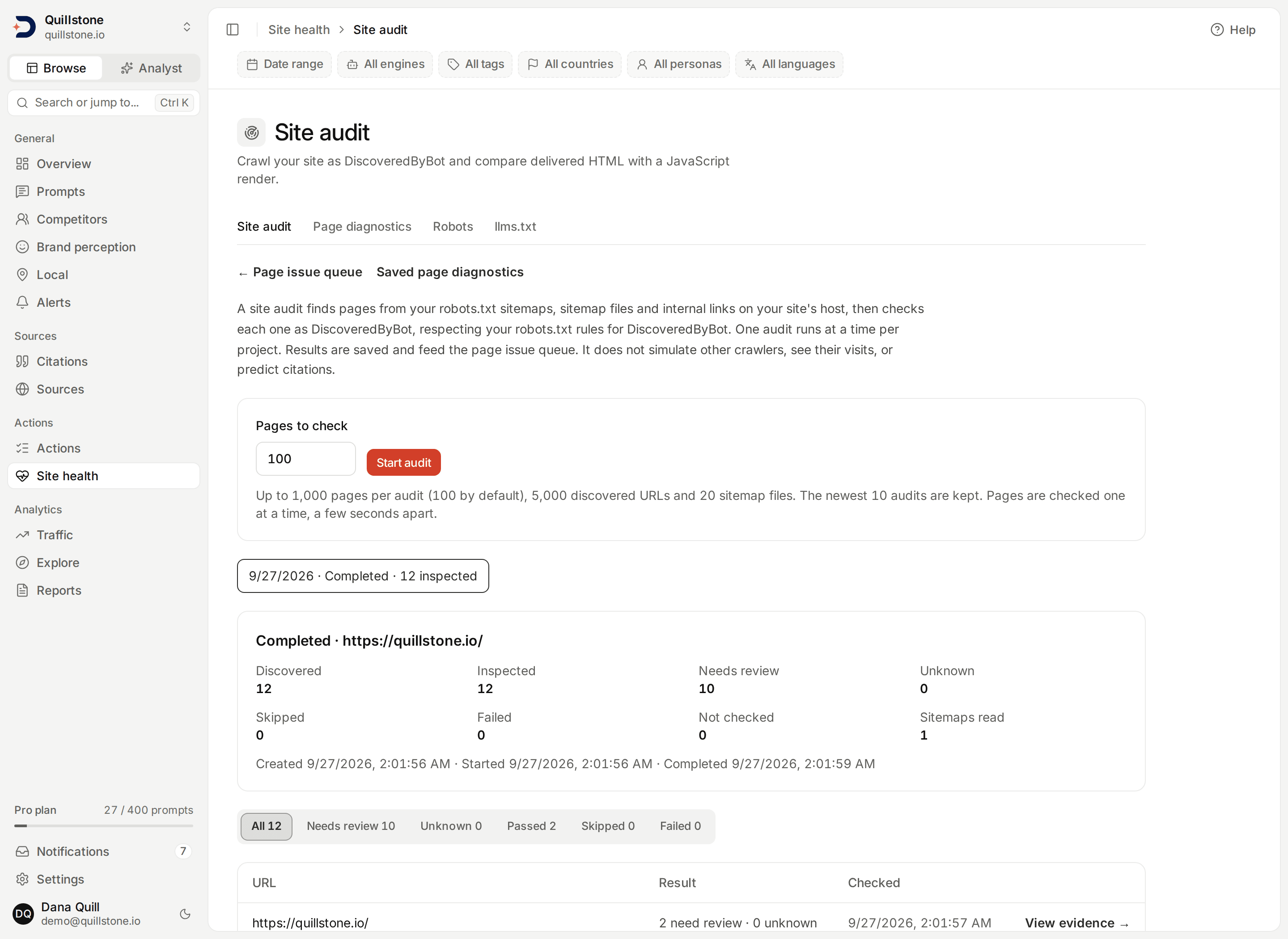
Open Site health → Site audit to crawl your own site as DiscoveredByBot, check each page it finds, and compare the raw HTML response with a browser render of the same page.
What a site audit finds
Starting an audit gives it three starting points on your project's domain:
robots.txt, a guessed /sitemap.xml, and the audited page itself
(api/services/site_audit/service.py#seed_rows). From there it keeps
discovering candidate pages by:
- reading every
Sitemap:line inrobots.txt(api/services/site_audit/frontier.py#robots_sitemaps); - following a sitemap index to the sitemap files it lists, and reading a
sitemap's page entries, including a gzip-compressed sitemap
(
api/services/site_audit/frontier.py#parse_sitemap); - following the internal links found in each checked page's raw and rendered HTML.
Sitemap files can be found anywhere on your registrable domain, including
a different subdomain. The pages a sitemap or a page links to are kept
only when they share the audited page's exact host, so a link to a different
subdomain is not queued for a check
(api/services/page_diagnostics/extended.py#same_host_links). If the audited
page itself redirects to a different host on the same domain, for example an
apex domain to its www subdomain, the audit adopts that host as its origin
and looks for robots.txt and sitemap.xml there as well.
A discovered page is checked, unless one of three things is true: DiscoveredByBot's
declared policy for that exact path is blocked, the response is not declared as
HTML, or robots.txt itself could not be read: a server error (HTTP 500 and
above), a network failure, a redirect loop, an unreadable file, or any other
response that is neither a clean 200 nor an HTTP 400 to 499 status. A missing
robots.txt, one that returns any HTTP 400 to 499 status, does not skip the
page: under RFC 9309 an unavailable robots.txt places no restrictions on the fetch, so
DiscoveredByBot is treated as allowed there. The five AI crawler policies
checked below still read unknown in that case, since their own declared policy
still cannot be read from a file that is not there. Either way a skipped page
is recorded as skipped, not checked (api/services/page_diagnostics/collect.py#inspect).
Start an audit, and follow it
Choose how many pages to check, from 1 to 1,000, 100 by default, then start
the audit. Only one audit runs per project at a time, and a project can start
a new audit at most once a minute
(api/services/site_audit/service.py#start_audit,
#START_COOLDOWN_SECONDS). Starting an audit keeps only the newest 10 audits
for the project; older audits and their saved pages are removed
(api/services/site_audit/service.py#RETAIN_AUDITS).
Pages are checked one at a time, a few seconds apart, in the background; the
screen refreshes on its own while an audit is queued or running
(api/services/site_audit/service.py#STEP_DELAY_SECONDS). Discovery stops at
5,000 discovered page rows and 20 sitemap files; checking stops once as many
pages as you chose have finished, completed, skipped or failed, even if more
were discovered. Each of these three limits shows its own note on the audit
when it is reached (api/services/site_audit/service.py#MAX_DISCOVERED,
#MAX_SITEMAPS, api/services/site_audit/runner.py#refresh_counters,
#_insert_discovered).
If a step is interrupted, for example by a worker restart, the audit resumes
automatically within about ten to fifteen minutes: an audit with no live lease
becomes eligible once its last update is ten minutes old, and a periodic check
for resumable audits runs every five minutes, so the wait is that ten minutes
plus up to another five for the next check to run
(api/services/site_audit/service.py#LEASE_MINUTES,
api/services/site_audit/runner.py#resumable_audit_ids,
#RESUME_IDLE_SECONDS). Resuming also swaps in a fresh dispatch token for the
audit, so a step from before the interruption can never run alongside the
resumed one
(api/services/site_audit/runner.py#claim_for_resume). The page that was being
checked when the interruption happened is not retried: it is recorded as
failed, and the audit moves on to its next page
(api/services/site_audit/runner.py#_ORPHANED_ROW_ERROR). Cancelling an audit only needs owner or editor
project access; it never requires the plan feature that starting an audit
does, so anyone who can stop other project work can stop an audit too
(api/services/site_audit/service.py#_authorize_cancel). Cancelling keeps
every page already finished; only pages still pending are left unchecked
(api/services/site_audit/runner.py#run_step).
Only your project's newest completed or cancelled audit feeds the
Page issue queue; a running or a failed audit
is skipped when choosing that audit, so it never hides the previous finished
audit's saved findings. Each inspected page from that audit, including a
skipped or a failed one, appears there as one Site audit checks item
linking back to that page's evidence here
(api/services/page_issues.py#inventory_statement).
What is checked
Each inspected page runs the same checks as
Saved page diagnostics: declared crawler
policy, delivered HTML, structure and metadata, response size and timing, and
a browser render. Every check is Check passed, Needs review or
Unknown, with saved evidence and, where the same exact URL has a saved
result from an earlier completed or cancelled audit, a comparison against the
newest such result using the same first observation, unchanged, new finding,
still open, resolved and not comparable outcomes
(api/services/page_diagnostics/checks.py#compare,
api/services/site_audit/runner.py#run_step). The structure, response and
render checks below are disclosed heuristics for review, from one lab
request or one lab browser load as DiscoveredByBot: they are not Core Web
Vitals, accessibility certification, a citation prediction or a grade
(api/services/page_diagnostics/extended.py).
Declared policy and delivered HTML
| Check | Review rule |
|---|---|
| Declared crawler policies | Needs review when the matched robots.txt rule for a search or training crawler, or DiscoveredByBot, is a Disallow rule at that redirect hop. Unknown when the policy could not be read, except DiscoveredByBot's own check on a robots.txt that is missing outright (HTTP 400 to 499): that passes instead, since RFC 9309 treats an unavailable file as no restrictions. |
| HTTP delivery | Needs review at HTTP 400 or above. Unknown when no status was reached, including an unresolved redirect (missing redirect target or too many redirects) or any other status that is neither 200 nor 400 or above. |
| Complete HTML response | Unknown unless a bounded UTF-8 HTML response was read; this check never shows Needs review on its own. |
Structure and metadata
| Check | Review rule |
|---|---|
| Page title, Main heading, Meta description, Text in delivered HTML | Needs review when the delivered HTML has none. |
| Indexing directives | Needs review when a robots meta tag or X-Robots-Tag carries noindex or none. |
| Canonical URL | Needs review when no canonical link is present, when several different canonical URLs are declared, or when the one declared URL points off the project domain. Declaring the same URL more than once is fine. |
| Document language | Needs review when the page has no html lang attribute. |
| Heading structure | Needs review when there is not exactly one H1 (zero or several) or a heading level is skipped. |
| Image alternative text | Needs review when any image has no alt attribute. |
| Structured data (JSON-LD) | Needs review when any JSON-LD block fails to parse, or none is present. |
| Reading complexity | Unknown under 100 extractable words. Otherwise needs review when the average sentence exceeds 25 words or the Flesch reading ease score is under 30. An English-language heuristic and a review prompt, not a grade (api/services/page_diagnostics/extended.py#structure_checks). |
Response size, timing and render
| Check | Review rule |
|---|---|
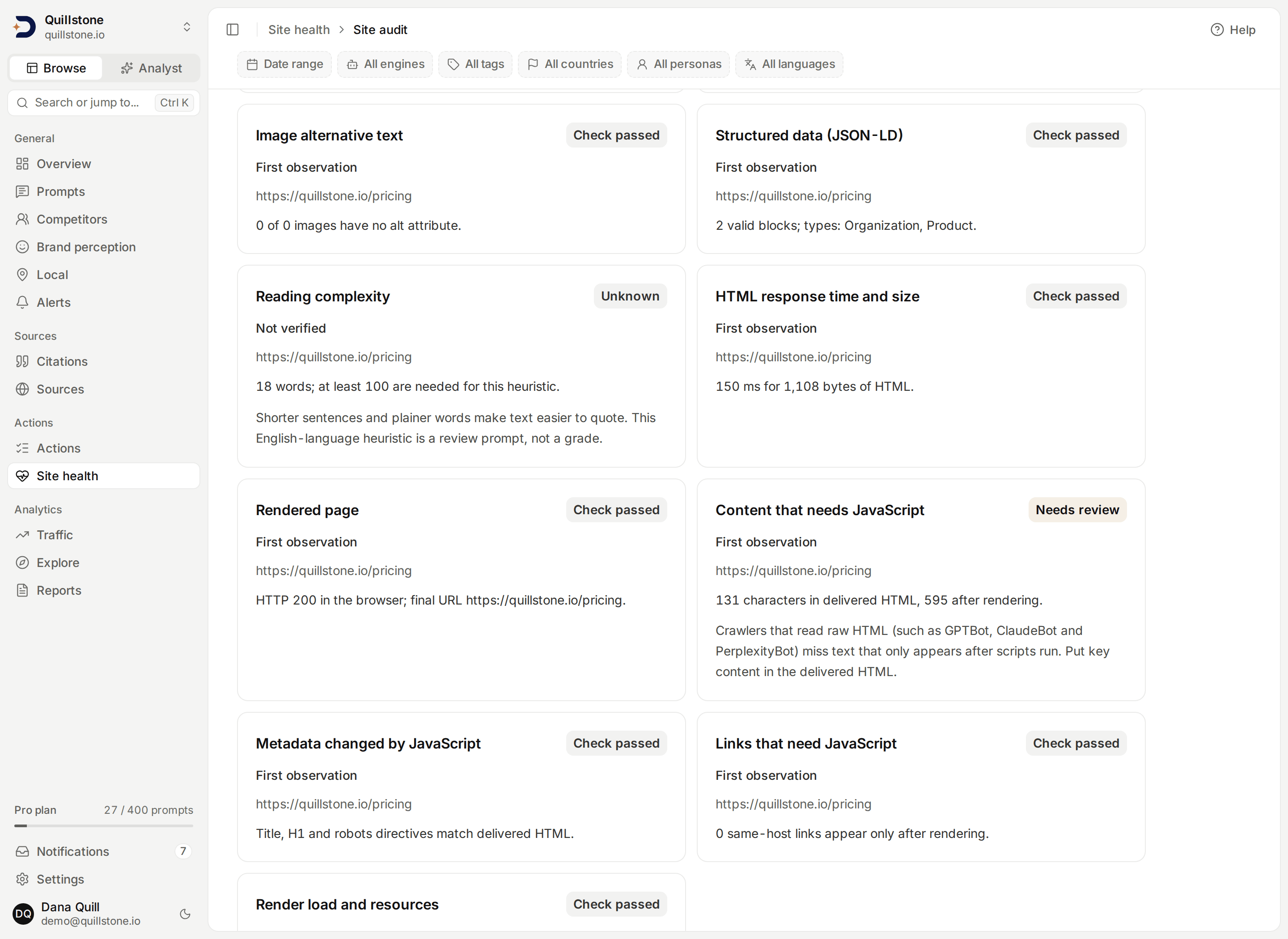
| HTML response time and size | Unknown with no complete response. Otherwise needs review when the full HTML response takes over 1,500 ms or the HTML is over 500,000 bytes (api/services/page_diagnostics/extended.py#response_check, #SLOW_RESPONSE_MS, #LARGE_HTML_BYTES). |
| Rendered page | Unknown when the render was not attempted, left the project domain, returned no HTML, or the rendered HTML could not be parsed. Otherwise needs review unless the browser's HTTP status is 200. |
| Content that needs JavaScript | Needs review when rendering adds at least 200 extra characters of text and at least doubles the raw HTML's text. |
| Metadata changed by JavaScript | Needs review when the title, H1 or robots directives differ between the raw and the rendered HTML. |
| Links that need JavaScript | Needs review when 5 or more same-host links appear only after rendering. |
| Render load and resources | Needs review when the render takes over 5,000 ms, or the load event was not reached, loads more than 150 resources, or the render's proxy refused a connection (other than a blocked analytics request) or reached its transfer budget (api/services/page_diagnostics/extended.py#render_checks). |
Raw HTML versus rendered
A site audit fetches each page's raw HTML for its content and structure
checks, then separately loads the same page once in a browser with
JavaScript enabled, and compares the two. This matters because crawlers that
do not run JavaScript only ever see the raw HTML response. Content, links, or
title and heading text that only appear after scripts run are invisible to a
crawler that never runs those scripts, even though a person opening the page
in a browser sees them (api/services/browser/render.py#render).
Safety
Every browser request the render step makes, including every resource the
rendered page loads, goes through a forward proxy that only allows the
public internet on ports 80 and 443. A request to a private, loopback or
link-local address is refused rather than followed, and refused connections,
with a sample of the hosts, appear in the render evidence for that page,
alongside how many bytes were transferred
(api/services/browser/egress.py#ALLOWED_PORTS,
#public_addresses). The browser also disables WebRTC's non-proxied UDP
path for every render, so a page cannot use it to reveal a real IP address or
reach the network outside the proxy's checks
(api/services/browser/render.py#render). The non-render fetches (robots.txt,
sitemaps and each page's raw HTML) use the same public-address check, on
ports 80 and 443, that Robots diagnostics and
Saved page diagnostics use. Page scripts
run during the render, and requests to common analytics and tag-manager
services (for example Google Analytics, Google Tag Manager, Meta Pixel,
Hotjar, Microsoft Clarity and Segment) are blocked, so an audit does not add
page views to those tools; the render evidence notes how many analytics
requests were blocked. First-party or self-hosted analytics, for example a
server-side tag manager or analytics proxied through your own domain, are
not blocked: only the specific third-party hostnames above are refused
(api/services/browser/render.py#ANALYTICS_HOSTS,
api/services/browser/egress.py#host_matches). DiscoveredBy does not edit
your site.
A page's raw HTML is bounded to 2,000,000 bytes
(api/services/page_diagnostics/collect.py#PAGE_MAX_BYTES); a sitemap file
is bounded to 10,000,000 bytes, including after it is decompressed from
gzip (api/services/site_audit/frontier.py#SITEMAP_MAX_BYTES). Each page's
render is bounded to 200 proxy connections and 15,000,000 downloaded bytes
(api/services/browser/egress.py#MAX_CONNECTIONS, #MAX_UPSTREAM_BYTES).
Access and limits
Any current project member can read a saved audit and its page evidence.
Starting a new audit needs owner or editor project access, plus the
project owner's robots diagnostics feature: the standard Starter, Growth and
Pro plans include it, Free and Trial do not; custom plans follow their saved
feature setting (api/services/site_audit/service.py#_can_start,
api/services/entitlements.py#standard_entitlements). Cancelling a running
audit needs only owner or editor project access, described above.
Access is also re-checked before every page it inspects, not just when the
audit starts: a running audit stops with a failed status if the requester
loses owner or editor project access, the project owner loses the robots
diagnostics feature, or the project's domain changes while the audit is
running (api/services/site_audit/runner.py#run_step).
This audit does not record whether real AI crawlers actually visited these pages: it checks declared robots policy and delivered content as DiscoveredByBot only, the same way Robots diagnostics and Saved page diagnostics do. It also does not establish complete coverage of your site: discovery is bounded, and a page you never link to and that is missing from every sitemap this audit reads will not be found.
Related
- Saved page diagnostics: check one exact URL on demand and keep its recheck history.
- Robots diagnostics: an unsaved, policy-only quick check for one URL.
- AI crawlers: which AI crawlers actually visited your pages, read from your own server logs.
- Page issue queue: known owned pages, gaps and optimization work, plus your newest finished audit's inspected pages.
- Plans and limits: feature access follows the project owner's plan.
Last verified 2026-09-23