Advisors
Growth Advisor
A written briefing, weekly or on request, that reads your search and traffic numbers alongside outside research and says what to do next.
What this is
Growth Advisor is a written
business briefing built by having a model research your business on the
open web, then read that research back against your own recent numbers and
say where you stand and what to do next
(api/services/growth_advisor.py#run_growth_briefing). It is gated on your
plan; see Pricing.
Two phases, one continuous run
A briefing runs in two steps under a single request. Phase one is free-form
web research: given up to about 30 minutes, the model researches the
business and its named social accounts and returns a single block of
prose, not a fixed shape. Phase two reads that research brief alongside
your own metrics and rewrites it into four fixed narrative fields: a
headline, where the business stands, how its social accounts are doing,
and what to do next. The row stays in a "running" state for the whole
run; the screen shows one banner throughout, with no separate signal that
phase two has started, and the run keeps going if you leave the page
(frontend/src/routes/(app)/growth-advisor/+page.svelte#isRunning,
api/services/growth_advisor.py#RESEARCH_WRAPPER_SCHEMA,
api/services/growth_advisor.py#BRIEFING_SCHEMA,
api/services/growth_advisor.py#run_growth_briefing).
Written by a model, not derived
This is the opposite of Weekly report: that
report never calls a language model, and this one is a language model from
end to end. The four sections you read are not formulas over your numbers;
they are prose a model wrote from a prompt, with your own data and
everything it read on the open web framed in that prompt as data to reason
about, not as instructions to follow
(api/services/growth_advisor.py#build_briefing_prompt). Phase one's own
research text is written to the row but never shown on screen; what
reaches you is phase two's rewrite of it. Nothing in the output is a
number you can trace back to one stored figure the way a citation rate or
a click count is: it is a narrative, grounded in real inputs, not a
computed one.
What feeds it
Both phases receive the same business identity block: your project's
name, URL, business type, description, and goal
(api/services/growth_advisor.py#_business_block). Of those, goal is the
field written specifically for this: a short, current statement of what
you are actually trying to achieve reaches both prompts verbatim, so a
specific goal gives the model something concrete to weigh recommendations
against, where a blank or generic one gives it nothing to prioritize
(#build_research_prompt, #build_briefing_prompt).
Both phases also receive the same block of your own platform-measured
numbers from the last 28 days: Search Console clicks, impressions,
click-through rate, and average position, and Google Analytics sessions,
conversions, conversion value, and channel mix, with a source's block left
out entirely when that source has no data for the project
(api/services/growth_advisor.py#assemble_internal_metrics,
#METRICS_WINDOW_DAYS, #build_metrics_block). These are the same kinds
of figures behind Search performance
and Traffic, summed over a fixed
window rather than broken out by query or page.
The two prompts differ in what else they carry. Phase one alone receives
whichever social accounts you have added, and phase two never sees that
list, only whatever phase one's research wrote about them; phase two alone
receives phase one's research brief
(#build_research_prompt, #build_briefing_prompt).
That same saved list now does double duty: it is also read as your own
accounts on Social sources, which labels
an AI engine's social citations as yours when they match one of these
profiles by network and account, never by the platform you picked when
saving it (api/services/social_sources/profiles.py#own_account_keys).
Requesting one, and what's already running
"New briefing" starts a run if the project owner's plan includes the Growth
Advisor; otherwise the request is rejected before anything starts
(api/routers/growth_advisor.py#trigger_briefing). Editors and owners can
start one; a viewer sees "New briefing" disabled, with a line above it
saying view-only access is why, rather than a request the API would refuse
(frontend/src/routes/(app)/growth-advisor/+page.svelte#writable). Only one briefing can be running for a project
at a time, and the next is blocked for 24 hours from the moment the last
one started, not from when it finished, which is one briefing per project
per day (#_trigger_block_reason, #TRIGGER_COOLDOWN_HOURS). Separately,
a project can be opted into a weekly automatic refresh with the Brief me
weekly checkbox beside New briefing, which only the project owner can
change; editors and viewers see it disabled, with a line saying why
(frontend/src/routes/(app)/growth-advisor/+page.svelte#owner,
api/routers/projects.py#update_project). Turning it on is refused for a
project whose owner's plan does not include the Growth Advisor. A systemd timer fires every
Monday at 05:00 UTC and enqueues one briefing for every opted-in project
that is itself active, whose owner is active and on a paid plan, and that
has no briefing already running or created in the last 7 days, so
triggering one yourself pushes that project's next automatic briefing back
rather than producing two in the same week
(discoveredby-cli@enqueue-growth-advisor-refresh.timer,
api/tasks.py#_enqueue_growth_advisor_refresh_for_eligible_projects,
#GROWTH_ADVISOR_REFRESH_INTERVAL_DAYS,
api/tasks.py#generate_growth_briefing_task).
What's on the screen
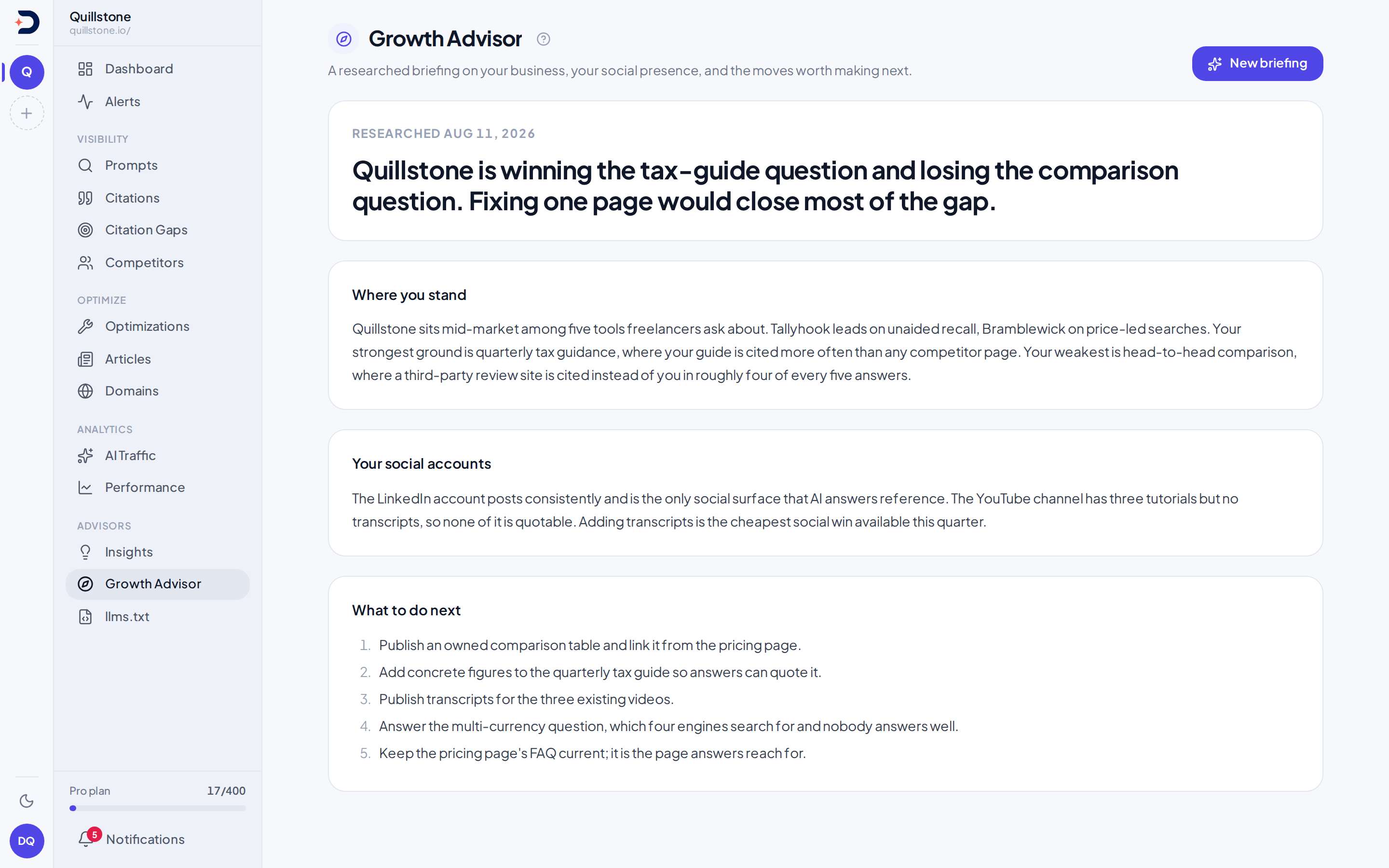
A succeeded briefing opens on its headline, then whichever of the three
sections, where you stand, your social accounts, what to do next, actually
came back with something written in it; a run that returned none of the
three says so rather than showing three empty headings
(frontend/src/routes/(app)/growth-advisor/+page.svelte#sections). A
failed run keeps its row rather than being dropped, with the failure shown
in place of the sections. Once more than one briefing exists, a dropdown
switches between them by the date each was generated.
Related
- Weekly report: the other periodic artifact on the account, built from your own numbers with no model involved, unlike this one
- Search performance: where the search figures in this briefing's metrics block come from
- Social sources: the other place these saved social accounts are used, to label your own accounts among the ones AI engines cite
- Traffic: where the traffic figures in this briefing's metrics block come from
Last verified 2026-10-01