Account
Tags and keywords
What a tag attaches to and where you can filter by one, and precisely what the keywords screen does today.
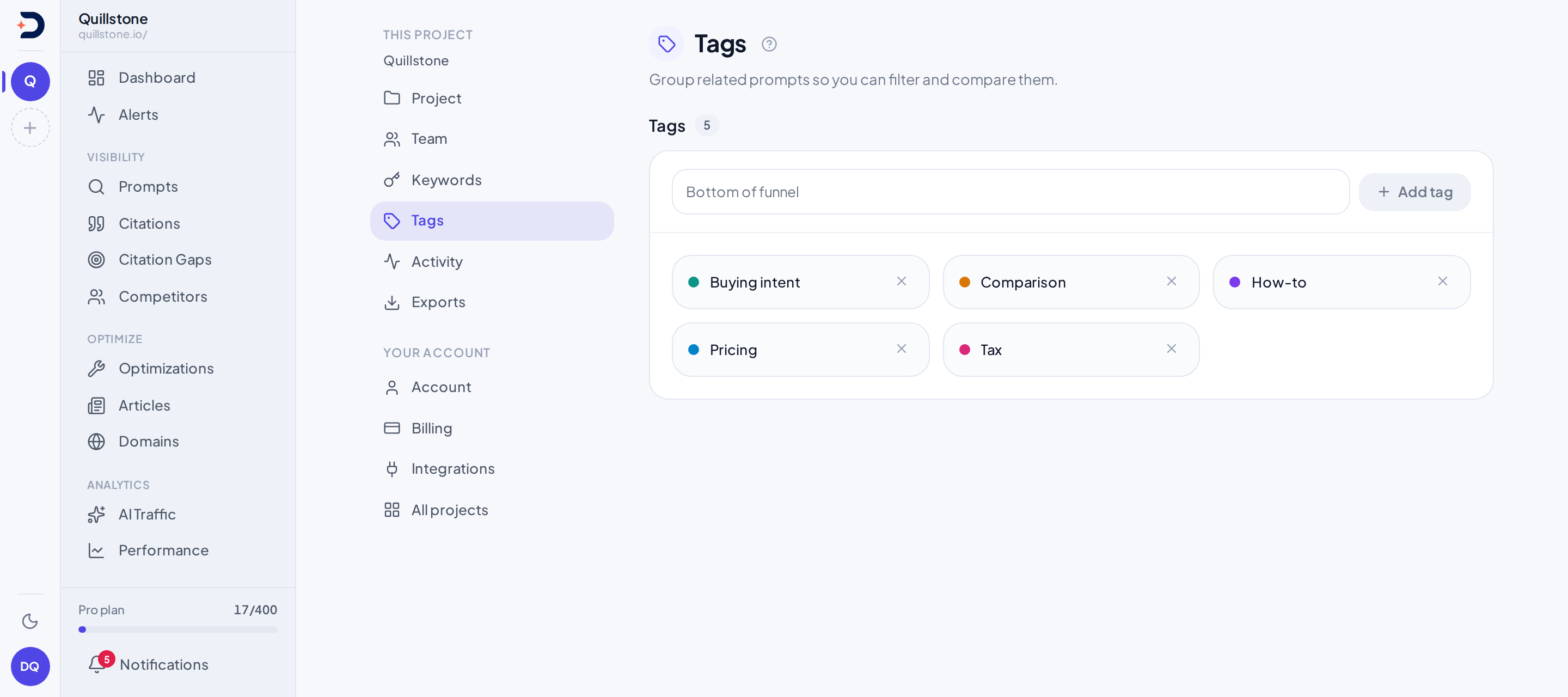
Tags
A tag is a short label you attach to a prompt, project-scoped and unique
within it: the table carries a project id and a uniqueness constraint over
the pair of that id and the name
(alembic/versions/46d194c8c504_baseline_schema.py#upgrade), and the create
endpoint refuses a name the project already has
(api/routers/tags.py#create_tag). You create one from /settings/tags,
by typing a name; there's no separate "create" step anywhere else, because
typing an unrecognised name in the prompt editor creates it too, described
below (api/routers/tags.py#create_tag). Nothing here can rename a tag once
it exists; the tags router has no update endpoint, only create and delete.
A tag attaches to a prompt through the same relationship Prompts
describes for the prompt record itself: creating or editing a prompt sends a
list of tag ids, and the backend replaces the prompt's tags with the tags in
that list that belong to the same project
(api/routers/prompts.py#create_prompt, #update_prompt,
#_attach_prompt_metadata). You filter by tag with the tag chip in the
filter bar,
built from whatever tags the project actually has plus No tag, on every
screen that takes it, the prompt list included; the
Explorer has a tag filter of its own
(api/services/answer_filters.py#available_filter_options,
api/services/explorer/dimensions.py#DIMENSIONS). Attaching one
happens in the prompt create and edit form, which accepts free-typed tag
names, matches each one to an existing tag case-insensitively, and creates
a new tag on the spot for any name that doesn't match, through the shared
resolveTagIds helper in frontend/src/lib/api/prompt-form.js
(frontend/src/routes/(app)/prompts/+page.server.js#actions,
frontend/src/routes/(app)/prompts/[id]/+page.server.js#actions).
Keywords
A keyword is the same shape as a tag at the data level: a short,
project-scoped, unique label, created and deleted the same way, from
/settings/keywords (alembic/versions/46d194c8c504_baseline_schema.py#upgrade,
api/routers/keywords.py#create_keyword, #delete_keyword). It attaches to
a prompt through the same field and the same code path a tag does: creating
or editing a prompt sends a list of keyword ids, and the backend replaces
the prompt's keywords with the ones in that list belonging to the same
project (api/routers/prompts.py#create_prompt, #update_prompt,
#_attach_prompt_metadata).
Attaching one happens in the prompt create and edit form, in its own picker
beside the tag picker. It offers the keywords the project already has as
buttons, takes a free-typed one, trims and lowercases it, and creates any
name that does not exist yet, through a resolveKeywordIds helper written
to mirror the tag one
(frontend/src/lib/api/prompt-form.js#resolveKeywordIds,
frontend/src/routes/(app)/prompts/+page.server.js#actions,
frontend/src/routes/(app)/prompts/[id]/+page.server.js#actions).
Where a keyword then shows up is three places, and that is the whole list:
as a chip on each row of the prompt list, as a chip in the header of a
prompt's own page, and as a filter dropdown on the prompt list, which
narrows alongside the status dropdown and the filter bar's tag and country
chips rather than instead of them
(frontend/src/routes/(app)/prompts/+page.svelte#keywordFilter).
The list can draw those chips because GET /projects/{id}/prompts returns
each prompt's keywords next to its tags
(api/routers/prompts.py#list_prompts, api/schemas/prompt.py#keywords). A
prompt's own page reads them from the editable prompt record instead, since
the read-only detail response it leads with carries tags but no keywords
(frontend/src/routes/(app)/prompts/[id]/+page.svelte#promptKeywords).
Length and count caps
Each settings form now caps what you can type at exactly what the column
behind it holds: 100 characters for a tag, 255 for a keyword
(frontend/src/routes/(app)/settings/tags/+page.svelte#newTag,
frontend/src/routes/(app)/settings/keywords/+page.svelte#newKeyword,
alembic/versions/46d194c8c504_baseline_schema.py#upgrade). Neither create
endpoint measures the name before inserting it
(api/routers/tags.py#create_tag, api/routers/keywords.py#create_keyword),
so those two form limits are the only thing standing in front of the
database.
There is a second way in that carries no limit at all. The free-typed tag
and keyword boxes in the prompt editor set no maximum length
(frontend/src/lib/components/AddPromptModal.svelte#addCustomKeyword), so
an over-long name typed there passes the form, passes the endpoint, and
fails only when the database refuses the insert. Neither a tag nor a keyword
has any cap on how many a project can have.
Related
Last verified 2026-08-11