Optimize
Articles
How a topic becomes a brief, a draft with its claims checked against the sources it names, and a published page tied back to the gap it closes.
What this is for
Citation gaps finds the prompts where a
competitor is cited and you are not. Articles
is where you decide what to do about it: not "write a blog post," but
which page should actually exist to win that prompt. On plans that draft
it grounded in evidence, that means building from the sources already
winning it today. A topic starts one of two ways: accepting a citation gap
opportunity creates a candidate topic on the Articles screen
(api/routers/citation_gaps.py#accept_citation_gap,
api/services/citation_gap.py#create_article_topic_from_opportunity), or
you type your own title directly
(api/services/articles.py#submit_custom_topic). Either way, nothing is
written until you pick it: choosing a suggested topic or submitting your
own is what creates the Article row and starts generation
(api/services/articles.py#select_topic,
api/tasks.py#generate_article_task). How many articles you can start in a
week is bounded by your plan; see Pricing for what each plan
includes (api/services/limits.py#check_article_limit).
From a topic to a brief
Before anything is written, DiscoveredBy reads two sets of pages: the
pages currently cited for the prompt behind the topic, and pages of
yours: the citation gap opportunity's own target page, pages already
mapped to that prompt during gap analysis (an explicit mapping, a page of
yours already cited for it, or a similarity match:
api/services/citation_gap.py#_resolve_owned_page), and, filling out the
rest, the project's own highest-scoring optimization opportunities that
have not been dismissed, whether or not they relate to this particular
topic (api/services/article_writer/corpus.py#_owned_pages). A page only
counts once it is long enough to say something
(api/services/article_writer/corpus.py#_useful_page). On a plan that
grounds drafts in evidence, if fewer than two of the cited pages count
yet and at least one of them still has no usable text, the brief itself
waits: generation defers at most twice, 180 seconds apart, before
a third and final attempt proceeds regardless of how many pages came back
(api/services/article_writer/service.py#generate_article_with_writer,
api/tasks.py#_run_generate_article,
api/tasks.py#MAX_ARTICLE_GENERATION_ATTEMPTS). A topic you typed
yourself has no cited pages to wait on in the first place, so this never
applies to it.
The brief itself decides the asset, not just the content: which asset to
build, from updating a page you already own to publishing something new
to holding off entirely, starting from a deterministic guess based on the
gap's own diagnosis and the prompt's shape and then confirmed or
overridden by the writer
(api/services/article_writer/asset_decision.py#deterministic_asset_recommendation,
api/services/article_writer/briefs.py#brief_prompt). Only a brand new
article or a comparison page actually get drafted
(api/services/article_writer/asset_decision.py#can_draft_asset). For
every other outcome, whether that is a page you own, a product, docs or
FAQ-only page, or holding off entirely, the brief itself is the
deliverable: why that page and not a new one, what the cited pages have
that yours does not, and what sections or proof to add, with no markdown
draft to copy, because a brief telling you to fix a page you already own
is the recommendation, not a placeholder for one.
When it stops and asks you first
On a plan where the draft is meant to be grounded in real source pages,
and only when the brief calls for a brand new page (a new article or a
comparison page, not an update to a page you own), generation can pause
instead of drafting: when the brief itself asks for proof only you can
supply, such as pricing or customer proof it has no way to invent on its
own (api/services/article_writer/briefs.py#_owned_input_requests), when
it flags that it needs your input outright, or, failing safe the same
way, when the brief call itself did not come back, rather than let a full
draft get written from a generic fallback brief with no real proof behind
it (api/services/article_writer/service.py#_should_pause_for_user_input).
When that happens the article's status reads "Needs your input," and the
page says plainly that the brief is ready but the draft needs proof only
you have. When the brief actually named what it needed, that proof is
listed under "Proof only you have" so you know what to add before you
rewrite it. The other two triggers do not guarantee anything there: the
model can flag that it needs input without naming what, and a failed
brief call falls back to a generic brief whose own request list is empty
unless the prompt is pricing, vendor, or comparison-shaped
(_owned_input_requests names five of the nine prompt intents; the rest,
including the default, get nothing). In either case the panel reads
"Nothing extra requested," and the status and the instruction to rewrite
are what you have to go on. On other plans, or when the brief calls for
anything short of a brand new page, generation never pauses this way.
Grounding and claim checks
A draft is written only from the brief and the pages already read for it,
with an instruction not to reuse a competitor's own phrasing or claims
(api/services/article_writer/drafting.py#draft_prompt). Every claim the
writer reports gets one of six labels, and what decides the label is
whether the writer is allowed the last word on it. Four labels stand as
the writer reported them: that a claim needs your own proof, that it
conflicts with the source, that it rests on a source that may be stale,
or that its wording is promotional. Any claim not carrying one of those
four goes through a deterministic test, and the label it comes out with
is the code's. It earns "verified by source" only when its quoted
evidence is at least four words long, appears in the actual scraped text
of the source page it names, and shares real terms with the claim it is
supposed to back, so a fabricated statement paired with a generic quote
does not pass. Failing that, it is labelled "promotional" if its wording
matches a fixed list of superlatives (best, leading, guaranteed, and the
like), and "unsupported" if not
(api/services/article_writer/verification.py#verify_claims,
_quote_supports_claim, _is_promotional_claim). So the writer cannot
certify its own work: "verified by source" and "unsupported" are the two
labels only the code ever awards, and a claim the model hands back as
verified whose quote fails the test comes out "unsupported" instead, or
"promotional" if the wording is superlative. The test only ever looks at
the claims list the writer handed back, not the rest of the draft, so a
factual statement in the prose that never made it into that list is not
checked either way. No claim is ever dropped from the draft over any of
this: what shows on the article is the label next to the claim's own
text, and any claim that does not come out "verified by source" counts
against the citation readiness score and raises a blocker under
"Fix before publishing"
(api/services/article_writer/readiness.py#citation_readiness).
Before you publish, and after
Every article that reaches "ready" status carries a publish checklist,
even a brief-only outcome with no draft to copy: a suggested slug, title
tag and meta description, which schema blocks actually validated and are
worth including, internal links to add, and indexation steps to take
once it is live (api/services/article_writer/publishing.py#publish_checklist).
An article paused at "Needs your input" has no checklist yet: generation
stops before one is ever built, and it only appears once you rewrite the
article past that point. DiscoveredBy never publishes the page for you.
You copy the draft out, or, on Starter and up, send it straight into a
connected WordPress site as a new draft post with one click, carrying over
the article's own title and meta description plus the checklist's
suggested slug; see WordPress drafts for what
that does and does not do. Either way, the draft still has to be put live
on your own
schedule, inside WordPress or wherever else it belongs, before it links to
anything here: paste the live URL back in afterward. Doing that links the
article back to the citation gap it came from, moves that opportunity into
monitoring right away, and records the day 7, 14 and 30 checkpoints it
will be compared against once something checks back
(api/services/articles.py#update_article_publication,
_attach_publication_monitoring). An article written from a topic you
typed yourself has no prompt behind it to check.
What you see
Two controls sit in the page header: a switch for weekly suggestions on this
project, and the day they arrive
(api/routers/articles.py#update_article_schedule). Turned on, a daily job
picks up the projects whose chosen day is today and generates that week's
topics for them
(api/tasks.py#_enqueue_weekly_topics_for_eligible_projects). Turned off,
that job skips your project entirely
(api/tasks.py#_run_generate_topics_for_project).
The day is UTC, not your local timezone. A project that has never set a day
gets one derived from its id, so not every account lands on Monday
(api/services/articles.py#scheduled_day_for_project).
Suggestions arrive at most once a week per project, even if that job runs
again in between: a project that ran within the last six days is skipped
(api/tasks.py#WEEKLY_TOPICS_MIN_INTERVAL_DAYS). Neither control gates either
of the two paths above, which are what put a topic on this screen.
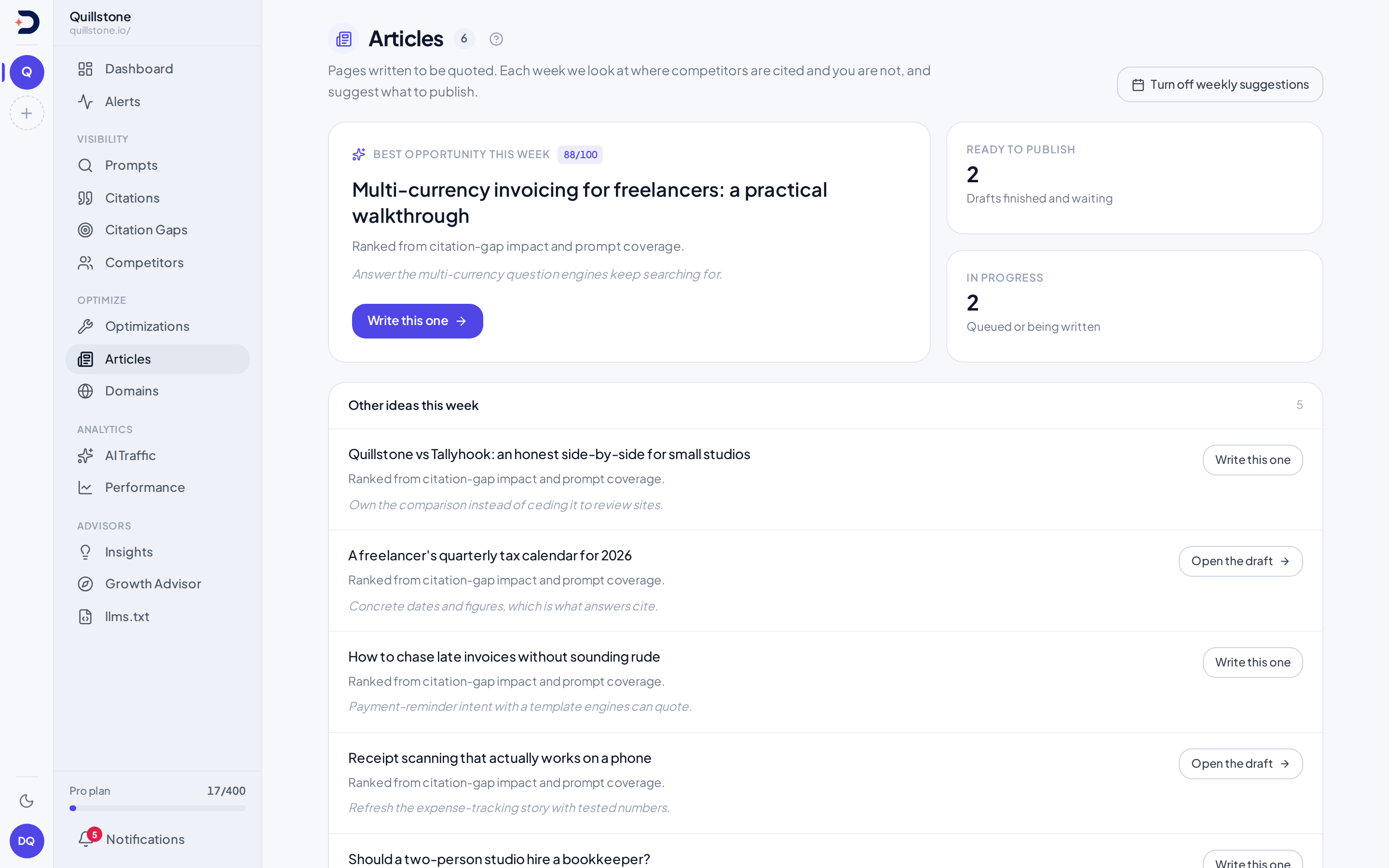
Articles opens on the strongest
topic still waiting on you, ranked by the topic's own opportunity score
when one exists (api/routers/articles.py#list_article_topics; see
"What the numbers mean" below for what that score is not),
with a button to start it, or, if it already has an article, to open the
draft instead, plus two tiles counting drafts ready to publish and ones
still queued or being written. Other topics list below it, and a form
lets you start from your own title and angle at any time. Below that,
your 50 most recent articles, each with its status and a readiness score
once one exists, which is also the list the two tiles are counted from.
Each article's own page leads with its citation readiness score
out of 100, then the brief's reasoning, the sources it read, the
claim-by-claim check (the first six shown, if there are more), the
publish checklist, the publish-and-monitor box described above, and the
draft itself.
What the numbers mean
Citation readiness, out of 100, starts full and loses points for a thin
source corpus, for claims left unsupported or unresolved, for FAQ schema
that failed to validate, and for a draft that reads short
(api/services/article_writer/readiness.py#citation_readiness). Read it
as a checklist score for this one draft, not a ranking against other
articles.
A topic's opportunity score is a different figure from the opportunity
score on Optimizations, which scores one of
your pages out of 100 and ranks it against your other pages: the two are
separate numbers that happen to share a name, so a figure there does not
translate into one here. This one belongs to the topic, comes from the
citation gap opportunity behind it
(api/services/citation_gap.py#create_article_topic_from_opportunity), and
is what orders the topic list above, strongest first
(api/routers/articles.py#list_article_topics).
It is now carried across on the gap's own scale of 1 to 100, unchanged,
which is what lets the badge beside the leading topic read as a real score
out of 100 (frontend/src/routes/(app)/articles/+page.svelte#topScore).
The same code used to divide that score by 100 before storing it, so every
topic created this way held a fraction below 1, and a badge rounding it to
a whole number could only ever print 0 or 1. Only topics written after that
correction carry the new scale: rescaling the rows already stored is a
separate database step, not something the code change does on its own. A
topic you typed yourself has no score at all
(api/services/articles.py#submit_custom_topic records none), and the
screen says "Suggested this week" with no badge rather than showing a zero
when the leading topic is one of those.
For how to read a change against a baseline in general, see How to read any number here.
Related
- Citation gaps: where a topic comes from, and how accepting one hands it to the writer
- Optimizations: the other route from a citation gap, for when the fix is smaller than a new page
- Metrics defined: the citation concept behind the prompt an article is written to win
- WordPress drafts: sending a finished draft into WordPress instead of copying it out by hand
- Pricing: how many articles a week your plan includes
Last verified 2026-09-27