Optimize
Source types
Organize cited pages with source categories, page formats, rule evidence and project-specific overrides.
Organize the sources cited for a client
Open the Types tab under Sources in the sidebar. Choose a 7, 28 or 90 day window with
the date range chip in the
filter bar,
then filter by source category, page format or ownership. The default is 28
days, ending yesterday; the bar's engine, tag, country, persona and language
chips narrow the cited pages too
(api/routers/source_taxonomy.py#ACCEPTS,
api/services/answer_filters.py#resolve_answer_filters).
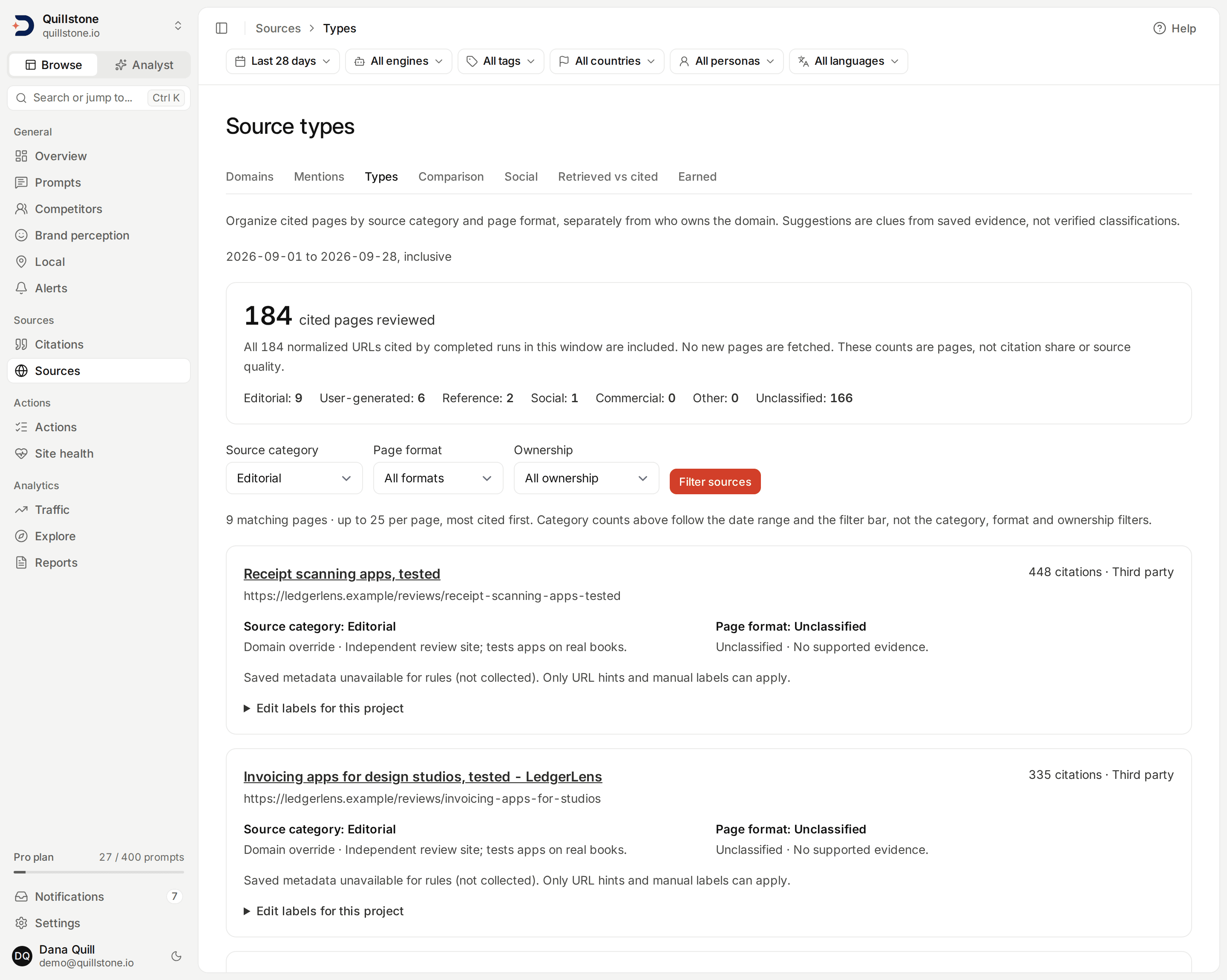
The screenshot uses local demo history and illustrative manual labels, not verified classifications of the displayed publishers.
Source categories describe how you organize a source: Editorial, User-generated, Reference, Social, Commercial, Other or Unclassified. Page formats describe the individual page: article, listicle, comparison, discussion, documentation, product, FAQ, video, other or unclassified. These are separate dimensions. A commercial site's blog can be an article; an owned page can be reference material.
Ownership is calculated separately from your project domain and active
tracked competitors. Everything else is third party. Pausing a competitor
changes its ownership label to third party without changing its source category
or page format (api/services/source_taxonomy.py#source_taxonomy_for_project).
What the counts cover
This screen includes pages cited in completed runs within the selected window that match the filter bar, including your own domain. It merges URLs using the same normalization as saved page content, including removing tracking parameters. Each normalized URL counts once in the page totals, while repeated citations contribute to its citation count.
At most 500 pages, ordered by citation count and then URL, are examined.
When more were cited, the screen reports the cap and total. Category counts and
filters then describe only that limited set, not all cited sources. Narrow the
window to reduce the set (api/services/source_taxonomy.py#MAX_SOURCES).
The page's own filters apply after that limit; the filter bar's apply
before it. Category totals above the filters describe the
whole examined set and do not change when you filter. Results show up to 25
pages at a time with pagination (api/services/source_taxonomy.py#PAGE_SIZE).
These counts measure cited pages, not citation share, publisher quality or
influence. See Domains for source reach and consistency,
and Source mentions on that screen's documentation for brand evidence inside
saved page text.
How rule suggestions work
Each suggested label says Rule suggestion and gives its reason. Rules use
the cited URL and a small portion of saved page metadata. Opening this screen
does not fetch a page or call an AI model. A saved title and schema declarations
are used only when the latest scrape succeeded; a failed, blocked or pending
scrape cannot reuse older metadata for these rules
(api/services/source_taxonomy.py#suggest_labels).
The initial rules deliberately cover a small set:
- Reddit thread paths suggest user-generated discussion. Wikipedia article paths suggest reference material. YouTube watch and shorts paths suggest social video. These are URL-based hints and can exist without a successful scrape; the page states when saved metadata is unavailable.
- Saved Article, NewsArticle or BlogPosting declarations suggest article; TechArticle suggests documentation; FAQPage suggests FAQ; QAPage or DiscussionForumPosting suggests discussion; Product suggests product; VideoObject suggests video.
- A saved title containing “vs” or “versus” followed by whitespace suggests comparison. A title starting with a one-to-three-digit number followed by “best”, “top”, “ways”, “tips” or “tools” suggests listicle. An Article declaration is compatible with these more specific formats.
- Conflicting format hints remain unclassified. ItemList or BreadcrumbList alone does not establish a listicle. Supported article, listicle or comparison hints can suggest an editorial category for that page, never automatically for the whole domain.
These are suggestions, not verified publisher classifications. A page's schema can describe nested objects, a title can be misleading, and a platform can host many content types. Editorial does not mean independent or trustworthy. Review the evidence, then use an override when your judgment differs. No supported evidence means unclassified, not “other”. Saved fetch dates help you judge freshness; the screen does not establish what the live page says now.
Edit or reset labels
Owners and editors can expand Edit labels for this project. Viewers can read labels and evidence but cannot change them. These organizational labels are available on all plans; existing collection and competitor limits still apply.
The priority order for a category is page override → domain override → rule suggestion → unclassified. A page format has a page override or a rule suggestion; there is no domain-wide page format.
This page only lets you set the category and format independently, with an
optional evidence note. All pages on the domain sets a project-specific
category across that registrable domain's pages and subdomains, including pages
outside the current window. Page category overrides keep their priority
(api/services/source_taxonomy.py#save_page_override,
api/services/source_taxonomy.py#save_domain_override).
Choose an Automatic option and save to restore the fallback. Choosing Unclassified instead saves an explicit override and suppresses the suggestion. Clearing both page overrides removes that page's note; clearing the domain category removes its note. If a save changes whether a page matches your current filters, it may disappear from the results.
Overrides belong to this project. Another client citing the same shared URL or domain keeps its own labels and notes. Tracking-parameter variants of one URL share a page override within the same project. Suggestions are recomputed from current saved metadata; manual overrides persist until changed or cleared. There is no classification history or AI classifier in this release.
Related
- Domains: reach, consistency and source-page mentions
- Citations: what was cited in a collected output
- Competitors: active tracked competitor scope
- Metrics defined: measurement populations
Last verified 2026-09-27