Optimize
Source comparison
Compare domain citation rates across equal periods and read owned-source share with explicit counts, recorded channels and missing-data limits; save domain or exact-URL watchlists and subscribe to observed citation gains and losses.
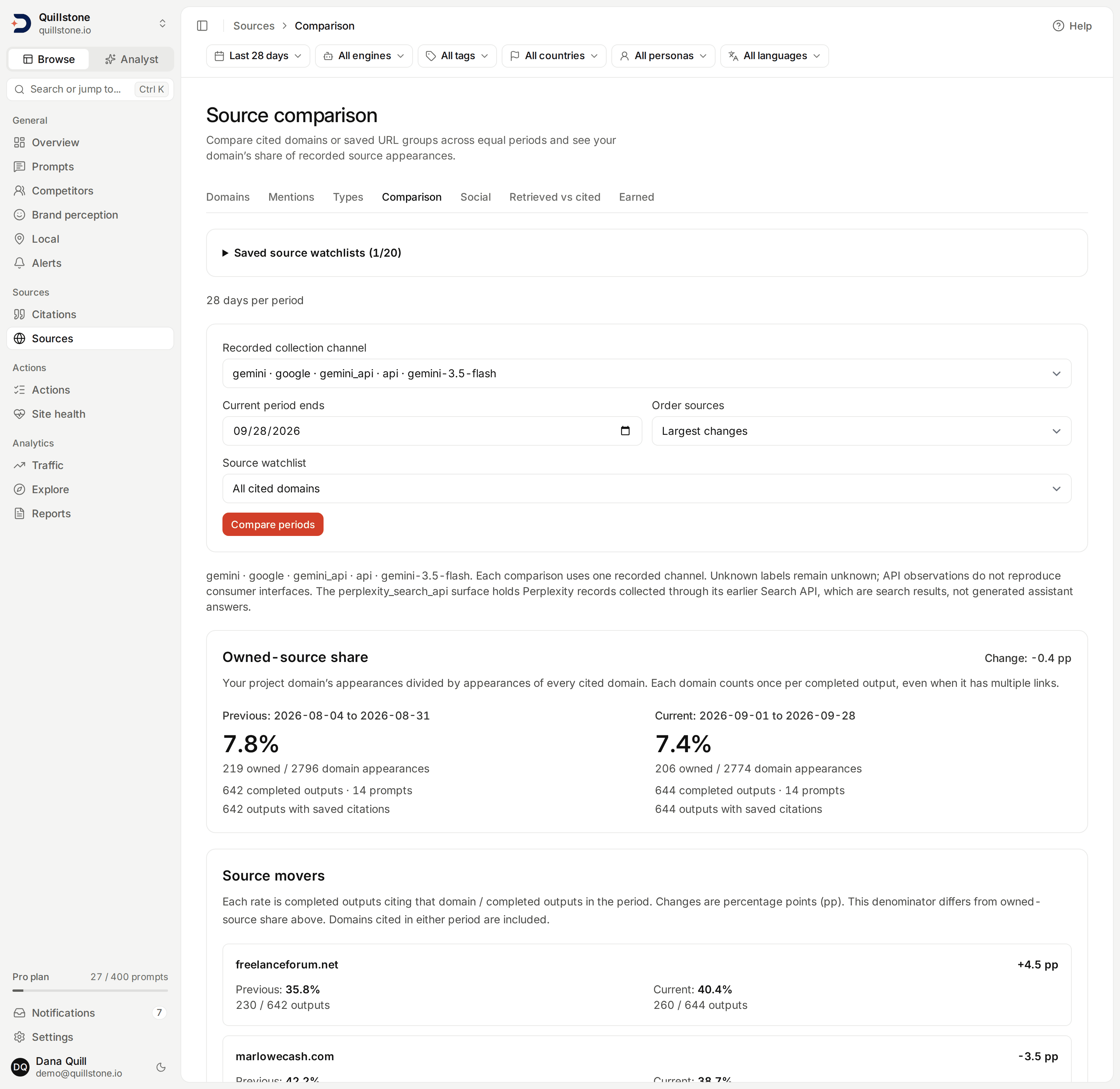
Illustrative development data is shown in this screenshot.
Compare equal periods
Open Source comparison from
the Comparison tab under Sources in the sidebar. The date range chip in the
filter bar
sets the days per period (7, 28 or 90) immediately, preserving the
other selections already applied; after you apply an end date it names it,
for example "7 days to Aug 1". Choose an end date, a recorded
collection channel, watchlist and sort order, then select Compare periods to apply
those fields. The default is two adjacent 28-day periods ending yesterday on
the collection server's calendar, not your device's calendar. Both endpoints
are included. Today is excluded because it is still in progress. An elapsed
day does not guarantee collection finished; late results can still arrive.
You can select an earlier end date to review historical results
(api/services/source_comparison.py#source_comparison_for_project). The
filter bar's
engine, tag, country, persona and language narrow both periods, and with an
engine chosen the channel list offers only that engine's channels
(api/routers/source_comparison.py#ACCEPTS).
The current period ends on the date you select. The previous period has the same length and ends the day before the current period starts. For example, seven days ending September 19 compare September 13–19 with September 6–12. Dates, counts and denominators are shown for both periods.
Each comparison keeps the recorded provider, platform, surface, collection method and model together. Different models and surfaces are separate options, including channels that appear in only one period. Missing provenance stays unknown. Changing the provider catalog does not relabel the recorded surface or model. A channel that is no longer in the selected dates resets to the first available option; check the displayed selection after changing dates. API observations do not reproduce consumer interfaces.
All project members, including viewers, can read this screen on all plans.
It uses saved records without new collection, scraping or model calls
(api/routers/source_comparison.py#source_comparison).
Saved source watchlists
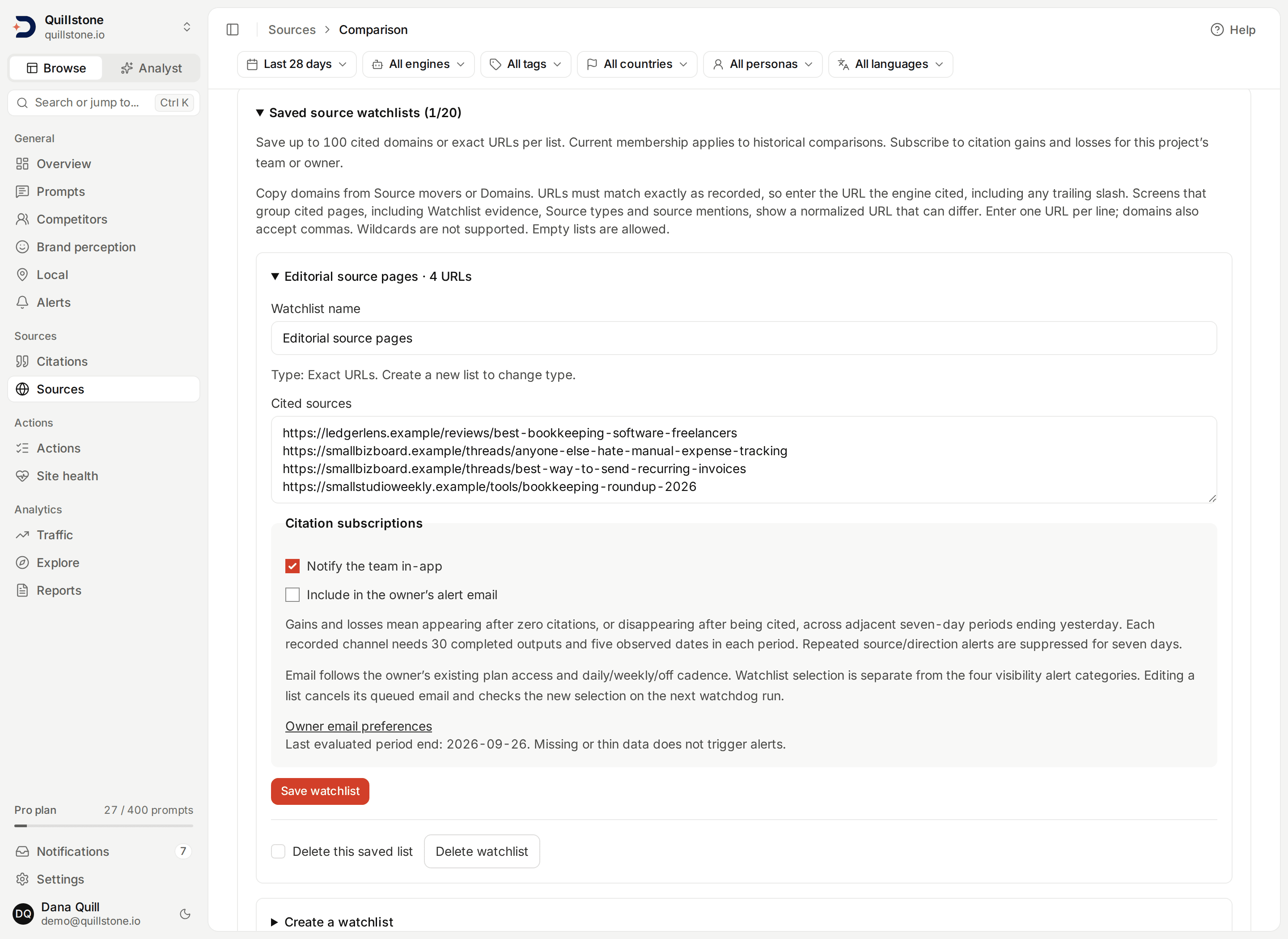
Expand Saved source watchlists to create a named group of Domains or
Exact URLs. Owners and editors manage lists and their project-level
subscriptions; all members can read and filter them on all plans. Each project
can save 20 watchlists, each with 100 unique domains or URLs
(api/schemas/source_watchlist.py#MAX_WATCHLISTS). Existing domain lists keep
their members and start with both notification options off.
Enter exact domains from Source movers or Domains,
one per line or separated by commas. For a URL list, enter full HTTP(S) URLs,
one per line, exactly as they were recorded. URL path and query case are
preserved; a comma inside a URL is not a separator. Only sources from this
project's completed citation history can be added. Wildcards and arbitrary
uncited URLs are not supported. Empty lists are allowed. A list's type cannot
change; create another list to switch between domains and URLs
(api/services/source_watchlist.py#save_watchlist).
Matching is exact, and most screens do not show the recorded URL. Screens that
group cited pages, including Watchlist evidence,
Source types and source mentions, display a
normalized URL: a trailing slash, a fragment and tracking parameters are
removed, the query is sorted and percent-encoding is rewritten
(api/services/urls.py#normalize_url). Copying from those screens can therefore
produce a URL that is refused, most often because of a trailing slash.
The recorded URL is shown in the saved members and Source movers rows of a URL list you already have, in a saved watchlist alert, and in the Cited URLs export on a paid plan. On a plan without exports, build a first URL list from the URL exactly as the engine cited it, including any trailing slash. A URL that does not match a recorded one is refused rather than matched loosely.
Select Create watchlist or Save watchlist. Concurrent edits refuse stale versions; reload to review the current list. Existing members can remain after their citation history disappears. Deletion requires the confirmation checkbox and removes the list, not observations or saved alert evidence.
Choose the list in Source watchlist, then Compare periods. URL lists show each exact saved page separately, even when pages share a domain. Saved members with no citations remain visible. Output denominators and domain-based owned-source share still cover the full channel. Current membership applies to historical windows; these lists are not historical membership snapshots.
Subscribe to citation gains and losses
Within a list, select Notify the team in-app, Include in the owner's alert email, or both, then save. Both options default off. These are project-level subscriptions, managed by owners and editors. In-app notices go to the active owner and active teammates. Email goes only to the active owner and requires the owner's alert-email entitlement and enabled daily/weekly cadence. Watchlist email selection is separate from the four visibility alert categories in Email preferences.
The existing watchdog compares two adjacent seven-day periods ending
yesterday, once per elapsed collection-server date. It keeps provider,
platform, surface, method and model separate. Each period needs 30 completed
outputs and five observed execution dates. Missing or thinner data is skipped
(api/services/source_watchlist_alerts.py#evaluate_subscriptions).
- Gain: no saved appearances in the previous period and at least one now.
- Loss: at least one saved appearance previously and none now.
A source counts once per completed output, regardless of duplicate citations. This detects appearance/disappearance, not every rate fluctuation. There is at most one gain and one loss alert per list/channel per evaluation. Repeated source/direction/channel events for that list are suppressed for seven days, including after edits. The last evaluated period end appears in the editor. Late results are reconsidered on the next date; missed days are not backfilled.
Open an alert from Alerts or Notifications for its saved source counts, denominators, dates and recorded channel. The live-comparison link may show newer data or an edited list. A deleted list leaves its saved alert readable to current project members. Editing a list invalidates its queued email; disabling email or deleting the list also cancels pending delivery. Existing email retry and seven-day digest-window limits apply.
Combined watchlist evidence
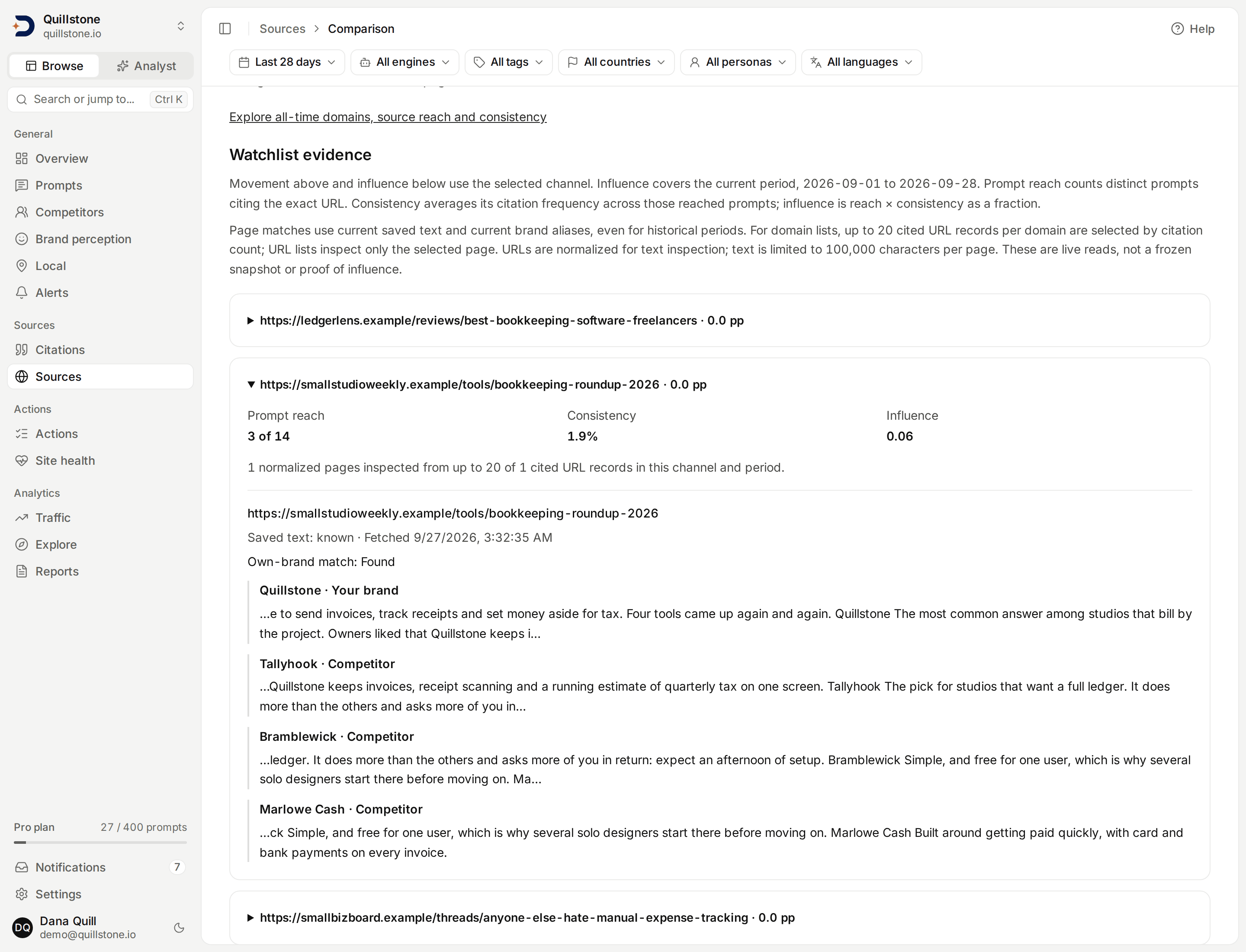
After selecting a watchlist, expand a source under Watchlist evidence to
inspect its citation movement, prompt reach, consistency and influence together.
Influence uses the comparison's current period and selected channel. Reach
counts prompts citing the domain or exact saved URL; consistency is the mean fraction of each
reached prompt's completed outputs citing it; influence is reach multiplied by
that fraction. Missing observations remain unavailable, and small samples are
provisional (api/services/source_evidence.py#attach_source_evidence).
Saved page text is inspected for literal current own-brand and competitor aliases. Up to 20 cited URL records per domain, ordered by citation count then URL, are normalized for inspection. URL lists inspect only the selected page. Each page shows its fetch time and matches. Unknown or unsuccessful scrapes do not become negative matches. Text is limited to 100,000 characters per page; longer text is marked partial, and no match within that portion leaves own-brand presence unknown. Your own domain is excluded from page checks.
These are current saved texts and current aliases even when comparing a historical period. They do not prove the page mentioned the brand at collection time. The screen uses live reads, so collection finishing during a request can change observations between summaries and supporting evidence. No new scrape, model call or notification is triggered.
Owned-source share
An appearance is one domain cited in one completed output. Three links to one domain in the same output count as one appearance. Two different domains in that output count as two. Ownership uses the project's current domain, not a brand-name mention or a manually labeled source category.
Owned-source share = own-domain appearances / all domain appearances × 100.
For example, four own-domain appearances among twenty domain appearances are 20%. The screen shows both counts and the change from the previous period in percentage points. Repeated links within one output cannot inflate this share.
This is different from your own-domain citation rate, which divides by completed outputs, and from the tracked-competitor snapshot share on Competitors. It includes every cited domain in the selected channel and dates, even when it is not a tracked competitor.
Source movers
With All cited domains selected, the list includes every domain with a saved citation in either period, so sources that disappeared remain visible. Each row shows:
- Previous and current counts of completed outputs citing the domain.
- Each count divided by that period's completed outputs, as a percentage.
- Current rate minus previous rate, in percentage points (pp).
For example, 2 of 10 outputs followed by 6 of 20 outputs is 20% followed by 30%, a +10 pp change. This accounts for different collection volumes, but does not hold the prompt or country mix fixed.
Largest changes orders by the absolute change in unrounded rates. You can
also put gains first, losses first, or the highest current rate first. Ties
use current output count, then domain name and ID. Sorting does not filter
out the other direction. Results are paginated, 25 sources at a time; the
owned-share summary and denominators always cover the full comparison.
Submitting Compare periods or changing the date range starts again at
page one. An out-of-range page resolves
to the last available page. Rates and changes round independently to one
decimal, so subtracting displayed rates can differ from the displayed change
by 0.1 pp (api/services/source_comparison.py#source_comparison_for_project).
Zero, unavailable and provisional
A rate is zero when the period contains completed outputs but none have a saved citation for that domain. It describes the records collected; it does not establish that an engine never cited the source or that citation capture was complete. The number of outputs with saved citations is shown separately.
With no completed outputs, that period's rates and rate changes are unavailable. With no domain appearances, owned-source share and its change are unavailable even when outputs were collected. If other domains appeared but yours did not, owned-source share is a measured zero.
Fewer than 30 completed outputs marks a period provisional
(api/services/brand_metrics.py#MIN_OBSERVATIONS). This is a sample-size cue,
not a statistical significance test or guarantee of reliable citation coverage.
Failed and in-flight outputs are excluded; completed outputs whose brand
sentiment has not been analyzed still count. Paused prompts and targets retain
their history. Citation dates use the parent execution's stored collection date,
which follows the server-calendar convention. This view does not convert dates to UTC.
Limits of the comparison
Prompts and countries are pooled within each channel and can change between periods. Prompt counts are shown, but this is not a fixed-cohort experiment and does not establish why a source moved. No source authority, causal influence, retrieval coverage or market-wide trend is inferred.
These are live saved records, not frozen reports. Late collection or corrections can change historical values. Source rows and their denominators come from one database statement per page; moving between pages can see newer data. The customer API and MCP retain their existing datasets; this screen does not add a new API-key or MCP tool contract.
Related
- Domains: citation counts, source reach and consistency over the filter bar's window and filters.
- Source types: project-specific categories and formats.
- Social sources: the same equal-period, percentage-point comparison, applied to social, community and review accounts.
- Metrics defined: other citation and brand denominators.
Last verified 2026-09-26