Visibility
Languages and templates
Run a tracked prompt in a language, what the response-language instruction says and where it goes for each chat engine, how the two Google engines, ChatGPT (app) and Gemini (app) receive a language instead, choosing which engines run, the server-side slot and answer preview, and saving a country/audience/language/engine combination as a reusable template.
What a language variant does
Open Prompts and add or edit a tracked prompt.
Alongside the countries and personas a prompt
already tracks, it can now also track one or more languages. A language
variant does not translate the prompt text: the exact words you typed are
sent to the engine unchanged, with one addition, a plain-language
instruction telling the engine to write its whole answer in that language
(api/services/llm.py#render_language_block,
#render_prompt_with_location). To track what a French-speaking buyer
would actually type, write the prompt in French yourself and set its
language to French; nothing here translates an English prompt into French
for you.
"As written" is the value every target already carried before this
feature, and it stays the default: no language block is added, and nothing
about today's behaviour changes for a target you never touch
(api/services/languages.py#is_supported_language).
The 48 supported languages
Language identity is one of 48 fixed ISO 639-1 two-letter codes, in this
order, the same list every picker in the app reads from
(api/services/languages.py#SUPPORTED_LANGUAGES,
api/routers/languages.py#list_languages):
| Code | Language | Code | Language |
|---|---|---|---|
| en | English | ru | Russian |
| es | Spanish | uk | Ukrainian |
| fr | French | ar | Arabic |
| de | German | he | Hebrew |
| it | Italian | fa | Persian |
| pt | Portuguese | hi | Hindi |
| nl | Dutch | bn | Bengali |
| sv | Swedish | ur | Urdu |
| da | Danish | ta | Tamil |
| no | Norwegian | te | Telugu |
| fi | Finnish | mr | Marathi |
| pl | Polish | gu | Gujarati |
| cs | Czech | kn | Kannada |
| sk | Slovak | ml | Malayalam |
| hu | Hungarian | pa | Punjabi |
| ro | Romanian | th | Thai |
| bg | Bulgarian | vi | Vietnamese |
| el | Greek | id | Indonesian |
| hr | Croatian | ms | Malay |
| sl | Slovenian | tl | Tagalog |
| et | Estonian | zh | Chinese |
| lv | Latvian | ja | Japanese |
| lt | Lithuanian | ko | Korean |
| tr | Turkish | sw | Swahili |
A code never carries a region: it is always the bare two-letter form
(fr, not fr-CA), the same ISO 639-1 code the response-language
instruction below names, and country already carries the region a prompt
runs in (api/services/languages.py#SUPPORTED_LANGUAGES,
api/services/llm.py#render_language_block).
Where the instruction goes
Every chat engine, Perplexity included, gets the response-language instruction the same way: it is appended to the rendered message the engine receives, after the audience block a persona variant adds and before the "Search context" location block (see How location reaches each engine). For a French variant the instruction reads exactly:
Response language:
- Write the whole answer in French (fr).
(api/services/llm.py#render_prompt_with_location). The saved execution
record's prompt_text_sent stores the whole rendered message, this block
included, exactly as the engine received it, the same way it already does
for a persona's audience block.
The two Google engines
Google AI Overviews and Google AI Mode get no instruction block. Google
receives the prompt as a search, and the language goes as a setting of the
request instead: the variant's language, or for an As written target the
project's default language, or else English
(api/services/llm.py#dataforseo_language). Both Google engines support
every language above except Chinese, where choosing Simplified or
Traditional would be a guess. On AI Mode, Portuguese is sent as Brazilian
Portuguese and Tagalog as Filipino
(api/services/google_serp.py#AI_MODE_LANGUAGE_CODES,
#AI_OVERVIEWS_LANGUAGE_CODES).
- A Chinese variant does not run on either Google engine: it is left
out rather than sent in English, and prompt detail lists it as "language
not supported by AI Mode" or "AI Overviews"
(
api/services/collection.py#target_runs_on). It still runs on every chat engine the prompt runs on. - An As written target whose project default language is Chinese runs on the Google engines in English, and says so.
- Every Google run shows the language actually sent in prompt detail's run
history, as in "Language sent to Google: Portuguese (Brazil)"
(
api/services/google_serp_reads.py#serp_language_label).
As on every engine, the prompt text is not translated: Google searches for the words you wrote.
ChatGPT (app)
ChatGPT (app) gets no instruction block either. It receives the prompt as
written, and the language goes as a setting of the request by the same
rule: the variant's language, or for an As written target the project's
default language, or else English
(api/services/llm.py#dataforseo_language). It supports every language
above except Chinese (api/services/chatgpt_app.py#LANGUAGE_CODES), so a
Chinese variant does not run on it and prompt detail lists it as "language
not supported by ChatGPT (app)"; an As written target whose project default
language is Chinese runs on it in English. Each ChatGPT (app) run shows the
language sent in prompt detail's run history, as "Language sent to ChatGPT
(app)".
A brand study is the one exception: an
objection,
attribute or
fact study in a language adds, after the
question it sends ChatGPT (app), the same response-language instruction the
chat engines get, because the language setting alone does not change the
language ChatGPT (app) answers in
(api/services/brand_study/question.py#study_prompt). Tracked prompts
never get it.
Gemini (app)
Gemini (app) gets no instruction block either. It receives the prompt as
written, and the language goes as a setting of the request by the same
rule: the variant's language, or for an As written target the project's
default language, or else English
(api/services/llm.py#dataforseo_language). It supports every language
above except Chinese; Portuguese is sent as Brazilian Portuguese and
Tagalog as Filipino, as on AI Mode, because those are the codes Gemini
(app) lists (api/services/gemini_app.py#LANGUAGE_CODES). A Chinese
variant does not run on it and prompt detail lists it as "language not
supported by Gemini (app)"; an As written target whose project default
language is Chinese runs on it in English. Each Gemini (app) run shows the
language sent in prompt detail's run history, as in "Language sent to
Gemini (app): Portuguese (Brazil)".
Choosing which engines run
A prompt can also choose which engines run it. Leaving Engines on "All
engines on your plan" means every engine on your plan, including one a
later plan upgrade adds, with nothing to revisit
(api/services/prompt_variants.py#plan_engine_names, #plan_providers).
Choosing a subset restricts every variant of that prompt to those engines;
it costs no prompt slots, only changes how many answers you get a month
(api/routers/prompts.py#create_prompt, #update_prompt). One function
decides whether a target actually runs on a given engine, and it is the
only place that rule lives: an engine you did not choose creates no
execution row at all. On the chat engines, neither a language nor a
persona skips an engine, so every variant runs on every chat engine the
prompt runs on. The two Google engines skip three kinds of variant: a
persona variant, a Chinese variant, and any variant of a prompt over 700
characters once encoded for Google (see
How the Google engines are collected).
ChatGPT (app) skips four: a persona variant, a city variant, a Chinese
variant, and any variant of a prompt over 2,000 characters once encoded
(see What reaches ChatGPT).
Gemini (app) skips three: a persona variant, a Chinese variant, and any
variant of a prompt over 2,000 characters once encoded; it runs city
variants (see
What reaches Gemini (app))
(api/services/collection.py#target_runs_on).
If your plan changes and a chosen engine is no longer on it, the choice
itself is not rewritten, so it resumes automatically the moment the engine
is available again; nothing runs on the missing engine meanwhile. The
prompt's own read exposes which of its chosen engines are currently off
your plan, and saving the prompt again with that same engine still in the
list is refused, naming it
(api/routers/prompts.py#_stamp_engines_off_plan,
api/services/prompt_variants.py#validate_engines).
Every plan; each variant uses a prompt slot
A location (a country, or a
city), an audience and a language
together now decide a prompt target, the same identity a country and an
audience alone decided before
(api/services/prompt_variants.py#target_key). Tracking one prompt in 2
countries as General, in As written plus French, produces 2 x 1 x 2 = 4
targets and reserves 4 slots
(api/routers/prompts.py#create_prompt,
api/services/prompt_variants.py#sync_targets). Languages, engine choice
and templates draw on the same prompt-slot budget every country and
persona already used, on every plan; none of the three needs a separate
entitlement.
A prompt tops out at 100 active variants, locations (countries and
cities) times audiences times languages, and every path that can add a
target enforces it: creating or editing a prompt, bulk-applying a
template, CSV/Excel import, and accepting a suggested or discovered
prompt all refuse to push a prompt over the cap, naming the count and the
limit
(api/services/prompt_variants.py#MAX_VARIANTS_PER_PROMPT,
#resolve_spec, #active_variant_count, #variant_cap_error; import
turns this into a row error rather than a raised exception,
api/services/prompt_import.py#_plan_one; accepting a suggestion or a
discovered prompt raises it as a 422,
api/routers/prompt_candidates.py#accept_candidate). Saving a template on
its own is capped the same way, since a template's own grid can never be
saved larger than 100 either. Editing a prompt, and bulk-applying a
template to one, are the two cases that are not always a hard ceiling:
either can resend or reapply a grid that is already over the cap
unchanged without being blocked, only growing it further is refused, so a
grid can be larger than 100 only if it was created before this release
(api/services/prompt_variants.py#_per_prompt_over_cap). One spec can
name up to 50 countries and up to 100 cities, at least one location
between them, 1 to 10 languages, and, when you choose a subset, 1 to 10
engine names (api/schemas/prompt_variants.py#VariantSpec).
Default language, and where it applies
Set a project's default language on its project settings form; leaving it "As written" is the state every project starts in. Changing it never rewrites a target that already exists: only a target created afterward, with no language named explicitly, picks up the new default. Existing prompts are not changed.
A new prompt whose languages are left unset uses the project's current
default for every target it creates, the same as naming that language
explicitly. CSV/Excel import, and accepting a suggested, discovered, or
persona-tagged prompt, are narrower: they manage one "base variant" per
country, for the audience the row concerns (General, or the candidate's
own persona). A country already tracked for that audience, meaning it has
an ACTIVE target in any language, is left alone entirely: nothing is
created or reactivated for it. A country that is not tracked for that
audience, whether it has no target at all or only an inactive one, gets a
target in the project's CURRENT default language: an inactive target with
exactly that (country, audience, language) key is reactivated if one
exists, otherwise a new one is created. So changing the
default language, then re-importing the same file or re-accepting the
same suggestion, never adds a second, new-language copy of a country a
prompt already tracks: it can only ever add a country the prompt did not
track before
(api/services/prompt_import.py#apply_plan, #_plan_one,
api/services/prompt_discovery.py#accept_candidate,
api/routers/prompt_candidates.py#_count_new_or_reactivated_targets, all
reading api/services/prompt_variants.py#base_language).
Onboarding is the one exception: a new project's onboarding prompts are
created before a default language can be set on a project that does not
exist yet, so those targets are always As written, on every project you
create, not only your first
(api/routers/projects.py#create_onboarding_project).
Editing a prompt's countries, cities, audience or languages still follows
the "any one field, all five resync" rule: the grid is five fields
(countries, cities, personas, General, languages), and when you actually
change any one of them the whole grid recalculates together. Changing
only a city resyncs the grid the same way a country does. But the
Add/Edit prompt form only sends those five fields at all when you changed
at least one of them from what the form opened showing, and then it
sends all five, the cities with the rest, so a city you cleared is
cleared rather than kept. A save that only edits the prompt text, its
tags, or its classification sends none of the five, so it cannot resync
the grid to a different shape than what is already tracked, even when
that grid is "ragged" (say, a country an import only ever tracked for
General, sitting alongside a country tracked for General and a persona)
(frontend/src/lib/components/AddPromptModal.svelte,
frontend/src/routes/(app)/prompts/[id]/+page.server.js,
api/routers/prompts.py#update_prompt).
Preview before you save
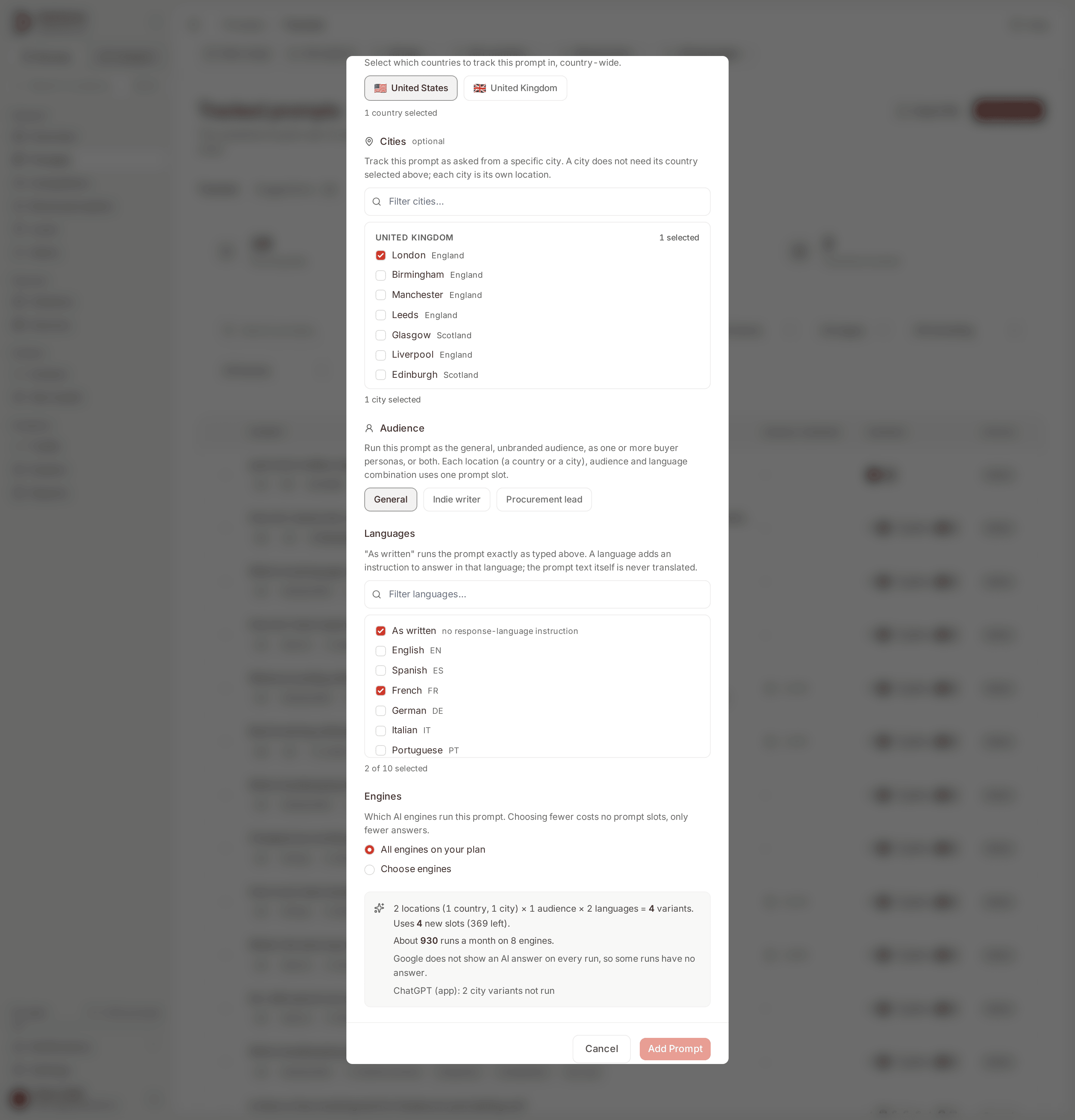
The Add and Edit prompt forms, and bulk-applying a template (below), all
call one server-side preview before anything is saved: the Add/Edit form
300ms after your last change, template bulk apply as soon as you pick a
template. It reports the grid size, the new prompt slots it would use and
how many are left, and a monthly estimate for before the change and after
it
(api/services/prompt_variants.py#_build_preview). Selecting one country,
General, As written plus French, and every engine, on a plan with 8 engines
and 373 slots left reads: "1 country × 1 audience × 2 languages = 2
variants. Uses 2 new slots (371 left). About 496 runs a month on 8
engines. Google does not show an AI answer on every run, so some runs have
no answer." The estimate counts runs rather than answers whenever a Google
engine runs a variant, because a Google run may show no AI answer; on chat
engines alone it reads "answers"
(frontend/src/lib/google-serp.js#estimateWording). The "(371 left)" figure is the slot count AFTER this change (373
minus the 2 new slots it uses), the same way the form always shows it:
what you would have left if you saved right now, not what you have left
today. A city counts as a location of its own: the form above, with the
United States plus London, General, As written plus French and every
engine, reads "2 locations (1 country, 1 city) × 1 audience × 2 languages
= 4 variants. Uses 4 new slots (369 left). About 930 runs a month on 8
engines.", followed by the Google note and "ChatGPT (app): 2 city variants
not run": the two London
variants run on seven engines, not eight, because Gemini (app) runs city
variants and ChatGPT (app) does not
(frontend/src/lib/api/prompt-form.js#locationCountText). Choosing Chinese
instead of French in the first example gives "About 372 runs a month",
because the Chinese variant runs on the four chat engines only, and four
more lines: "Google AI Overviews: 1 variant in an unsupported language not
run" and the same for Google AI Mode, ChatGPT (app) and Gemini (app)
(frontend/src/lib/google-serp.js#notRunPreviewLines). A persona
audience adds "persona variants" lines the same way.
The answer estimate is 31, the pricing page's own days-in-a-month
convention, times the number of (target, engine) pairs that would
actually run under the rule above, summed over every active variant of
every active prompt in the request
(api/services/prompt_variants.py#monthly_answers,
#DAYS_PER_MONTH_ESTIMATE). It is an upper bound: it does not subtract
runs that fail or runs where Google shows no AI answer, and it keeps
counting past the point where your slot budget would itself cut monitoring
off partway through a month. For a new prompt the preview has not read the
text yet, so a prompt over 700 characters is still counted for the Google
engines; the form says so under the estimate.
Templates: save a combination once, reuse or bulk-apply it
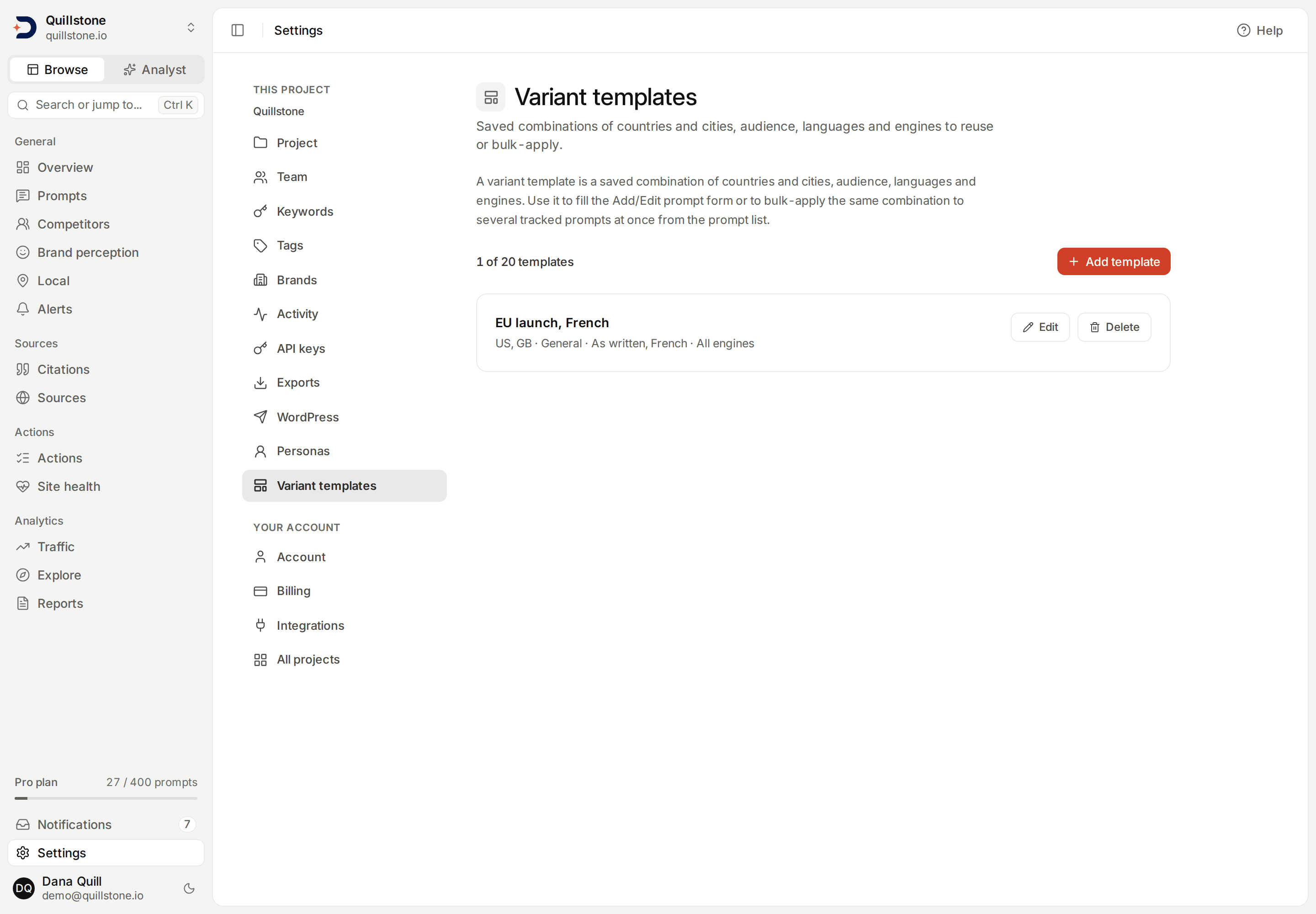
Open Settings → Variant templates.
A variant template is a named, project-scoped combination of countries,
cities, audience, languages and engines, the exact shape the Add prompt
form already fills in (api/services/variant_templates.py). A template
saved before cities existed reads as one with no cities, so bulk-applying
it to a prompt that has city targets shows those cities as removals in the
preview before anything is written. Owners and editors
create, edit and delete templates; every project member can read the
list. A template fills the "Start from template" select on the Add/Edit
prompt form, and drives bulk apply from the prompt list: select several
tracked prompts, choose a template, preview what it would change across
all of them, then apply.
A stale template, one naming an archived persona or a country the project
no longer has enabled, behaves differently depending on how you apply it.
"Start from template" on the Add/Edit prompt form fills the form from the
template and drops any disabled country, or city of a disabled country,
from the pickers (it simply is not one of the choices offered), while a
flag under the template picker itself names how many countries, cities or
personas were dropped
(frontend/src/lib/components/AddPromptModal.svelte#templateFlags). Bulk
apply is stricter: it sends the template's spec as saved, unfiltered, to
the same validator prompt create and edit use, so a disabled country is
refused with an error before anything is written for any of the selected
prompts, though the error itself is the generic "Prompts can only target
countries enabled for the project" message and does not name the country
(a city in a country no longer enabled is refused the same way, and that
error does name the city, as in "Lyon, FR"),
and an archived persona is dropped from what gets activated rather than
failing the request
(api/services/prompt_variants.py#apply_variants, #resolve_spec).
Reading a saved template resolves it against today's project first, so
both surfaces can flag an archived persona, a disabled country, or an
engine no longer on your plan before you apply it; the saved spec itself
is never rewritten by that flag
(api/services/variant_templates.py#_read). Deleting a template does not
change any prompt already built from it: applying a template copies its
combination onto the prompts you chose at that moment, it does not keep
them linked to the template afterward.
A project can hold at most 20 saved templates. A name is 1 to 60
characters, trimmed, and cannot repeat another template's name in the
same project regardless of case
(api/services/variant_templates.py#TEMPLATE_LIMIT, #NAME_MAX_LEN,
#UQ_TEMPLATE_NAME). There is no default template: the project's own
default language above already covers what a template with no explicit
choice would otherwise need to repeat.
Reporting by language
- The filter bar: its language chip narrows to As written or one
language on every screen that takes it, the prompt list included, where
it lists the prompts with an active target in that language. It offers
the languages your prompts' targets use, As written among them when some
target runs untranslated, and is disabled with fewer than two choices
(
api/services/explorer/dimension_values.py#target_languages,api/services/answer_filters.py#available_filter_options); see The filter bar. - Prompts: each row carries a chip for every real language currently
tracking it, plus a separate As written chip only when the same prompt
also runs unmodified (
frontend/src/lib/languages.js#languageChips). A prompt running on a subset of engines carries its own chip too. - Sentiment trends, Brand reasons and
Compare vs. competitor follow
the language chip like the persona chip
(
api/services/sentiment_trends.py#sentiment_trends_for_project). Sentiment trends and Brand reasons each pair the persona chip with a separate "By persona" breakdown view; neither has an equivalent "By language" view, and Compare vs. competitor has no breakdown view for either dimension, only the chips. - Explorer: language is one of its dimensions, so any of its metrics,
citation rate and brand visibility included, can be broken down or
filtered by language, and a language breakdown keeps every chat engine
a prompt runs on; a Chinese row holds no Google AI Overviews or AI Mode
answers (see
Explorer)
(
api/services/explorer/dimensions.py#DIMENSIONS,api/services/collection.py#target_runs_on). Overview has no language card; its answer drawer tags an answer with the language it was collected in (api/services/overview_answer.py#build_answer). - Exports and API: the Answers and Brand mentions (
entity_mentions) file exports, and Brand reasons, all gain alanguagecolumn, empty for As written, never omitted; Citations, Cited URLs, Domains, Daily metrics and Prompts do not (api/services/exports/answers.py#COLUMNS,api/services/exports/entity_mentions.py#COLUMNS,api/services/exports/brand_reasons.py#COLUMNS). The customer API's answer and brand-reason objects, and the matching MCP tools, carry the same field, a code ornullfor As written (api/schemas/customer_api.py#CustomerAnswer,#CustomerBrandReason).
What this does not include
- The prompt text itself is never translated; write it in the language you want measured and set that language on it, as above.
- CSV and Excel import carries no language column: only a country new to the prompt for the audience a row concerns lands in the project's current default language, the same as typing a prompt by hand for that country. A country the prompt already tracks for that audience is left untouched, and a row whose countries are all already tracked is reported "Already tracked" and writes nothing.
- Prompt discovery and research suggest prompt text the same way regardless of language; only the language an accepted suggestion's own target lands in follows the project default, not the text the research model was asked to write.
- Nothing detects a project's default language automatically from its website; you set it yourself in project settings.
- Engine choice is per prompt, not per variant: one prompt cannot run its French targets on one set of engines and its As-written targets on another.
- A language code never carries a region: there is no separate variant for, say, Brazilian versus European Portuguese.
- Answers from the chat engines are collected through their APIs, not the consumer apps, so a consumer AI app's own interface-language setting is not reproduced for them; this page's language is only what an engine is asked to answer in, or, for the four DataForSEO engines, the language setting sent with the request. This describes tracked prompts; brand studies are the exception above, since a study in a language also sends ChatGPT (app) the response-language instruction.
- Answer analysis, mentions, sentiment and reasons, runs on a non-English answer with the same models used for an English one; how accurately it performs per language has not been separately measured.
Related
- Prompts: countries, audiences and now languages, together, and what running a prompt actually means
- Personas: the audience dimension languages sit alongside
- Sentiment trends: the language chip, alongside persona and prompt segment
- Brand reasons: the same language chip, for strength and weakness reasons
- Exports and activity: the
languagecolumn on Answers and Brand mentions - Plans and limits: why languages, templates and engine choice need no separate entitlement
Last verified 2026-09-29