Features
Optimize
Turn what the answers show into ranked page fixes, article drafts and technical checks for your own site.
To do
One ranked list of what to do next.
Fact check findings, alerts, page fixes, citation gaps, Search Console opportunities, earned sources and prompt suggestions each have their own screen. To do gathers the open ones into one list, highest priority first. It keeps no status of its own: every button changes the record on its own page, so nothing is tracked twice.
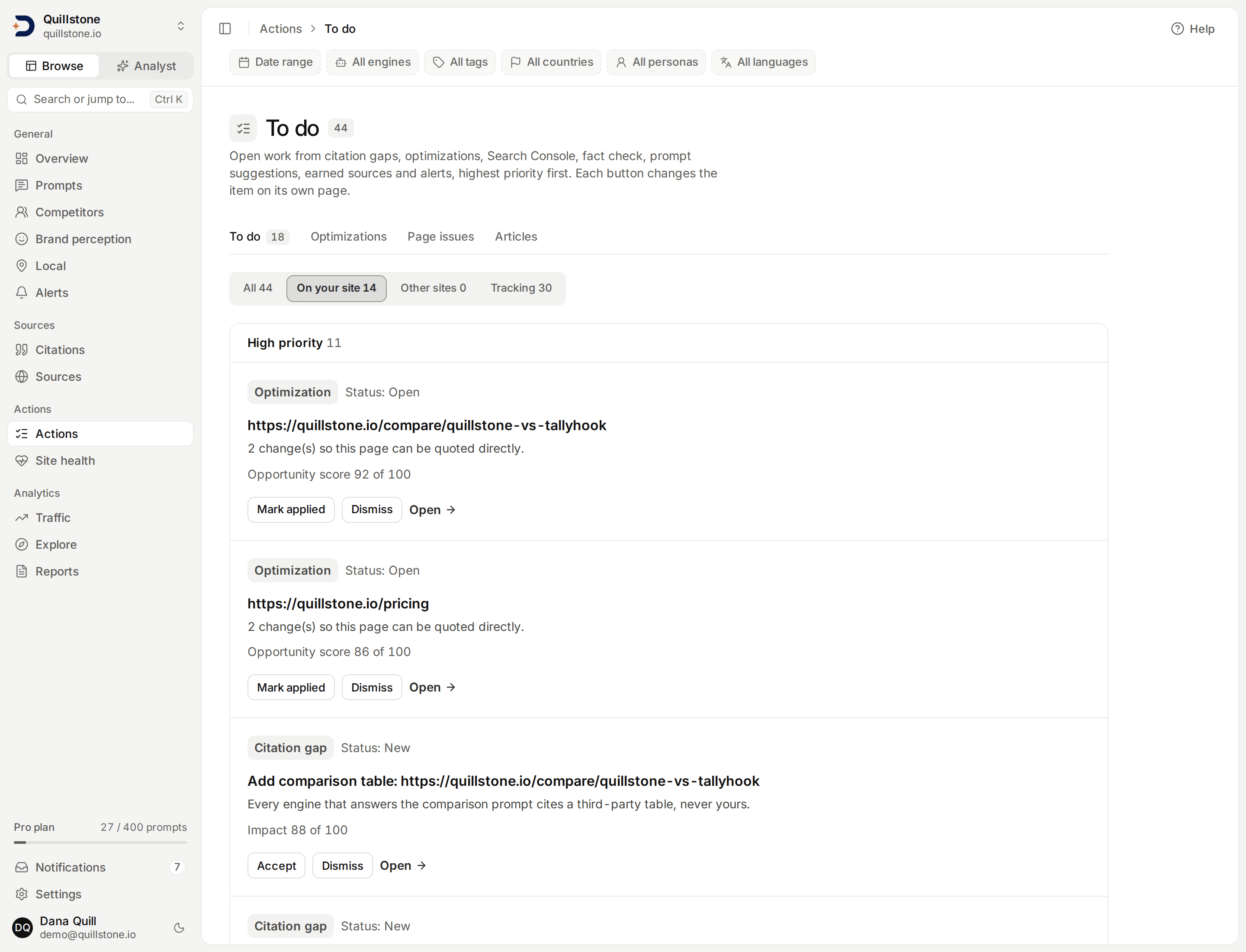
- A priority you can read: scores from different sources measure different things, so they are never added up. Each item gets a High, Medium or Low band from a stated rule for its kind, and its reason line states the input behind it.
- Act from the list: mark a page fix applied, accept or dismiss a citation gap or a prompt suggestion, dismiss a Search Console opportunity, or acknowledge an alert, without leaving the page. Fact check findings and earned sources open on their own pages.
- Counted once: a citation gap is hidden while a page fix built from it is on the list, so the same work does not appear twice.
- Split by where the work happens: tabs for your own site, other sites and tracking, a New mark on anything created in the last 7 days, and a count of open High-priority items on the To do tab.
Every project member can read the list; owners and editors see the buttons. To do has no plan gate of its own: it lists the open records the project's sources already hold.
Take Action
Actionable Recommendations
Data without direction is just noise. DiscoveredBy doesn't just show you where you stand. It tells you exactly what to do about it. Every recommendation is backed by data from your scans and prioritized by potential impact.
Whether it's improving your structured data, filling content gaps, or building citations that AI engines trust, you'll get a clear playbook for increasing your AI search presence.
- Content gap analysis: identify topics and questions where your brand should appear but currently doesn't.
- Citation opportunities: see which sites the engines already pull from for your prompts, and how much of your prompt set each one covers, so a mention or link can be aimed at one that actually shows up. We rank sources on observed reach and consistency, not on any judgement of their authority.
- Structured data recommendations: get specific schema markup and content structure suggestions that help AI engines understand your brand.
- Priority-ranked action items: every recommendation is scored by effort and expected impact so you know what to tackle first.
- Progress tracking: after you mark a fix applied, compare the visibility of its prompts with the 30 days before it. These observations do not establish that the edit caused a change.
Headline Agent
On-Page Optimization
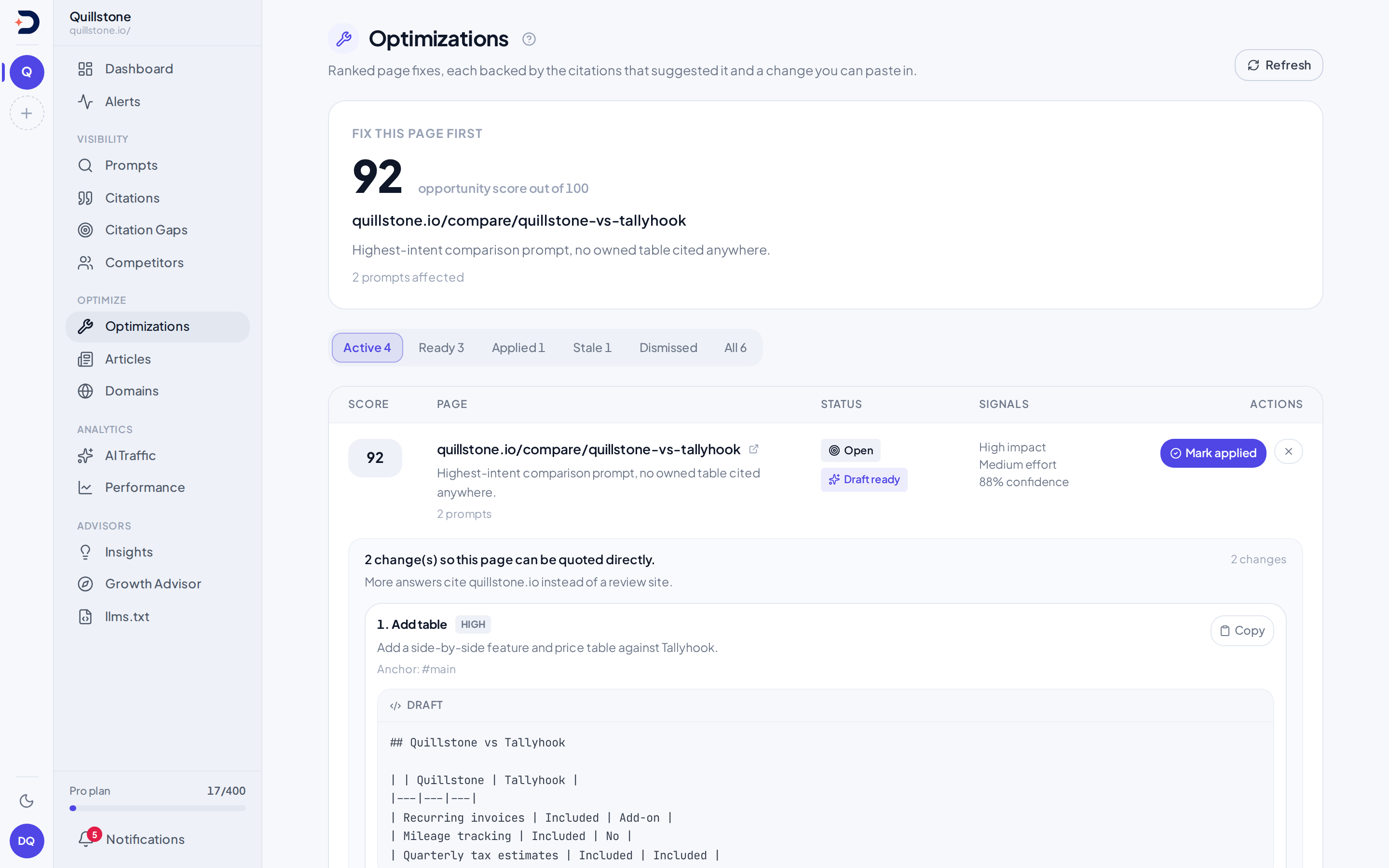
Recommendations are only useful if they’re specific, and safe to ship. The On-Page Optimization agent reads your live page alongside the competitor pages AI engines actually cite for your prompts, then hands back a ranked worklist of concrete edits: which page to fix first, the proposed change, and drafts you can review for your CMS. Each retained change has a quote matched to saved source text. After you mark a change applied, follow-up observations compare visibility with the 30 days before it.
- A ranked worklist: scored by impact, effort, and confidence, so you always know the single highest-value page to fix next.
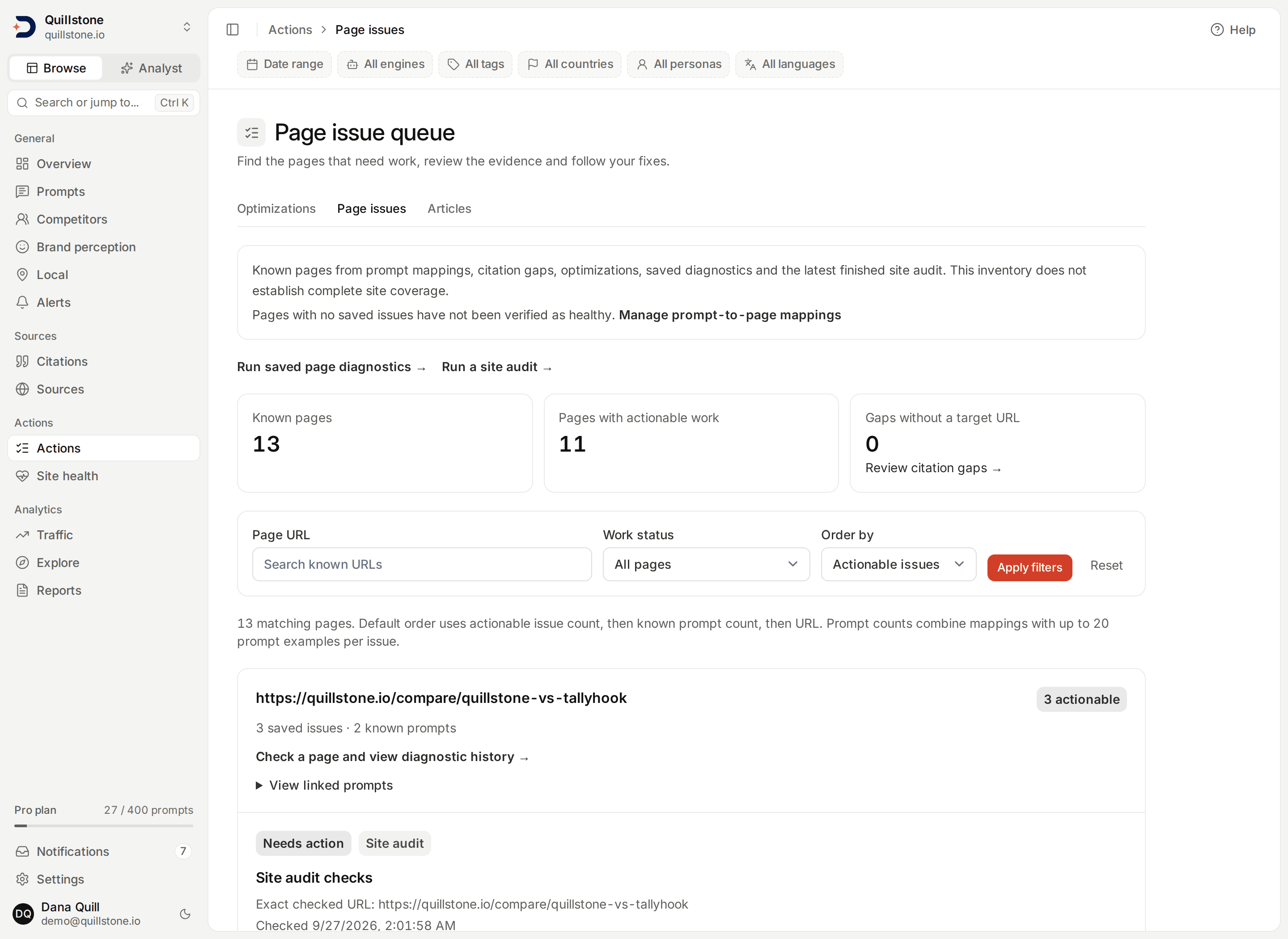
- A page-level work queue: prioritize known owned pages by actionable issues, review linked evidence, inspect saved diagnostic findings and follow draft or applied status. The saved inventory is bounded and clearly labels its coverage; it is not a complete crawl of your site. Explore the page issue queue.
- Drafts for implementation: approve reviewed drafts for handoff in batches of up to 25, copy proposed text, or export a Markdown or PDF task packet with all saved draft formats, source quotes and a review checklist. Task exports use the project owner's data-export access, included on Starter, Growth and Pro and during the product trial.
- Evidence for review: saved source quotes support each retained change. The draft itself still needs checking, with additional human-review flags for regulated topics.
- Observe subsequent changes: mark a change applied after implementation, then compare later visibility with its baseline. These observations do not establish that the edit caused a change.
Publishing Agent
Article Writer
Most AI writers spin a blog post whether you need one or not. The Article Writer decides what page should actually win a prompt first. It reads the pages AI engines cite for it alongside your own site, then tells you the move: update a page you already have, add an FAQ, publish a comparison, or draft a new article. When a new page is the right call, it drafts from the real cited sources, labels each claim it reports, from verified by a source to unsupported or a proof point you need to supply, and hands back a publish-ready checklist. Once the page is live and you paste its address back, it ties back to your prompt monitoring to see whether it earned the citation.
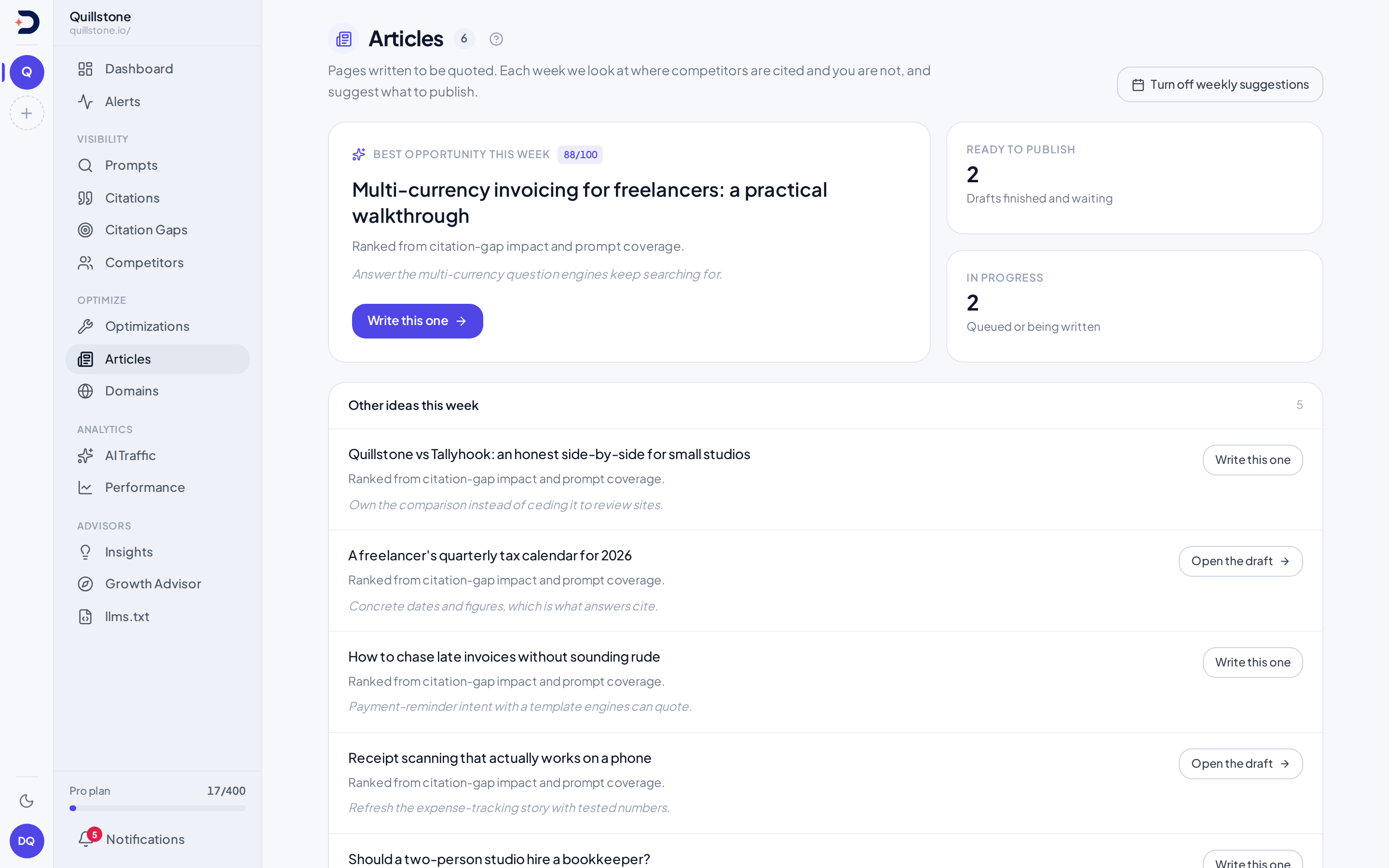
- A brief before a draft. It reads the cited pages and your own site, then recommends the right asset, including updating an existing page or not writing at all.
- Grounded and labeled. It drafts from the sources AI actually cites and labels each claim it reports. A claim reads verified only when its quote is found in the source page it names; the rest read as unsupported, promotional, stale, in conflict with the source, or a proof point for you to supply.
- Publish-ready, then measured. You get a citation-readiness score plus a checklist of slug, metadata, JSON-LD schema, and internal links, and once it’s live it ties back to your prompt monitoring.
- Send finished articles to WordPress as drafts. DiscoveredBy never publishes. On Starter, Growth and Pro, connect a WordPress account once and send a finished draft with one click. See how WordPress drafts work.
WordPress
A new draft in WordPress, never a publish.
Send a finished article into your WordPress site as a new draft post, then read it and publish it there yourself. Each send creates a new draft. DiscoveredBy never publishes, edits or deletes a post in WordPress, and never touches anything already there.
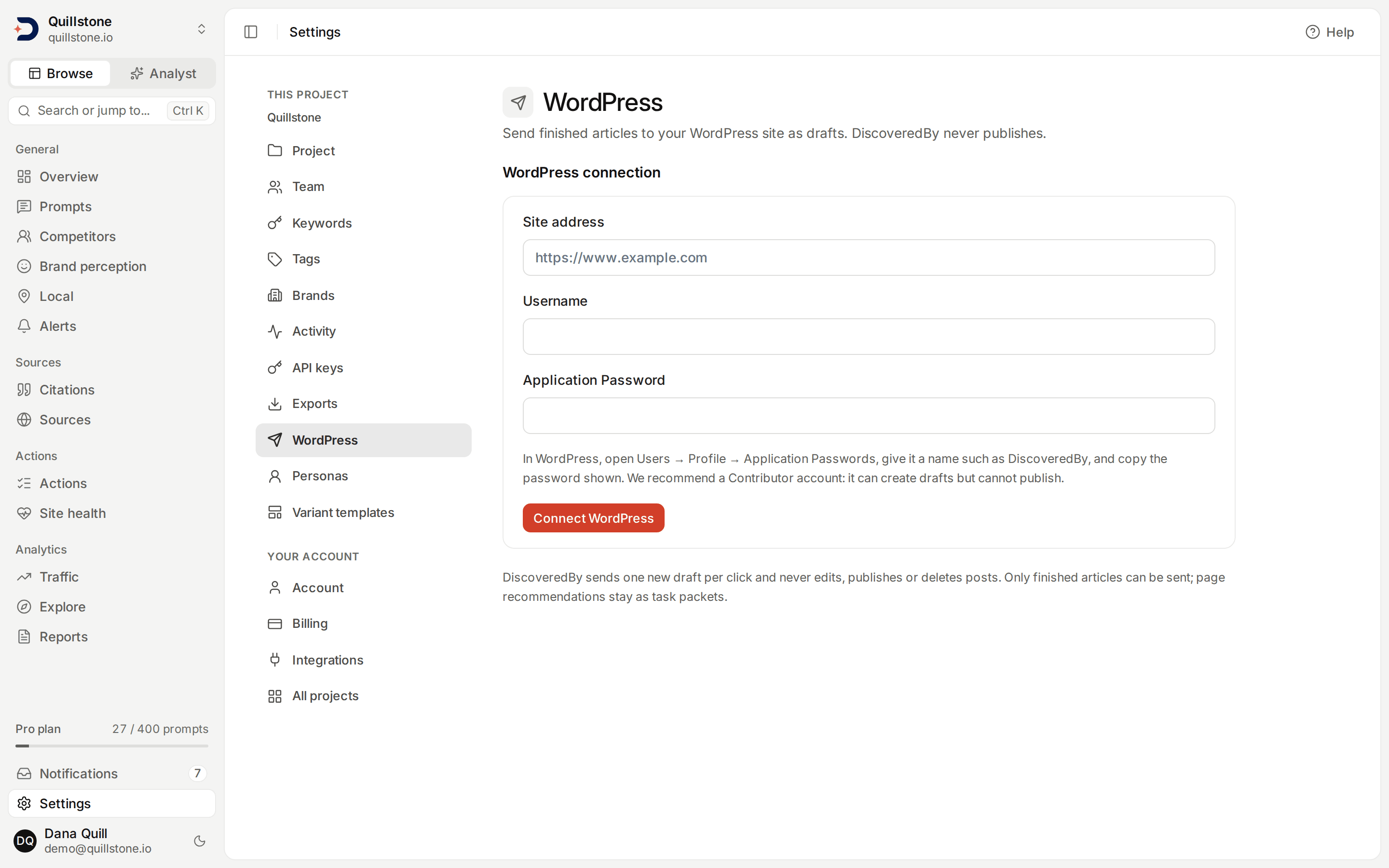
- Connect once, as a Contributor: the project owner connects a site on the project's own domain with a WordPress Application Password. We recommend a Contributor account, which can create drafts but cannot publish, so WordPress itself enforces the draft-only rule. The password is stored encrypted and never shown again.
- What arrives in the draft: the article's title and content, its meta description as the excerpt, and the suggested slug when it passes our check. Images are not sent; each one becomes its alt text. Page fixes from Optimizations stay task packets and are never sent to WordPress.
- No accidental duplicates: sending the same version again is refused while an earlier send created a draft or may have. A send that fails after WordPress may have received it reads Outcome unknown, so you check WordPress first; Send another copy makes a second draft on purpose.
Connecting a site and sending drafts follow the project owner's plan: Starter, Growth and Pro.
Technical checks
Check a page. Save the evidence. Recheck the fix.
Check a page on your domain against five AI crawler policies. See the matching rule and line number, with search and training crawlers shown separately. Saved page diagnostics adds HTTP, HTML, structure and browser-render checks, dated evidence and recheck history linked to your page issue queue. Unknown results cannot resolve findings; these checks do not establish actual bot access or citations.
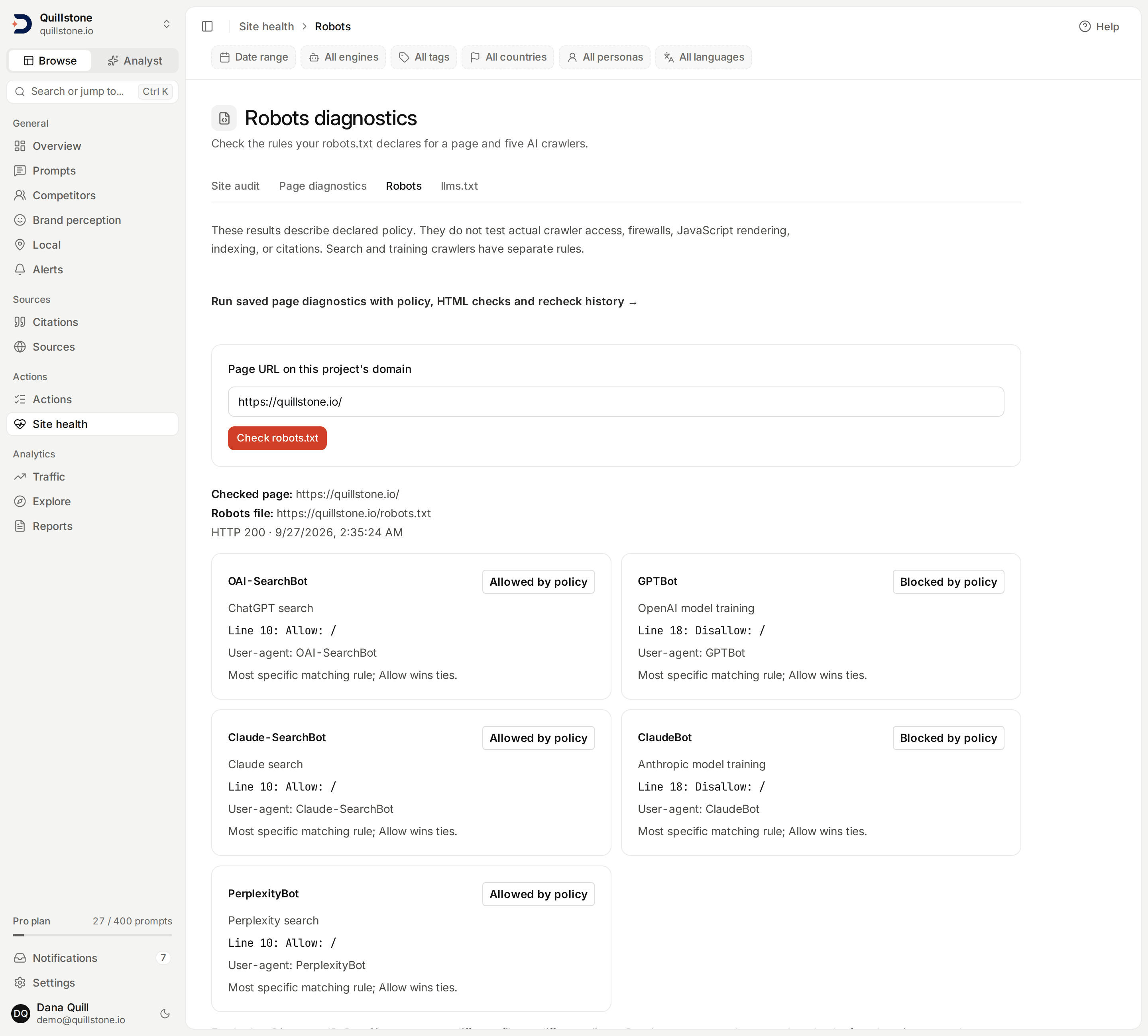
- Site audits, raw HTML against a rendered page. Crawl your site from its robots.txt, sitemaps and internal links, then compare the raw HTML response each page delivers against a browser render of the same page, so you can see content, links or metadata that only appear after scripts run.
On-demand checks for project owners and editors on Starter, Growth and Pro.
Site audit
See your site the way a crawler without JavaScript does.
A site audit crawls your own site as DiscoveredByBot, from its robots.txt, its sitemaps and the internal links on each page, and checks up to 1,000 pages in one run. Crawlers that do not run JavaScript only ever see the raw HTML a page delivers, so each page is also loaded once in a browser and the two are compared.
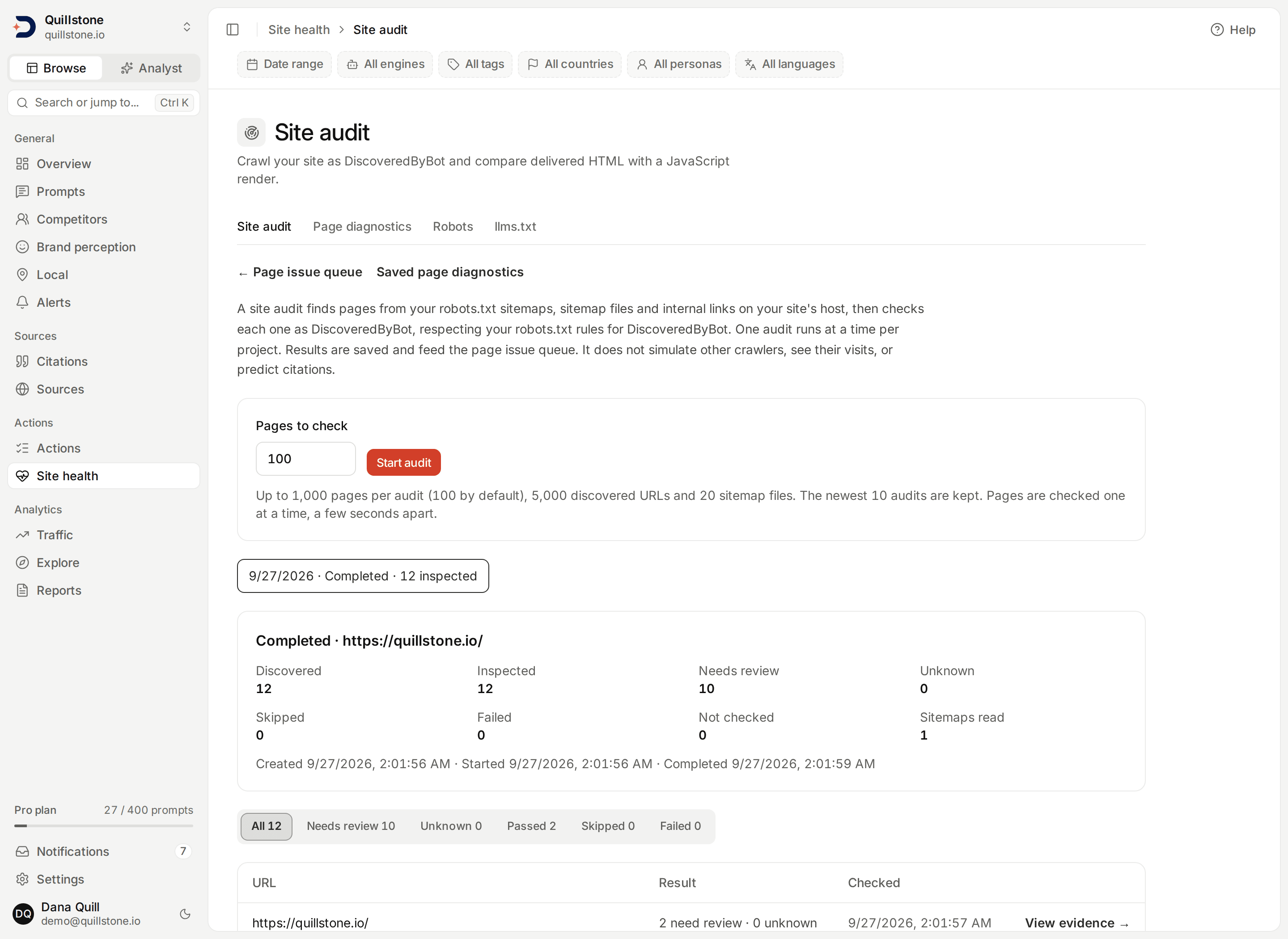
- One set of checks per page: each page it checks gets declared crawler policy, delivered HTML, structure and metadata, response size and timing, and the browser render. Each check reads Check passed, Needs review or Unknown, with its saved evidence.
- What only scripts add: a page whose text or same-host links grow substantially only after its scripts run, or whose title, main heading or robots directives change when they do, is flagged for review.
- Straight into your work queue: your newest finished audit adds one item per inspected page to the page issue queue, and a page checked in an earlier audit is compared with its previous result.
- Read-only and honest about it: requests to common third-party analytics and tag-manager services are blocked during the render, so an audit does not add page views to those tools, and DiscoveredBy does not edit your site. The structure, response and render checks are heuristics from one lab request or browser load, not Core Web Vitals, a citation prediction or a grade.
Starting an audit is for owners and editors on Starter, Growth and Pro; every project member can read saved audits.
Page diagnostics
Fix one page, then see whether the response changed.
Run the same checks on one exact URL on demand, keep the evidence, and recheck it after your team publishes an edit. Each URL's latest completed result appears in the page issue queue, which gathers the pages from your prompt-to-page mappings, citation gaps with a target page, optimization opportunities, saved diagnostics and your newest finished site audit into one list.
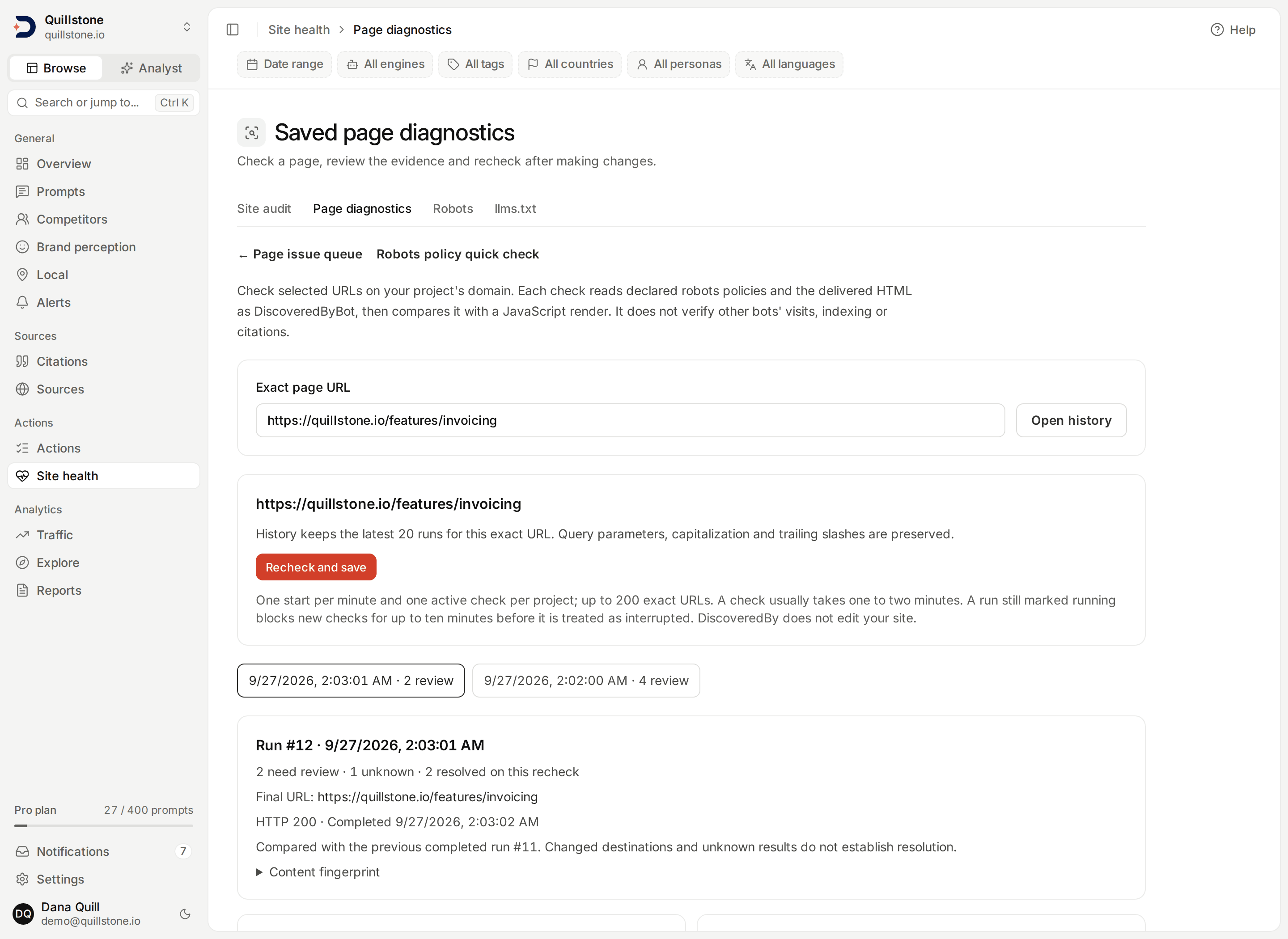
- Rechecks you can trust: a finding reads Resolved on recheck only when an earlier review finding is followed by a passed check. Unknown evidence never resolves a finding, and each URL keeps its latest 20 runs.
- The next page to work on: the queue orders pages by how many actionable issues they have, then by how many known prompts they serve, and links each issue to the evidence behind it.
- Reading changes nothing: opening the queue only reads saved records. It runs no generation, and the platform does not modify your website.
Running checks is for owners and editors on Starter, Growth and Pro; every project member, on every plan, can read the queue and saved results.
llms.txt Advisor
A compliant llms.txt, written out for you.
llms.txt is a short Markdown file at the root of your domain that gives AI engines a curated map of your site. The llms.txt Advisor fetches your live file, checks it against the llmstxt.org spec, then has a model draft a compliant replacement for you to publish.
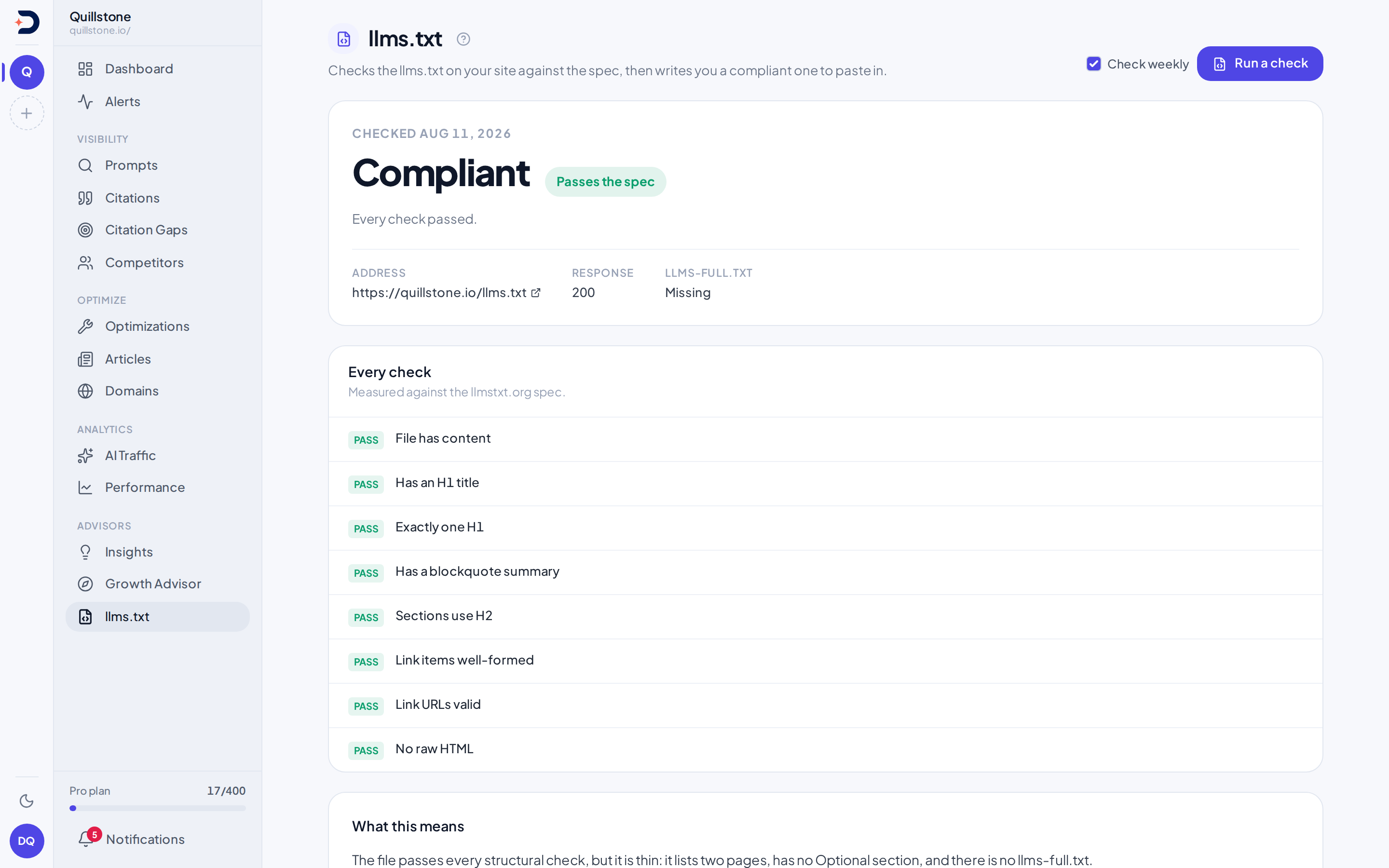
- Checked by rules, not a model: the checklist is plain code, so the same file always gets the same result. Only an empty or missing file, or one that does not open with a title line, fails; everything else can at most raise a warning.
- A file ready to copy: the proposed file appears with a Copy button. Nothing is written to your site; putting it live is a step you take yourself.
- On demand or weekly: owners and editors can run a check on demand, and the project owner can turn on a weekly automatic check.
- A structural check: it checks the file's shape against the spec. It does not follow the links to confirm the pages still exist, or judge whether a summary or a link description is any good.
Available on Starter, Growth and Pro, following the project owner's plan.
Documentation
Learn more in the docs
To do
One list of open work from seven sources, banded by priority, where each button changes the record on its own page.
Read the docsOptimizations
Page fixes with saved source evidence, bulk handoff review, Markdown/PDF task packets and observations after implementation.
Read the docsPage issue queue
Prioritize known owned pages using saved gaps, draft status, diagnostic findings, linked evidence and recorded outcomes.
Read the docsArticles
How a topic becomes a brief, a draft with its claims checked against the sources it names, and a published page tied back to the gap it closes.
Read the docsWordPress drafts
Send a finished article into a connected WordPress site as a new draft, never a publish, with duplicate, unknown-outcome and interrupted-send handling.
Read the docsSite audit
Crawl your own site as DiscoveredByBot from robots.txt, sitemaps and internal links, and compare raw HTML with a browser render.
Read the docsSaved page diagnostics
Save selected-page policy and HTML checks, review evidence, and compare rechecks with retained history in the page issue queue.
Read the docsRobots diagnostics
Check declared robots.txt rules for five AI crawlers on a project URL, with matching rules and unknown fetch failures.
Read the docsllms.txt Advisor
A weekly audit of your live llms.txt against the spec, with a compliant file written out for you to publish.
Read the docs
Ready to see your AI visibility?
Start monitoring how AI search engines talk about your brand.
Start free