Features
AI visibility
See whether AI answers name your brand for the prompts your buyers ask, checked every day on the engines your plan includes.
Core Feature
AI Visibility Monitoring
Every day, millions of people ask AI assistants for product recommendations, service comparisons, and brand information. DiscoveredBy runs scheduled scans through the Gemini, Perplexity Sonar, Anthropic and xAI APIs, and collects Google AI Overviews, Google AI Mode, ChatGPT's app and Gemini's app answers through a licensed data provider, according to your plan. The API outputs can differ from what people see in the consumer apps.
You get a clear picture of when you're mentioned, what's being said about you, and how your visibility changes over time. No more guessing whether AI engines know your brand exists: you'll have the data.
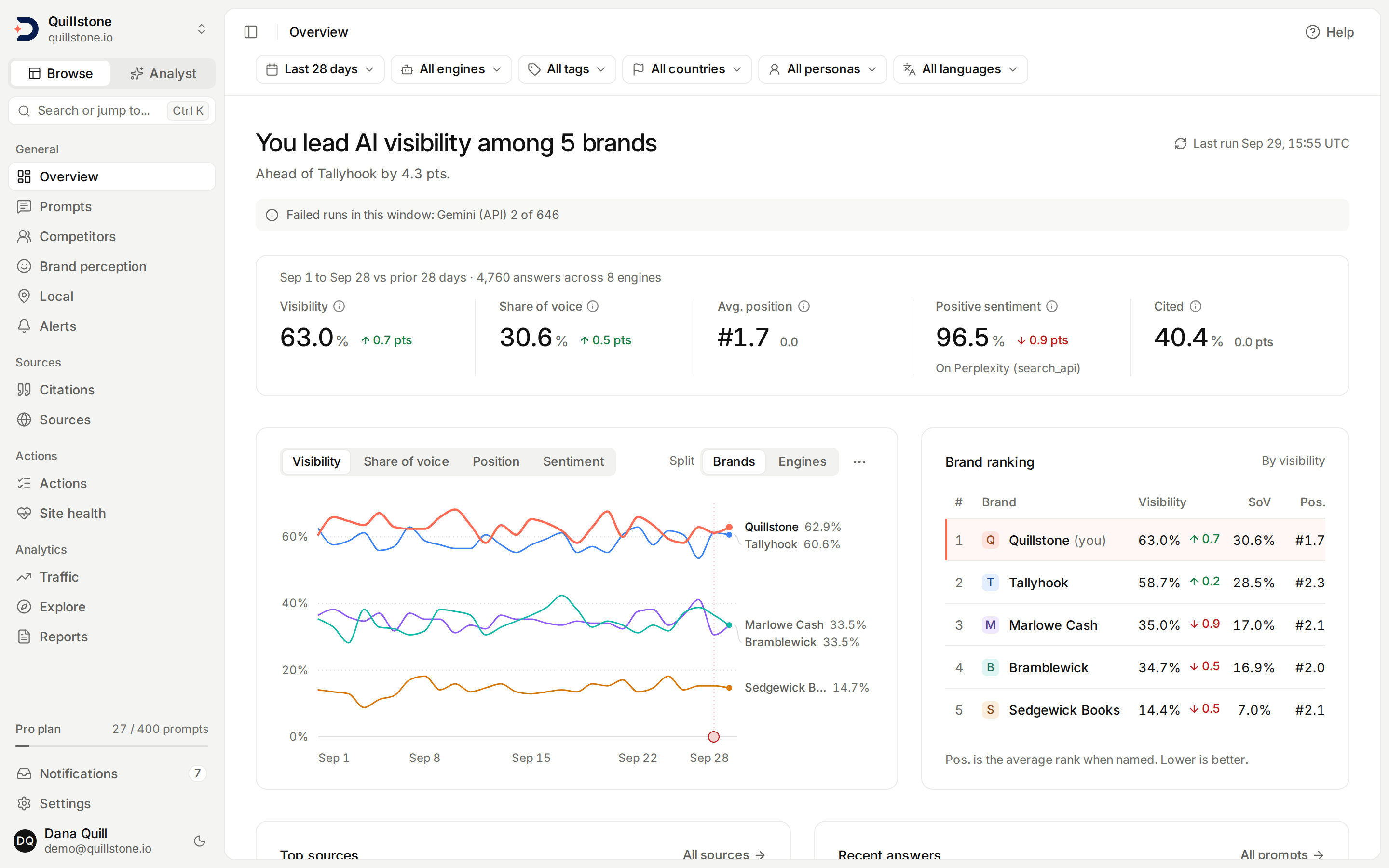
- Brand mention tracking: see when collected outputs for your tracked prompts name your brand, with evidence from those runs.
- Visibility score: a single metric that quantifies your brand's presence in AI-generated answers, tracked daily.
- Prompt-level breakdown: see which specific questions trigger mentions of your brand and which ones don't.
- Bring your list in bulk: import CSV or Excel (.xlsx) prompts, countries and tags, with a preview that shows exactly what will be created and what each row costs before anything is saved. Excel reads the first worksheet only.
- Sort your portfolio by intent: assign or clear intent, buyer stage, theme and branding across selected prompts, manage tags in bulk, and pause or resume the selection. Each classification is from a fixed list, and each one filters the list. On Starter, Growth and Pro, use on-demand AI suggestions to review intent, buyer stage, theme and branding before saving. Branded and unbranded labels are editable and filterable. Prompts we suggest arrive already classified; the ones you write or import can be classified manually or through reviewed AI suggestions.
- See which prompts people already search for: connect Search Console and every prompt shows the Google impressions behind the queries it covers, scored against your own portfolio. It measures Google demand, not AI demand, and says so on the screen.
- Multi-engine comparison: understand how your visibility differs across ChatGPT (app), Gemini (API), Perplexity, Google AI Overviews, Google AI Mode, Gemini (app), Grok and Claude.
- Google AI Overviews and AI Mode: measured through a licensed data provider that fetches Google's own results for each prompt. See how often Google showed an AI answer at all, and where you rank in the organic results next to whether the AI Overview cited you.
- ChatGPT (app): what chatgpt.com shows a visitor who is not signed in, measured through the same licensed data provider, and the only way we measure ChatGPT. ChatGPT decides for itself whether to search, so see how often its answers cite any source at all.
- Gemini (app): what gemini.google.com shows a visitor who is not signed in, measured through the same licensed data provider, next to Gemini (API), our own call to Google's Gemini API. City targets run on it at the city's coordinates, and the Google product and Maps place links among its sources count as shopping and local businesses, not as citations.
Competitive Edge
Competitive Intelligence
Knowing your own visibility is only half the picture. On Starter, Growth and Pro and during the product trial, DiscoveredBy tracks your competitors across the same AI engines and the same prompts, so you can see your Share of Voice relative to the brands you compete with.
You don't have to know that list up front. Because we read the brand names in every answer, not just the links, DiscoveredBy surfaces the competitors already appearing alongside you, including the ones you had never thought to track.
When a competitor starts appearing more often in AI answers, or a brand you have never tracked starts turning up in them, you'll know about it. This gives you the intelligence to respond quickly and stay ahead in the AI discovery channel.
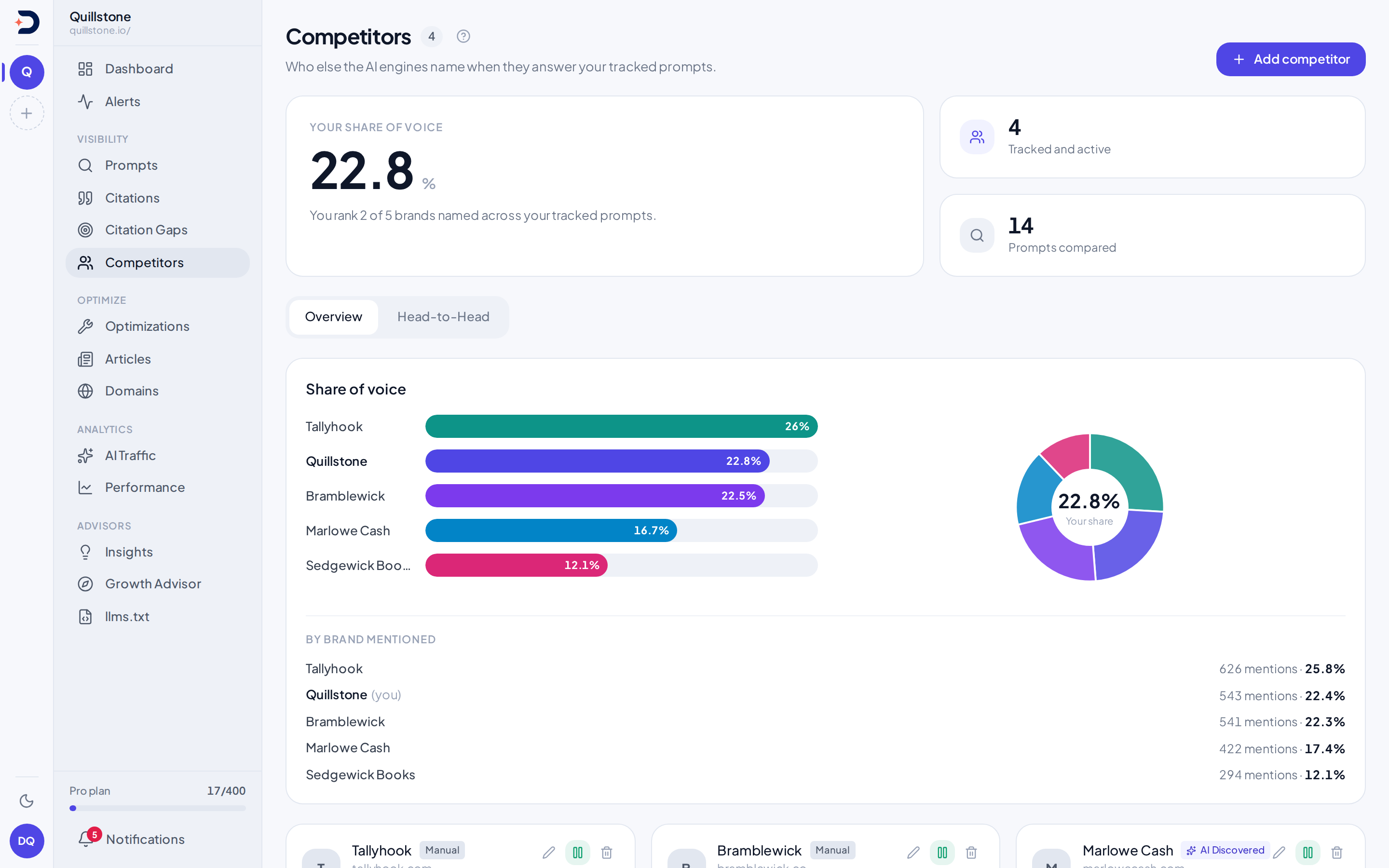
- Competitor discovery: see the brands named in your answers that you never added, ranked by how often they appear and sorted so you get competing companies rather than the technologies AI happens to mention.
- Share of Voice: for each brand family, yours or a tracked competitor's, count how many answers named it, treating a brand and its own sub-brands as one count per answer, then compare that against every active tracked family's own count added together. The domain-citation view separately shows each tracked domain's share of citations.
- Side-by-side comparison: compare your visibility and mention frequency against active tracked competitors, then explore stored sentiment by collection channel.
- Tracked competitor comparisons: compare the brands you track across the prompts you monitor.
Brand Families
Sub-brands and aliases
On Starter, Growth and Pro, nest a sub-brand one level under your own brand or a tracked competitor, such as a product line with its own name. A brand family counts once per answer even when it and a sub-brand are both named, and each active sub-brand also reports its own answers and sentiment, shown alongside its family rather than added to it.
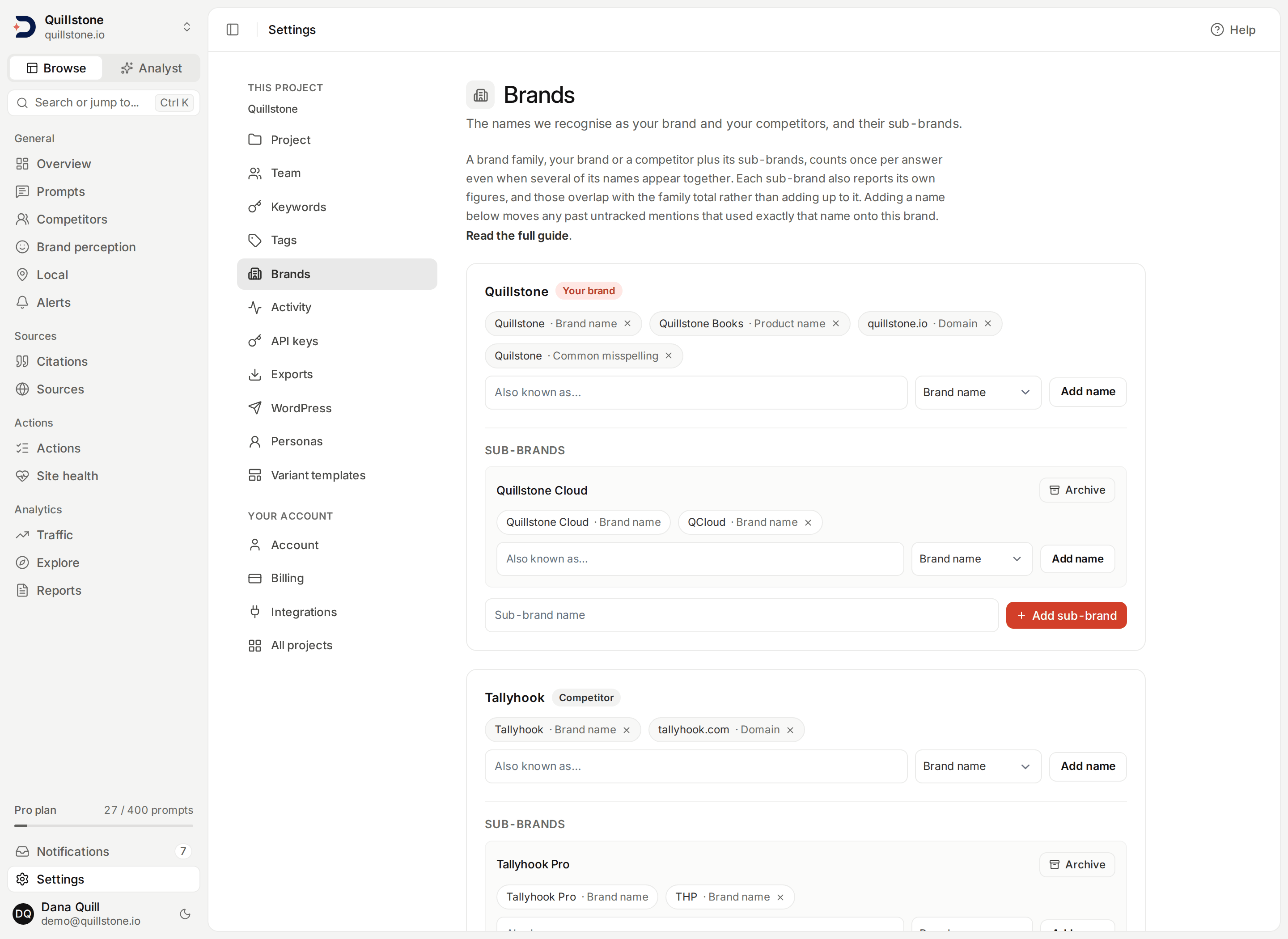
- Aliases on every plan: give your own brand its other names, such as a product name, an abbreviation, a common misspelling or a domain, and each one is handed to mention extraction as another name for that brand. A tracked competitor takes aliases the same way, on Starter, Growth and Pro and during the product trial.
- From a discovered name: any untracked name on Competitors can become an alias of your brand or a tracked competitor or, where sub-brands are available, a sub-brand, instead of a separate competitor.
- History comes with it: adding a name moves the project's past untracked mentions with exactly that name onto it, and the app reports how many moved. No model is run again on old answers.
Audiences
Buyer personas
On Starter, Growth and Pro, name a buyer profile and run a tracked prompt as that persona, alongside or instead of the general, unbranded audience. Each location (a country or a city), audience and language combination uses one prompt slot. A persona run adds one audience block to the message sent to each chat engine, Perplexity included; Google AI Overviews, AI Mode, ChatGPT (app) and Gemini (app) receive only the prompt text, so persona variants do not run there.
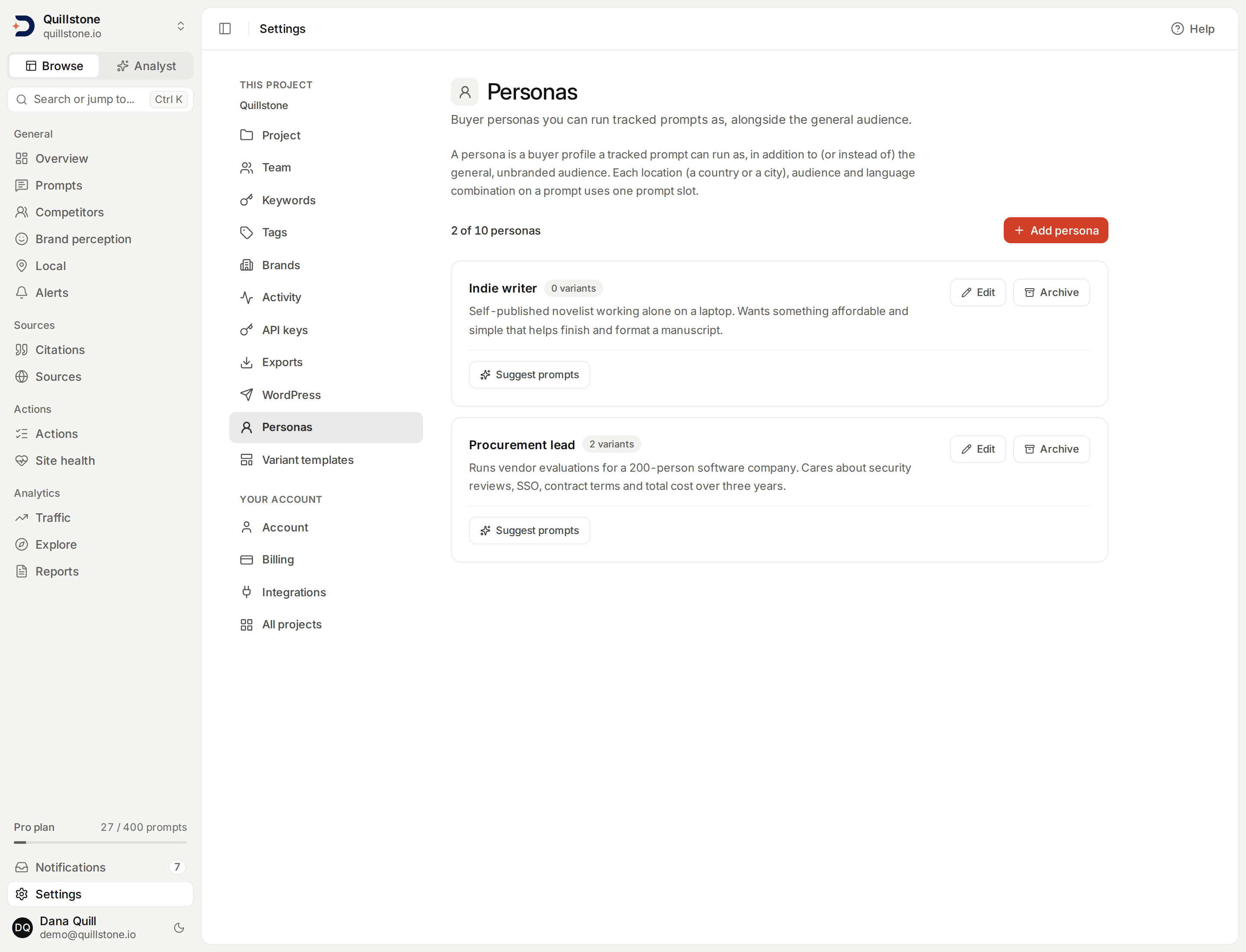
- Prompts a persona would ask: each persona can suggest up to 10 buyer-intent questions that person would plausibly ask, without naming your brand. They wait in Suggestions for your review and are never tracked automatically.
- Report by audience: the persona filter narrows every screen that takes it, Sentiment trends and Brand reasons each have a By persona view, and persona is an Explorer dimension.
- History stays as it was sent: each run stores the exact message the engine received, audience block included, so rewriting a persona changes only future runs.
Languages
Run a prompt in another language
On every plan, name one or more of 48 languages for a tracked prompt and each chat engine is asked to write its whole answer in that language, while Google AI Overviews, AI Mode, ChatGPT (app) and Gemini (app) receive the language as a setting of the request; the prompt text itself is never translated. Choose which engines run a prompt too, at no extra slot cost, and save a countries/audience/language/engine combination as a reusable template. A server-side preview shows the new slots and the monthly estimate before you save.
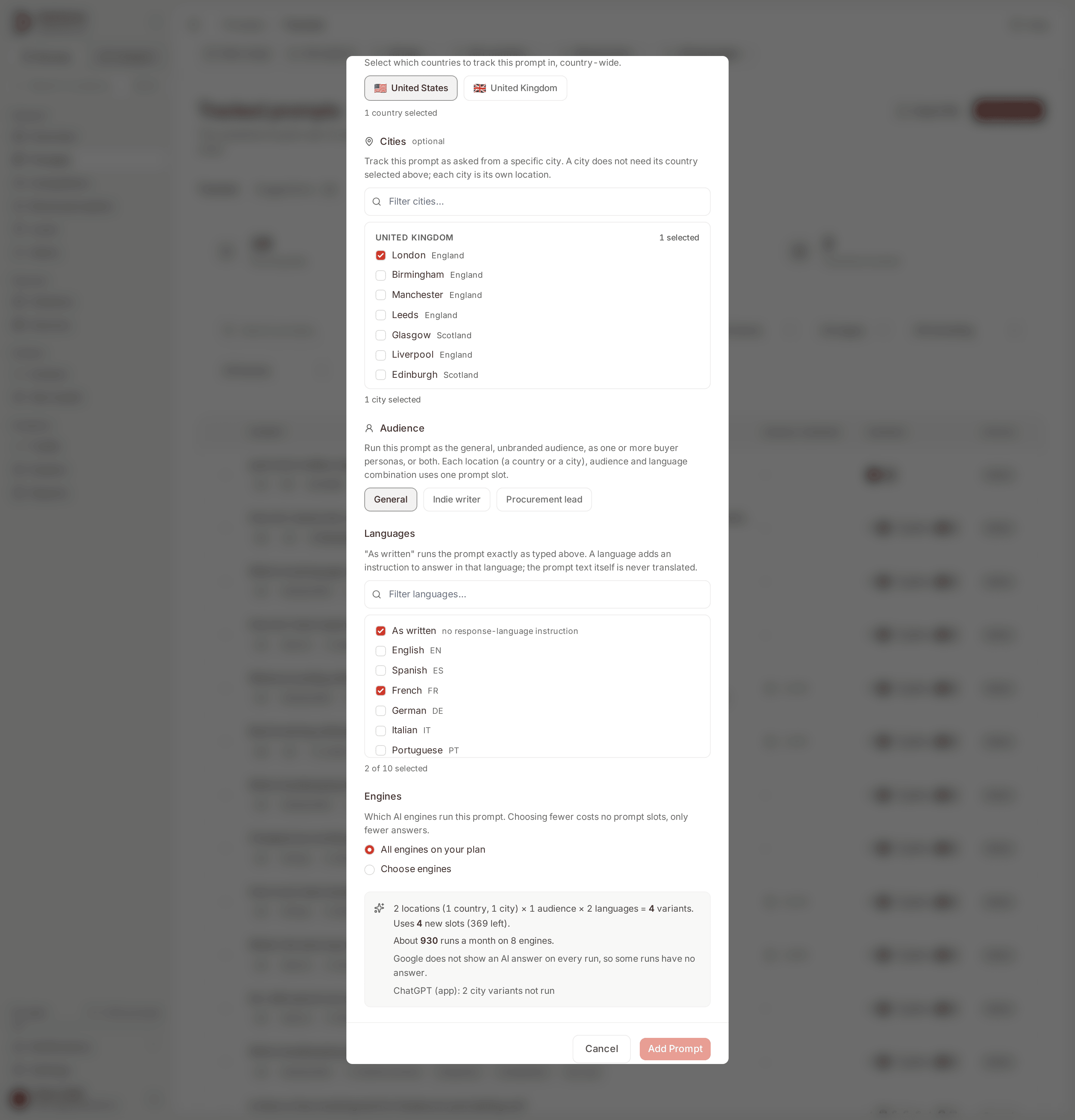
- Templates for many prompts: start a new prompt from a saved template, or apply one to a selection of tracked prompts and preview what it changes across all of them before anything is written.
- Report by language: the language filter narrows every screen that takes it, and any Explorer metric can be broken out by language.
- Where a language cannot run: a Chinese variant does not run on Google AI Overviews, AI Mode, ChatGPT (app) or Gemini (app). It still runs on every chat engine, and the prompt's page lists where it was not run.
Cities
Track a prompt from a city
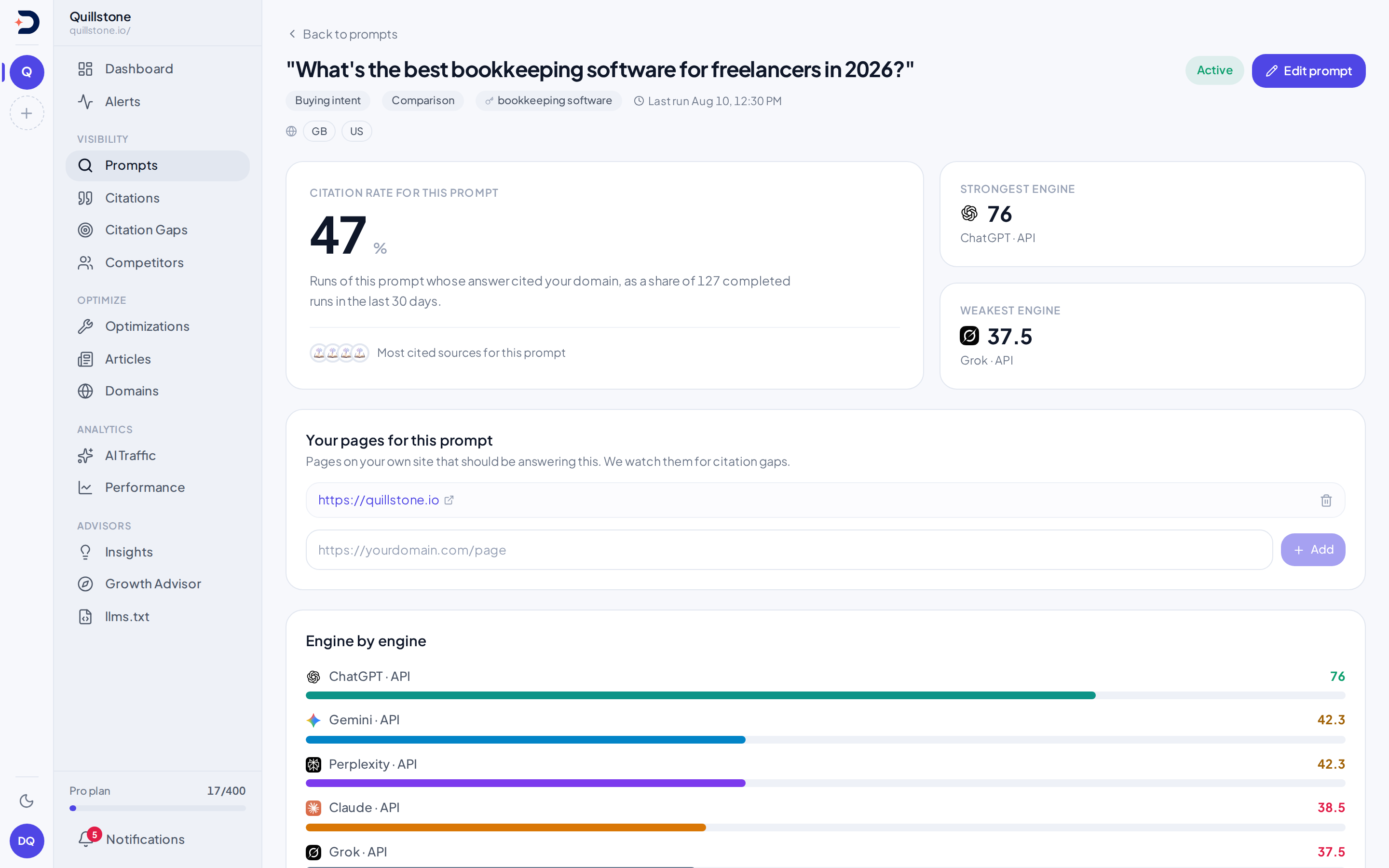
On every plan, add cities such as London or New York to a tracked prompt, picked from a list of 344 major cities across our 18 countries. Each city, audience and language combination uses one prompt slot, the same as a country. The Local view compares each city's brand visibility, citation rate, share of voice and position with the same country country-wide. A city is information we pass to the engine, not a real person's location, and each answer records how its location was sent.
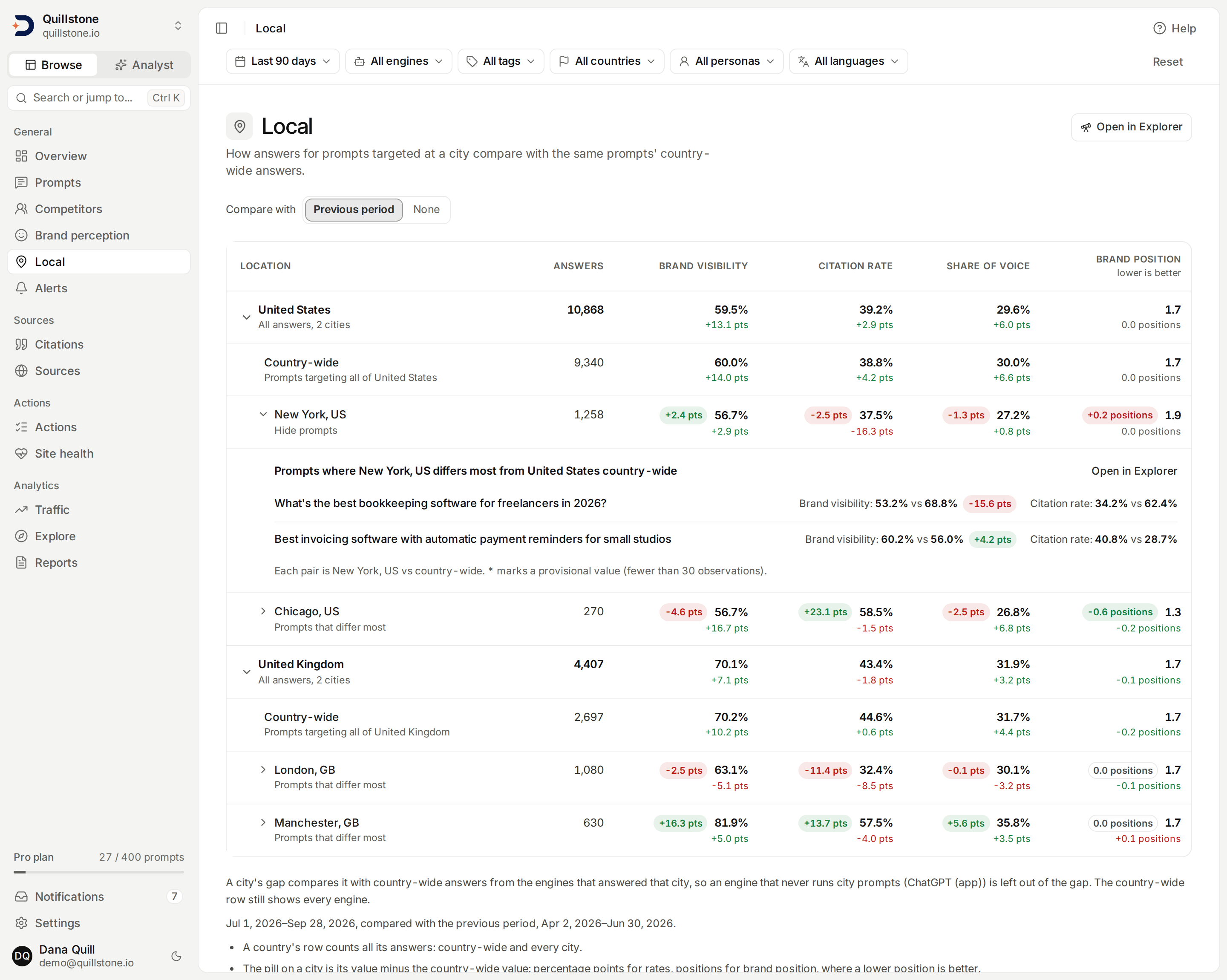
- A gap on every city: each city row shows the difference from the same country's country-wide answers, counted over the engines that answered for that city, so like is compared with like.
- Where a city differs most: open a city to list up to 10 prompts where its brand visibility differs most from the same prompt country-wide.
- How each engine gets the city: the four chat engines receive it in a search context block with the prompt, and Perplexity, Claude and Grok also receive it natively; Google AI Overviews, AI Mode and Gemini (app) receive its coordinates; ChatGPT (app) takes no city, so a city target does not run on it.
Under the Hood
See what the AI actually searched for.
Before some AI engines answer your prompt, they search behind the scenes, expanding one question into several of their own before composing a reply. DiscoveredBy captures those hidden searches and, on Starter, Growth and Pro and during the product trial, sorts each one into a category, so you can see whether a competitor is winning because they show up in a comparison search, a shopping search, or a search that names a brand you never thought to track.
- Eight categories, one order: shopping, comparisons, named-brand searches, personalization, and more, judged in a fixed order so a search lands in exactly one of the eight, or is marked unclear rather than guessed.
- A permanent record: what the engine actually searched for is written once and never rewritten, so a better classifier later never touches the underlying history.
- From search to tracked prompt: on Starter, Growth and Pro and during the product trial, send any search you find interesting into your suggestions queue, so you can start tracking it directly.
Inside the Answer
What each answer held
On every plan, see how often each engine's answers used web search and held shopping, local businesses, ads, video, images or tables, from the structured parts of the Google AI Overviews, ChatGPT (app) and Gemini (app) responses and the searches each engine recorded; an engine that does not report a feature shows no value, never 0%.
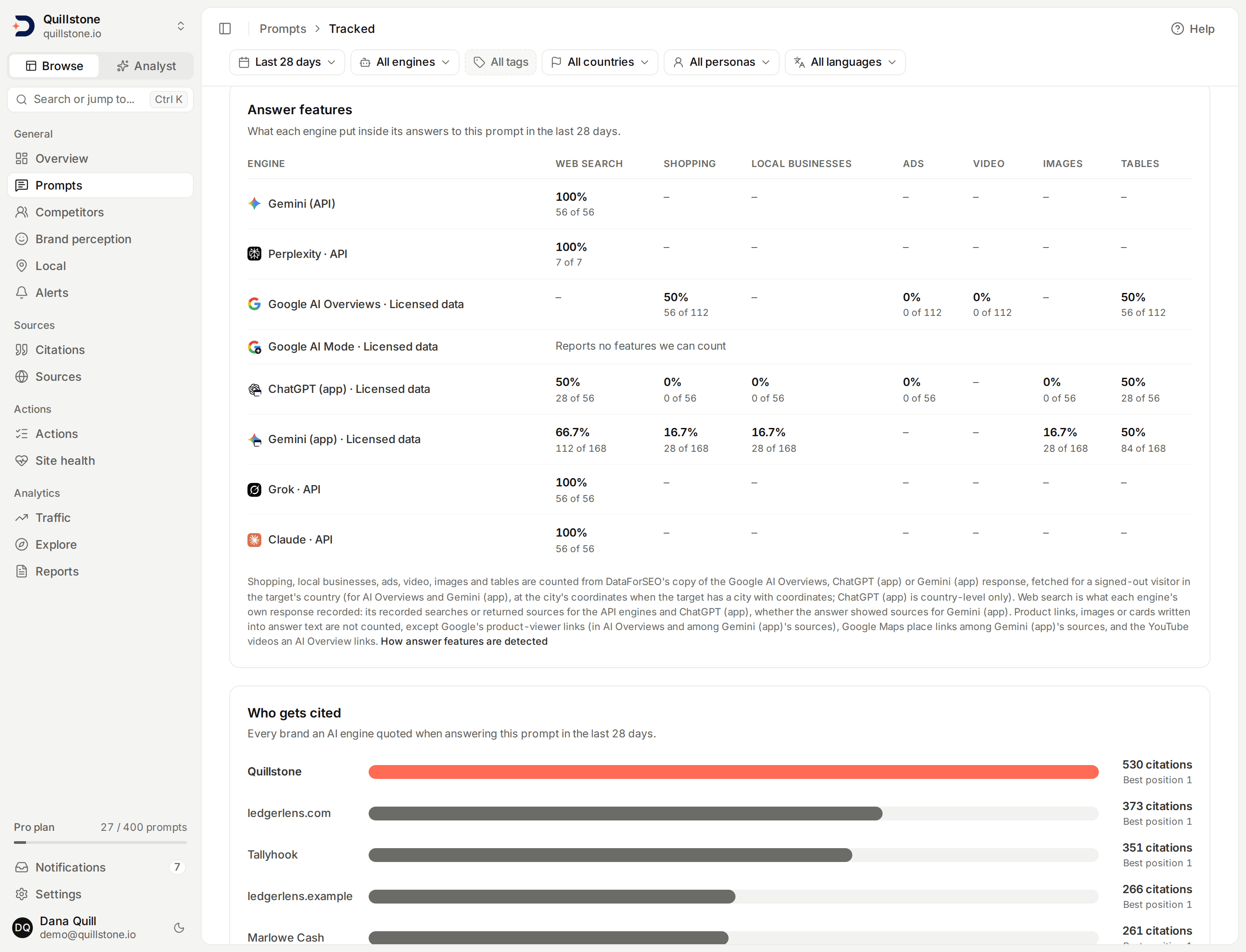
- Answer by answer: a prompt's run history marks each answer with the features it held, with a count for shopping, local businesses, ads, images and tables.
- In the Explorer: seven Answer features metrics, from answers using web search to answers with tables, can be charted and broken down like any other.
- What is not counted: anything written into the answer text, such as product links or images in the text, apart from Google's product-viewer links, Google Maps place links among Gemini (app)'s sources and the YouTube videos an AI Overview links.
Portfolio
Find prompts you could pause
On every plan, Prompt coverage compares the last 28 days of answers to your running prompts and recommends ones you could pause together while every source and brand they see regularly is still seen by a prompt you keep. Prompts that fact checks, open fixes or citation gap work depend on, and the last prompt for any country, city, persona, language or engine, are never recommended. Preview any selection, with the slots it frees and what it would stop observing, then pause it from the same screen. Nothing is paused automatically.
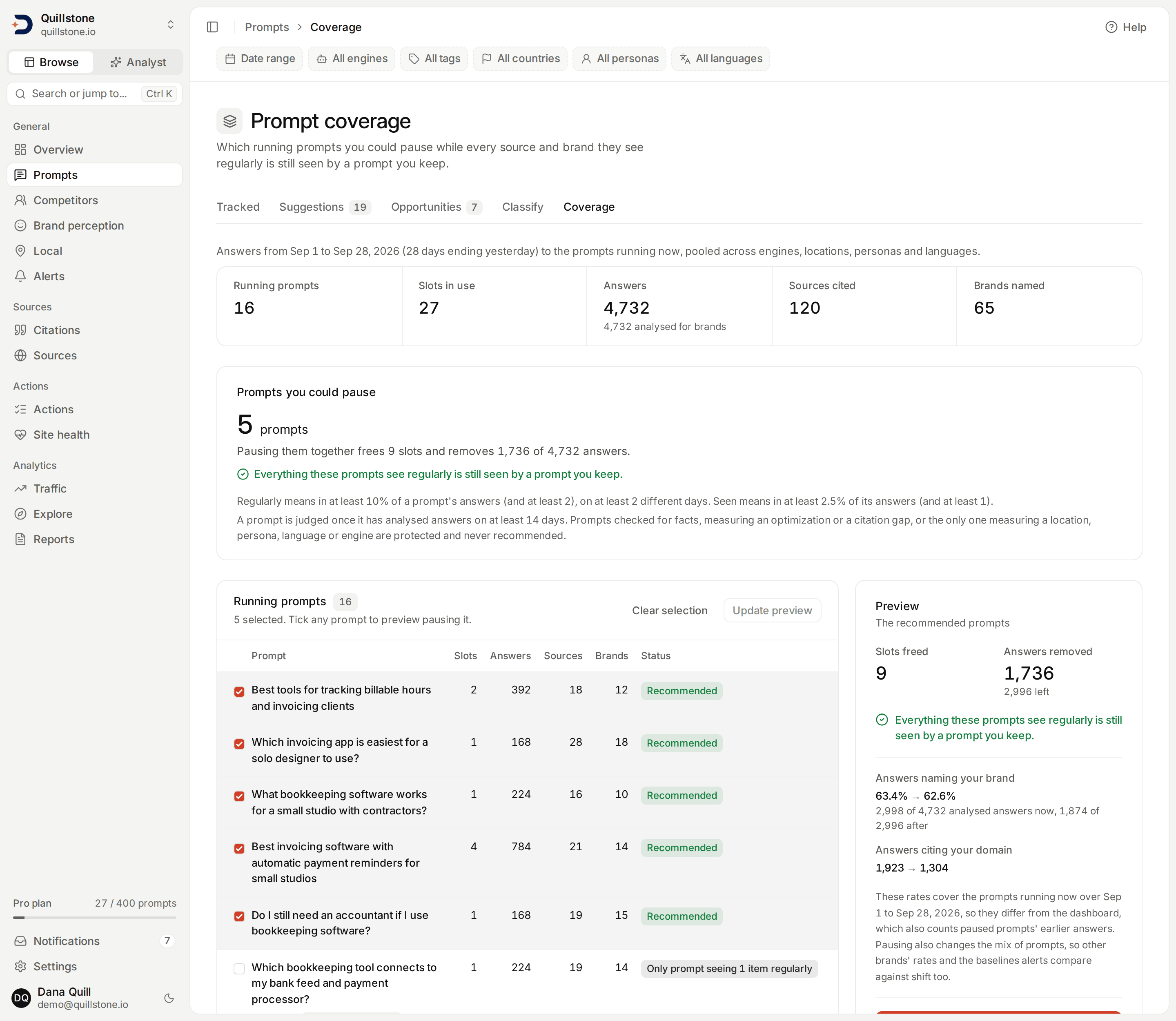
- Two stated bars: a source or brand is regular for a prompt when it appears in at least 10% of that prompt's answers on at least 2 days, and still covered when a prompt you keep sees it in at least 2.5% of its answers.
- New prompts are safe: a prompt is judged only once it has analysed answers on at least 14 days, so one you just added is never the first offered for pausing.
- No model, nothing stored: every number is worked out from answers already collected when you open the page; only a pause you confirm changes anything.
Docs
Learn more in the docs
Prompts
What a prompt is, how it differs from a keyword, how the ones you track get run, countries, cities and buyer-persona audiences, the Google results card (shown rate and organic rank next to Overview citations), bulk organization, reviewable AI classification and prompt branding, and the Google demand behind it.
Competitors
How competitors are discovered, what tracking one changes, and what the comparison shows.
Brands and sub-brands
What an alias is, how a sub-brand rolls up into its family, the once-per-answer rule, and what happens to history when you add one.
Personas
Named buyer audiences a tracked prompt can run as, how they use prompt slots, what changes at execution, and where their results show up.
Languages and templates
Run a tracked prompt in a language, what the response-language instruction says and where it goes for each chat engine, how the two Google engines, ChatGPT (app) and Gemini (app) receive a language instead, choosing which engines run, the server-side slot and answer preview, and saving a country/audience/language/engine combination as a reusable template.
Local
Compare the answers for prompts tracked in a city with the same country country-wide: brand visibility, citation rate, share of voice and position, the gap for each city, and the prompts where a city differs most.
Fan-out
What each engine actually searched for behind your prompt, and the eight categories those searches fall into.
Answer features
Which engines put shopping, local businesses, ads, video, images or tables inside their answers, and which answers used web search.
Prompt coverage
Which running prompts you could pause while everything they see regularly, the sources their answers cite and the brands they name, is still seen by a prompt you keep: the last 28 days of answers, protections for prompts other work depends on, a preview of any selection, and pausing it from the same screen.
Engines and measurement
The eight AI engines we measure, how we query them (the two Google engines, ChatGPT (app) and Gemini (app) through a licensed data provider), which engines run for your project, how a country or city reaches each one, and how each answer is labelled.
Which plan includes each engine and feature is on the pricing page.
Ready to see your AI visibility?
Start monitoring how AI search engines talk about your brand.
Start free