Visibility
Personas
Named buyer audiences a tracked prompt can run as, how they use prompt slots, what changes at execution, and where their results show up.
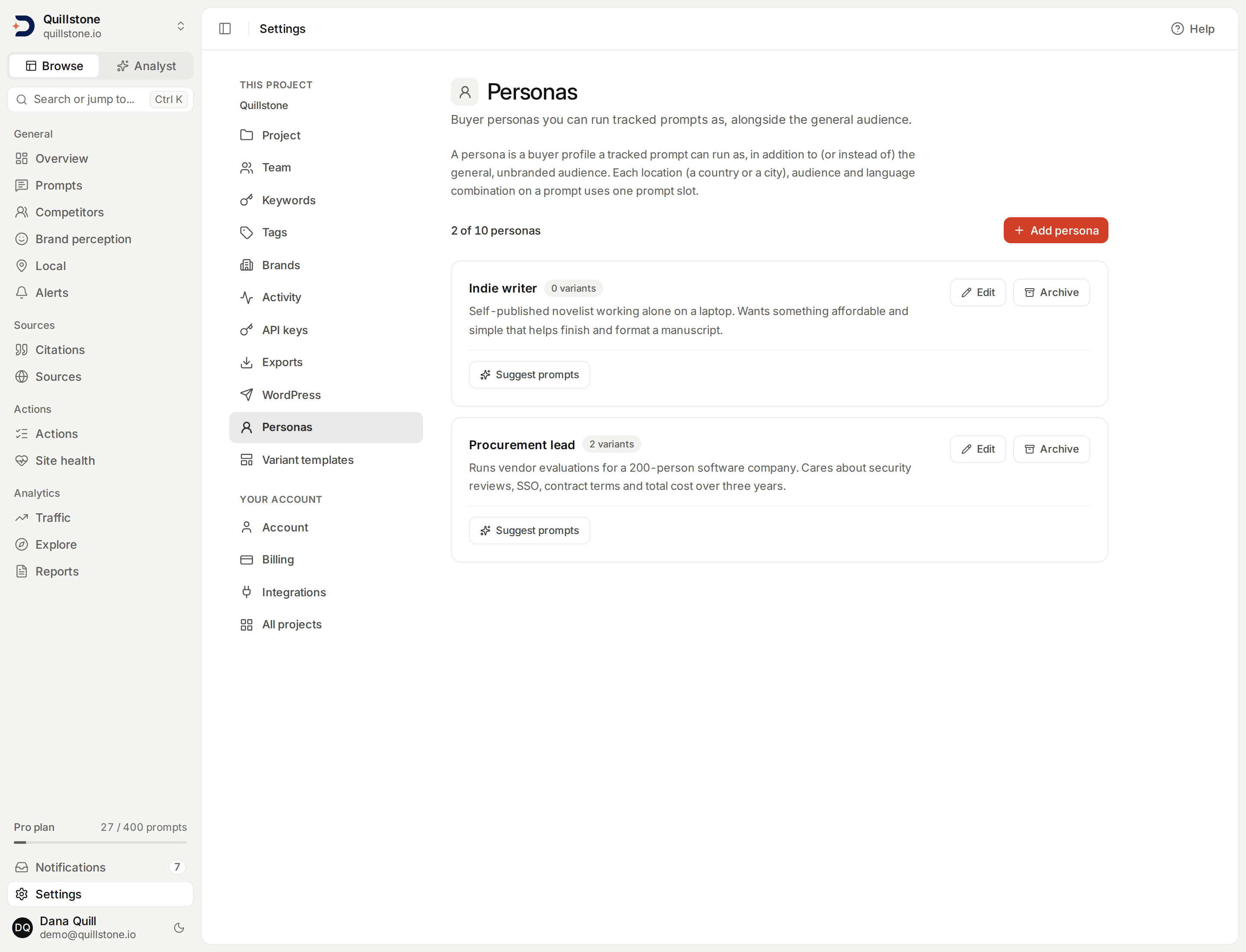
What a persona is
Open Settings → Personas. A
persona is a named buyer profile, a name and a short description, that a
tracked prompt can run as, alongside or instead of the plain, unbranded
"General" audience every prompt already runs as today
(api/models/persona.py#Persona). A persona is not a separate prompt: it is
an extra audience you attach to a prompt you already track, described below.
Creating and managing personas
Owners and editors create, edit, archive and restore personas; viewers can
only read the list. A name is 1 to 60 characters after trimming, and no two
active personas in a project can share a name, case-insensitively; a
description is 1 to 500 characters and can hold line breaks, a name cannot.
Both refuse Unicode control characters
(api/services/personas.py#clean_persona_text,
api/services/personas.py#NAME_MAX_LEN,
api/services/personas.py#DESCRIPTION_MAX_LEN).
Editing a persona's description only changes what future runs send to
the engines; a past execution keeps exactly what it actually sent, so
rewriting a persona does not rewrite history
(api/models/persona.py#Persona). Archiving a persona deactivates every
prompt target that carries it, which frees the prompt slots those targets
were using, and keeps their run history intact
(api/services/personas.py#archive_persona). Restoring an archived persona
does not bring those targets back: you add the restored persona to a
prompt again, which reserves slots for it the same way adding a brand new
persona would (api/services/personas.py#restore_persona). An archived
persona stays selectable in the filter bar's persona chip, listed last and
marked "Archived", because its past executions still belong to your
project's history (api/services/answer_filters.py#available_filter_options).
How many personas you can have
Creating or restoring a persona past your plan's active-persona limit is
refused with a message naming the limit; existing personas and their
history are never affected by a plan change on their own
(api/services/personas.py#persona_limit,
api/services/personas.py#_enforce_limit). See Pricing for how
many active personas each plan includes. Archiving a persona you can no
longer create or restore is always allowed, specifically so an account that
moved to a plan with a lower limit can still tidy up
(api/services/personas.py#archive_persona).
Adding a persona to a prompt
On Prompts, a prompt's countries and its
audiences are chosen together: General plus zero or more active personas.
Only active personas can be attached, and a persona id has to belong to the
current project. General starts selected on a new prompt, and stays selected
on an edit unless you touch it, but it is not compulsory either way: you can
deselect it as long as at least one persona is selected instead, and the
same rule runs in reverse, so at least one audience always remains
(api/schemas/prompt.py#PromptCreate, api/routers/prompts.py#create_prompt,
#update_prompt).
Each country, audience and language combination is its own prompt target,
and each one uses one prompt slot, exactly like adding a country does
today. Tracking one prompt in 3 countries as General plus 2 personas, all
As written, creates 3 x 3 x 1 = 9 targets and reserves 9 slots; adding a
persona to a prompt that already runs in 3 countries reserves 3 more
(api/services/prompt_variants.py#sync_targets,
api/services/limits.py#reserve_prompt_slots). Accepting a
persona-tagged suggestion (below) creates that persona's targets, in the
requested countries, on top of whatever the prompt already runs; a plain CSV
or Excel import, and onboarding, only ever create General targets
(api/services/prompt_discovery.py#accept_candidate,
api/services/prompt_import.py#apply_plan). See
Languages and templates for the
language dimension and engine choice this same grid now also includes.
Sending back a persona id on an edit that has since been archived does not
422 the whole request and does not reactivate that persona's targets: the
archived id is simply dropped from the audiences the edit activates, and any
target it already had stays exactly as inactive as it was
(api/services/prompt_variants.py#only_active_persona_ids).
What changes when a persona runs
A persona variant is checked with the same schedule, on the same chat
engines, as a General target, Perplexity included. It never runs on Google
AI Overviews, Google AI Mode, ChatGPT (app) or Gemini (app): those engines
receive only the prompt text, with no message to carry an audience, so a
persona variant is left out on all four rather than run as if it were
General, and prompt detail lists it as "personas are not sent to Google",
"personas are not sent to ChatGPT's app" or "personas are not sent to
Gemini's app"
(api/services/collection.py#target_runs_on; see
What reaches Google,
What reaches ChatGPT and
What reaches Gemini (app)).
The General variant of the same prompt still runs on them, and the persona
variant still uses its prompt slot for the engines it does run on.
The one addition is that the rendered message sent to the model gets an
audience block, after the prompt text and before the "Search context"
location block, naming the persona and asking the engine to answer for that
person (api/services/llm.py#render_audience_block,
api/services/llm.py#render_prompt_with_location). All four chat engines
receive the message built this way (see
How location reaches each engine).
The audience block reads:
{prompt}

Audience context:
- Asking as: {name}
- About them: {description}
Answer for this person.
request_context records the persona_id, persona_name and
persona_description actually sent, and prompt_text_sent stores the whole
rendered message, audience block included, exactly as the engine received
it, even after the persona's own description is edited later
(api/services/execution.py#execute_query_for_provider,
api/services/llm.py#SearchContext).
This is one audience block added to a single user message on each call, not a logged-in consumer session, a saved profile the engine remembers, or a separate account: nothing distinguishes a persona-variant run from a General one except that block of text.
Prompt suggestions per persona
Each active persona card offers Suggest prompts: one on-demand model
call that proposes up to 10 buyer-intent questions that persona would
plausibly ask, without naming your brand
(api/services/persona_prompts.py#suggest_persona_prompts,
api/services/persona_prompts.py#INSTRUCTION). It needs write access and a
plan that includes personas. Requests for the same project are limited to
one per minute, whichever persona each one names: a second request inside
sixty seconds of the last one starting is refused. Separately, at most one
request can be running at a time: since the call itself can take up to 90
seconds, a request that started under two minutes ago and has not finished
yet keeps refusing new ones for that project even past the one-minute mark.
As soon as the earlier request ends, whether it produced suggestions or
failed, that refusal lifts immediately and only the plain one-minute rule
still applies; the two situations are refused with different messages
(api/services/persona_prompts.py#RATE_LIMIT_SECONDS,
api/services/persona_prompts.py#IN_FLIGHT_LOOKBACK_SECONDS,
api/services/persona_prompts.py#FINISHED_ACTION).
The model is given the project's domain, name and business goal, a short summary of the project's latest accepted business profile if one exists,
the persona's name and description, and up to 50 of the project's existing
active prompt texts so it does not repeat them; everything under that data
is explicitly framed as untrusted, never as instructions
(api/services/persona_prompts.py#_approved_profile_summary,
api/services/persona_prompts.py#MAX_EXISTING_PROMPTS_IN_PAYLOAD). Each
returned text is trimmed, checked against your existing prompts and any
already-pending suggestion case-insensitively, and dropped if trimming
leaves it shorter than 5 characters or it is still over 300; survivors are
saved as pending suggestions tagged with that persona, never tracked
automatically
(api/services/persona_prompts.py#_clean). Suggestions
shows the persona tag on a card that came from this flow and offers a
persona filter alongside its other filters.
Reporting by persona
- The filter bar: its persona chip narrows to one persona or to
General only on every screen that takes it, the prompt list included,
where it lists the prompts with an active target for that audience; see
The filter bar.
Each row of the prompt list shows a chip for every active audience
currently tracking it (
api/routers/prompts.py#list_prompts). - Sentiment trends and Brand reasons both follow the persona chip,
and both offer a View by
persona breakdown: one row per audience, General included only when it
has at least one answer naming the brand, plus every persona in the same
position, archived personas included
(
api/services/sentiment_population.py#by_persona_rows). See Sentiment trends and Brand reasons for what that view shows. - Explorer: persona is one of its dimensions, so any of its metrics,
citation rate and brand visibility included, can be broken down or
filtered by audience, and a persona breakdown keeps every chat engine;
a persona's row never holds Google AI Overviews, Google AI Mode,
ChatGPT (app) or Gemini (app) answers, because persona variants do not
run there (see
Explorer)
(
api/services/explorer/dimensions.py#DIMENSIONS). Overview has no persona card; its answer drawer tags an answer with the persona it was collected for (api/services/overview_answer.py#build_answer). - Exports and API: the Answers and Brand mentions (
entity_mentions) file exports, the customer API's answer objects, and the MCPlist_answerstool all carry a persona field, empty ornullfor the General audience, never omitted (api/services/exports/answers.py#COLUMNS,api/services/exports/entity_mentions.py#COLUMNS,api/schemas/customer_api.py#CustomerAnswer).
Related
- Prompts: what a prompt target is, and how countries and audiences together decide what actually runs
- Sentiment trends: the By persona view
- Brand reasons: why answers favour or caution against a brand, broken out by audience
- Suggestions and opportunities: where a persona-tagged suggestion comes from
- Plans and limits: how many active personas each plan includes
Last verified 2026-09-29