Features
Alerts and reports
Hear about a real shift without watching a dashboard, and get a weekly report you can share with clients.
Stay Ahead
Know the moment something moves.
You shouldn't have to keep a dashboard open to catch a real shift in your AI visibility. Every day, DiscoveredBy compares your latest week against the week before it, automatically, for every project, and raises an alert only when a change is big enough to matter, not on every normal day's wobble.
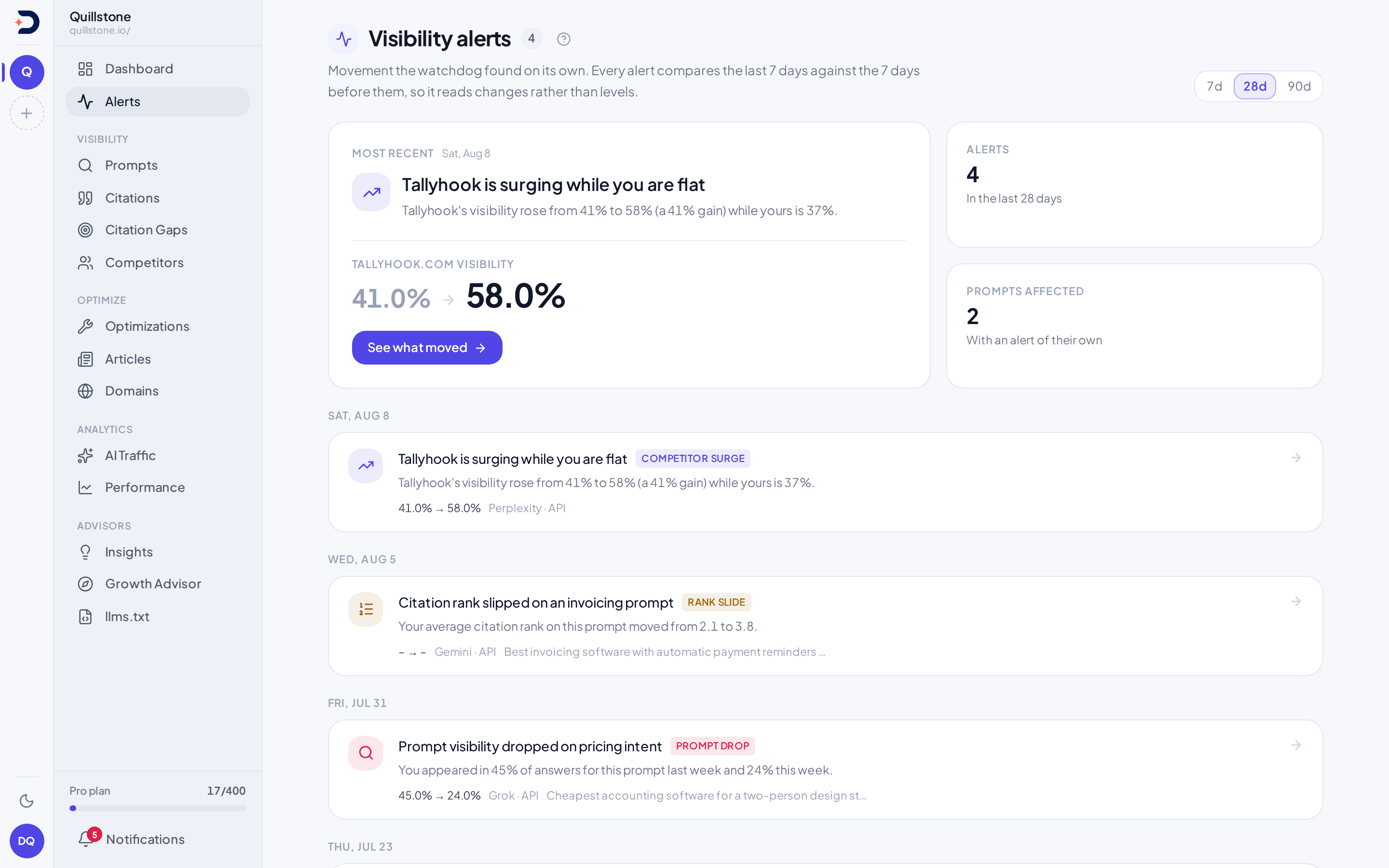
- Eight kinds of threshold move, not noise: four visibility moves (a project-wide visibility drop, a competitor surging, one prompt losing citations, and your citation rank sliding on a prompt you already win) and four brand signals (a brand share shift, meaning your own brand's share of analysed answers rising or dropping or a competitor's share of tracked brand mentions rising; brands that start being named in your answers; a sentiment shift, meaning your own or a competitor's negative-sentiment share rising or easing, or your own or a competitor's specific weakness reason rising; and a competitor cited on social where you are not), each checked against its own threshold. Two more kinds are not threshold moves. On Starter, Growth and Pro, fact contradiction flags a fact you approved in Fact check that AI answers newly contradicted, while those contradictions are still unreviewed. A source watchlist you subscribe to raises a gain or a loss when a domain or URL it watches starts or stops being cited.
- Why it fired, not just that it did: every alert opens on the evidence saved when it fired. The four visibility kinds show the before-and-after numbers, the exact dates behind them and which engine moved most; a visibility drop or a prompt drop additionally shows whether competitors moved too or the shift looks specific to you.
- No repeat noise: the same kind of change, for the same project, prompt, brand or subject, is suppressed for a week, so a drop that stays down doesn't post a fresh alert every single day. Snoozing one for longer keeps it suppressed for as long as the snooze lasts.
- React as a team, or ask why: owners and editors can acknowledge, dismiss or snooze any alert with a shared note the whole project sees. On Starter, Growth and Pro, request a plain-language reading of one alert's own saved evidence, describing what changed without guessing why; the reading is cached, so reopening the same alert doesn't call the model again.
- Delivered where you'll see it: every fresh alert lands on the alerts screen, a day's new alerts reach every project member's notifications inbox as one digest, and source watchlist notices follow each list's own settings. Owners with alert-email access can choose daily or weekly digests and which of the nine alert types to include, excluding anything already dismissed; Sentiment shifts' weakness-reason checks, the competitor-only social type and fact contradictions depend on Brand reasons, Social sources and Fact check respectively. Weekly-report email has its own on/off preference.
Alert evidence
Open an alert and read exactly what moved.
Everything behind an alert, the before and after figures, the engine breakdown and whether competitors moved too, is saved at the moment it is detected. Opening it later reads that saved record; it does not re-run the comparison against today's data.
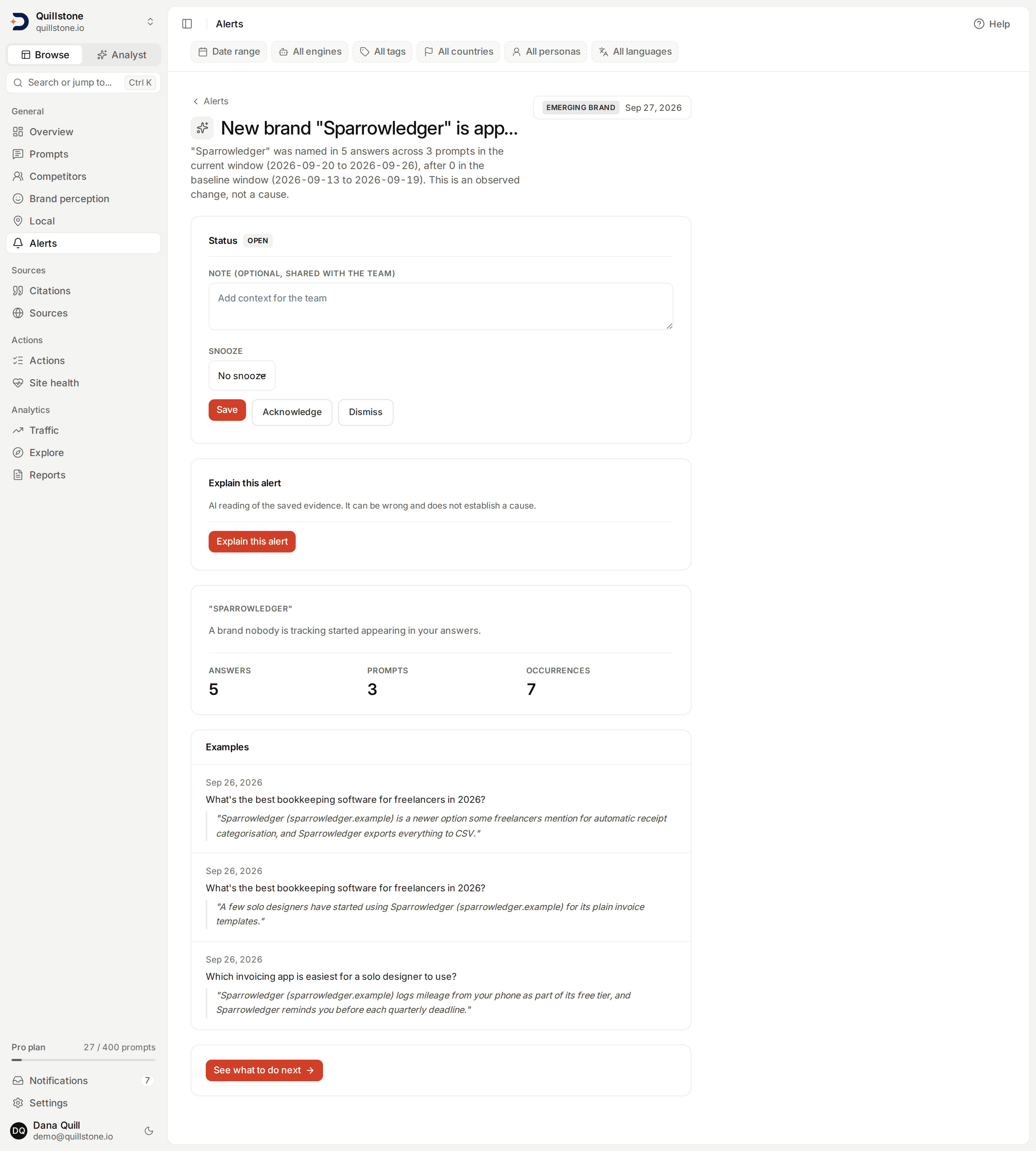
- Evidence shaped to the signal: a brand share or sentiment shift shows the rate moving with the count behind each number, an emerging brand shows its answer, prompt and occurrence counts with up to three example quotes, and a competitor-only social citation lists the accounts behind it.
- A next step, one click away: each brand-signal alert links to the screen its evidence came from, and a fact contradiction opens Fact check with its review queue filtered to that fact.
- An AI reading that does not guess: on Starter, Growth and Pro, owners and editors can ask for a plain-language reading of an alert's saved evidence. The model is told to describe what changed and never to guess why, and any quote it points to is shown from the alert's own saved record, never from the model.
Notifications
One inbox, and email on your schedule.
Notifications is one inbox for your whole account: every project you belong to writes into the same list. A day's fresh watchdog alerts arrive as one notification per project member, not one per alert; source watchlist notices follow each list's own settings.
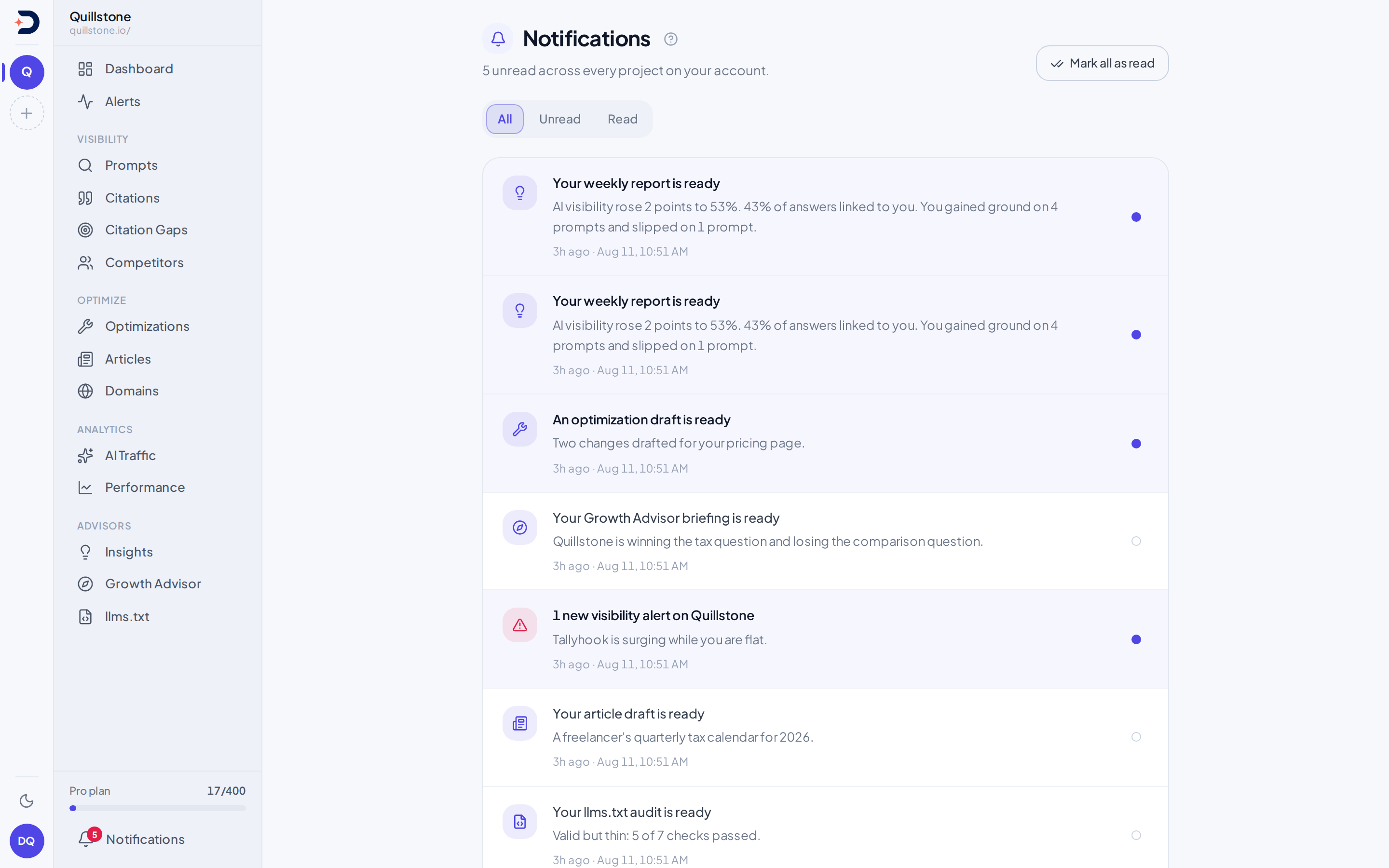
- Finished work lands there too: a weekly report, a Growth Advisor briefing, an llms.txt audit, new citation gaps, a page fix ready to review and a drafted article each post their own notice.
- Owner email preferences: on Starter, Growth and Pro, the project owner chooses Daily, Weekly or No alert emails, picks which of the nine alert categories to include, and turns weekly-report email on or off separately.
- Digests without the noise: daily sends at most once per UTC day and weekly becomes due on Monday. A digest leaves out anything already dismissed, and an empty one is not sent. Turning email off leaves alert detection and in-app notifications unchanged.
Weekly report
A weekly report built from your own numbers.
For each project whose owner's plan includes it (Starter, Growth and Pro), DiscoveredBy builds a dated report every week for the last complete Monday-to-Sunday week: one hero number, the prompts that moved, where you stand against competitors, and a short list of what to do next. No language model is involved: it reads numbers the product already computes and formats them in code.
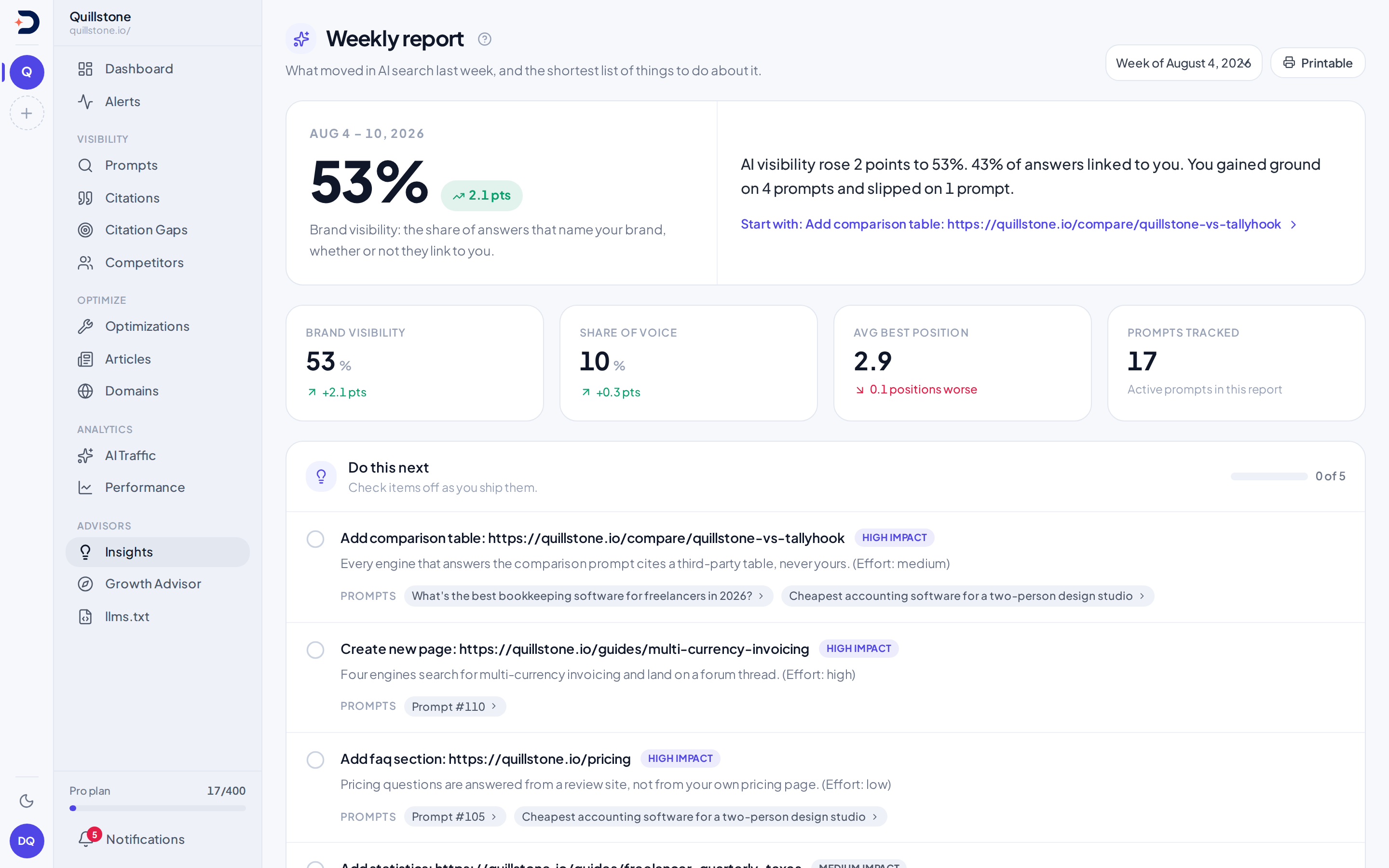
- Do this next: the five highest-impact citation gap opportunities on file. Owners and editors check them off, and next week's report shows how many got done.
- The rest of your week: engine by engine, against your competitors, and, when there is something to show, AI referral traffic, striking-distance Search Console queries, a sentiment breakdown, and the articles, page fixes and prompts your team shipped.
- No invented zeros: a change with no comparable week before it is left blank rather than shown as 0.
- On screen, by email, on paper: read it in the app, have it emailed to the project owner when it finishes unless the owner turns that off, or open the printable page and save it as a PDF from your browser. Past weeks are one dropdown away.
Client reports
Share the week with a client, without a login.
Turn a generated week into a fixed digest a client opens by link, with no DiscoveredBy account. The link expires after 1, 7 or 30 days and can be revoked, and what it shows never changes after you create it.
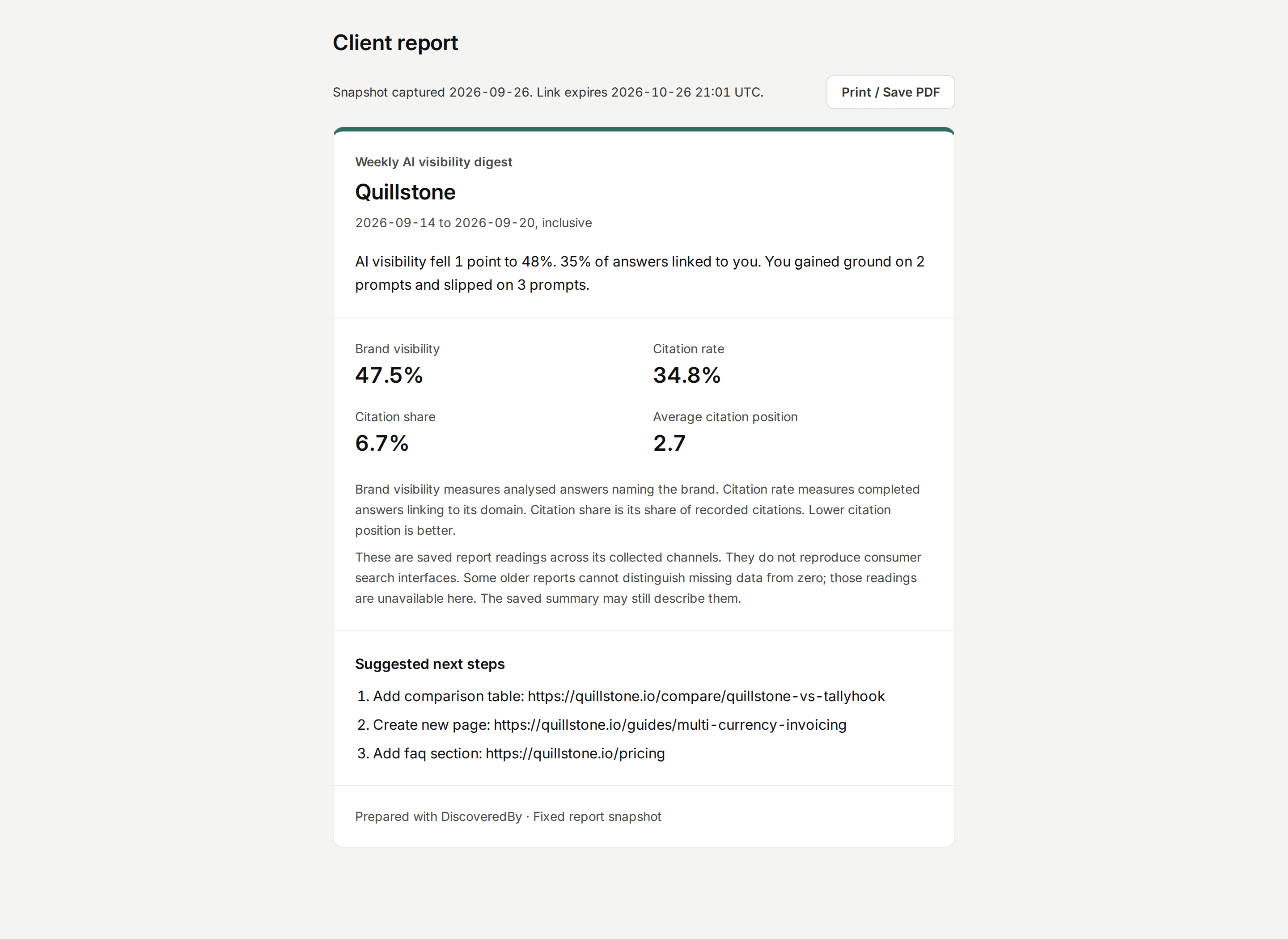
- What the client sees: the project name and accent colour, the report dates and summary, four metric readings, recorded activity and up to three recommendation titles. Raw answers, prompt lists, analytics revenue, team details, internal IDs, recommendation details and logos stay out.
- Your sections, your evidence: save up to 20 report templates per project with the sections you choose, and optionally add up to five saved citation examples from the week, with their source URLs and snippets.
- Every client, one week: the Client reports overview lines up the same completed week across every active project you can access, then shares a combined report for 2–10 clients. Each client keeps its own metrics; there is no pooled average.
- Checked on every open: each request checks expiry, revocation and the access behind the link. The digest keeps a Prepared with DiscoveredBy footer; it is a client-branded digest, not a white-labelled app.
Client links and combined reports need the project owner's weekly-report access: Starter, Growth and Pro.
Growth Advisor
A written briefing on where you stand.
The Growth Advisor has a model research your business and your named social accounts on the open web, then read that research against your last 28 days of Search Console and Google Analytics numbers and say where you stand and what to do next.
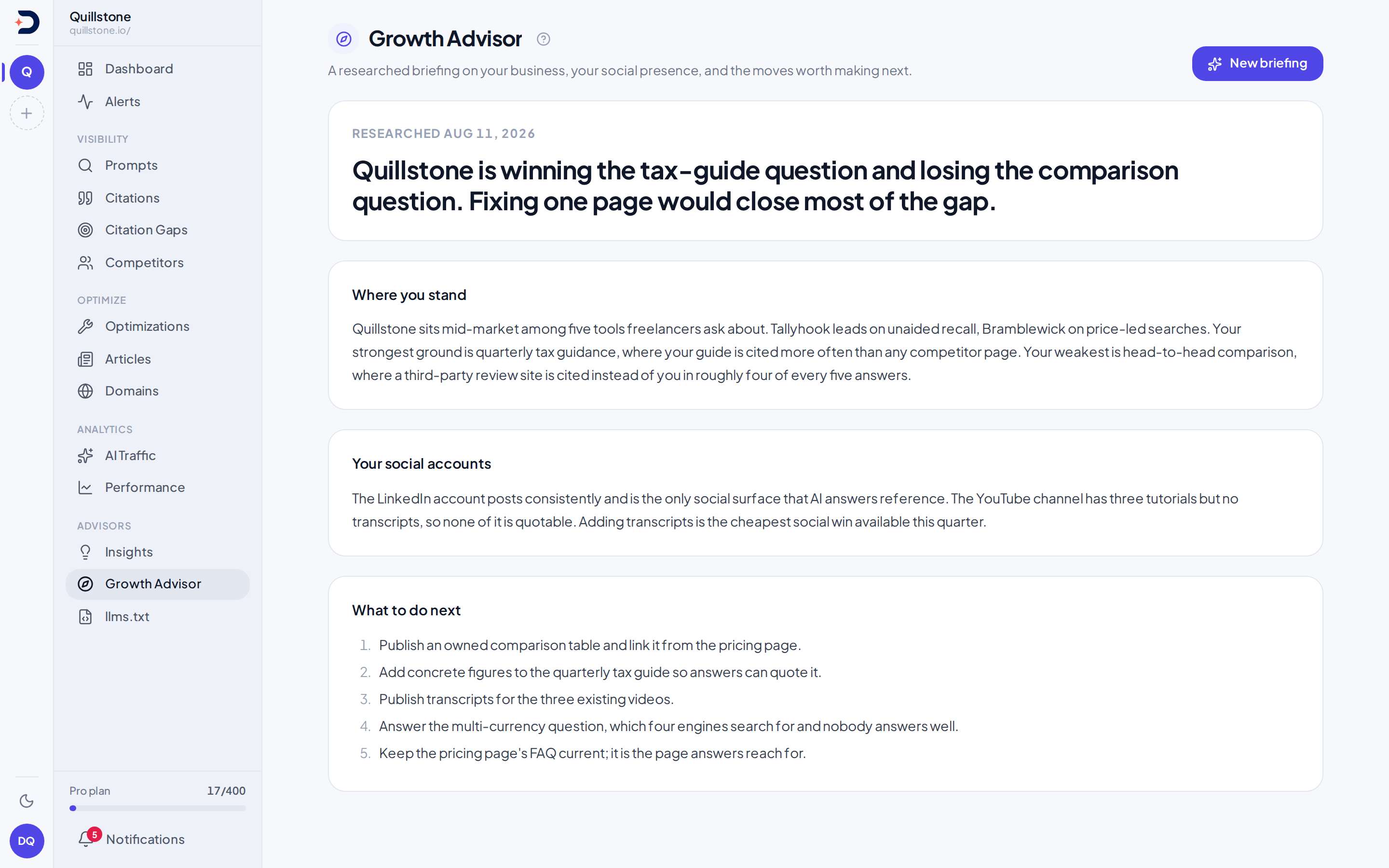
- Four parts: a headline, where the business stands, how its social accounts are doing, and what to do next.
- Aimed at your goal: your project's goal reaches the model word for word, so a specific goal gives it something concrete to weigh its recommendations against.
- Written, not computed: unlike the weekly report, the briefing is a model's prose grounded in real inputs, not figures you can trace to one stored number. Research runs for up to about 30 minutes and keeps going if you leave the page.
- Weekly or on request: owners and editors start a briefing, one per project per day, the owner can turn on a new one every Monday, and past briefings stay one dropdown away.
Available on Starter, Growth and Pro, following the project owner's plan.
Documentation
Learn more in the docs
Alerts
A daily watch on your visibility that raises an alert when something moves enough to be worth reading, shows why it fired, and lets the team acknowledge, dismiss, snooze or ask for an AI reading of the saved evidence.
Read the docsNotifications
Read account notifications and configure project owner alert email cadence, categories and weekly-report delivery.
Read the docsWeekly report
A dated report for each week, built from your own numbers with no model in the loop, readable on screen, by email, and on paper.
Read the docsClient report links
Save project report templates and preview a fixed client digest with optional citation examples, share it without sign-in, and control access with expiry and revocation.
Read the docsClient reports
Compare saved client readings and share reviewed, revocable combined agency snapshots for one completed week.
Read the docsGrowth Advisor
A written briefing, weekly or on request, that reads your search and traffic numbers alongside outside research and says what to do next.
Read the docs
Ready to see your AI visibility?
Start monitoring how AI search engines talk about your brand.
Start free