Advisors
Client report links
Save project report templates and preview a fixed client digest with optional citation examples, share it without sign-in, and control access with expiry and revocation.
Share a weekly digest with a client
Open Reports → Weekly insights and choose Client links. Choose a generated week, inspect the preview, give the link a private label and select an expiry: 1, 7 or 30 days. Seven days is the default. With the standard digest, to add source evidence, select Include citation examples from this report's week and choose Update preview. This option is off by default for the standard digest. A saved default template can include it. Confirm that you reviewed the contents, then choose Create link. Creating a link does not send an email.
The full link is shown once. Copy it before leaving the page. A client can open it without a DiscoveredBy account, and anyone they forward it to can also open it. Treat the complete link as an access credential.
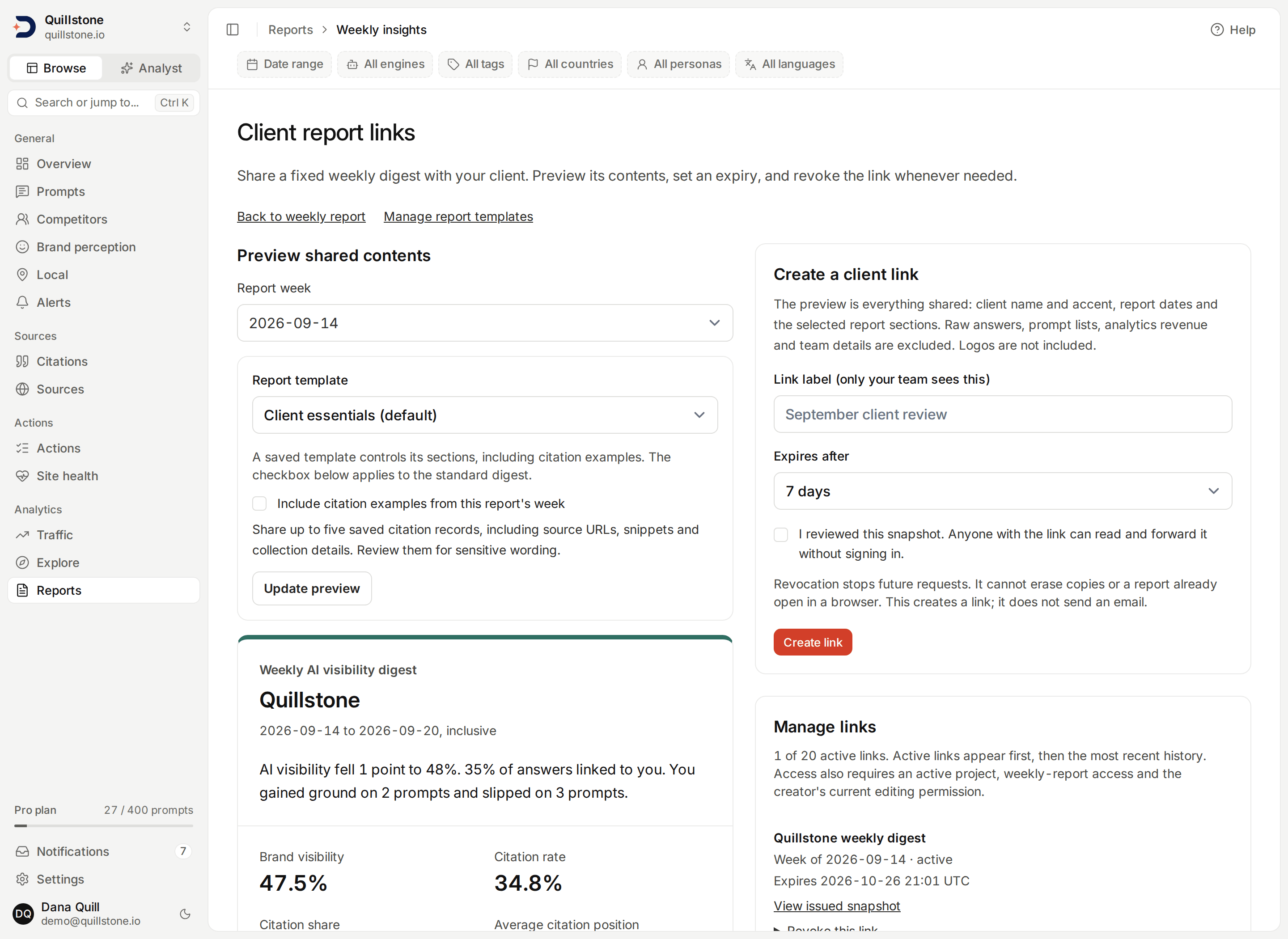
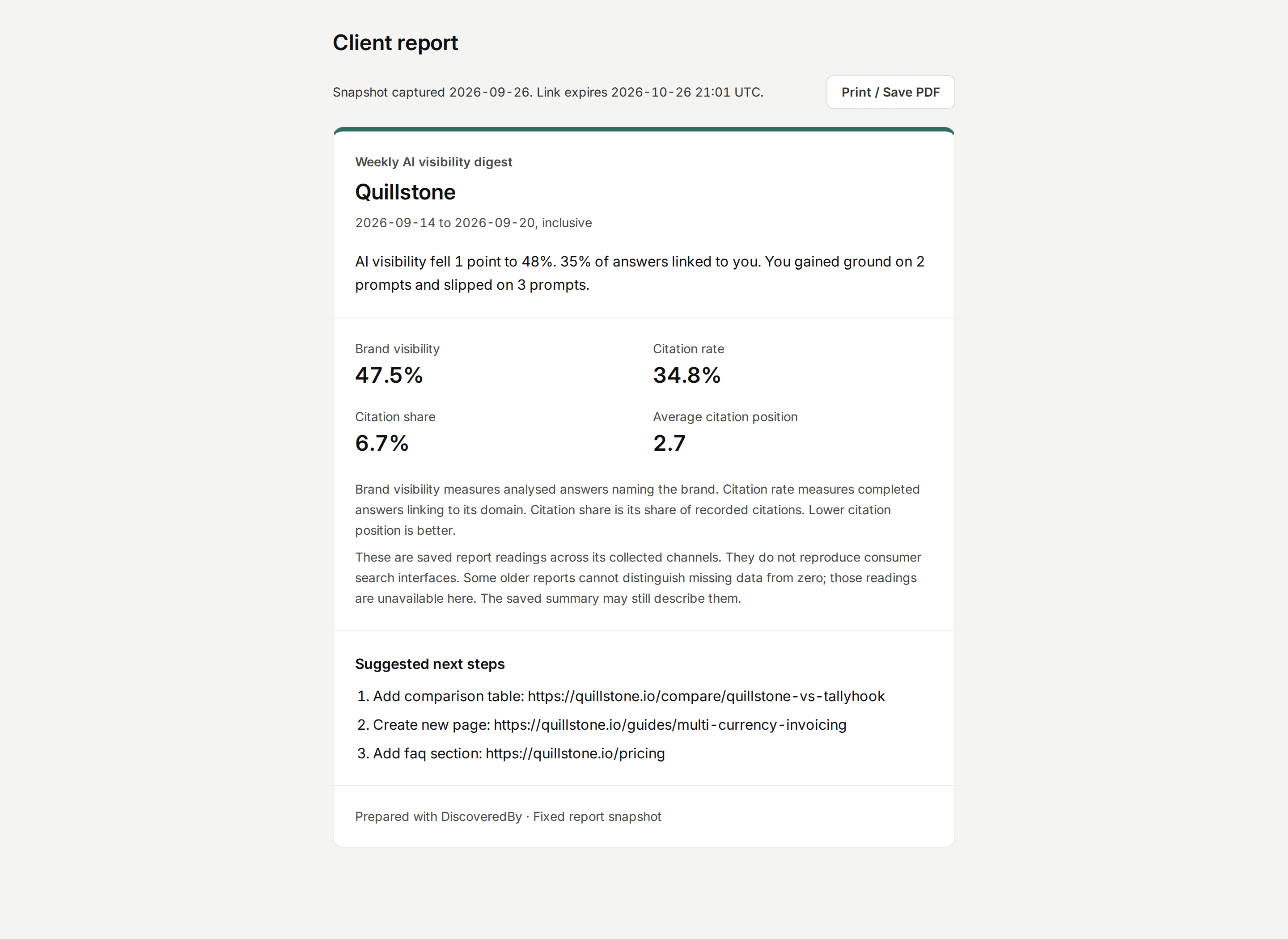
The link management, template and client view screenshots use the local Quillstone demo report for 2026-09-14 through 2026-09-20. The client view further down is a 30-day demo link to that report with the standard digest.
Reusable report templates
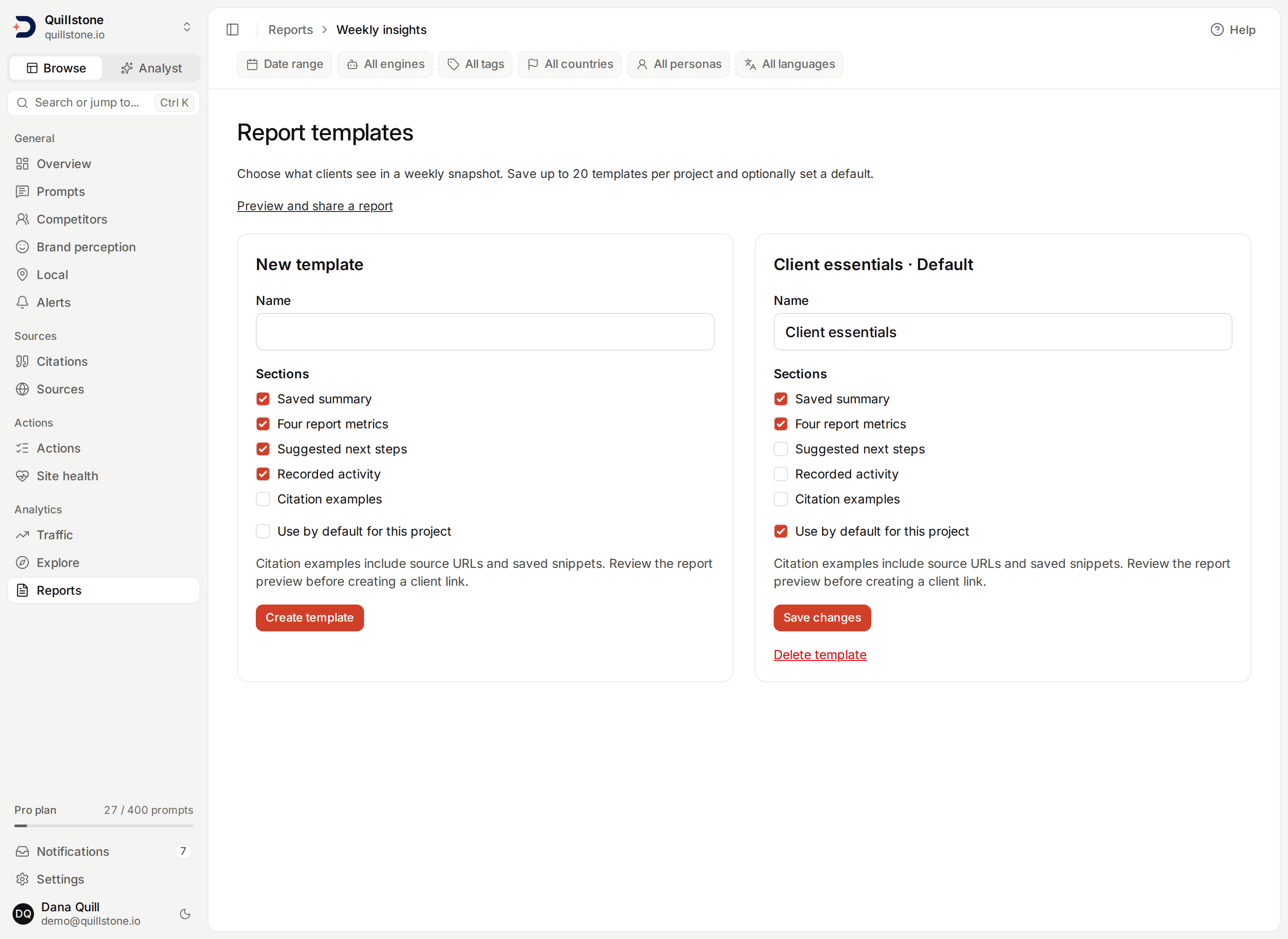
Choose Manage report templates from Client links. Owners and editors with
weekly-report access can save up to 20 named templates per project. Choose
one or more sections: saved summary, four metrics, suggested next steps,
recorded activity and citation examples. Names are unique ignoring case.
Set one template as the project default, or leave all without a default to
start with the standard digest (api/services/report_templates.py#save_template).
On Client links, choose Report template and Update preview. A template controls all included sections, including citations; the separate citation checkbox applies only to the standard digest. Inspect the exact preview before creating a link. Excluded sections are removed from the saved payload, not merely hidden on the client page. Changing or deleting a template never changes issued links. Concurrent edits are rejected until you reload and review. Templates stay within one project and do not customize the weekly email or customer API digest.
What the client sees
The preview and client page use the same digest. The standard digest includes the client project
name and accent colour, the stored report dates and summary, four metric
readings, recorded activity and up to three recommendation titles. Summary text
is limited to 2,000 characters and recommendation titles to 300 characters each.
Inspect the preview for any sensitive wording before sharing
(api/services/report_shares.py#build_snapshot).
The digest excludes raw answers, prompt lists, analytics revenue, team details, internal IDs, recommendation details and logos. It retains a Prepared with DiscoveredBy footer. This is a client-branded digest, not a white-labeled app or a cross-client dashboard.
The content is fixed at creation. Later report regeneration, recommendation
changes, citation edits or project branding changes do not update an existing link. Create a
new link to share a newer copy. If the report, branding, selected citation examples or available record count changes after you
preview it but before you create the link, creation is refused until you reload
and review the updated preview
(api/services/report_shares.py#preview_share, #create_share).
Include citation evidence
For the standard digest, select Include citation examples from this report's
week, then choose Update preview. Inspect the examples before confirming
and creating a link. Clearing the option and updating the preview removes the
appendix from the new link. Changing the option without updating the preview
does not change what will be shared: the displayed preview is the source of
truth (api/services/report_shares.py#preview_share, #create_share).
The appendix includes at most five saved citation records from completed
outputs in the report's exact inclusive date range, including paused prompt
and target history. It requires a completed seven-day report period. Older
seven-day reports that start on another weekday remain eligible. Selection
orders execution dates newest first, then answer IDs newest first, then citation
position and citation ID ascending. It does not select by sentiment, own-domain
status or unique URL. Repeated URLs may appear; these are examples, not a
representative sample or a ranking of sources
(api/services/report_citations.py#citation_evidence).
Each example contains the saved source URL and domain, citation position, own-domain flag at collection, date, platform, surface, collection method, model and target country/city. A saved snippet is limited to 500 Unicode characters, with an explicit truncation label. Missing snippets and provenance are stated. Only HTTP(S) URLs without embedded credentials are clickable; other saved URL strings are displayed as text. No source is fetched when previewing, sharing or opening the report.
The appendix states the available citation-record count for that week and how many examples are shown. Zero records means no saved evidence is available; it cannot distinguish missing provider evidence from an observed absence of citations. Positions are citation positions, not brand rankings. A citation does not prove the source page mentions the brand, and snippets are saved provider evidence, not verified page contents. API collections do not reproduce consumer interfaces, and recorded target locations do not establish consumer geolocation.
Examples use the records available when the link is created. Late collection or corrections can make that population differ from the one used when the weekly report was generated. The appendix does not recompute the four saved metrics or explain their changes. It adds no prompt text, internal IDs, raw answers, scraped page text, provider metadata or model sentiment labels. Review the source URLs and snippets for sensitive content before sharing.
Standard digests with examples store version-2 snapshots; standard digests without examples use version 1. Template-based links use version 3 with the selected sections. Existing snapshots keep their original format. Issued examples, counts and snippets stay fixed even if a citation or report later changes or is deleted. Source pages themselves may change. Inspection and the public client page use the same saved contents; expiry and revocation still apply. The customer API's weekly report digest and the cross-client overview are unchanged. This option needs only the existing weekly-report entitlement, with no API key, new plan gate, collection or AI call.
Inspect an issued snapshot
Under Manage links, choose View issued snapshot. This opens the saved
contents of that specific link, with its private label, capture time, expiry and
active, expired or revoked state. It remains the original copy even if the
weekly report or project branding has changed. Back to manage links returns
to the preview for creating a new link
(api/services/report_shares.py#inspect_share).
This team-only view requires current owner or editor permission. Like link
management, it remains available after a plan downgrade or project archive,
and for expired or revoked links. It does not restore client access, recover
the secret link or confirm public availability: an active link still needs all
the eligibility checks below (api/routers/report_shares.py#inspect_link).
Measurements and older reports
The four readings are brand visibility, citation rate, citation share and average citation position. They come from the saved weekly report, with no new collection or AI calls. They combine that report's collected channels and do not reproduce consumer search interfaces. See Metrics defined.
Reports written from 2026-09-19 record a reading with no data behind it as
empty, so a 0% in a digest built from one of them is a real measurement
of zero. Older reports stored that same case as zero, which cannot be told
apart from a measured zero, so a percentage there whose value, previous
value and change are all zero shows Unavailable, and a genuine zero in
an older week is hidden along with it. Missing or nonpositive citation
positions are unavailable in either case. The digest, the weekly report
screen, the printable page and the weekly email all apply this one rule
(api/services/weekly_report.py#METRICS_VERSION, #reading_is_measured,
api/services/report_shares.py#build_snapshot).
The saved summary is preserved and may still describe readings the digest withholds; review it before sharing. Historical deltas and engine comparisons are not included.
Who can share and revoke
Project owners and editors can preview, create, list and revoke links. Viewers
cannot manage sharing. Creation requires an active project and the project
owner's weekly-report entitlement, included in the standard Starter, Growth
and Pro plans. An editor does not need their own paid subscription
(api/routers/report_shares.py#get_preview, #create_link, #get_shares,
#revoke_link).
Each project can have at most 20 unexpired, unrevoked links. The list shows
all active links first, then recent history, with at most 100 entries and an
explicit total. A listed “active” link still needs the access conditions below
to open (api/services/report_shares.py#MAX_ACTIVE_SHARES, #SHARE_LIST_LIMIT,
#list_shares).
Expand Revoke this link, then choose Confirm revocation. Revocation is
permanent for that link. You can still revoke after a plan downgrade or project
archive. Creating and revoking links records an activity receipt; it does not
record the secret link (api/services/report_shares.py#revoke_share,
#create_share).
Expiry and access checks
Every new request checks expiry and revocation. It also requires an active
project and owner, weekly-report access and an active creator who still has
editing permission on the project. Removing the creator or changing them to a
viewer makes their links unavailable. Restoring those conditions can make a
still-unexpired, unrevoked link available again. Delete a project and its shared
snapshots are deleted with it (api/services/report_shares.py#resolve_share).
Revocation and expiry stop future requests. They cannot erase a report already open in a browser, a forwarded copy, screenshot or downloaded PDF. The client page has Print / Save PDF, which uses the browser's print dialog. There is no server-generated PDF or recipient identity verification.
The server stores only a hash of the secret. The secret is placed after # in
the link and sent in a request body, so it is not part of the request URL.
The public page requires JavaScript. Responses use no-store, no-referrer and
noindex headers; these controls are not a substitute for treating the link as
private (api/routers/report_shares.py#open_shared_report,
api/main.py#protect_report_sharing).
Related
- Client reports: compare the same week across accessible projects
- Weekly report: the source report and its schedule
- Project settings: client branding
- Exports: CSV and JSON downloads
Last verified 2026-09-27