Optimize
Saved page diagnostics
Save selected-page policy and HTML checks, review evidence, and compare rechecks with retained history in the page issue queue.
Open Site health → Page diagnostics, or choose Check a page and view diagnostic history in the Page issue queue. Select an exact URL on your project's domain and run the checks. Use a recheck to compare saved evidence after your team has published its edits.
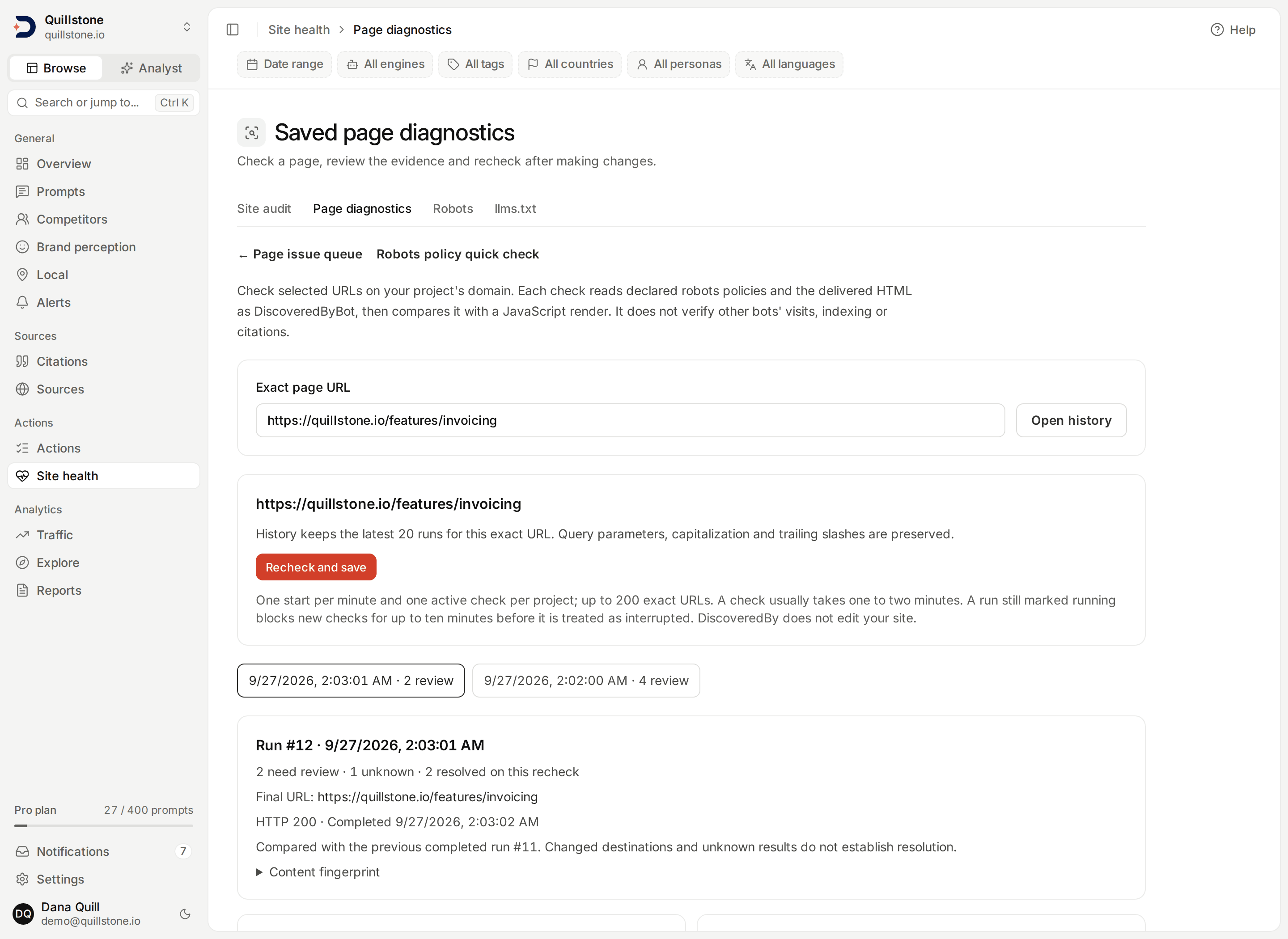
Run a selected-page check
- Enter a public HTTP or HTTPS page URL and choose Open history. This only reads saved results; it does not fetch the page.
- Choose Run and save checks, or Recheck and save for an existing URL.
- Review the saved policy and HTML evidence. Make any appropriate edits on your own website, then recheck the same exact URL.
The URL must belong to the project's registrable domain; subdomains are allowed. Paths, capitalization, trailing slashes, escapes and query parameters are preserved. Fragments are removed and internationalized hosts use their encoded form. The page queue groups normalized URLs, so several exact diagnostic URLs can appear under one queue page. Each saved diagnostic link opens its own exact URL and history. Check the URL before starting a new run.
What is checked
Each run that gets a successful HTTP 200 HTML response also loads the page
once in a browser with JavaScript enabled and compares it with that raw HTML
response (api/services/browser/render.py#render).
The structure, response and render checks below are disclosed heuristics for
review, from one lab request or one lab browser load as DiscoveredByBot: they
are not Core Web Vitals, accessibility certification, a citation prediction
or a grade (api/services/page_diagnostics/extended.py).
| Check | Evidence and interpretation |
|---|---|
| Declared crawler policies | Matching robots.txt rules and lines for five AI search/training crawlers, plus DiscoveredByBot. Redirect destinations are checked too. A deliberate restriction can be appropriate. |
| HTTP delivery | The status returned to DiscoveredByBot and the final destination. This does not simulate another crawler or establish WAF access for it. |
| Complete HTML | Whether a complete, bounded UTF-8 HTML response could be read. Unsupported content types, decoding failures and incomplete responses remain unknown. |
| Page title and H1 | Whether nonempty title and main-heading text appear in delivered HTML. |
| Meta description | Whether a nonempty description is present. Absence is a review prompt, not proof of a citation problem. |
| Body text | Extractable text in delivered HTML, excluding script, style, template and noscript contents. This does not measure readability or text visible after JavaScript runs. |
| Indexing directives | Generic/named supported robots meta tags and X-Robots-Tag headers. A noindex or none value prompts review; named restrictions are shown rather than treated as universal crawler behavior. |
| Canonical URL, Document language, Heading structure, Image alternative text, Structured data (JSON-LD) | Canonical URL needs review when delivered HTML has no canonical link, when several different canonical URLs are declared, or when the one declared URL is off the project domain; declaring the same URL more than once is fine. The others need review with no html lang attribute, not exactly one H1 (zero or several) or a skipped heading level, an image with no alt attribute, or any JSON-LD block that fails to parse (or none present) (api/services/page_diagnostics/extended.py#structure_checks). |
| Reading complexity | Unknown under 100 extractable words. Otherwise needs review when the average sentence exceeds 25 words or the Flesch reading ease score is under 30. An English-language heuristic and a review prompt, not a grade. |
| HTML response time and size | Unknown with no complete response. Otherwise needs review when the full HTML response takes over 1,500 ms or the HTML is over 500,000 bytes (api/services/page_diagnostics/extended.py#response_check, #SLOW_RESPONSE_MS, #LARGE_HTML_BYTES). |
| Rendered page, Content that needs JavaScript, Metadata changed by JavaScript, Links that need JavaScript, Render load and resources | Needs review when the browser's HTTP status is not 200; when rendering adds at least 200 extra characters of text and at least doubles the raw HTML's text; when title, H1 or robots directives differ between raw and rendered HTML; when 5 or more same-host links appear only after rendering; or when the render takes over 5,000 ms, or the load event was not reached, loads more than 150 resources, or its proxy refused a connection (other than a blocked analytics request) or reached its transfer budget. Unknown when the render was not attempted, left the project domain, returned no HTML, or the rendered HTML could not be parsed (api/services/page_diagnostics/extended.py#render_checks). |
Crawler names and purposes follow the existing robots policy checker. For indexing-directive semantics, see Google's robots meta tag documentation. These limited structural observations do not produce an AEO score, predict lift, or establish indexing, citation eligibility or complete page health.
The render step, and every resource the rendered page loads, goes through a forward proxy that only allows the public internet on ports 80 and 443. A request to a private, loopback or link-local address is refused rather than followed, and refused connections appear in the render evidence for that page. See Site audit for the same checks run across a whole crawl.
Read changes and history
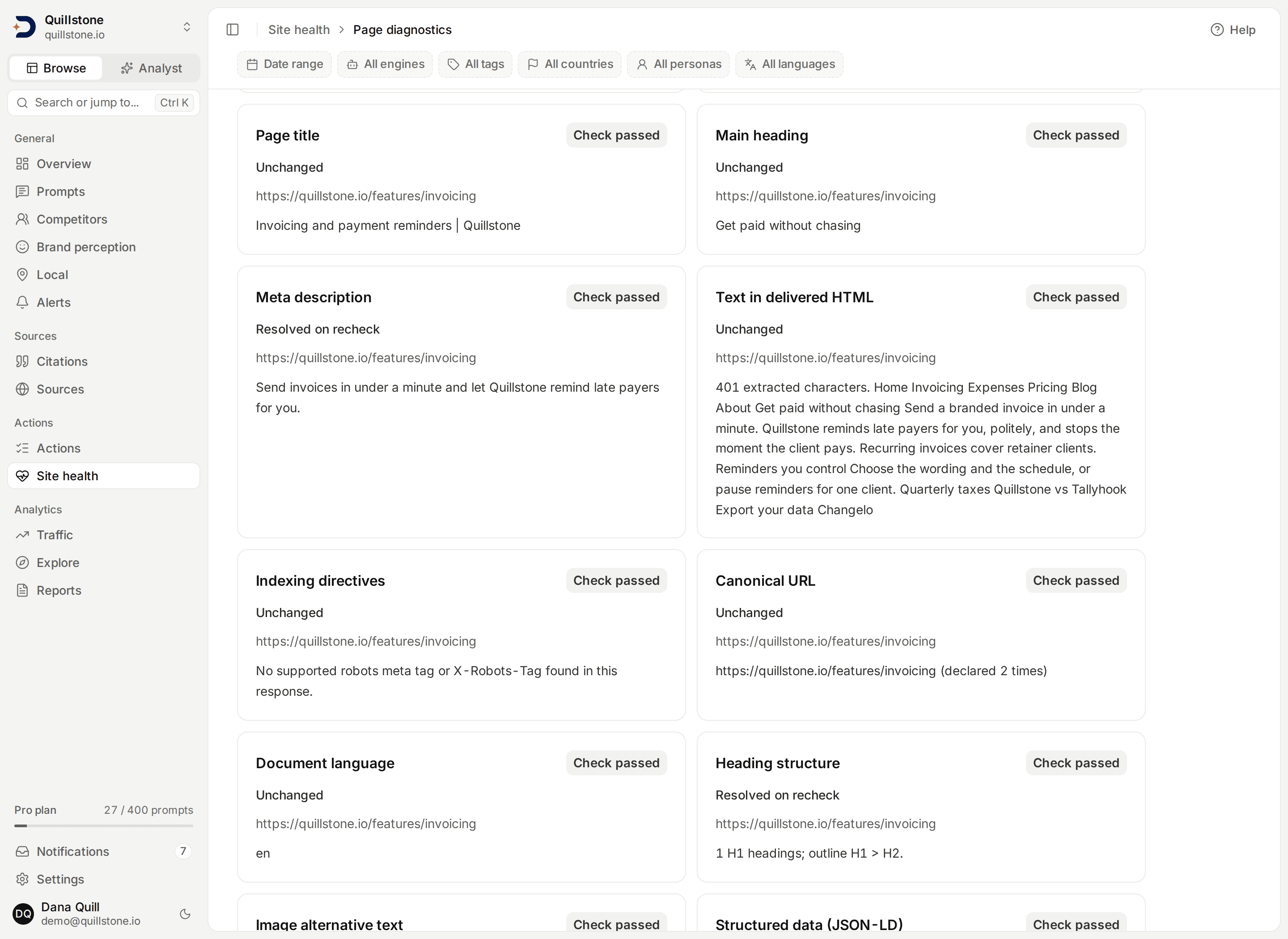
Each check is Check passed, Needs review or Unknown, with its URL, bounded evidence and guidance. The run records start/completion times, final URL, HTTP status and a SHA-256 content fingerprint when complete HTML was received. Full HTML is not stored or displayed. The rendered HTML from the browser comparison is not stored either; only the evidence each render check produces is saved.
A recheck compares the same check and destination with the previous completed run for that exact requested URL. Resolved on recheck requires a previous review finding followed by a passed check. Unknown evidence never resolves a finding. Changed destinations, changed check versions, or a previously unknown result are labelled as lacking a comparable result. A new review finding and a still-open finding are distinguished. These are observed response changes, not proof that a particular edit caused an outcome.
History retains the latest 20 runs per exact URL. Older runs and links to them
leave retained history. A run is reserved immediately, then checked by a
background worker, usually finishing within one to two minutes. That worker
also runs site audits, alternating between a selected-page check's own queue
and the site-audit queue, so a check waits for at most about one in-flight
audit step, a few minutes when an audit is running
(api/services/page_diagnostics/service.py#reserve_diagnostic,
#publish_diagnostic, api/services/site_audit/dispatch.py#dispatch_diagnostic).
Interrupted runs remain visible. A run still shown as
running blocks a new check until ten minutes have passed since it started;
a run already marked interrupted only waits out the standard one-minute
start cooldown
(api/services/page_diagnostics/service.py#LEASE_SECONDS,
#COOLDOWN_SECONDS). If a recheck is running or interrupted, the queue
continues to show the latest completed result. If no run has completed, the
queue shows unknown.
Each diagnostic bundle counts as one saved queue item, regardless of how many checks need review. It has no citation-gap impact or optimization score. Use Diagnostics unknown or Diagnostic checks passed to filter the queue. Policy/content review findings appear under Needs action. Saved evidence can become outdated; open history and recheck to observe the current response.
Access and fetch limits
Owners and editors can run checks when the project owner's saved plan includes robots diagnostics. Standard Starter, Growth and Pro include it; Free and Trial do not. Custom plans follow their persisted feature setting. Every current project member can read retained results, including viewers and members of a project that later downgrades. Removed members lose access. Permissions, domain and plan eligibility are checked again before a completed run is published.
There are up to 200 exact diagnostic URLs per project, 20 retained runs per URL, one active run per project, and one start per minute. Existing URLs can still be rechecked at the page limit.
Fetches use public addresses, pinned DNS, ports 80/443, no credentials or cookies,
and up to five page redirects within the project domain. Reading the declared
policy and the page has a 60-second overall deadline; each robots fetch also
has its existing 30-second limit. The browser comparison that follows a
successful page fetch has its own separate deadline, up to a further 45
seconds. A robots.txt response is bounded to 512,000 bytes; the page's own
HTML response is bounded to 2,000,000 bytes
(api/services/page_diagnostics/collect.py#PAGE_MAX_BYTES). Excessive HTML
nesting is unknown. The page is fetched only when the declared policy for
DiscoveredByBot allows its path, including each redirect destination. A
robots.txt unreachable because of a server error, a network failure or an
unreadable file is conservatively unknown and skips that page fetch; a
robots.txt missing outright (any HTTP 400 to 499 response) does not skip the
fetch, since RFC 9309 treats an unavailable file as no restrictions
(api/services/page_diagnostics/collect.py#inspect).
There is no automatic crawl, schedule, notification, model generation or site modification. Actual third-party bot traffic, field performance measurement and complete site coverage remain outside these checks; the render load and resources check is one lab browser load, not a Core Web Vitals measurement.
Related
- Site audit: run the same checks across a whole crawl of your site.
- Page issue queue: prioritize saved work and diagnostics.
- Robots diagnostics: run an unsaved policy-only quick check.
- Optimizations: review content drafts and observed outcomes.
Last verified 2026-09-23