Account
Projects
Every field on the project record, who is actually allowed to change it, and what pausing and archiving really do.
What's scoped to a project, and what isn't
A project is one website you're tracking, and it is the boundary almost
everything else in this section hangs off: a team roster, a set of keywords
and tags, an activity log, and the exports you can download are each read
back by project id and belong to exactly one project
(api/routers/team.py#list_members, api/routers/keywords.py#list_keywords,
api/routers/tags.py#list_tags, api/routers/pages.py#get_activity_page,
api/routers/exports.py#exports_index). Your account sits above that: your
sign-in details, the plan every project you own draws on, and the Google
account you connect for Search Console and Analytics all belong to you
rather than to any one project. That last one is worth being exact about:
the connection is found by your user id with no project in the query at all,
and which Search Console or Analytics property feeds which project is a
separate mapping underneath it
(api/services/integrations/google/oauth.py#get_active_integration).
The settings navigation is grouped along the same line, and its two groups
follow where the primary object lives rather than everything a screen can
change (frontend/src/routes/(app)/settings/+layout.svelte#groups).
Integrations is the tab that does both, which is exactly why the connection
is account-wide while each property mapping is not; the nav's own blurb for
it says as much, and Integrations opens on
that split. "All projects" is the softer version of the same thing: filed
under your account, because it lists every project you can open rather than
anything inside one, but each row opens one project's own record. See
Plans and limits for what "your account"
means for billing specifically.
The project record
The record itself, and everything on it, is one form
(frontend/src/lib/components/ProjectRecordForm.svelte), reused unchanged
by both the settings screen for whichever project you currently have
selected and the settings screen for any project you own reached from the
all-projects list further down this page.
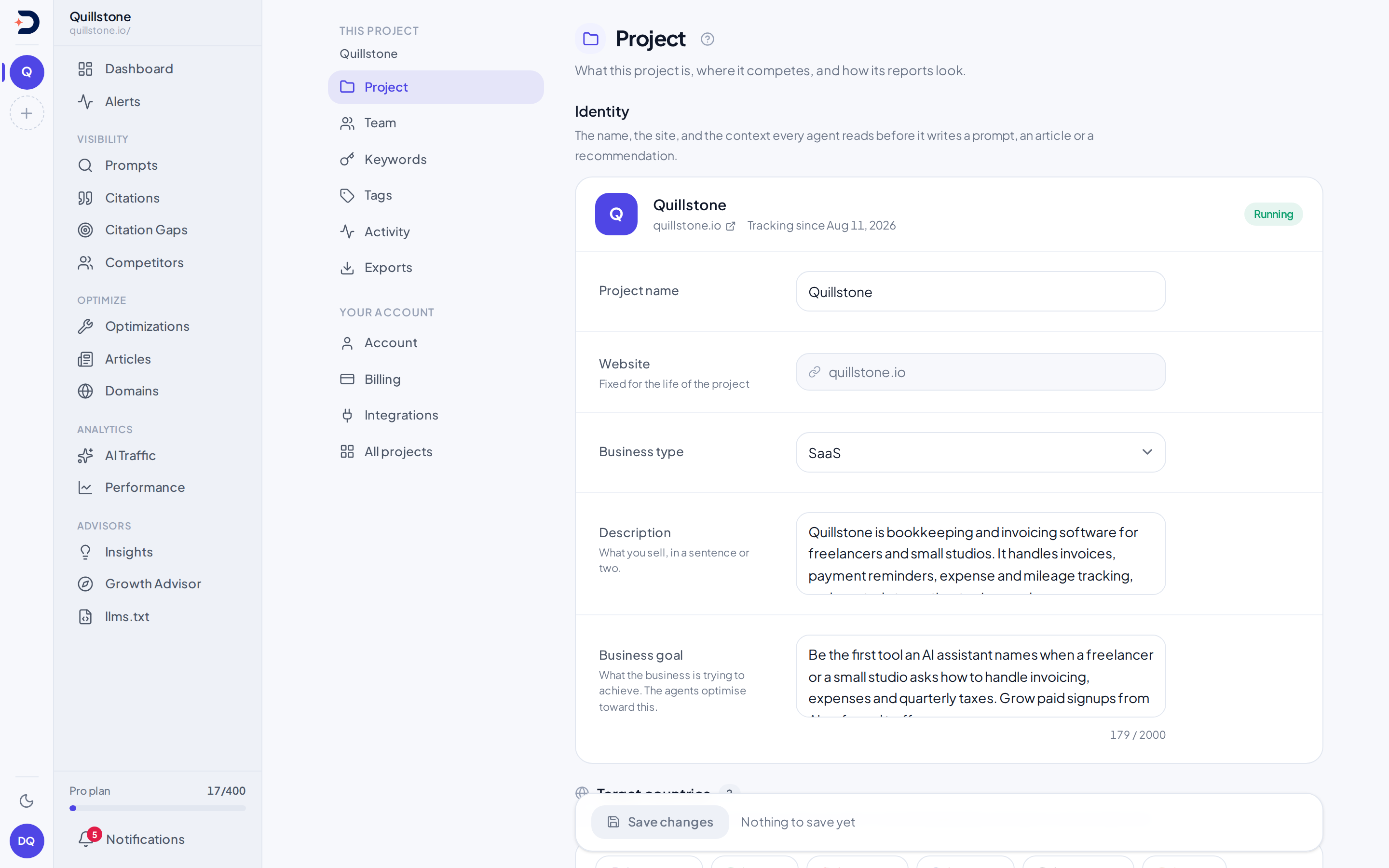
Identity: a required project name, and a website field that is shown but can
never be changed once the project exists, because every domain, citation and
snapshot the product has collected is tied to that original URL. Beneath
those, a business type chosen from a fixed list of verticals, and a free-text
description of what you sell. All four, plus the business goal described
next, are read together as the project's business identity by the agents
that write on your behalf, most directly Growth Advisor's and the llms.txt
Advisor's own research step (api/services/growth_advisor.py#_business_block,
api/services/llms_txt/service.py#_business_block).
Business goal is the same idea taken further: a plain-English statement of
what the business is trying to achieve, which every one of five separate
agent runs reads as steering context rather than as an instruction to
follow literally: the Growth Advisor's
briefing, the llms.txt Advisor's audit,
Optimizations's recommendations,
Articles's drafts, and the research pass behind
Suggestions and opportunities
all read it (api/services/growth_advisor.py#_business_block,
api/services/llms_txt/service.py#_business_block,
api/services/optimization/service.py#generate_recommendation_for_opportunity,
api/services/article_writer/corpus.py#project_payload,
api/services/research.py#run_pipeline). The business type also doubles as
the fixed set of options a research pass can choose between when proposing
one for you during setup (api/services/research.py#business_profile_schema).
Target countries: a checkbox per seeded country, opening with the countries
this project already has ticked, since the form is initialised from the
project's own current set (frontend/src/lib/components/ProjectRecordForm.svelte#initial).
That set is never empty on a project created through onboarding, which
refuses to create one with no country at all
(api/routers/projects.py#create_onboarding_project).
Every country you add is tracked as its own separate set of prompt
executions, so more countries draw on the same pooled capacity a prompt
itself does; see Plans and limits for what
that capacity is and how it's shared. There is no separate cap on how many
countries you can pick beyond that.
Tracking: a toggle to run the project at all, covered in the next section,
and a toggle for whether a weekly pass re-runs prompt discovery and proposes
new prompts on its own. Turning the weekly pass on can be refused depending
on your plan; turning it back off is always allowed
(api/routers/projects.py#update_project). Its results land on
Suggestions and opportunities.
Report branding: an accent colour and a logo URL, both optional, both
validated as a real six-digit hex colour and a real https:// link before
they're accepted (api/schemas/project.py#validate_brand_accent,
api/schemas/project.py#validate_brand_logo_url). Neither is read by any
agent; the only place they're read back out is the printable
Weekly report, which falls back to the product's
own colour and no logo when either is empty
(frontend/src/routes/(app)/insights/report/+page.svelte#accent).
Who can open and change it
Opening this screen and saving from it are two separate permissions, and only the second one is owner-only.
The request that loads the project record accepts the project's creator or
anyone holding an active membership row on it, whatever their role, which is
the same rule the rest of the product's project-scoped reads use
(api/routers/projects.py#get_project, #_accessible_to,
api/dependencies.py#get_project_for_user). A member you added can open the
form and read what is on it.
Saving is refused for anyone but an owner: the endpoint behind the Save
button reads the caller's role and accepts nothing else
(api/routers/projects.py#update_project). Adding or removing a social
account, covered below, and archiving the project carry that identical
check (api/routers/growth_advisor.py#add_social_profile,
api/routers/projects.py#delete_project). "Owner" to those checks means the
project's creator, or a member whose own role reads owner
(api/dependencies.py#get_user_role_in_project).
The screen and the API agree about who may edit, and this is not special to
the project record: the same isOwner test, reading the project's my_role,
gates every owner-only control across the app
(frontend/src/lib/permissions.js#isOwner). Here it is handed to the form
rather than a broader write test, so a non-owner sees the fields as
read-only with a short line saying why, instead of a Save button whose
request the API would refuse
(frontend/src/routes/(app)/settings/+page.svelte#isOwner,
frontend/src/lib/components/ProjectRecordForm.svelte#canSave). The Archive
control is gated the same way, exactly as its endpoint is
(frontend/src/routes/(app)/settings/+page.svelte#canArchive). A team
member's role otherwise governs what they can do elsewhere in the product,
on prompts, competitors, keywords and tags, where editors do have write
access.
Pause, and archive
"Run this project" and "Archive this project" end up doing the exact same
thing to your data: both simply set the project's own active flag to off,
and nothing else is removed, touched, or queued for removal
(api/routers/projects.py#update_project, api/routers/projects.py#delete_project).
Turning a project off, by either route, is what actually stops anything from
happening to it: every scheduled pass, the daily run included, only picks up
projects whose flag is still on (api/tasks.py#_enqueue_for_user), and a
paused project's active prompts stop drawing on your pooled capacity the
moment it's off (api/services/limits.py#get_active_prompt_slot_count).
Turning it back on re-runs the same check that creating a brand new project
would; see Plans and limits for what that
re-check does. The visible difference between the two controls is entirely
in the interface: the toggle flips with one click, while Archive asks once
inline first and, if the request is refused, says so and stays where it is
rather than navigating away regardless
(frontend/src/routes/(app)/settings/+page.server.js#archiveProject). That
control used to be called "Delete this project" and to arm only after you
typed the project's own name, which framed as irreversible something the
API never made irreversible. An archived project still appears, as a paused
project, in the all-projects list below, with the same Resume button any
other paused project has.
All your projects
The all-projects list shows every project you can open, active or paused:
the ones you created and the ones you hold an active membership row on. It
is read from the same query the sidebar's project switcher uses, which
combines those two grounds as an OR
(api/routers/projects.py#list_projects, #_accessible_to). Each row shows the project's name,
its site, when it was added, and a Paused pill when its active flag is off.
From a row you can switch your current project to it, or open its own
settings screen without switching to it first, which is the same project
record form this page has already described
(frontend/src/routes/(app)/settings/projects/[id]/+page.svelte#isOwner).
Pausing or resuming in place, with the same toggle described above, still
goes through the same owner-only endpoint the Save button does, but this
list can hold a project you own alongside one where you are only an editor
or a viewer, so the toggle is gated per row, off that row's own my_role,
rather than off the project you currently have selected: it is disabled on
any row where you are not that project's owner, and the list carries one
line stating the rule when it holds at least one such row
(frontend/src/routes/(app)/settings/projects/+page.svelte#hasUnowned,
frontend/src/lib/permissions.js#isOwner).
Social accounts
A project can list its own public social profiles, one platform picked from
a fixed set and a URL, no login involved. The Growth Advisor reads these
alongside its other research to judge how the business is doing on its own
channels (api/services/growth_advisor.py#build_research_prompt). A project
can hold at most ten of them, checked on the server regardless of what the
form shows (api/routers/growth_advisor.py#MAX_SOCIAL_PROFILES). Adding and
removing one both carry the same owner-only check as the rest of this
screen.
The platform picked here is only a label for this list; it plays no part in Social sources, where a saved profile's network and account are read straight from its URL, so a profile saved under the wrong platform still labels its citations correctly there.
Related
- Plans and limits: the project-count ceiling this page's toggle and resume both re-check, and how prompt capacity pools across every project you own
- Create your account: how sign-in works and how a project's owner and team roles come to exist in the first place
- Onboarding: where a project's name, business type, description and countries are first filled in
- Growth Advisor: the weekly briefing that reads this project's business identity and social accounts together
- Social sources: which AI-cited accounts these profiles label as yours, and how a competitor's accounts are added
Last verified 2026-08-11