Optimize
Domains
What counts as a domain here, how far each source reaches across your prompts and how consistently, brand evidence inside cited pages, what an owned page is, and what each daily snapshot records.
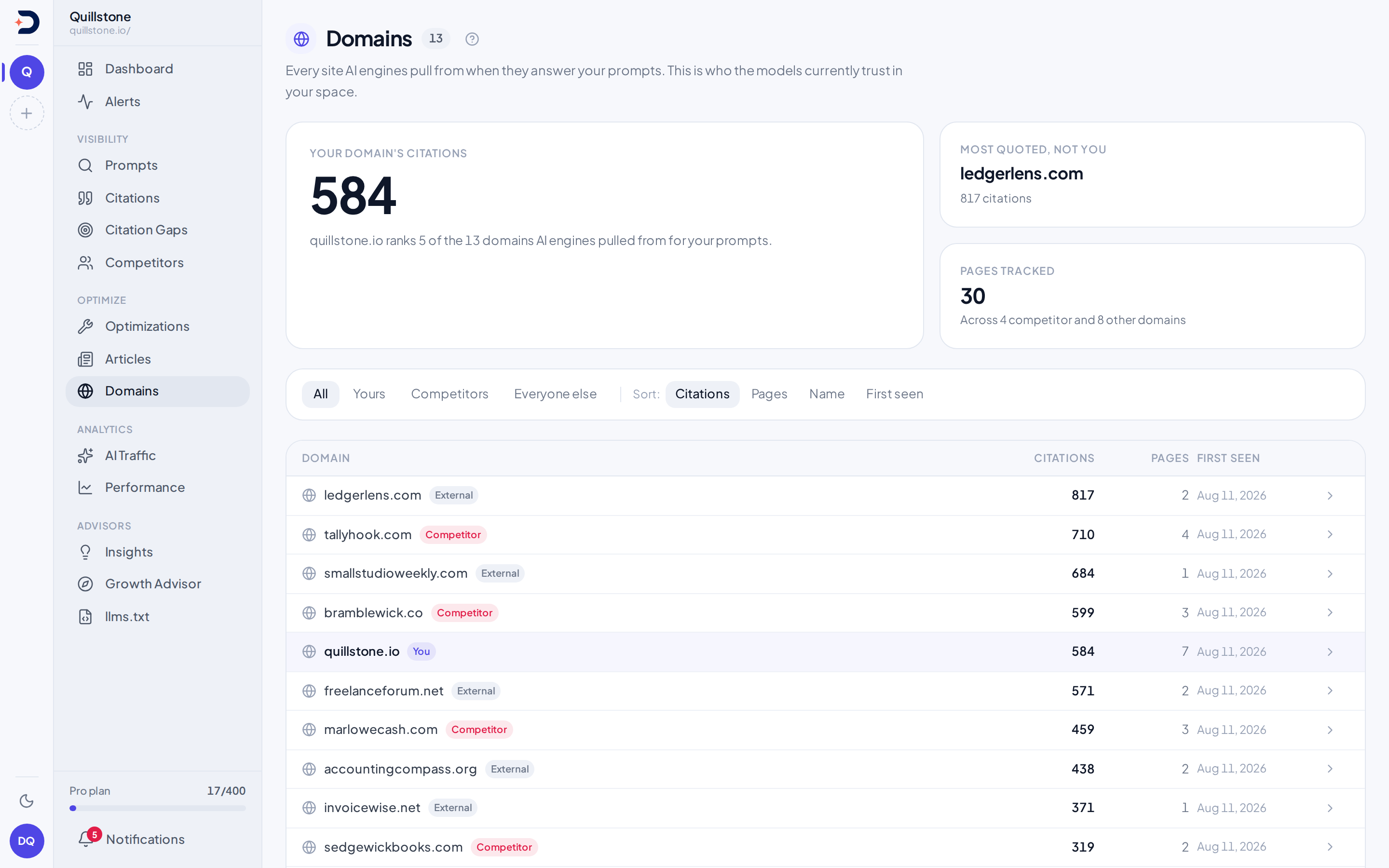
What counts as a domain
A Domain row is the registrable domain a URL resolves to, extracted and
lowercased once and deduplicated across the whole platform, so "example.com"
and "blog.example.com" collapse into the same row, shared by every project
that has ever touched it, not owned by yours alone. The row appears the first
time any URL under it is recorded, wherever that URL came from. Storing a
citation records one (api/services/execution.py#get_or_create_domain). So
does setting up a project or a competitor
(api/services/project_setup.py#get_or_create_domain), so does storing a
search result an engine retrieved whether or not it went on to cite it
(api/services/execution.py#_store_search_result), and so does anything
else that puts a URL into the platform's URL store
(api/services/web_pages.py#record_url). A Domain row can therefore exist
for a domain no engine has ever cited.
See Citations
for exactly how a URL is reduced to that domain and matched against your own.
Domains lists every domain that has
been cited at least once in this project (api/routers/pages.py#domains_page),
ranked by default on the expected figure described in
Reach, consistency and expected rather
than on the raw citation count, which is still a column and still one of the
sort options. A tracked competitor that has not been
cited yet in this project does not appear here at all, even though it is
tracked: the query behind this screen only returns a domain reached through
an actual citation row, unlike Competitors,
which lists every tracked competitor whether or not it has been cited.
Yours, a tracked competitor, or everyone else
Every domain on the screen gets exactly one of three labels, decided fresh on
each load: yours, if it is the domain your project was set up against; a
tracked competitor's, if an active Competitor row links your project to
that domain; everyone else's otherwise, carrying an "External" badge. The
three-way decision is made in the API response
(api/routers/pages.py#domains_page); the wording on the badge comes from
the screen's own markup (frontend/src/routes/(app)/domains/+page.svelte).
A paused or removed competitor's domain drops out of the middle group: the
join that supplies the "Competitor" badge and name only matches an active
row, so pausing or removing a competitor makes its domain read here as an
ordinary external domain from then on, the same way it drops out of the
share-of-voice chart on
Competitors.
Citations and pages, counted here
The citation count beside each domain, and the count of distinct pages
beneath it, are live totals over the answers the
filter bar
selects: every citation, and every distinct cited URL, recorded against
that domain in this project by a completed answer in the window that
matches the bar's engine, tag, country, persona and language
(api/routers/pages.py#domains_page, #DOMAINS_ACCEPTS). A domain with no
such citation is not listed. The hero figures at the top of the screen name
the same window, "last 28 days" for example
(frontend/src/routes/(app)/domains/+page.svelte#discoveredDomains), and
the line above the table says every column covers it.
That is a different figure from
domain-citation share of voice
on the Competitors screen, which sums a separate daily snapshot over the
filter bar's window and only for domains you are tracking
(api/routers/pages.py#competitors_page). The two used to share a field
name, total_appearances, and nothing else; this screen's field is now
called total_citations, leaving that name to the stored column on the
snapshot table it always meant
(api/schemas/domains_page.py#total_citations,
api/models/domain_daily_snapshot.py). They answer different questions over
different windows, so a domain's count here and its share on Competitors are
still not meant to match.
Reach, consistency and expected
The three columns to the right of the citation counts answer a different
question from those counts: not how much a source has been quoted in total,
but how much of your prompt portfolio it currently covers and how reliably.
They are computed fresh on each load from the citations and the runs inside
the filter bar's window, narrowed by its other chips, with the same filters
on both halves of each ratio, so nothing here is stored and nothing can go
stale (api/services/source_influence.py#source_influence_for_project).
The window is 7, 28 or 90 days, chosen with the filter bar's date range
chip and carried in the URL as ?days=, so a view can be linked. The same
range travels with you to the other screens that honour it. It defaults to
28 and ends yesterday, with both ends inclusive: "last 7 days" is yesterday
plus the six days before it, and today's answers count from tomorrow
(api/services/answer_filters.py#resolve_answer_filters). The line
above the table always names the window in dates and says how many prompts
ran inside it.
Here is the whole calculation. For each prompt that ran in the window, take the completed runs of that prompt, and the share of them that cited this source:
- Reach is how many prompts that share is above zero for, shown against the number of prompts that ran, as "12 of 16". It counts prompts, not citations and not targets: ten citations inside one answer is a reach of one, three citations across one answer is one appearance, and the same question tracked in two countries is one prompt, not two.
- Consistency is the average of that share across exactly the prompts the source reaches. Prompts it never touched are excluded from the average, because this column answers "when a prompt it covers runs, does it show up", and their absence is already reported by reach. A source cited on every run of both prompts it reaches reads 100 percent even though it reaches only two.
- Expected is reach multiplied by consistency. It is not a weighted blend and there is nothing to tune: because the average above is unweighted, the product is exactly the sum of those per-prompt shares across the whole portfolio, which reads as "if every tracked prompt ran once more, in how many of them would we expect this source to appear". The table sorts by it, and the two columns beside it are its factors, so the ranking can be checked against them by hand. Expect the last digit to disagree slightly if you do: the consistency column is rounded to a whole percent for display, while the product is computed before any rounding, so 14 and 54% read as 7.56 by hand against a printed 7.6.
Only completed runs count. A failed run is not evidence that a source was absent, so counting outages would drag every source's consistency down on a bad day for an engine. Your own domain is scored exactly like every other source, because the row you most want to compare against the others is your own.
What these numbers are not
They record how often a source was observed, across how many prompts, in a stated window. They are not a measure of editorial quality, authority or trustworthiness, and they do not establish that a source caused anything. A source can be consistent because it is genuinely the reference work for a topic, or because one engine happens to favour it. Nothing here distinguishes those two, and a high figure is a description of what was collected, not a verdict on the site.
A dash is not a zero
Every listed domain was cited in the window, and its three columns are computed over the same answers as its citation count, so a listed domain normally has a value in each. Should a row have no observation, it shows a dash in all three columns, not a zero, and under the two sorts that read these columns, expected and reach, it sorts below every domain that does have one, so an unmeasured source can never outrank a measured one. The distinction between a dash and a zero is the point: a zero would say we looked at this source over these dates and it never appeared, while a dash says we have no observation of it in this window at all.
When no answer in the window, or none matching the filters, cited any
domain, the table is replaced by a note that says which, rather than
leaving the reader to conclude that nothing was ever cited
(frontend/src/routes/(app)/domains/+page.svelte#narrowed).
Provisional figures, and a wide window
Below 30 observed runs for a source, an asterisk appears beside its
expected figure, with a note under the table. The asterisk sits on that one
column to keep the row readable, but the caveat covers all three: they are
the same thin sample, so a reach and a consistency next to a starred
expected are provisional too. Thirty is the same threshold the
brand metrics use for the same reason, imported
rather than restated so the product has one answer to "is this number
settled yet" (api/services/brand_metrics.py#MIN_OBSERVATIONS). The figure
is shown rather than withheld; widening the window usually settles it.
Widening also has an effect worth expecting: reach saturates. Over a long enough window most sources get cited for most prompts at least once, so every row drifts towards "14 of 14" and consistency does all the discriminating. A narrow window is where reach separates sources from one another. That is a property of counting "at least once" over a long period, not a fault in the data, and it is the main reason the window is a control rather than a fixed number.
The pages under a domain
Expanding a domain's row lists its individual CitedUrl pages, each with how
many times it was cited, and when it was first and most recently seen
(api/routers/pages.py#domains_page). As on
Citations, neither a page
nor its domain is scoped to this project: the same URL cited on a different
one of your projects, or discovered through a citation on someone else's
project entirely, is one shared row, so "first seen" and "last seen" mark
when the platform first recorded that page or domain, not when it first
showed up for you specifically (api/services/execution.py#get_or_create_cited_url).
Owned pages are a different thing
"Owned page" names a different feature, not anything shown on this screen.
On a prompt's own page you can map the pages already on your own site that
should rank for it; see
Inside one prompt. Each mapping
is a PromptOwnedPage, restricted to your project's own domain whichever way
it was added, and it exists whether or not any engine has ever cited it: you
add some yourself (api/services/owned_pages.py#add_owned_page), and
citation gap analysis fills in others on its own, matching a prompt to one
of your own cited pages or a similar one
(api/services/citation_gap.py#_resolve_owned_page).
Optimizations and
Articles both read that list to see what you
already have before recommending or drafting something new. A page under
your own domain on this screen, by contrast, only appears because a citation
already pointed at it: every domain here, yours included, is reached the
same way.
The daily snapshot behind these numbers
DomainDailySnapshot holds one row per project, domain, engine and day,
recording whether the domain is yours, its citation-weighted appearances and
distinct pages for that single day, its response-weighted average and best
rank, and how many of that day's prompt targets it appeared in against how
many ran (api/models/domain_daily_snapshot.py). Each time an execution
against one engine finishes, that whole day's rows for its project and
engine are deleted and rebuilt from the raw citations recorded so far
(api/tasks.py#_resume_completed_execution,
api/services/snapshots.py#rebuild_snapshots_for_execution). A separate job
runs per prompt target and engine (api/tasks.py#_enqueue_for_user), so
that rebuild happens many times across a day, not once at the end of it.
None of that table's numbers show on this screen; it exists to be summed
over a window, which is what
domain-citation share of voice
does with it.
Mentions inside cited pages
Open the Mentions tab under Sources in the sidebar, or follow the link on the Domains
screen. This view checks
your brand and active tracked competitors against saved, extracted text from
third-party cited pages. Your own domain is excluded; competitor sites are
included (api/services/source_mentions.py#source_mentions_for_project).
What the numbers cover
Two bounds decide which pages are read, and the screen prints both.
The window picks the citations. It is the filter bar's date range: 7,
28 or 90 days, defaulting to 28, the same choices and the same inclusive
both-ends definition as the reach window above, so a 28-day window is
yesterday plus the 27 days before it. A page cited only outside the window
is not in the corpus at all. The bar's engine, tag, country, persona and
language narrow the citations too
(api/services/source_mentions.py#source_mentions_for_project). The two screens are
still measuring different things: reach and consistency count prompt runs,
while this view counts distinct pages.
The scan cap bounds the work after that. At most 500 distinct URLs have their text read, taken in order of citation count, so the least-cited sources are dropped first. Current figures are derived by reading saved text on request, and without a cap a long-running project would scan its whole history on every page view and filter change. When the cap bites, the screen says how many sources were scanned and how many were cited in the window, and every count on it then describes the scanned pages rather than the whole window. Narrowing the window is what brings a corpus back inside the cap.
In the default Literal names and aliases mode, the source-mention rate is the number of analyzable pages with a match for your brand divided by all analyzable third-party pages, within those bounds. Each normalized URL counts once, regardless of its citation count. Coverage and unknown-page counts sit beside the rate. With no analyzable pages the rate is a dash, not zero. These totals cover every scanned page, even when a filter or pagination shows only part of them.
A match is a case-insensitive, word-bounded occurrence of a current brand name
or alias. Multiword aliases may span whitespace or line breaks. Expand
Names and aliases used to inspect the roster. Each matched brand gets
one evidence snippet and the matching text. This is literal evidence, not
semantic disambiguation: a common-word alias can match an unrelated use,
and a name absent from the roster can be missed
(api/services/source_mentions.py#alias_pattern,
api/services/source_mentions.py#find_evidence).
Filter to pages with your brand, without your brand match, or a competitor match without your brand. The last two only include pages with usable saved text. Unknown includes missing, pending, failed, blocked, empty, and oversized scrapes. Matching accepts at most 100,000 extracted characters per page; longer text is unknown rather than evidence of absence. These pages are excluded from the rate and absence filters. The Matching brand filter narrows rows to a specific active brand with a match under the selected evidence basis; it does not change the headline counts. An unsuccessful later scrape makes the page unknown even if earlier saved text exists.
Each analyzable page shows when the text was fetched. Older successful text
remains analyzable, so check that date before acting. Unknown pages show the
last scrape attempt when available. This is the latest saved snapshot, not a
live-page check, an AI-answer mention metric, sentiment, or endorsement.
Opening or filtering the view makes no model calls and is available on all plans.
AI review runs only when an eligible owner/editor explicitly requests it.
Current aliases and saved content are re-read on each request. To preserve
evidence, open Source-mention history:
owners/editors can save dated snapshots, inspect frozen aliases and compare
gained/lost matches only where both observations are comparable. Snapshots
and AI reviews always cover every answer in the window, so while the filter
bar's engine, tag, country, persona or language is set, both are disabled
and the screen says why: "Snapshots and reviews cover every answer. Clear
the engine, tag, country, persona and language filters to save one."
(frontend/src/routes/(app)/sources/+page.svelte#saveBlocked,
api/services/source_mention_history.py#save_snapshot). Opening the
current screen does keep the brand and competitor roster in step with the project, so
a competitor added elsewhere appears here without a separate step.
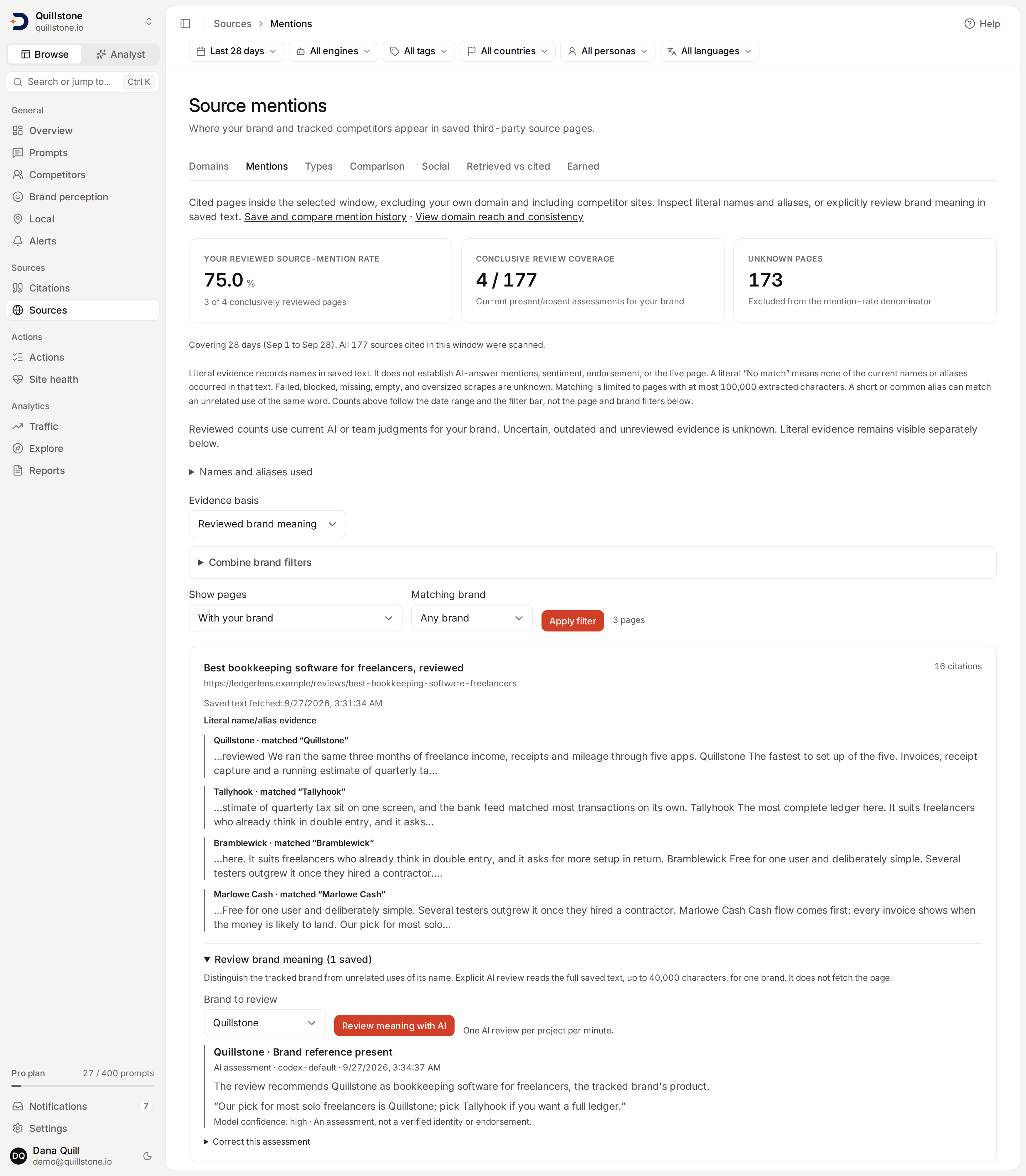
Review brand meaning
Expand Review brand meaning on a page with usable text. Select a tracked brand, then Review meaning with AI. The configured model reads the full saved text and the brand's name, aliases and domain to distinguish a real reference from an unrelated name match. The result is present, absent or uncertain, with a reason, confidence, review date and recorded model.
AI review accepts at most 40,000 characters of full saved text and never silently
truncates a page. One review may run per project at a time, with at least one
minute between requests. Interrupted attempts can be retried after two minutes.
No review runs automatically after scraping. Generation uses the project owner's
persisted source_mention_review feature; standard Starter, Growth and Pro enable
it. Owners/editors can correct retained assessments on every plan, and all
current project members can read them. See Plans and limits.
A present result needs an exact supporting quote found in the saved text. Rejecting a literal name match as unrelated also needs its supporting quote. Unverifiable quotes or low-confidence results become uncertain. Quote checks verify the quoted text exists; they do not prove the model's identity judgment. Use Correct this assessment to save a state, source quote and reason after reviewing the evidence. Corrections record a team judgment and cannot overwrite a newer version. Changes to content, brand context or access while AI is running prevent publication of that result.
Choose Reviewed brand meaning to calculate the rate from current, conclusive assessments of your own brand. Its denominator is the pages reviewed as present or absent, not every scraped page. Missing, uncertain or stale reviews are unknown and cannot establish absence. Text or alias changes make a saved review stale until a fresh review is requested. Literal evidence remains separately visible. Up to 500 review attempts per project are retained; the latest completed assessment for each page/brand is used while retained. Snapshots preserve their saved assessments independently of later corrections or review retention.
Combine brand filters
Expand Combine brand filters to require all selected brands, at least any one of another group, and exclude selected brands. All groups apply together using the chosen evidence basis. Each group accepts up to 20 brands. A brand cannot be both included and excluded. Excluded brands need observed absence: a page with missing, uncertain or stale evidence does not pass. Headline counts stay fixed while filters narrow rows.
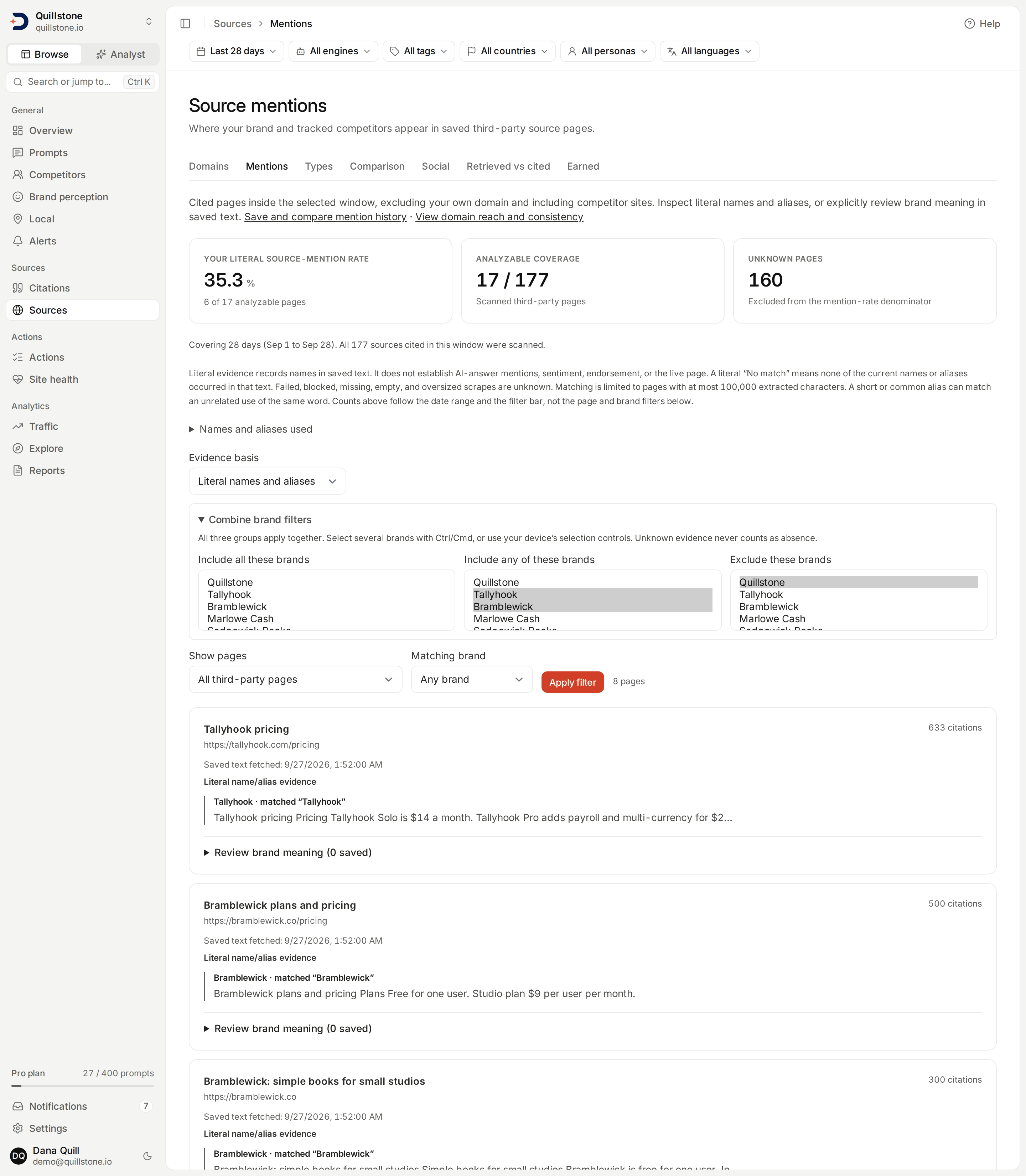
Illustrative development data is shown in this screenshot.
Related
- Citations: what a citation and a cited URL are, and how one gets attributed to a domain
- Competitors: tracking a competitor, and what pausing or removing one changes
- Metrics defined: the daily-snapshot figure this page's counts are not
- Optimizations and Articles: where an owned page actually gets used
- Social sources: the same reach, consistency and expected formula, applied to one social account instead of a whole cited domain
Last verified 2026-09-27