Optimize
Earned sources
Save cited third-party pages or add one by hand, assign outreach work, report placements and compare subsequent page citations, including recorded address variants, with explicit measurement limits.
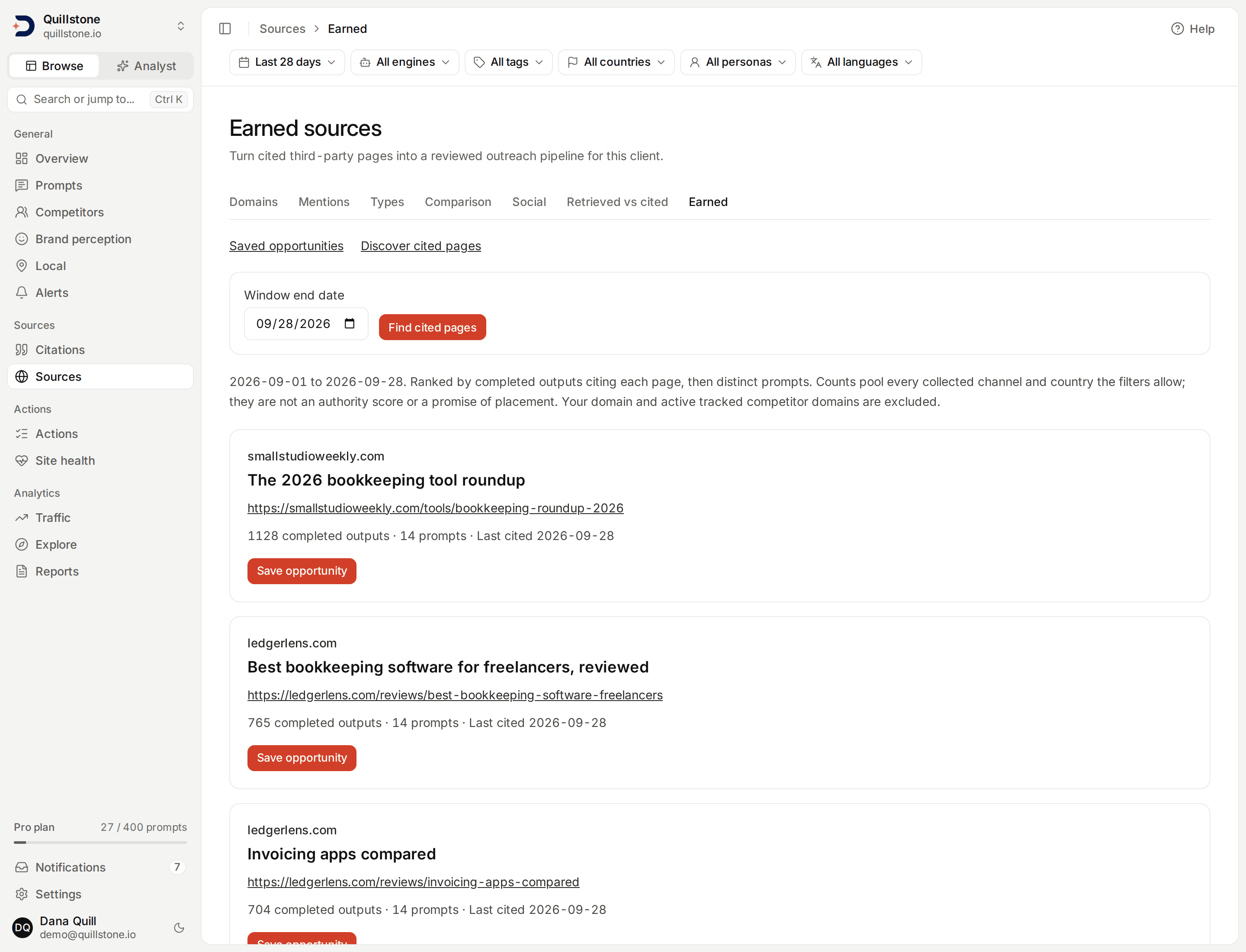
Illustrative local development data is shown. Outreach and placement entries in these screenshots are demonstrations, not actual campaigns.
Build an outreach pipeline from cited pages
Open Earned sources and choose Discover cited pages. This workflow helps a client team review third-party sources, coordinate outreach outside DiscoveredBy, and record a placement on a saved source page. It does not send messages, find contacts, buy placements, publish content, or connect to a placement partner.
All project members can read opportunities on every plan. Owners and editors
can save and update them. Assignees must be active project owners or editors;
viewers cannot be assigned. These records use existing collected data without
new model, scraping or collection calls (api/routers/earned_source.py#save_source).
Discover and save a prospect
Choose 7, 28 or 90 days with the date range chip in the
filter bar,
then an end date before today, and select Find cited pages. In this
Discover view all six chips apply, so the bar's engine, tag, country,
persona and language narrow the answers too
(api/routers/earned_source.py#DISCOVER_ACCEPTS). The saved pipeline list
reads no answers, so every chip is disabled there; a saved prospect's own
page takes only the date range, as the length of the periods it compares
(see below). The default is 28 days ending yesterday. Dates use the collection
server's calendar. The date range chip immediately changes the window,
preserves other applied URL selections and returns to the first page; after
you apply an end date it names it, for example "28 days to Aug 1".
Submitting the end-date form resets pagination. Historical end dates let you
review older collection.
The list includes pages cited in completed outputs in the selected window.
Your current project domain and active tracked competitor domains are excluded.
Pages are ordered by the number of distinct completed outputs citing them,
then distinct prompts, then saved page ID. Repeated links in one output count
once toward the output count. Failed and in-flight outputs are excluded;
paused prompts and targets retain their history
(api/services/earned_source.py#prospects).
Discovery counts pool recorded channels and countries, within whatever the filter bar has narrowed to. They are a way to find observed sources, not a source-authority score, a likelihood of placement, or a claim that the page is missing your brand. Use Source mentions to inspect literal matches in saved source text. Missing or old scraped text limits what that screen can establish.
Select Save opportunity to open a new record. Saving the same page again
opens its existing record, including a dismissed record, without resetting it
or replacing its evidence; the same dedupe matches a page already
added by hand. Each project can retain up to 2,000
opportunities, including dismissed ones. Discovery and saved lists show 25
records per page (api/services/earned_source.py#create_opportunity).
A saved opportunity's evidence counts every completed answer in its window,
not only the ones the chips select, so while a chip other than the date range
is set a note under Save opportunity says "Saved opportunities count every
answer, not only the filtered ones."
(frontend/src/routes/(app)/earned-sources/+page.svelte#narrowed).
Add a page by hand
Owners and editors can add a page that AI answers have not cited yet
directly, without discovering it first; viewers can only read the saved list.
Enter an absolute web address starting with http:// or https:// (at most
2,048 characters) and an optional title (at most 512 characters)
(api/services/earned_source.py#create_manual_opportunity).
A hand-added address is stored normalised: tracking parameters, the
fragment and a trailing slash are dropped, and the host is lowercased. A
discovered page is saved with its address exactly as it was recorded. Either
way, matching and dedupe compare addresses in that normalised form and also
ignore the scheme and a leading www. on the host, so
https://www.g2.com/x?utm_source=chatgpt.com and http://g2.com/x count as
the same page (api/services/earned_source.py#_match_key). Your project's
own registrable domain is refused:
"This is your own site. Earned sources are third-party pages." The domain of
an active tracked competitor is refused too: "This is a tracked competitor's
site. Competitor pages are measured on Competitors, not saved for outreach."
These are the same two exclusions discovery applies.
Adding a page that already matches a saved opportunity on the same domain, whether that record was discovered and saved or added by hand, opens the existing record instead of creating a second one. A hand-added page carries no discovery evidence: it was never seen cited, so there is nothing to snapshot. Nothing is fetched, scraped or scored when a page is added by hand. It joins the same per-project cap and review pipeline as a discovered page, and carries an Added by hand label on the saved-opportunities list.
Review the saved evidence
Each record discovered from citations keeps the source URL, title, domain, discovery dates, distinct-output and prompt counts, and up to five citation examples as they were read when the opportunity was saved. Examples show collection date, provider, recorded platform/surface/method/model, a link to prompt history, and up to 500 characters of saved citation context. Truncated snippets are labeled. Examples are chosen by most recent execution date and answer ID, then citation position and ID. Repeated links can appear as separate examples; this sample is not another metric denominator.
A page added by hand has none of this: its record shows only when it was added, because it was never seen cited before being saved.
The evidence stays attached when notes, assignments or statuses change, and is not refreshed by later collection. A saved snippet does not verify a brand mention on the live page. A source that later becomes owned or a tracked competitor remains in the saved pipeline; its historical evidence is retained. Removed prompt history may no longer open.
Coordinate the work
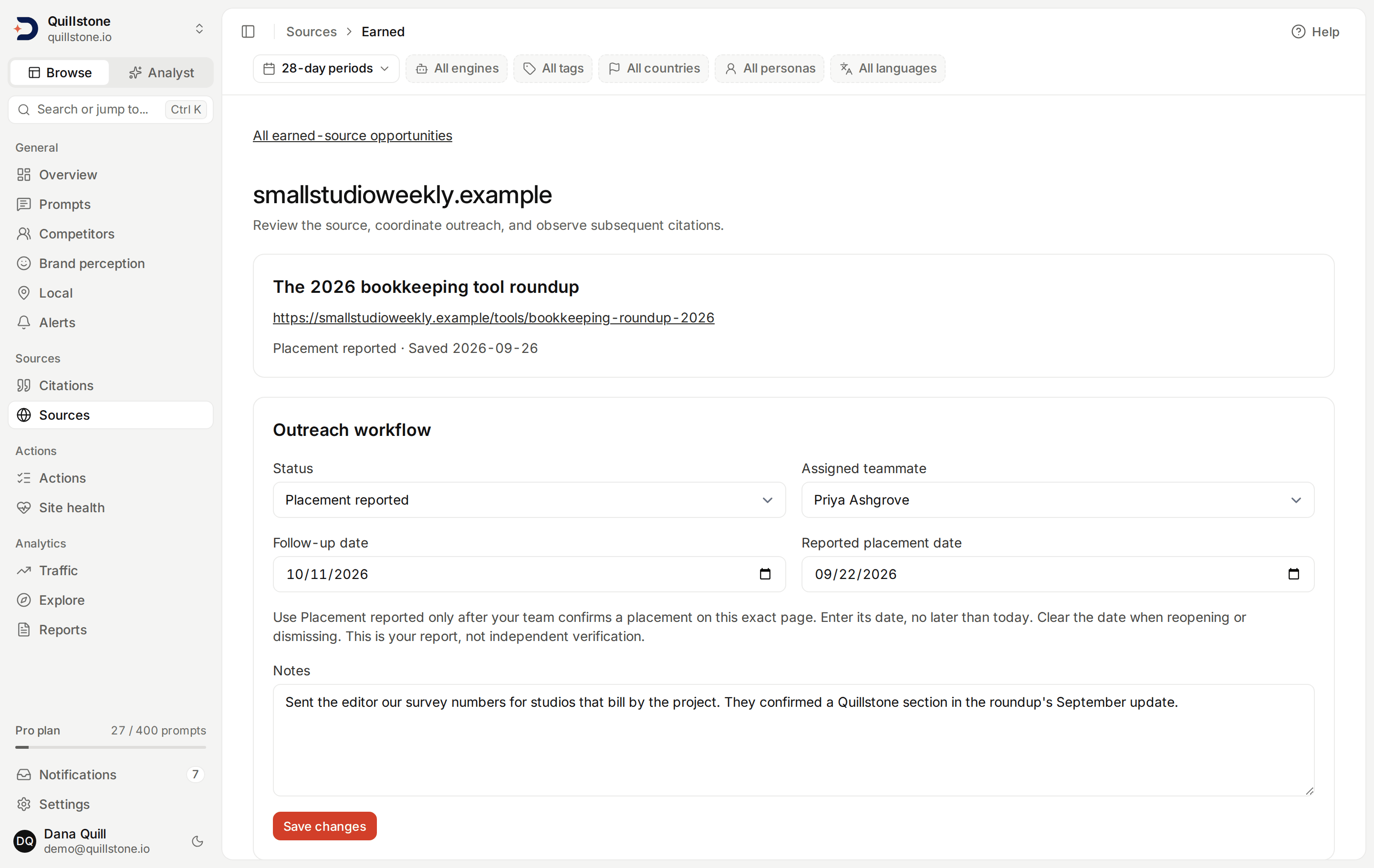
Open an opportunity to set its assigned teammate, notes, follow-up date and
status (api/services/earned_source.py#update_opportunity):
- New: saved for review.
- Planned: the team intends to pursue it.
- Outreach in progress: the team is handling outreach externally.
- Placement reported: your team reports a placement on this exact saved page.
- Dismissed: not being pursued.
A reported placement requires a date no later than today. This is a team-entered claim, not independent verification. Add your placement evidence to the notes. When reopening or dismissing, explicitly clear the placement date; the record then stops showing a placement comparison. Other status changes are reversible.
Follow-up dates appear on the record and saved-opportunity list; they do not schedule messages or notifications. Notes allow 4,000 characters. Removed or inactive assignees appear as unavailable and must be cleared or replaced before saving. Changes appear in Activity, without copying your notes or citation snippets into the audit entry. If a teammate has saved a newer revision, your save is refused; reload the latest record before applying your changes.
Observe citations after a reported placement
The Observed citations panel compares 7-, 28- or 90-day periods, set by
the filter bar's date range chip, which reads "7-day periods"
(or 28 or 90) on this screen. For a
placement reported on August 10, a seven-day comparison uses August 3–9 and
August 11–17. The placement day is excluded because its answers may predate
the placement. The comparison becomes available on August 18, after the full
post-placement window has elapsed in the server calendar. Waiting is explicit;
a partial window is not presented as a complete result
(api/services/earned_source.py#observed_outcome).
For each recorded provider, platform, surface, collection method and model:
Page citation rate = completed outputs citing the saved page or a recorded address variant of it / completed outputs × 100.
Repeated citations of that page within an output count once. A genuinely
different page on the same domain does not count toward this numerator, but
a recorded address variant of the saved page does. The comparison reads the
addresses on the saved page's domain that this project's outputs cited
between the start of the before window and the end of the after window,
taking the first 20,000 of them in the order they were first recorded,
whether or not they match. It counts each one that is the same page as the
saved one under the matching rule above: tracking parameters, the fragment,
a trailing slash, the scheme and a leading www. all ignored
(api/services/earned_source.py#_match_key, #MAX_MATCH_CANDIDATES). The
panel states how many variants matched, and a truncation note when that
limit was reached. Each
panel shows numerator, denominator, distinct prompt count, outputs with any
saved citations, dates, and the percentage-point change. Channels present in
only one period remain visible. Channels are paginated, 25 at a time,
without combining their rates.
No completed outputs means an unavailable rate, not zero. With completed outputs but no citation of the target page or any of its recorded address variants, the rate is zero: a page with no matches at all in a period is a valid, complete result, not a missing one. A period with between 1 and 29 completed outputs is marked provisional, not statistically significant; a period with none is unavailable rather than provisional, because there is no rate to qualify. Failed and in-flight outputs are excluded; paused history and completed outputs without finished brand analysis remain included.
These comparisons use live saved observations, not frozen measurement snapshots. Late collection or corrections can change them. Prompt and country mixes may change between periods. A higher rate does not establish that outreach caused it, that the source now mentions your brand, or that revenue changed. API observations do not reproduce consumer interfaces. This workflow adds no customer API or MCP dataset.
Related
- Source comparison: domain-level period comparisons.
- Source types: inspect categories and page formats.
- Citation gaps: prioritize changes to owned content.
Last verified 2026-09-26